





JTVUS
Members
-
Joined
-
Last visited
-
I have had an issue where I could not reliably do a clean reboot on my server for a while. After getting stuck where I couldn't even mount all my shares this morning, I spent most of my day today working (with an AI) to get it (hopefully) resolved. Posting to hopefully help someone else: # Unraid Server Recovery Summary Date: March 28, 2026 Server: Unraid 7.2.4 Hardware: 2x array disks (XFS, LUKS encrypted), 1x NVMe cache (btrfs, LUKS encrypted), 1x parity disk --- ## Initial Problem The server was in a crash loop with three compounding issues: 1. Most shares were missing — only appdata and system appeared in the Shares tab (should have been 6: appdata, backup, data, games, important, system) 2. All Docker apps were missing 3. Unable to cleanly reboot — the server hung indefinitely on "Retry unmounting user share(s)..." during every shutdown, forcing hard power cycles that compounded the problem --- ## Root Causes Identified ### 1. Unmount Hang (Shutdown Problem) Cause: emhttpd (Unraid's management daemon) tries to unmount /mnt/user during array stop, but its own child processes (nginx, php-fpm, monitoring scripts) plus Tailscale, Docker, and custom scripts were all holding the mount open. emhttpd was essentially blocking its own shutdown. Key processes blocking unmount: emhttpd, nginx, php-fpm, notify_poller, session_check, system_temp, device_list, disk_load, parity_list, tailscale-watch, rc.flash_backup, log-watcher-enhanced, emergency-trigger ### 2. Missing Shares (Boot Problem) Cause: A bug in Unraid 7 with encrypted drives. During the initial boot, emhttpd scans for shares and mounts shfs (the FUSE-based user share filesystem) before the encrypted array disks are fully available. As a result, it only discovers shares that exist on the cache drive. Shares that only exist on array disks backup, important) are never found. Evidence: - shfs is called with -disks 7 (includes cache) but only shows cache-based shares on first boot - /mnt/user0 (mounted with -disks 6, array-only) correctly shows array-only shares - A manual stop/start cycle (with emhttpd already running) properly discovers all 6 shares - The syslog showed getxattr: Operation not supported (95) errors on shares — emhttpd was trying to read extended attributes before shfs was properly mounted ### 3. Docker Apps Missing Cause: Docker containers depend on shares being available. Since shares were missing, Docker couldn't start properly. Docker template XML files were intact at /boot/config/plugins/dockerMan/templates-user/ and container appdata was safe on the cache drive. --- ## Data Status All data was confirmed safe throughout the recovery. Data was verified on: - /mnt/disk1/ — backup/, data/ - /mnt/disk2/ — backup/, data/, important/ - /mnt/cache/ — appdata/, data/, games/, system/ Share configuration files were intact at /boot/config/shares/ (appdata.cfg, backup.cfg, data.cfg, games.cfg, important.cfg, system.cfg). Docker templates were intact at /boot/config/plugins/dockerMan/templates-user/. --- ## Fix Implemented ### File 1: /boot/config/stop — Pre-Shutdown Cleanup Script This script runs BEFORE emhttpd tries to stop the array. It kills all processes that hold mounts open, then force-unmounts everything so emhttpd's array stop completes without hanging. What it does (in order): 1. Stops Tailscale 2. Kills custom scripts 3. Stops Docker 4. Unmounts Docker image loopback mounts 5. Stops Samba and NFS 6. Kills all Unraid monitoring scripts (notify_poller, session_check, system_temp, device_list, disk_load, parity_list, tailscale-watch, rc.flash_backup) 7. Force lazy-unmounts user0, user shares, and all disk/cache mounts 8. Removes stale empty directories under /mnt/user that block emhttpd ### File 2: /boot/config/go — Boot Startup Script with Share Fix After emhttpd starts, a background process waits for the array to fully start (including encrypted disk decryption), then checks if all shares are visible. If shares are missing, it: 1. Pre-cleans all services and mounts (same as stop script) 2. Triggers an array stop via emhttpd's unix socket API 3. Waits for the array to fully stop 4. Triggers an array start via emhttpd's unix socket API 5. The second start properly discovers all shares The share count check is dynamic — it counts unique folders across all disk and cache mount points and compares to what's visible in /mnt/user/. This means it automatically adapts if shares or disks are added/removed. ### Share Configuration Change Changed backup.cfg and important.cfg from shareUseCache="no" to shareUseCache="yes" with shareCachePool="cache". This tells emhttpd these shares involve the cache pool, which helps with share discovery. (This alone was not sufficient to fix the boot issue but is part of the overall fix.) --- ## Current Script Contents ### /boot/config/stop ```bash #!/bin/bash logger "stop script: starting pre-shutdown cleanup" /etc/rc.d/rc.tailscale stop 2>/dev/null pkill -f log-watcher-enhanced 2>/dev/null pkill -f emergency-trigger 2>/dev/null pkill -f emergency-shutdown 2>/dev/null /etc/rc.d/rc.docker stop 2>/dev/null umount -l /var/lib/docker/btrfs 2>/dev/null umount -l /var/lib/docker 2>/dev/null /etc/rc.d/rc.samba stop 2>/dev/null /etc/rc.d/rc.nfsd stop 2>/dev/null pkill -f notify_poller 2>/dev/null pkill -f session_check 2>/dev/null pkill -f system_temp 2>/dev/null pkill -f device_list 2>/dev/null pkill -f disk_load 2>/dev/null pkill -f parity_list 2>/dev/null pkill -f tailscale-watch 2>/dev/null pkill -f rc.flash_backup 2>/dev/null sleep 2 umount -l /mnt/user0 2>/dev/null umount -l /mnt/user/* 2>/dev/null umount -l /mnt/user 2>/dev/null sleep 1 rmdir /mnt/user0 2>/dev/null for dir in /mnt/user/*/; do rmdir "$dir" 2>/dev/null; done rmdir /mnt/user 2>/dev/null for disk in /mnt/disk*; do [ "$disk" = "/mnt/disks" ] && continue umount -l "$disk" 2>/dev/null done umount -l /mnt/cache 2>/dev/null sync sleep 1 logger "stop script: pre-shutdown cleanup complete" ``` ### /boot/config/go ```bash #!/bin/bash /usr/local/sbin/emhttp ( while ! grep -qs 'mdState=STARTED' /proc/mdstat 2>/dev/null; do sleep 5; done while ! mount | grep -q '/mnt/disk1'; do sleep 5; done sleep 15 VISIBLE=$(ls /mnt/user/ 2>/dev/null | wc -l) EXPECTED=$(ls -d /mnt/disk*/*/ /mnt/cache/*/ 2>/dev/null | xargs -I{} basename {} | sort -u | wc -l) if [ "$VISIBLE" -lt "$EXPECTED" ]; then logger "go-fix: only $VISIBLE of $EXPECTED shares visible, triggering array restart" CSRF=$(grep 'csrf_token' /var/local/emhttp/var.ini | cut -d'"' -f2) /etc/rc.d/rc.docker stop 2>/dev/null umount -l /var/lib/docker/btrfs 2>/dev/null umount -l /var/lib/docker 2>/dev/null /etc/rc.d/rc.tailscale stop 2>/dev/null pkill -f notify_poller 2>/dev/null pkill -f session_check 2>/dev/null pkill -f system_temp 2>/dev/null pkill -f device_list 2>/dev/null pkill -f disk_load 2>/dev/null pkill -f parity_list 2>/dev/null pkill -f tailscale-watch 2>/dev/null pkill -f rc.flash_backup 2>/dev/null sleep 2 umount -l /mnt/user0 2>/dev/null umount -l /mnt/user/* 2>/dev/null umount -l /mnt/user 2>/dev/null sleep 1 rm -rf /mnt/user/*/ 2>/dev/null rmdir /mnt/user0 2>/dev/null rmdir /mnt/user 2>/dev/null for disk in /mnt/disk*; do [ "$disk" = "/mnt/disks" ] && continue umount -l "$disk" 2>/dev/null done umount -l /mnt/cache 2>/dev/null sleep 2 curl -s --unix-socket /var/run/emhttpd.socket "http://localhost/update.htm?cmdStop=apply&csrf_token=$CSRF" >/dev/null 2>&1 for i in $(seq 1 60); do if ! grep -qs 'mdState=STARTED' /proc/mdstat 2>/dev/null; then break; fi sleep 2 done sleep 5 curl -s --unix-socket /var/run/emhttpd.socket "http://localhost/update.htm?cmdStart=apply&csrf_token=$CSRF" >/dev/null 2>&1 sleep 20 NEW_COUNT=$(ls /mnt/user/ 2>/dev/null | wc -l) logger "go-fix: after restart, $NEW_COUNT shares visible" else logger "go-fix: all $VISIBLE shares visible" fi ) & # custom scripts [removed] --- ## Recommendations: Report the bug to Lime Technology — The core issue (encrypted array disks not being scanned for shares on first boot in Unraid 7) is a bug that should be reported on the Unraid forums. --- ## Key Learnings & Diagnostic Notes - fuser -mv /mnt/user/ shows what holds mounts open, but most entries are kernel threads that can't be killed - umount -l (lazy unmount) is safe and detaches filesystems without killing processes - emhttpd runs shfs /mnt/user -disks 7 to mount the user share FUSE filesystem — this is what aggregates disks into unified shares - /mnt/user0 is an array-only view (no cache), /mnt/user includes cache - Share configs live at /boot/config/shares/*.cfg and Docker templates at /boot/config/plugins/dockerMan/templates-user/ - The go file runs at boot before the array starts; the stop file runs during shutdown before emhttpd stops the array - CA Mover Tuning plugin's cleanFolders="yes" setting deletes empty directories from cache — this was relevant when attempting placeholder-based fixes - The Unraid event system at /usr/local/emhttp/plugins/dynamix/event/disks_mounted/ fires after disks mount but wasn't reliable for this fix
-
Just to close the loop on my issue in case anyone else is having it: It does appear to be the update setting. I apparently forgot to save the setting change last week, so the backup ran successfully this morning without automatically applying updates. When I changed the setting to automatically update and ran a manual backup, it had the same errors starting the Docker apps again. So I will just keep the auto-update setting off for now. Thanks all.
-
Good news: backup was successfully completed this morning! I am interested in still having app updates automatically applied. I may try to see if the problem with the updates is connected with the stopped / non-auto-start apps. Especially (VPN linked) Bazaar in my case. I have removed Bazaar, set Handbrake to auto-start. And turned on updates in this plugin. I will see if it works next week.
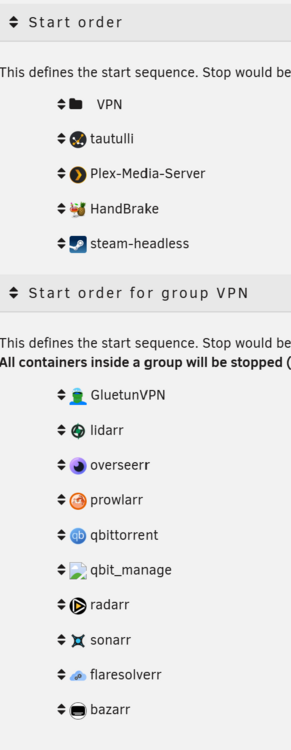
-
The auto-updates are a useful feature but I have turned it off for now so we can at least see if it is potentially the problem. I also tweaked the start order in case the apps like Bazaar that are stopped are for some reason tripping up other app VPN apps. It is worth noting that when the backup fails, "Start All" in the Docker tab will not restart the apps. I have to restart the Server, Docker, or each App one-by-one. I have rebooted my server (and updated it to Unraid 7.2.0) and manually completed a backup. Will report back after the scheduled backup next week.
-
No luck. :-/ Same errors this morning. Debug Log attached. DebugLog 20251104.txt
-
I have experimented with some delays in the past, but no I did not have one set. I just updated the "Wait" to 120 for GluetunVPN. Manual backup just worked successfully. Fingers crossed for the regular backup next week!
-
Welp, I spoke to fast. The regular weekly backup failed with the same error this morning. Log attached. This has been frustrating to troubleshoot because I am not reliably able to reproduce the problem. I try a fix and works in the short term but then it fails at the regular weekly backup. backup log 20251028.txt
-
That seemed to work for the regular backup this morning too! Thanks again!
-
Thanks! I think I have tried iterations of that setup including the "stop all containers, backup, start all" backup type. However, I have now created an explicit "VPN" group and just tried a manual backup that worked. Though, manual backups normally work and the errors seem to crop up more with the regular scheduled backups. I have adjusted the scheduled backups to be daily for now and will report back tomorrow.
-
Thanks for a great plugin. I have been troubleshooting a problem for the last few weeks and cannot figure it out. It seems similar to some other issues being posted. Basically this was working normally then a few weeks ago suddenly failed to restart certain containers: [21.10.2025 08:06:57][ℹ️][radarr] Starting radarr... (try #3) Container 'radarr' did not started! - Code: No such container [21.10.2025 08:06:57][❌][radarr] Container 'radarr' did not started after multiple tries, skipping. More infos in debug log Full debug log attached. It seems to be the containers that have their network routed through GlutenVPN that are having issues restarting. I have tried multiple iterations of changing the backup type / order / grouping and it doesn't seem to have solved it. This current iteration / log I have "Stop, backup, start for each container" backup type with GlutenVPN in a "First" group to make sure it was up first. But no luck. I have tried about every other variation I can think too. The backup seems to complete successfully however I am left with most of my docker containers stopped. In addition, I cannot even use the Unraid Docker GUI to "Start All". I have to reboot or at least restart Docker itself to get all the containers working again. This has been particularly challenging to troubleshoot is that I cannot reproduce the problem with a manual backup. It seems to only happen with the scheduled (currently weekly, Tuesday at 8am) backups. appdata backup debug log.txt
-
I have been setting up my first Unraid Server over the last few weeks and keep filling up my cache drive. Found a lot of helpful advice out there. I setup Mover Tuning, got hardlinks working, and returned my 512GB SSD and replaced it with 2TB but that still is not stopping my cache from filling up when I do stupid stuff like download a multi-season show in remux or a collection 4K movies at once. And I don't want to keep waking up and and have to deal with my server being down. The Mover Tuning plugin is great and its "Move All from Primary->Secondary" if above x% is really a key functionality when the cache is filling up. And for traditional cache usage situations, I take advantage of the "age" logic and have new content stay on the cache for a week to seed and get the initial peak of IO from usage and 'arr processing out of the way before transferring to the array for longer term storage. For those 99% / normal situations having the mover run every week is all that I need. If content sticks around on the cache for two weeks instead of one it is no problem as long as there is space on the cache. But weekly won't handle a full cache. I tried moving up the schedule for the mover to run daily and that still wasn't enough to stop a crash, probably because my download client was keeping files locked up and the mover was not able to complete. I didn't want to go to hourly schedule because I would prefer to not have the mover running during the day in "normal" circumstances. So, it was clear that I would need two triggers for the mover, the normal schedule and an "emergency" / "cache full" trigger. I found some different threads out there where people decided to do similar things, but not a complete solution in one place. So I cobbled one together. I am new to script writing so I am sure people can recommend improvements. But this seems to serve my needs well, and I figure others may benefit from it too. Optional Plugins I use in conjunction with this script: "Mover Tuning" and "User Scripts". I keep this script in "User Scripts". What this script does: Should be run frequently, I currently run every 15 minutes (custom cron: */15 * * * *). 99.99% of the time it simply confirms the cache is not full and exits without doing anything. If cache is over the defined threshold it: Confirms this script is not already running Sends a warning notification via Unraid Stops (non-blacklisted) Docker containers Runs the Mover Restarts Docker containers Probably a little more verbose than needed in the script but hopefully it helps people setup / customize to their needs. Credit to Plugin creators and people in threads like this one that did all the real work. I just pasted it together. #!/bin/bash # This script is intended to be run frequently to check if the cache drive is full. # If the cache drive is below the threshold it exits without taking any other action. # If the cache drive is full it stops all Docker Continers and runs the mover. # Set the percent threshold for how full the cache drive is to take action. # IMPORTANT: Make sure Mover will move files if run. Suggest setting "Move All from Primary->Secondary" in Mover Tuning 5% lower than this. pct_threshold="85" lock_file="/tmp/mover_lock" cache_path="/mnt/cache" # Blacklist Docker Containers to not stop / start here Blacklist=( Plex-Media-Server steam-headless ) # List any Docker Containers to be restarted first here StartFirst=( GluetunVPN ) #### Check if cache is below threshold, if true takes no action and exits #### if [[ $(df -h "$cache_path" | awk 'NR==2 {sub(/%/, "", $5); print $5}') -lt "$pct_threshold" ]]; then echo "Cache drive at: " $(df -h "$cache_path" | awk 'NR==2 {sub(/%/, "", $5);print $5}') "% full. Below $pct_threshold% threshold. Taking no action." exit 0 fi echo "Cache drive at: " $(df -h "$cache_path" | awk 'NR==2 {sub(/%/, "", $5);print $5}') "% full! Above $pct_threshold% threshold!" #### Check if the mover is already running #### if [ -f "$lock_file" ]; then echo "Mover already running!" exit 1 fi #### Send Warning #### /usr/local/emhttp/plugins/dynamix/scripts/notify -i warning -s Docker -d "Cache drive is full! Stopping containers and running mover!" #### Touch lock file / prevent script from starting the mover again #### touch "$lock_file" #### Get all Docker Containers #### Containers=$(docker ps -a --format "{{.Names}}") #### Loop thru all containers #### for val in $Containers; do Skip=false #### Skip those in blacklist #### for check in ${Blacklist[@]}; do if [ $val == $check ] then Skip=true fi done #### Stop containers #### if [ $(docker container inspect -f '{{.State.Running}}' $val) == "true" ] && [ $Skip == "false" ] then docker container stop -t 30 $val echo "stopped " $val fi done echo "Stopped all containers (not in blacklist). Running Mover." #### Run Mover #### #### Command to start Mover Tuning: #### /usr/local/emhttp/plugins/ca.mover.tuning/age_mover start #### Command to start OG Mover: #### #mover echo "Mover Done. Starting containers." #### Start the "Start First" containers #### for val in $StartFirst; do Skip=false #### Skip those in blacklist #### for check in ${Blacklist[@]}; do if [ $val == $check ] then Skip=true fi done #### Start containers #### if [ $(docker container inspect -f '{{.State.Running}}' $val) == "false" ] && [ $Skip == "false" ] then docker container start $val echo "started " $val fi done #### Loop thru all containers #### for val in $Containers; do Skip=false #### Skip those in blacklist #### for check in ${Blacklist[@]}; do if [ $val == $check ] then Skip=true fi done #### Start containers #### if [ $(docker container inspect -f '{{.State.Running}}' $val) == "false" ] && [ $Skip == "false" ] then docker container start $val echo "started " $val fi done echo "Started all containers (not in blacklist). Releasing lock file." #### Remove mover lock file #### rm "$lock_file" echo "cacheFull script end" exit 0
-
Ah, this thread can be moved! Edit: Reposted here: I will try to delete this thread...
-
I have been setting up my first Unraid Server over the last few weeks and keep filling up my cache drive. Found a lot of helpful advice out there. I setup Mover Tuning, got hardlinks working, and returned my 512GB SSD and replaced it with 2TB but that still is not stopping my cache from filling up when I do stupid stuff like download a multi-season show in remux or a collection 4K movies at once. And I don't want to keep waking up and and have to deal with my server being down. The Mover Tuning plugin is great and its "Move All from Primary->Secondary" if above x% is really a key functionality when the cache is filling up. And for traditional cache usage situations, I take advantage of the "age" logic and have new content stay on the cache for a week to seed and get the initial peak of IO from usage and 'arr processing out of the way before transferring to the array for longer term storage. For those 99% / normal situations having the mover run every week is all that I need. If content sticks around on the cache for two weeks instead of one it is no problem as long as there is space on the cache. But weekly won't handle a full cache. I tried moving up the schedule for the mover to run daily and that still wasn't enough to stop a crash, probably because my download client was keeping files locked up and the mover was not able to complete. I didn't want to go to hourly schedule because I would prefer to not have the mover running during the day in "normal" circumstances. So, it was clear that I would need two triggers for the mover, the normal schedule and an "emergency" / "cache full" trigger. I found some different threads out there where people decided to do similar things, but not a complete solution in one place. So I cobbled one together. I am new to script writing so I am sure people can recommend improvements. But this seems to serve my needs well, and I figure others may benefit from it too. Optional Plugins I use in conjunction with this script: "Mover Tuning" and "User Scripts". I keep this script in "User Scripts". What this script does: Should be run frequently, I currently run every 15 minutes (custom cron: */15 * * * *). 99.99% of the time it simply confirms the cache is not full and exits without doing anything. If cache is over the defined threshold it: Confirms this script is not already running Sends a warning notification via Unraid Stops (non-blacklisted) Docker containers Runs the Mover Restarts Docker containers Probably a little more verbose than needed in the script but hopefully it helps people setup / customize to their needs. Credit to Plugin creators and people in threads like this one that did all the real work. I just pasted it together. #!/bin/bash # This script is intended to be run frequently to check if the cache drive is full. # If the cache drive is below the threshold it exits without taking any other action. # If the cache drive is full it stops all Docker Continers and runs the mover. # Set the percent threshold for how full the cache drive is to take action. # IMPORTANT: Make sure Mover will move files if run. Suggest setting "Move All from Primary->Secondary" in Mover Tuning 5% lower than this. pct_threshold="85" lock_file="/tmp/mover_lock" cache_path="/mnt/cache" # Blacklist Docker Containers to not stop / start here Blacklist=( Plex-Media-Server steam-headless ) # List any Docker Containers to be restarted first here StartFirst=( GluetunVPN ) #### Check if cache is below threshold, if true takes no action and exits #### if [[ $(df -h "$cache_path" | awk 'NR==2 {sub(/%/, "", $5); print $5}') -lt "$pct_threshold" ]]; then echo "Cache drive at: " $(df -h "$cache_path" | awk 'NR==2 {sub(/%/, "", $5);print $5}') "% full. Below $pct_threshold% threshold. Taking no action." exit 0 fi echo "Cache drive at: " $(df -h "$cache_path" | awk 'NR==2 {sub(/%/, "", $5);print $5}') "% full! Above $pct_threshold% threshold!" #### Check if the mover is already running #### if [ -f "$lock_file" ]; then echo "Mover already running!" exit 1 fi #### Send Warning #### /usr/local/emhttp/plugins/dynamix/scripts/notify -i warning -s Docker -d "Cache drive is full! Stopping containers and running mover!" #### Touch lock file / prevent script from starting the mover again #### touch "$lock_file" #### Get all Docker Containers #### Containers=$(docker ps -a --format "{{.Names}}") #### Loop thru all containers #### for val in $Containers; do Skip=false #### Skip those in blacklist #### for check in ${Blacklist[@]}; do if [ $val == $check ] then Skip=true fi done #### Stop containers #### if [ $(docker container inspect -f '{{.State.Running}}' $val) == "true" ] && [ $Skip == "false" ] then docker container stop -t 30 $val echo "stopped " $val fi done echo "Stopped all containers (not in blacklist). Running Mover." #### Run Mover #### #### Command to start Mover Tuning: #### /usr/local/emhttp/plugins/ca.mover.tuning/age_mover start #### Command to start OG Mover: #### #mover echo "Mover Done. Starting containers." #### Start the "Start First" containers #### for val in $StartFirst; do Skip=false #### Skip those in blacklist #### for check in ${Blacklist[@]}; do if [ $val == $check ] then Skip=true fi done #### Start containers #### if [ $(docker container inspect -f '{{.State.Running}}' $val) == "false" ] && [ $Skip == "false" ] then docker container start $val echo "started " $val fi done #### Loop thru all containers #### for val in $Containers; do Skip=false #### Skip those in blacklist #### for check in ${Blacklist[@]}; do if [ $val == $check ] then Skip=true fi done #### Start containers #### if [ $(docker container inspect -f '{{.State.Running}}' $val) == "false" ] && [ $Skip == "false" ] then docker container start $val echo "started " $val fi done echo "Started all containers (not in blacklist). Releasing lock file." #### Remove mover lock file #### rm "$lock_file" echo "cacheFull script end" exit 0
-
That did it!! Thank you!
-
Thanks for the work on this. Setting up my first Unraid server and got it mostly working except this vpn port forwarding. It seems to be close. I verified port forwarding is working in the logs and can manually put that port number in qbittorrent. I verified the script is in /tmp/gluetun with x privileges but when I try to run I get a "/bin/sh: /tmp/gluetun/update_qbittorrent_listening_port.sh: not found" error. Any ideas?

