





Jamyang_Server
Members
-
Joined
-
Last visited
-
Okay bingo, I managed to get it to launch by changing the section you specified and using the directory in the error message to make them match - we are up and running, thanks so much for the support! This will be so beneficial for our centre
-
Also I tried without the plug-in but it didn't seem to launch - it seems the plug-in is integral to the launching of the app
-
I think I didn't add the date path which you specified, where would I input this: mkdir -p /mnt/user/appdata/koha-docker/data/ mkdir -p /mnt/user/appdata/koha-docker/data/koha mkdir -p /mnt/user/appdata/koha-docker/data/mariadb mkdir -p /mnt/user/appdata/koha-docker/data/rabbitmq_plugins sorry if simple questions I am new to all this
-
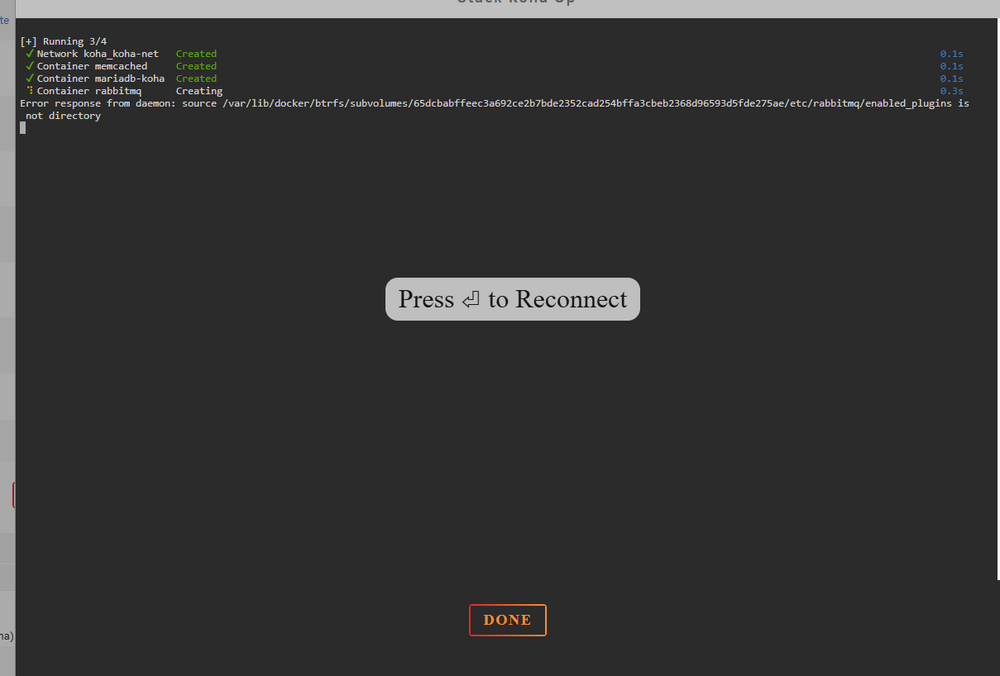
I'm trying to launch this Library app for our Buddhist centre, but I'm struggling to get the app to Launch - It would be really beneficial if we can get this to work so any help is greatly appreciated! Thanks for the help. Here is the code I ran to launch the application: #version: "3.9" services: koha: image: teogramm/koha:24.11 container_name: koha hostname: koha ports: - 8080:8080 - 8081:8081 networks: - koha-net cap_add: - DAC_READ_SEARCH - SYS_NICE environment: MYSQL_SERVER: db MYSQL_USER: koha_teolib MYSQL_PASSWORD: Change-Me-Mysql DB_NAME: koha_teolib MEMCACHED_SERVERS: memcached:11211 MB_HOST: rabbitmq depends_on: - db - rabbitmq - memcached volumes: - koha-data:/var/lib/koha rabbitmq: image: rabbitmq:3 container_name: rabbitmq hostname: rabbitmq volumes: - rabbitmq-plugins:/etc/rabbitmq/enabled_plugins networks: - koha-net db: image: mariadb:11 container_name: mariadb-koha hostname: db volumes: - mariadb-koha:/var/lib/mysql environment: MARIADB_ROOT_PASSWORD: Change-Me-Mysql MARIADB_DATABASE: koha_teolib MARIADB_USER: koha_teolib MARIADB_PASSWORD: Change-Me-Mysql networks: - koha-net memcached: image: memcached container_name: memcached hostname: memcached networks: - koha-net volumes: koha-data: driver: local driver_opts: type: none device: /mnt/user/appdata/koha-docker/data/koha o: bind mariadb-koha: driver: local driver_opts: type: none device: /mnt/user/appdata/koha-docker/data/mariadb o: bind rabbitmq-plugins: driver: local driver_opts: type: none device: /mnt/user/appdata/koha-docker/data/rabbitmq_plugins o: bind networks: koha-net: driver: bridge ipam: config: - subnet: 172.18.0.0/16 gateway: 172.18.0.1 When I run this code and do compose up I get the following error message, I'm wondering if there is anything I can do to edit stack or edit the RabbitMQ Application to get rid of this error? I guess there is a disparity between the directory that exists and the directory it is being directed towards? Edit: I am new to coding and Un-raid so if you can advise in basic/clear terms that would be much appreciated If you have other questions that might help you find the problem and help I am happy to answer, Thanks very much.
-
Thanks so much for the detailed explanation - It's great there is a docker and thanks for posting the stack information - That is exactly what I was looking for. Unfortunately I am getting an error message I am not so sure how to get rid of. I did download Rabbit MQ before running the stack and tried uninstalling it and reinstalling it - So perhaps I am get getting the error message because of that? I'm not sure if you know how I could fix this? I tried uninstalling the the Rabbitmq I had previously installed too because I guess the stack installs it anyway - I still receive the same error though. Thanks again for the help!
-
Hi, I am new to Unraid and exploring the applications on docker, Our server running as storage for a Buddhist Centre and we have had a library that hasn't been possible to take books out of for a long time, I'm hoping to use this server to also host a library so that people who come to our centre can get books out. The reason I was interested in an application called Koha is because our physical library is fairly large and because we are thinking of (in the future) upgrading to get a kiosk and Koha is an application which can also work with various Kiosks. Is it possible to launch this from our unraid server and by chance would anyone be able to offer advise so that we can do so? any help/support would be greatly appreciated. https://git.koha-community.org/koha-community/koha



