






jbedsaul
Members
-
Joined
-
Last visited
-
My server has seemingly randomly shutdown twice today. I'm a reviewing the attached syslog, but still learning how to read all this. Anyone know where to point me with pin-pointing the issue? server-syslog-previous-20250523-1914.zip
-
I have unraid set up with the following components: Mobo: ASRock b450 Steel Legend Nic: Intel X540-T2 (connected to PCIe 3.0 x16 slot) Switch: MikroTik CSS610-8G-2S+in SFP: 10GBASE-T SFP+ to RJ45 Transceiver, x2 in SFP ports on switch ( https://amazn.so/DiGZPMY ) Mac mini M4 with upgraded 10G ethernet and unraid server are connected to the SFP ports on switch using CAT6 cabling (both 25ft or less) Server is also connected with two other CAT6 cables from the second port on the 10G nic, and the mobo LAN port. Here are screenshots of the settings. I'm new to networking and unraid. It looks like the NIC is showing 10G speeds on eth1, but not getting those speeds and not sure why.
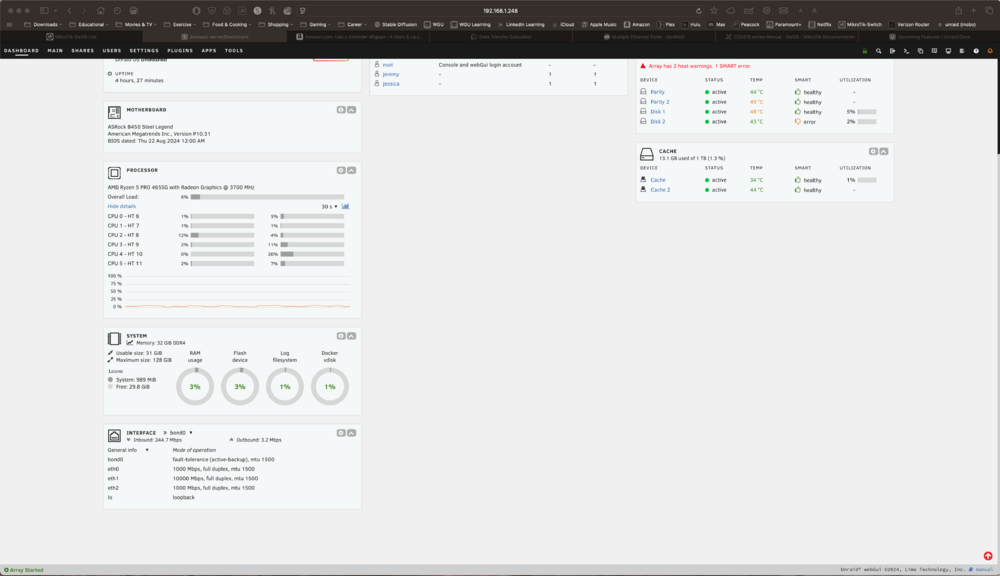
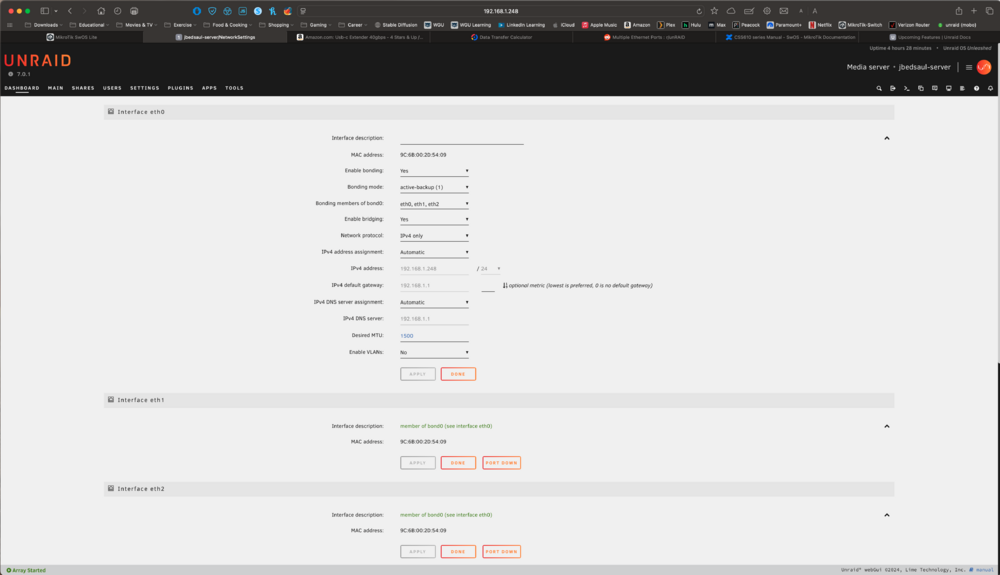
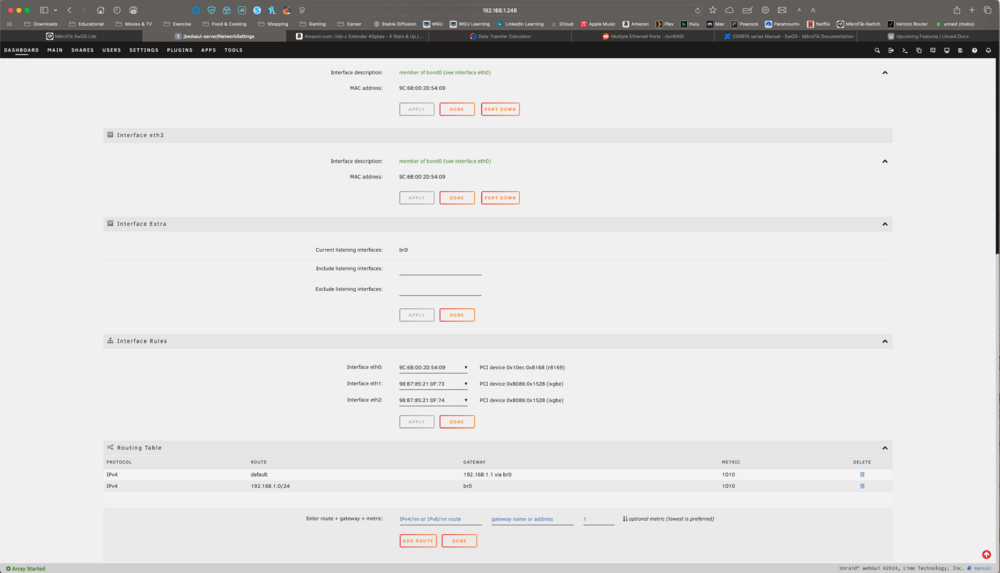
-
OK, I deleted the 'network.cfg' and 'network-rules.cfg' files from the configs folder and that appears to have done the trick.
-
Here's the latest diagnostics, Ispci.txt shows: 01:00.1 Ethernet controller [0200]: Intel Corporation Ethernet Controller 10-Gigabit X540-AT2 [8086:1528] (rev 01) Subsystem: Beijing Sinead Technology Co., Ltd. Device [1dcf:031b] Kernel driver in use: ixgbe Kernel modules: ixgbe but I'm still getting now IPv4 address. jbedsaul-server-diagnostics-20250426-1322.zip
-
OK, I'm messing with this again and I still cannot get an IP address using the 10G card. I followed the diagram on the mobo, nothing is in the 2nd m/2 slot. This should be freeing up the 2nd PCIe x16 slot, which is where the 10G card is plugged in. For some reason it still will not get an IP though, anyone run into this, or know a solution?
-
It was definitely the NIC. I connected to the mobo, restarted, and I now have an IP. After SMART tests I'll shutdown and figure out what is going on with the NIC. For anyone else with the ASRock b450 steel legend mobo, the second PCIe x16 slot is disabled when running a NVMe drive in the second m.2 slot. I'll be switching the second NVMe cache drive over to a PCIe x1 card to prevent this issue.
-
I tried searching the forums, couldn't find my answer. Anyone know if you can run multiple extended SMART tests on several drives at once?
-
Thank you, switching to the mobo LAN worked; I now have an IP. How do I get unraid to recognize the 10G nic?
-
jbedsaul changed their profile photo
-
Unraid newbie, just installed unraid and made my first USB. When I boot through the main OS I'm getting 'not set' for the IPv4 and IPv6 addresses. I followed prior topics I found and set bonding in the network.cfg file to 'no'. Rebooted, and still not IP address. I have a server based on an ASRock b450 steel legend, using a 10G add-on card for networking. Card: https://www.amazon.com/dp/B01IR7T7PG?ref_=ppx_hzsearch_conn_dt_b_fed_asin_title_1&th=1 I have the Intel X540-t2 at the link above. Cable is known working (Cat6), the NVMe I have installed ran Windows 10 on it, cable was connected to the same network card, both worked under Windows. I also ran diagnostics, I'll attach the file. jbedsaul-server-diagnostics-20250324-1511.zip


