





Catch_22_
Members
-
Joined
Everything posted by Catch_22_
-
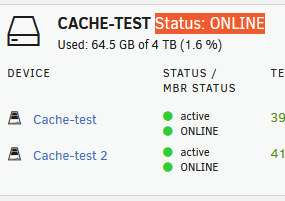
Hate to open a new thread just to ask but - is this new from 7.2 - 7.3? I didn't have this "Status" on the cache/drives before. Only now that I have recreated the pool do I have this - but I also did a OS update between the action as well.
-
Oh nice. I'll give that a go. Any tips on how to narrow the plugin down after confirming this is the cause via safe mode or is it more of a "whats the last thing you installed" game of wack-a-mole?
-
Trying to pin down some issues I have been developing on my device. This is a small issue but seems to have been replicated in a few posts: https://forums.unraid.net/bug-reports/stable-releases/722-array-wont-start-after-being-stopped-emhttpd-cmdstart-already-starting-logs-r4227/ https://forums.unraid.net/topic/197199-array-wont-start-after-stopping/ This was discovered while I try and address a cache issue that has returned. In an unrelated reddit post someone noted a bad cache pool might prevent the array from starting. As this was in the middle of troubleshooting the cache issue I just deleted the pool and still had the issue. I also had an update to apply so figured perhaps it would be addressed in the update. Updated to current and still have the issue. Attached are dags. Please call out any other issues you spot. For context to my overall issue that led up to this - cache pool on 2 nvme drives (raid 1/btrfs) will drop one drive when under heavy i/o. This occurred on a pair of TeamGroup 512GB drives. Somehow these drives became misaligned (I didn't know this could even happen with Raid 1) and the drives would end up with 2 different sets of data on them. I ended up deleting the pool, replacing the drives with Western Digital 4TB drives, everything seemed better but now I find myself in the same situation. This tells me the issue is deeper than the drives and I have started looking at the board/pcie bridge and OS (however I don't have a strong indication yet from unraid being the casue) f4-424-diagnostics-20260709-1245.zip
-
First - nothing is broken. This is just and oddity and I'm curious if anyone knows why. I have had 2 unraid servers syncing using syncthing for a long time now. On the two servers I have ran the tailscale docker. I just found out there is a "plugin" for tailscale (I think this is just a plugin version of the docker but thats not important right now). I switched the tailscale over and deleted the dockers. In my syncthing UI I noted the remote devices are discovered different now. Device1 configured with remote Device2 as a tailscale IP 100.xxx.xxx.100:22000 and shows it finds the remote device as connection type TCP WAN with the configured tailscale IP of 100.xxx.xxx.100:22000 Device2 configured with remote Device1 as a tailscale IP 100.xxx.xxx.101:22000 shows it finds the remote device as connection type TCP LAN with the docker gateway IP of 172.17.0.1:22000 Everything is working but why would syncthing report the IP this way? Local Discovery is the only option configured - I would have expected to see both found as the same connection type and using the tailscale IPs bot both. Why would it detect a NAT (the same range as the servers docker subnet)
-
Thank you for confirming!
-
Both Docker and VM are off. VM has always been off and Docker is stopped for this troubleshooting. RE: the Array only comment - Perhaps I'm not understanding something - setting the array only on shares where data is on the cache - shouldn't mover re-home these to the array?
-
ok, even after cleaning up the dups I still have something disconnected here. I was going to move everything off cache and reformat it - stopped my dockers, I changed the shares over to array only and kicked off a move but none of my appdata/system is moving. I know I can manually move things but I'm curious why its not functioning as expected. Log attached. f4-424-diagnostics-20260605-1056.zip
-
As for minimum free space I thought I had that set but checking specifically, you are correct it is set to 0 so - yeah that for sure needs defined. As for the cache to share moving, I do think that is correctly configured. I pulled dialogs with mover logging and I think I see the issue. It seems - somehow that a large set of the data on the cache that normally would be moved was duplicated somehow without being removed from the cache. Mover is balking that the files exist and when I check the paths per cache vs the array disk I do in fact see 2 sets of the same files. I can only think this relates to a fail over event with the 2 drives or balance along with this event. One of the cache drives has a lot of "Write errors Read errors Flush errors Corruption errors" from that event when it went offline (rebooted and the device was up, passes SMART and has not made anymore errors since) Thanks for pointing out the mover diag option! I couldn't find anything telling me "ouch!" - now I have that!

-
So I have a raid1 btrfs cache setup on 2 nvme drives, the only data I keep on these drives static are the system/appdata directories. I keep everything else in a monolithic "media" share that is cache->array. Easy peasy. During a large data download I managed to fill the cache faster than expected, my mover had not run yet (I dont use mover tuning) and it knocked my docker containers offline as expected in that scenario. I kicked off the mover service and as it ran I was checking other things and noted that the balance task under the cache was saying it was "recommended". It showed it was scheduled to run 1st of the month so I ran it manually - "full re-balance." I don't know if this relates but I suspect so - thats why I mention it. For some reason now my cache always shows 50% full. Running mover quickly (a few seconds) finishes without error. Utilization is 50% on cache. Looking on the pool (512GB cache) shows system/appdata taking 60GB and and "media" (the share that is cache->array) is 179GB. Any ideas why the mover would ignore these files and not be moving them to the array? Would this relate to the balance task I manually ran? I suspect I should rerun the balance but pick raid1 but figured I should get clarification before I got any deeper into this issue. If I should manually move these files before performing this operation please let me know.
-
Is this confirmed fixed in 7.0.1 becasue I have this issue with a Teramaster NAS. I have pulled the 6 HDDs (leaving just the 2 nvme drives) and still have the issue. This is with a new install (waiting to lic until it proves functional) v6 works without issues.
-
Thanks, I figured with it just being the driver change from the v6 then it would be related regardless of underlying infrastucture. I will look for another thread under the right sub.
-
Using Terramaster and new 7.0.1 imaged via the creator v.1.0.1 and I have this issue when booting with no GUI. If I opt for GUI it boots. I have tested with 2 USB drives
