





frank_sp61
Members
-
Joined
-
Last visited
-
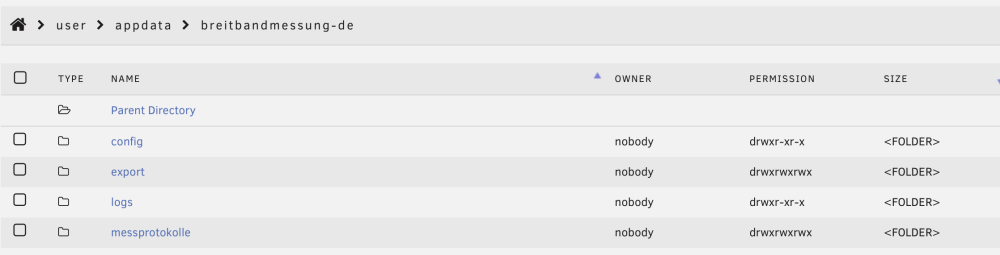
Hello - trying to get this running on my Unraid server but am getting this error consistently. Can anyone help here? Here is my config: timezone=Europe/Berlin crontab=* */2 * * * run_once=true run_on_startup=true Here is the logs output: Setting timezone: Europe/Berlin Run on startup: true PREPARING SPEEDTEST RUNNING SPEEDTEST SPEEDTEST DONE saved results to /export/ fatal error TypeError: Cannot read properties of undefined (reading 'getProperty') at /usr/src/app/index.js:107:45 at processTicksAndRejections (node:internal/process/task_queues:96:5) Exiting... This is my directory structure:
-
Oddly, I was able to connect again to the webui and I think it's working. Not sure what happened.
-
Was sure something happened but wasn't sure what.
-
Hello - I had Adguard Home working for a while and then it stopped. I can't login to the webui either. I checked the router and the first entry pointed to DNS 127.0.0.1 with the 2nd to 192.168.178.3. Not sure how any of this changed, but really need some help. My router has the ip of this container with a static ip of x.x.x.3. Tried accessing the UI from docker options, directly to x.x.x3, unraid server address. Have it shut down at this point at the router is using ISP supplied DNS servers at this point. Help? I have removed/reinstalled the app but no joy. Logs: 2026/08/19 09:27:08.982647 [info] starting adguard home version="AdGuard Home, version v0.107.79" 2026/08/19 09:27:08.986006 [info] tls_manager: using default ciphers 2026/08/19 09:27:09.223977 [info] webapi: initializing 2026/08/19 09:27:09.349740 [info] dnsproxy: upstream mode is set mode=load_balance 2026/08/19 09:27:09.349760 [info] dnsproxy: cache enabled size=4096 2026/08/19 09:27:09.349772 [info] dnsproxy: max goroutines is set count=300 2026/08/19 09:27:09.349821 [info] dnsproxy: server will refuse requests of type any 2026/08/19 09:27:09.349831 [info] dnsproxy: upstream mode is set mode=load_balance 2026/08/19 09:27:09.349838 [info] dnsproxy: cache enabled size=4194304 2026/08/19 09:27:09.349845 [info] dnsproxy: max goroutines is set count=300 2026/08/19 09:27:09.350633 [info] addrproc: processing addresses 2026/08/19 09:27:09.350859 [info] permcheck: warning: found unexpected permissions type=directory path=/opt/adguardhome/work perm=0755 want=0700 2026/08/19 09:27:09.352448 [info] webapi: AdGuard Home is available at the following addresses: 2026/08/19 09:27:09.352773 [info] webapi: serving url=http://127.0.0.1:80 2026/08/19 09:27:09.352787 [info] webapi: serving url=http://[::1]:80 2026/08/19 09:27:09.352795 [info] webapi: serving url=http://192.168.178.3:80 2026/08/19 09:27:09.352839 [info] starting plain server server=plain addr=0.0.0.0:80 2026/08/19 09:27:09.664070 [info] dnsproxy: starting dns proxy server 2026/08/19 09:27:09.664090 [info] dnsproxy: creating udp server socket addr=0.0.0.0:53 2026/08/19 09:27:09.664164 [info] dnsproxy: listening to udp addr=[::]:53 2026/08/19 09:27:09.664172 [info] dnsproxy: creating tcp server socket addr=0.0.0.0:53 2026/08/19 09:27:09.664241 [info] dnsproxy: listening to tcp addr=[::]:53 2026/08/19 09:27:09.664328 [info] dnsproxy: entering udp listener loop addr=[::]:53 2026/08/19 09:27:09.664426 [info] dnsproxy: entering listener loop proto=tcp addr=[::]:53

-
Thanks. Will do.
-
Adguard Home seems to have stopped working in my network. I've tried to remove/reinstall and it's not blocking ads nor can I get to the web ui. Using this repository: adguard/adguardhome Logs: 2026/08/19 09:27:08.982647 [info] starting adguard home version="AdGuard Home, version v0.107.79" 2026/08/19 09:27:08.986006 [info] tls_manager: using default ciphers 2026/08/19 09:27:09.223977 [info] webapi: initializing 2026/08/19 09:27:09.349740 [info] dnsproxy: upstream mode is set mode=load_balance 2026/08/19 09:27:09.349760 [info] dnsproxy: cache enabled size=4096 2026/08/19 09:27:09.349772 [info] dnsproxy: max goroutines is set count=300 2026/08/19 09:27:09.349821 [info] dnsproxy: server will refuse requests of type any 2026/08/19 09:27:09.349831 [info] dnsproxy: upstream mode is set mode=load_balance 2026/08/19 09:27:09.349838 [info] dnsproxy: cache enabled size=4194304 2026/08/19 09:27:09.349845 [info] dnsproxy: max goroutines is set count=300 2026/08/19 09:27:09.350633 [info] addrproc: processing addresses 2026/08/19 09:27:09.350859 [info] permcheck: warning: found unexpected permissions type=directory path=/opt/adguardhome/work perm=0755 want=0700 2026/08/19 09:27:09.352448 [info] webapi: AdGuard Home is available at the following addresses: 2026/08/19 09:27:09.352773 [info] webapi: serving url=http://127.0.0.1:80 2026/08/19 09:27:09.352787 [info] webapi: serving url=http://[::1]:80 2026/08/19 09:27:09.352795 [info] webapi: serving url=http://192.168.178.3:80 2026/08/19 09:27:09.352839 [info] starting plain server server=plain addr=0.0.0.0:80 2026/08/19 09:27:09.664070 [info] dnsproxy: starting dns proxy server 2026/08/19 09:27:09.664090 [info] dnsproxy: creating udp server socket addr=0.0.0.0:53 2026/08/19 09:27:09.664164 [info] dnsproxy: listening to udp addr=[::]:53 2026/08/19 09:27:09.664172 [info] dnsproxy: creating tcp server socket addr=0.0.0.0:53 2026/08/19 09:27:09.664241 [info] dnsproxy: listening to tcp addr=[::]:53 2026/08/19 09:27:09.664328 [info] dnsproxy: entering udp listener loop addr=[::]:53 2026/08/19 09:27:09.664426 [info] dnsproxy: entering listener loop proto=tcp addr=[::]:53
-
Hello - yes, it's the latter. We have a ton of photos on Amazon Photos and I've been setting up my IMMICH server here on UNRAID server. I don't want to have Amazon just decide to change the plan and I've been making an effort to get off all the cloud services. I think IMMICH can do some of this but I rather have a docker container grabbing everything and not tying up one of my computers. Of course there are VM options I'm sure, but then I'd just install the VM and then delete it. I have about 30GB (72K files) that I think would tie up a machine for a while, maybe even overnight.
-
I see there are several apps to backup iCloud Photos and I wa t to do the same with Amazon photos. I’ve looked and can’t find anything. Suggestions?
-
Very much a noob question. I installed Python 3 (Python 3 for UNRAID) thinking it was a docker container. Just needed to run a tinytuya script and I don't have another system to run it on. Question is, I don't need this since it's not a container. I "uninstalled" it but it said it didn't find 'xxxx' so I'm not sure It was uninstalled properly. Can you please let me know how to ensure it is no longer installed? Thanks!
-
I think I found it. Additional host and container path set to /dev/dri. Thanks. Things are running better. 😁
-
Okay, did that. Where is the iGPU setting? For video transcoding or images?
-
Pretty sure it’s the Immich docker. When I turned that off, the cpu and memory usages dropped to reasonable. So can I just “pin” 1 or 2 cpus so it reserves 2 for other things? Pretty sure with the number of phots I’m trying to import, it’s very taxing on resources. Once completed I think it’ll be fine. So is this what pinning is used for?
-
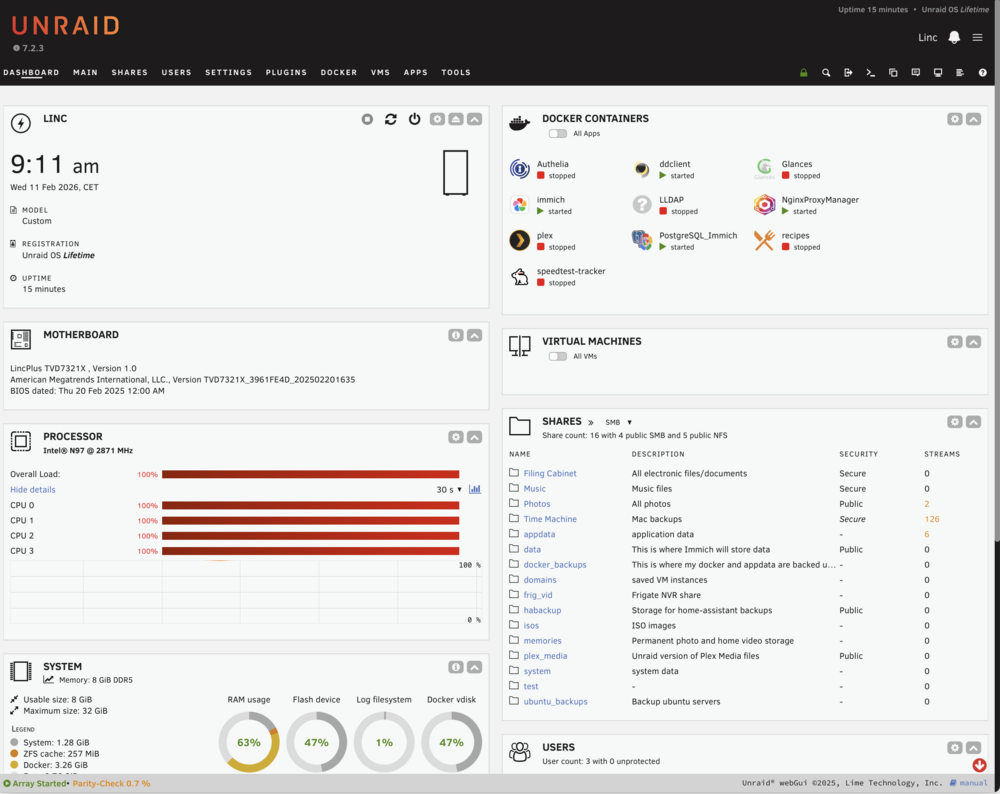
Hello all, Just had my first issue with my server. It went down for no apparent reason (that I know of) and I had to power cycle the unit. It seemed to be stuck in a recycle loop? Not sure. Just a newbie here. I've attached the logs for smart people to review. Hopefully this is a one off. I was running an 'immich' scan of my external library which might have been the culprit. It has 200k+ pics and videos. Maybe this? Maybe because the processors were 100% for a long time? See attached after reboot. Is this what CPU pinning is for? Would immich be the culprit or more likely Post-egres? Appreciate the assist. linc-diagnostics-20260211-0858.zip
-
Just fyi, I confirmed that the SMB does work! Thank you. Also LINCPLUS confirmed that they are using the smartctl in the go file to update the LCD display and is optional.
-
Excellent! I will try that! Thank you again. You've been a big help.


