




Skip to content
View in the app

A better way to browse. Learn more.

Unraid

A full-screen app on your home screen with push notifications, badges and more.

To install this app on iOS and iPadOS
  1. Tap the Share icon in Safari
  2. Scroll the menu and tap Add to Home Screen.
  3. Tap Add in the top-right corner.
To install this app on Android
  1. Tap the 3-dot menu (⋮) in the top-right corner of the browser.
  2. Tap Add to Home screen or Install app.
  3. Confirm by tapping Install.

GungHo

Members
  • Joined

  • Last visited

Everything posted by GungHo

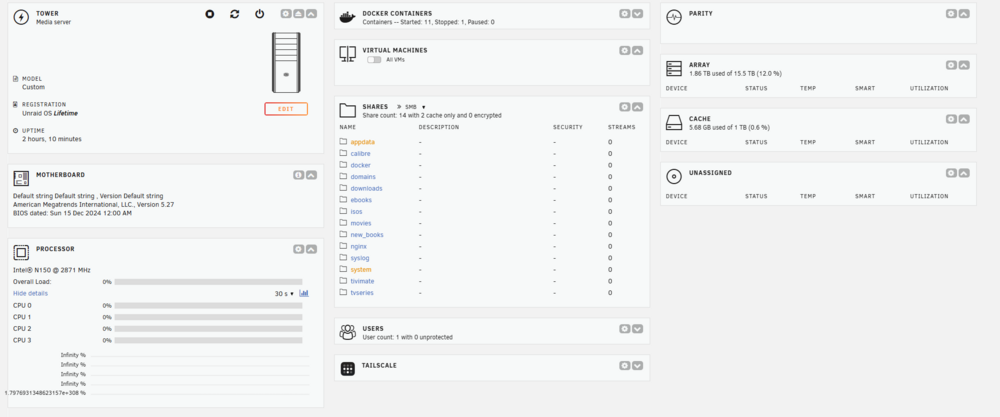
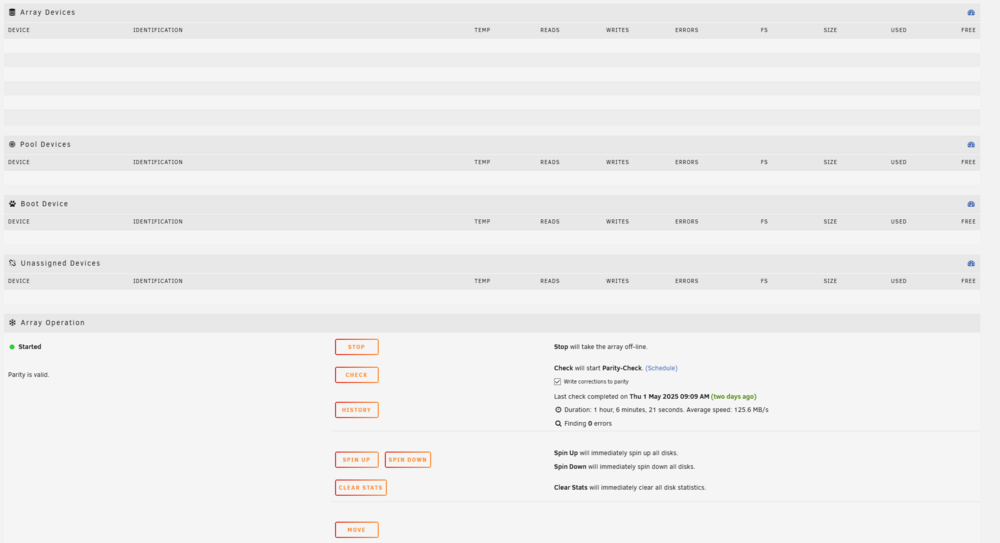
  1. Hi, Suddenly my array devices stopped showing in Dashboard and Main on the gui. I recently replaced the MB cause it was fried, The replacement went super fine and i did not seem to have to reinstall the unraid SW ounce i mapped the HD same as they where before. Also there is no cpu statistics on the dashboard Do not know really where to start looking for the problem. I attached some screen shots to show what i mean. I found the problem I am normally using a nginx reverse proxy to get to my NAS, And if i go directly there is no problem. But perhaps somebody can explain this so that a child can understand it ? ///Newbie
Account

Navigation

Search

Search

Configure browser push notifications

Chrome (Android)
  1. Tap the lock icon next to the address bar.
  2. Tap Permissions → Notifications.
  3. Adjust your preference.
Chrome (Desktop)
  1. Click the padlock icon in the address bar.
  2. Select Site settings.
  3. Find Notifications and adjust your preference.