





Andrew_T
Members
-
Joined
-
Last visited
-
I upgraded from v6.12.15 to v7.1.4 in the evening and after restart I was able to start my array. I noticed just making the text in the Docker tab seemed to take longer than usual but could have been my browser (Firefox). Soon after without doing anything on the server, however ( same evening), I wasn't able to load the webGUI at all, and TV Shows shares I couldn't play from a media box. I also tested plain SSH and it just hung, no connection. I had recently paid for a v7 license on another server with much less on it and have never had issues. I'm unsure what might've caused this system to be unresponsive, but I'm just going to downgrade back to v6 and be happy. fifdee-diagnostics-20250819_0749.zip
-
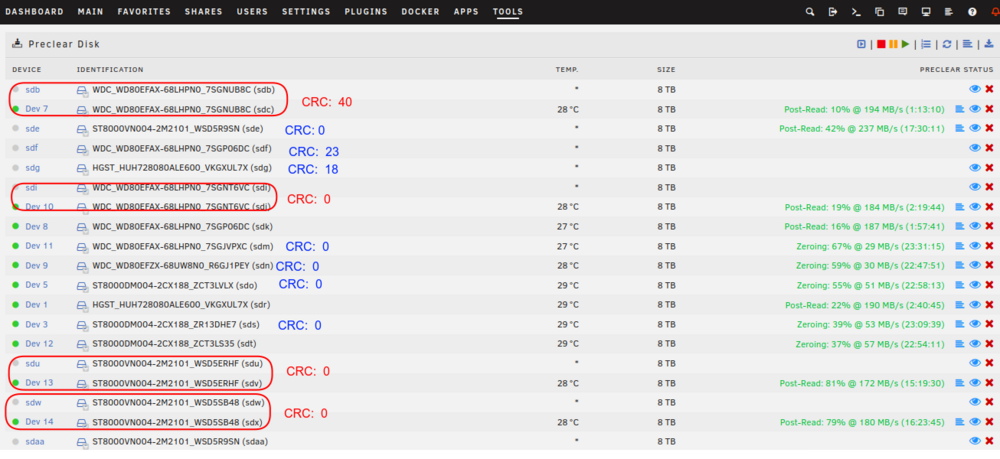
Hi Everyone, I'm looking for help understanding why disks go offline in the array from my short trial license (~ 3 d). I decided to just wipe all the disks (1-5 y power on), run preclear on them to see if that gives more diagnostic help. Chassis: used eBay Supermicro X10DRU-i+ (Xeon E5-2690), 12 HDDs HBA1: AOC-S3008L-L8E LSI SAS3008 PCI-Express Fusion-MPT SAS-3 (rev 02) - both SAS ports connected to backplane all 12 disks listed in http://tower.local/Tools/SysDevs under this card HBA2: LSI SAS2308 PCI-Express Fusion-MPT SAS-2 (rev 05) - both SAS ports connected to backplane 0 items listed under this card Prior to preclear start, only 12 disks were listed as "Dev <int>", but now many have a corresponding "sd{a-z}". Why does that happen? This is what happened during testing the array, where an array disk would show italicized name below it. I ordered 2 new cables to test but won't be here for a week, but should I be concerned about the backplane or an HBA card or HDD itself too?
-
I made the mistake of buying a SuperMicro CSE-847 SuperChassis SAS2/SATA2 6Gbps 45-bay 4U JBOD without realizing its fans do not slow down from their ultrahyper and loud noise. From what I could read, IPMI was not on that, so the fans wouldn't adjust to anything but the highest speed setting. You can hear the noise 2 stories away! That listing you have lists that it has it, so I wouldn't worry about noise then: Motherboard: X9DRD-7LN4F-JBOD with Integrated IPMI 2.0 Management Specs are up to you, but that's an awfully powerful machine which is good for VMs or serving media to external people, otherwise overkill on CPUs (electricity costs) and RAM. For my main server, I have a DDR3 16 GB 8 core with about 15 containers, 0 VMs, and 2 local media devices runs fine. The old norco case I bought 10 y ago though was probably $400 and unserviceable now, and the supermicro servers are really nice to work on. My only worry is once something dies (like a CPU or PSU for example) how to get a cheap Supermicro brand replacement part.
-
I just ran into this issue myself using the Community Applications (not Docker) install after I realized I should have a dedicated email for this purpose with 2FA setup on the account. To accomplish it, I: went into the tailscale login site (external of the unraid server) click at the right side with the 3 horizontal dot icon, removed the Tower user machine went to unraid server http://tower.local/Settings/Tailscale then Setting tab on top "Restart Tailscale" then back to the "Tailscale" tab on top, refresh, took a min, but finally shows "This device needs to be logged in to Tailscale. Refresh this page after logging in to view the status." where the email was wiped out
