





Cololate
Members
-
Joined
-
Last visited
-
So, I have swapped the PSU, and ran the rebuild with no errors. Everything looks good atm - im so happy ^^ Thanks so much guys - I really love this forum, so much help everytime <3
-
So, new PSU - first spin-up, and here is the diag: If it all looks good to you guys, I will try and rebuild in onto itself using the guide https://docs.unraid.net/unraid-os/using-unraid-to/manage-storage/array/replacing-disks-in-array/#re-enabling-a-disabled-disk-rebuilding-onto-itself tdk-diagnostics-20260909-1903.zip Should I use the SMART test, or should I be fine without it? Thanks agian guys - much love! <3
-
Yea :) I did run 12 drives at one point, and no problems at all on the PSU - but over time, alot of power issues have come and gone, with alot of help here, but its just always the power and not the drives that is the issue. So, now I just fitted the new Seasonic Core ATX 3 GX-750W, and I hope I am safe now, and time to rebuild it all agian :) (Just need to figure out how - as I feel its so complicated every time
-
I just feel like I have had alot of power issues over time, and its been the same PSU. I have swapped cables, raidcards and so on, and that leads me to think that the PSU is the bad guy here :)
-
Ill buy that new PSU before I do anymore. I feel like this G650M corsair 80 Bronze might be in over its head Thanks for the help - means so much to a noob like me
-
Hey guys It havent been long, sadly, since I got some help from you guys. This time, I started a DL, and both my disks (not parity) made an error right away. The one drive went on to be emulated/disable, and the other was with errors, just like the other one, but running still. I did a restart, before I got the diag - I know, mistake - but here we are. After the restart, the dl continued, and made more errors to the drive, that was running 'fine' before the restart. Here is the diag, after the restart, and with the errors: tdk-diagnostics-20260908-1623.zip I really dont know why my rig is so unstable and just want to make so many errors all the time - but I am getting a bit frustrated Edit: thoughts - could it be that the PSU is to old and weak to spin the 3 x 20 TB disks up at the same time? Is that possible?
-
Aight - might just go get a new one then, as I dont wanna be in this situation agian, if I can help it :)* There are no splitters. Just 3 disk's and a SSD for cache, and the get power directly from the PSU. Though it is an older one, so I just might think that it could have some issues. I am gonna go out and find a top tier PSU for this one, and see how it goes
-
Ok, so it ran fine, full rebuild, no errors. tdk-diagnostics-20260726-1843.zip This is from when it finished. I have changed the cables and raidcard before, as I have had this error before, many times. (before I had help here, and just swapped the disks DOH) Could this be a PSU thing? I feel like thats the only thing I have not changed over the years. Its a CoolerMaster G650M - and I would swap it in a heartbeat, if that could be the reason over the years, to the many errors. Thanks agian guys - you are all awsome as always, and I am so happy to be back on track (it seams)
-
Ill get right on it - thank you so much :) Hope it gets better this time around :)
-
Back from vacation - and ready to move on Started the server, paused the data-rebuild, made this diag: tdk-diagnostics-20260725-1455.zip Hope I did the right thing of pausing it, otherwise, I know you will let me know ;)
-
I will do so I just hit another vacation, so it wont be until next saturday. Until then, it has been turned off :)
-
Thanks! I have unplugged all connections, and now it went well Here is the diag: tdk-diagnostics-20260716-2059.zip
-
Yea, it makes no sence to me what so ever Newest diag:tdk-diagnostics-20260716-1608.zip I hate beeing this dumb to unraid, but on the otherhand, I feel like its a big thing to learn atm So I really appreciate all the help here.
-
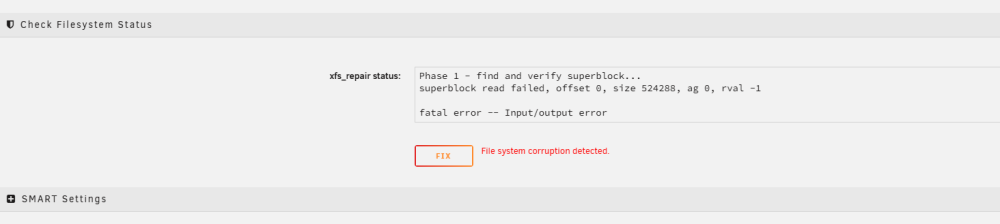
Alright Then I am getting this, no matter how many times I press it:
-


