





dkeners
Members
-
Joined
-
Last visited
-
I ran into this issue after updating to 7.2.2 (I jumped many versions at once) and found the solution to be turning off SSH in settings->management access and applying the settings. Then after turning it back on and applying my connections were all fixed
-
Hey @runza_gaming , I found some info on this error in another thread. It seems like something that I could maybe improve on the template side! I have to provide some major updates to this template as Maybe was sunset by the old devs, however a compatible branch is still under active development. I will update again in this channel when I make those changes to the template, in the meantime that thread has some helpful ways to get past this error! (Except running in privileged mode, avoid that whenever possible)
-
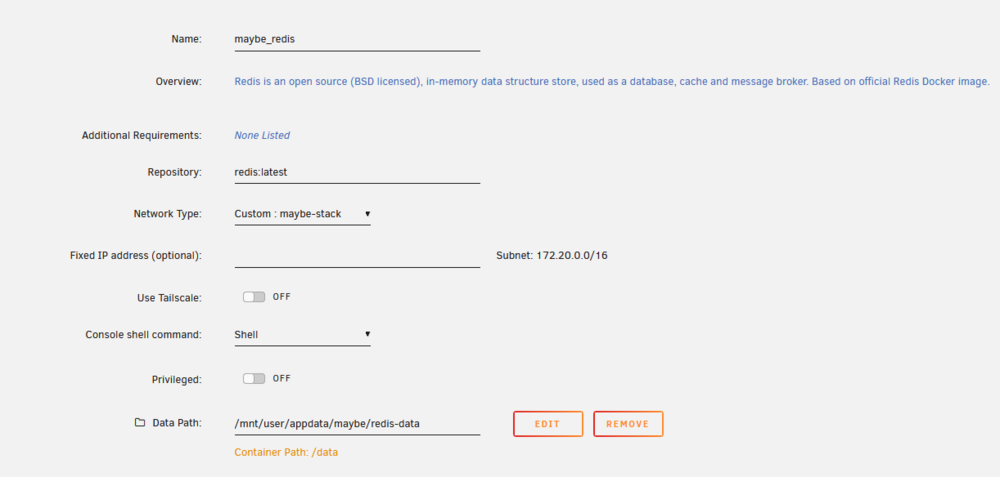
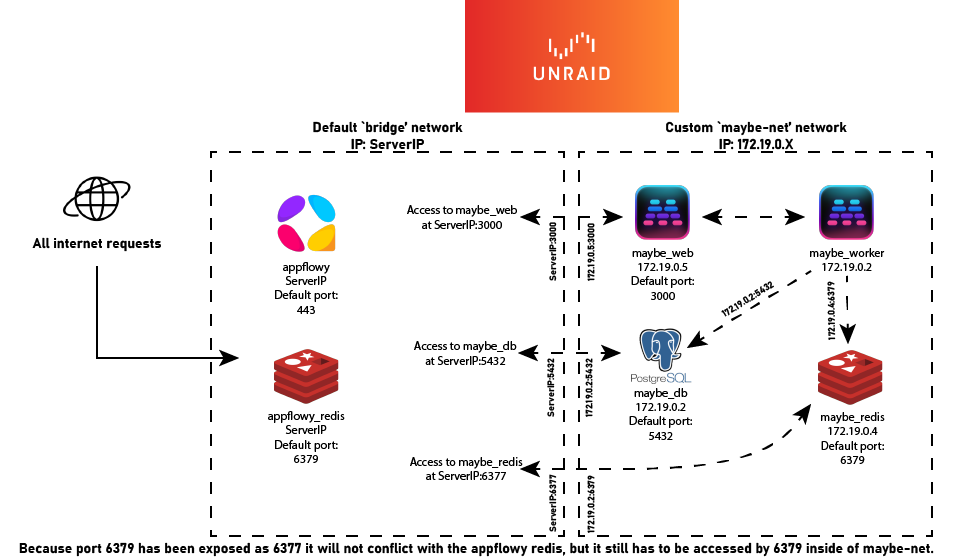
@exputesco No worries! Hopefully we can solve this and then it won't be a problem for the next person! :) I looked through your logs and your database and redis look to be running perfectly! It does look like the issue is still with how your Maybe_Web and Maybe_Worker are reaching Redis, I am finding this in the Maybe_Worker logs Connection refused - connect(2) for 172.19.0.4:6377 (redis://maybe_redis:6377/1) . I may have been mistaken about how local dns works in custom docker networks... 😅. I think that Maybe is not seeing your custom defined port at all, only docker containers outside of the network see the custom number. I have made a small diagram about how this works, happy to clarify if it doesn't make sense, I will add to the guide if helpful! (Appflowy is used as an example app that would have another redis container.) Setting your Redis port in the Maybe_Web and _Worker containers to the 6379 value in the column should fix your issues. Apply in both containers and see if you get past the redis screen of the app. If the app is now working, and you don't need access to the DB or Redis in the bridge network, you can remove the port like in the config below.

-
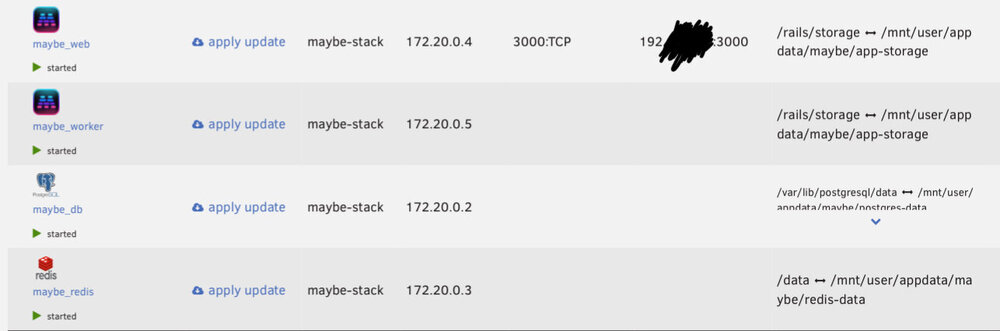
@exputesco of course! Sorry for the delay in replies; busy couple of days… You are correct that changing any port is ok as long as you take care to match it everywhere needed. (And that it doesn’t conflict with any other ports you have set up). Setting up 1 redis per server is not completely necessary, and they can be shared between apps assuming they run on the same version of redis. HOWEVER, I like running 1 redis per app so that I do not have to worry about my other apps needing a version change or having any unintended overlap. I’m just confirming that you created the custom docker network, and inside of it you have your Web, Worker, Redis and Postgres containers? Also, did you update the redis URI inside of the worker container settings? That should match exactly what you have in the web settings. Let me know if any of these help! If there are still errors with the worker some logs may be helpful, or a description of where each of the 4 apps are located (in default network, custom bridge, or other custom network, ports. Do Not, Do Not share sensitive IP data). I have attached a photo of my docker tab that shows what ports and network each container is on.
-
Hey @exputesco , I looked over your logs and think the issue is with your Redis URI, based on these three lines here: I, [2025-06-24T13:45:52.704365 #1] INFO -- : Processing by PagesController#redis_configuration_error as HTML F, [2025-06-24T13:45:52.712384 #1] FATAL -- : URI::InvalidURIError (bad URI (is not URI?): "192.168.188.158:6377") - Gracefully stopping, waiting for requests to finishThe issue with redis may (I suspect) be one of the two things below: - One thing that catches my attention is the port for redis is 6377 in the URI you have configured, while the default port for redis is often 6379. - The second item would be the IP of redis docker container. Make sure that all your containers that want to talk to each other are on the same network, be it all on default bridge, or a custom bridge. If using the maybe_net bridge this should be configured as: redis://maybe_redis:6379/1 If using the default unraid network then it could be configured: redis://{YOUR-UNRAID-IP}:6379/1 Skylight is a service that Maybe uses for their hosted platform to monitor performance, so in a self-hosted setup it is OK and expected for this to not start.
-
Glad it worked out! I would recommend the discord for maybe, there is a solid community there, as well as the resources page. I personally don't have too many myself. I have! Follow one of the Unraid guides to set up tailscale, https://unraid.net/tailscale, and then on another device that is looged into tailscale you should be able to access the container by going to your Unraid tailscale IP (100.xx.xx.xx) and appending the :3000.
-
Hey @headtrip0 , Sorry it didn't work smoothly! This log tells me that the container itself keeps crashing and restarting. In the container settings, under advanced, you can remove --restart unless-stopped from the extra parameters line, this will clear up this spam from your Unraid logs. You are correct that the container path for Redis is /data . If you provide the logs from the docker container itself I may be able to help figure out what is causing it to crash repeatedly. If the logs button for the container isn't working you can access specific container logs by running docker logs maybe_web in the Unraid console (maybe_web will be case specific to your name). I have also heard of Unraid not checking for conflicting ports when one is in a custom network, which leads to similar connectivity issues, please confirm you have no other containers exposing the same port (3000).
-
Support for Velocity docker template Application Name: Velocity Velocity Website: https://papermc.io/software/velocity itzg/docker-mc-proxy Github Repo: https://github.com/itzg/docker-mc-proxy My Template Repo: https://github.com/dkeners/unraid-templates Take a look at the template repository readme, I will be adding tips and tricks for running Velocity. Please leave questions/issues in this thread or as an issue in the template repository.
-
Support for Maybe Finance docker containers (Web & Worker) Application Name: Maybe Web | Maybe Worker Maybe Github Repo: https://github.com/maybe-finance/maybe My Template Repo: https://github.com/dkeners/unraid-templates Take a look at the template repository readme, I will be adding tips and tricks for running Maybe Finance. Please leave questions/issues in this thread or as an issue in the template repository. Unraid is not an official environment for this app, please post any questions or issues relating to running Maybe via these templates in this thread and not in the maybe github issues.



