





Chengnan
Members
-
Joined
-
Last visited
Everything posted by Chengnan
-
Have you checked your network to GitHub?
-
The Tailscale plugin webui works normal or not? can other device reached to the unraid machine?
-
1.98.3 is the latest version, same problem to me.
-
Maybe you need to disable SMB sign in gpedit.msc on ur PC
-
No, just a script, remember to perform chmod +x /mnt/user/Apps/mihomo/mihomo if you just used DockerSafeNewPerms Start #!/bin/bash echo "Start mihomo" cd /mnt/user/Apps/mihomo # 轮转日志:保留最近5个 for i in 4 3 2 1; do [ -f "/mnt/user/logs/mihomo.log.$i" ] && mv "/mnt/user/logs/mihomo.log.$i" "/mnt/user/logs/mihomo.log.$((i+1))" done [ -f "/mnt/user/logs/mihomo.log" ] && mv "/mnt/user/logs/mihomo.log" "/mnt/user/logs/mihomo.log.1" rm -f "/mnt/user/logs/mihomo.log.6" chmod +x ./mihomo # 启动 ./mihomo -d . > /mnt/user/logs/mihomo.log 2>&1 & Stop #!/bin/bash echo "Stopping mihomo..." # 找到并停止 mihomo pkill -f "mihomo" # 等待进程退出(最多2秒) for i in 1 2; do pgrep -f "mihomo" > /dev/null || break sleep 5 done # 强制终止(如果还在) pgrep -f "mihomo" > /dev/null && pkill -9 -f "mihomo" echo "mihomo stopped"
-
Add below in config.yaml when using fake-ip mode. tun: route-exclude-address: - 100.64.0.0/10 - fd7a:115c:a1e0::/48 exclude-interface: - tailscale1 dns: fake-ip-filter: - "+.ts.net" nameserver-policy: "+.ts.net": 100.100.100.100#tailscale1 rules: - PROCESS-NAME,tailscaled.exe,DIRECT
-
In China, we use mihomo to proxy. When MagicDNS disabled, we need to specify the network interface name used for tsnet DNS resolution in the `nameserver-policy` field. On my computer, this is named `Tailscale`, while on unRAID it is `tailscale1`. To improve the maintainability of the configuration, I need to standardize the network interface names.
-
Can we support custom Tailscale network interface name?
-
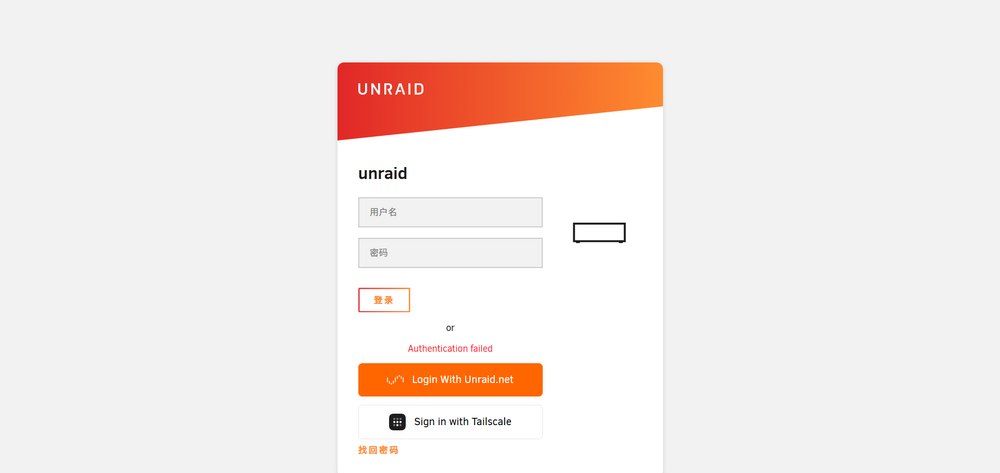
[07:04:39 INFO OidcService]: Built authorization URL via discovery for provider tsidp {"apiVersion":"4.29.2+c39b0b26","logger":"OidcService","context":"OidcService"} [07:04:39 INFO OidcService]: Authorization parameters: {"redirect_uri":"https://unraid.xxx.ts.net/graphql/api/auth/oidc/callback","scope":"openid profile email","state":"tsidp:bc1d80521bfc123745e5acb35ad74372.1777275939026.07cd4c720601451f09277a0d0b828830a14d12493d7369346938e1d91599ece9","response_type":"code"} {"apiVersion":"4.29.2+c39b0b26","logger":"OidcService","context":"OidcService"} [07:04:39 INFO OidcRestController]: Redirecting to OIDC provider: https://unraid.xxx.ts.net:1025/authorize?redirect_uri=https%3A%2F%2Funraid.xxx.ts.net%2Fgraphql%2Fapi%2Fauth%2Foidc%2Fcallback&scope=openid+profile+email&state=tsidp%3Abc1d80521bfc123745e5acb35ad74372.1777275939026.07cd4c720601451f09277a0d0b828830a14d12493d7369346938e1d91599ece9&response_type=code&client_id=unraidgui {"apiVersion":"4.29.2+c39b0b26","logger":"OidcRestController","context":"OidcRestController"} [07:04:39 ERROR OidcTokenExchangeService]: Token exchange failed {"apiVersion":"4.29.2+c39b0b26","logger":"OidcTokenExchangeService","context":"OidcTokenExchangeService"} [07:04:39 ERROR OidcTokenExchangeService]: Error type: ClientError {"apiVersion":"4.29.2+c39b0b26","logger":"OidcTokenExchangeService","context":"OidcTokenExchangeService"} [07:04:39 ERROR OidcTokenExchangeService]: Error message: unexpected response content-type {"apiVersion":"4.29.2+c39b0b26","logger":"OidcTokenExchangeService","context":"OidcTokenExchangeService"} [07:04:39 ERROR OidcTokenExchangeService]: Error code: OAUTH_RESPONSE_IS_NOT_JSON {"apiVersion":"4.29.2+c39b0b26","logger":"OidcTokenExchangeService","context":"OidcTokenExchangeService"} [07:04:39 ERROR OidcTokenExchangeService]: Error cause chain: {"apiVersion":"4.29.2+c39b0b26","logger":"OidcTokenExchangeService","context":"OidcTokenExchangeService"} [07:04:39 ERROR OidcTokenExchangeService]: [Cause 1] object: [object Response] {"apiVersion":"4.29.2+c39b0b26","logger":"OidcTokenExchangeService","context":"OidcTokenExchangeService"} [07:04:39 ERROR OidcTokenExchangeService]: Token endpoint returned invalid or non-JSON response. {"apiVersion":"4.29.2+c39b0b26","logger":"OidcTokenExchangeService","context":"OidcTokenExchangeService"} [07:04:39 ERROR OidcTokenExchangeService]: This typically means: {"apiVersion":"4.29.2+c39b0b26","logger":"OidcTokenExchangeService","context":"OidcTokenExchangeService"} [07:04:39 ERROR OidcTokenExchangeService]: 1. The token endpoint URL is incorrect (check for typos or wrong paths) {"apiVersion":"4.29.2+c39b0b26","logger":"OidcTokenExchangeService","context":"OidcTokenExchangeService"} [07:04:39 ERROR OidcTokenExchangeService]: 2. The server returned an HTML error page instead of JSON {"apiVersion":"4.29.2+c39b0b26","logger":"OidcTokenExchangeService","context":"OidcTokenExchangeService"} [07:04:39 ERROR OidcTokenExchangeService]: 3. Authentication failed (invalid client_id or client_secret) {"apiVersion":"4.29.2+c39b0b26","logger":"OidcTokenExchangeService","context":"OidcTokenExchangeService"} [07:04:39 ERROR OidcTokenExchangeService]: 4. A proxy/firewall is intercepting the request {"apiVersion":"4.29.2+c39b0b26","logger":"OidcTokenExchangeService","context":"OidcTokenExchangeService"} [07:04:39 ERROR OidcTokenExchangeService]: 5. The OAuth server returned malformed JSON {"apiVersion":"4.29.2+c39b0b26","logger":"OidcTokenExchangeService","context":"OidcTokenExchangeService"} [07:04:39 ERROR OidcTokenExchangeService]: Configured token endpoint: https://unraid.xxx.ts.net:1025/token {"apiVersion":"4.29.2+c39b0b26","logger":"OidcTokenExchangeService","context":"OidcTokenExchangeService"} [07:04:39 ERROR OidcTokenExchangeService]: Please verify your OIDC provider configuration. {"apiVersion":"4.29.2+c39b0b26","logger":"OidcTokenExchangeService","context":"OidcTokenExchangeService"} [07:04:39 ERROR OidcService]: OAuth callback error: unexpected response content-type {"apiVersion":"4.29.2+c39b0b26","logger":"OidcService","context":"OidcService"} [07:04:39 ERROR OidcRestController]: OIDC callback error: UnauthorizedException: Authentication failed {"apiVersion":"4.29.2+c39b0b26","logger":"OidcRestController","context":"OidcRestController"}Tailscale ACL below: { "src": ["tag:grp-admin", "tag:role-relay"], "dst": ["*"], "ip": ["*"], "app": { "tailscale.com/cap/tsidp": [ { "allow_admin_ui": true, "allow_dcr": true, "resources": ["*"], "users": ["*"], }, ], }, }
-
Is there any way to use Podman instead of docker on unRAID?
-
See https://forums.unraid.net/topic/72240-solved-is-there-a-way-to-installuninstall-plugins-from-script/#findComment-664131
-
curl -I login.tailscale.com curl -I controlplane.tailscale.com
-
https://tailscale.com/kb/1085/auth-keys tailscale login --auth-key=
-
Or is there anyway to disable OutgoingProxy via CLI? Update: Edit /boot/config/plugins/dynamix/outgoingproxy.cfg set proxy_active to 0 proxy_active="1"then run /usr/local/emhttp/plugins/dynamix/scripts/outgoingproxy apply
-
How to start Tailscale without using OutgoingProxy? I set OutgoingProxy to a device in tailnet, after update, Tailscale can't login. I can ssh into my router and then ssh in my unRAID. root@unraid ~ [1]# tailscale status # Health check: # - You are logged out. The last login error was: fetch control key: Get "https://controlplane.tailscale.com/key?v=130": proxyconnect tcp: dial tcp 100.x.x.x:7890: connect: connection timed out
-
Add Tailscale Peer Relays support
-
目前在用 easy-mihomo 不需要设置 Outgoing
-
目前在用去年九月4号买的CZ550, USB 3.2有GUID,目前在用米多贝克的盘,三星不太能考虑,金属的漏电就完蛋,散热还差,我买的时候看评论的测速这方面三星不如闪迪
-
-
Where is plugin source code? I want to translate it into Chinese and update some old links.
-
After update to 1.86.0 2025.07.29, br0 interface disappeared
-
Did u solve the problem bro?
-
需要频繁读写的还是建议买MLC盘,普通的也能用
-
这是Docker的锅
-

