ilium007
Members
-
Joined
-
Last visited
-
I feel like such an idiot. Chased my tail, installed TrueNAS and got exactly the same transfer speed. Went looking at router and found an incorrectly configured fqcodel queue (to limit Australian NBN upload speeds) that was limiting to 48mbps. I’ll reinstall unRaid now. 🤦♂️
-
I was testing with the one file here to maintain like for like conditions.
-
Diagnostics generated while copying a single 2.44GB file. This is the only file operation at present. Going to nuke the system after this test and install TrueNAS and see what that experience is like. Hopefully I can sort Unraid out because I like its feature set but can't pay for 5.95MB/sec file copies. unraid01-diagnostics-20251027-2130.zip
-
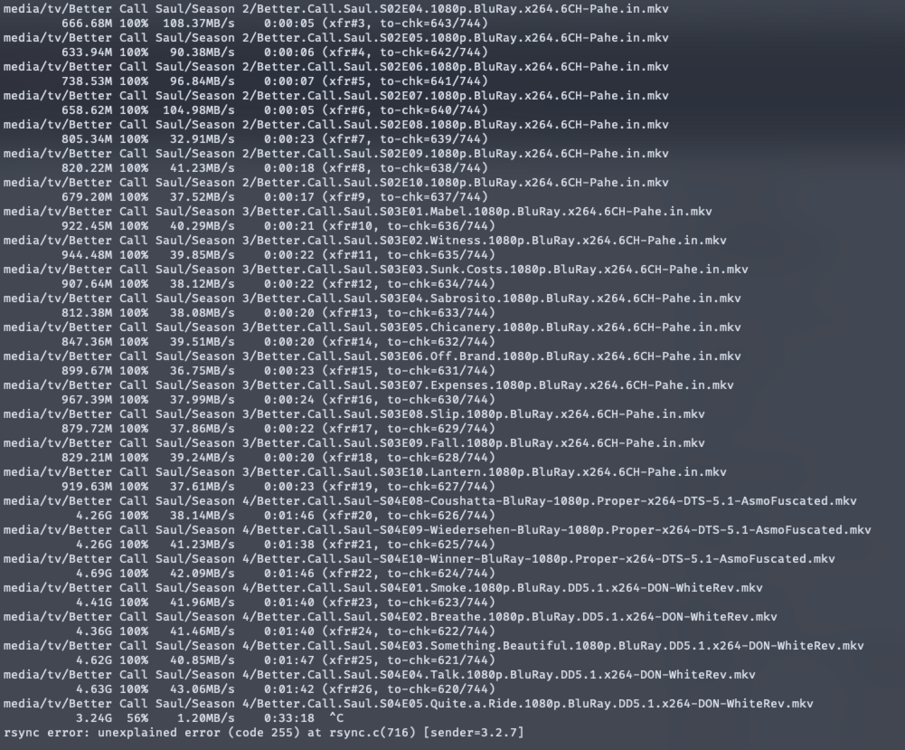
rsync -avh --progress /tank/backup/media/ [email protected]:/mnt/user/MEDIA
-
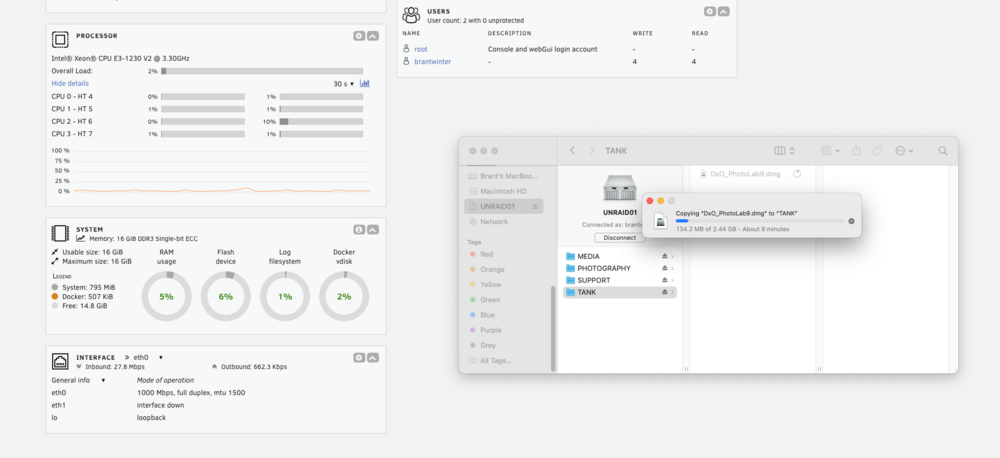
Single file copy via SMB when I saw 5.9MB/sec This was the only file operation at the time The MACOSX is there because when I downloaded the diagnostics.zip Safari automatically unzipped it, I just zipped it back up to post here Yes, running Unraid on bare metal
-
But 5.9MB/sec?? Even on this old hardware? I'll do another file copy and generate the diagnostics. Cheers.
-
I ran the disk speed shell script (found on this forum) and got the following: I am about to wipe the machine and install TrueNAS to see if I c an get more than 5.9MB/sec across the network.
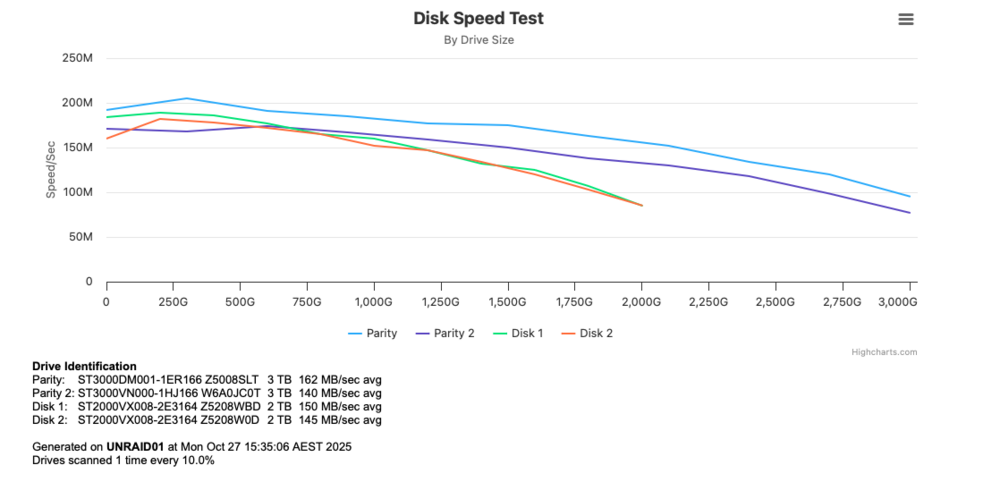
-
So parity sync finished overnight and I have attempted to copy the same 2.44GB file, same as with the SMR parity drives, 7min. Thats 5.9MB/sec across 1Gb wired connection via SMB.
-
I'm currently waiting for the parity to re-sync but I tried a SMB file copy during the re-sync and it was just as slow. I then tried rsync (during parity re-sync) and it maintained 110MB/s transfer initially and then dropped to 38MB/s for a 50G file.
-
I meant I've got it on with the CMR drives I put in.
-
Is that "Tunable (md_write_method): reconstruct write"? I have that enabled already.
-
I found a couple of 3TB CMR drives and replaced the 4TB SMR parity drives, I'll see if this makes any difference.
-
Do you think 4 x matching CMR drives such as the Seagate Ironwolfs or WD RED's would make this perform at 1GB wire speed? I am thinking of keeping 2 x parity and have the other 2 in a mirror. I have the HBA card so was going to add 2 x 1TB SSD's in a cache mirror.
-
Drives: root@UNRAID01:~# lsblk NAME MAJ:MIN RM SIZE RO TYPE MOUNTPOINTS loop0 7:0 0 579.8M 1 loop /usr loop1 7:1 0 169.8M 1 loop /lib sda 8:0 1 14.8G 0 disk └─sda1 8:1 1 14.8G 0 part /boot sdb 8:16 0 1.8T 0 disk sdc 8:32 0 1.8T 0 disk sdd 8:48 0 3.6T 0 disk └─sdd1 8:49 0 3.6T 0 part sde 8:64 0 3.6T 0 disk └─sde1 8:65 0 3.6T 0 part md1p1 9:1 0 1.8T 0 md /mnt/disk1 md2p1 9:2 0 1.8T 0 md /mnt/disk2 root@UNRAID01:~# Drive tests: /dev/sdb root@UNRAID01:~# for ((i=0;i<12;i++)); do hdparm -tT /dev/sdb; done /dev/sdb: Timing cached reads: 23112 MB in 1.99 seconds = 11610.38 MB/sec Timing buffered disk reads: 508 MB in 3.08 seconds = 164.89 MB/sec /dev/sdb: Timing cached reads: 22932 MB in 1.99 seconds = 11521.78 MB/sec Timing buffered disk reads: 516 MB in 3.03 seconds = 170.25 MB/sec /dev/sdb: Timing cached reads: 23642 MB in 1.99 seconds = 11877.73 MB/sec Timing buffered disk reads: 476 MB in 3.05 seconds = 155.89 MB/sec /dev/sdb: Timing cached reads: 22258 MB in 1.99 seconds = 11179.74 MB/sec Timing buffered disk reads: 508 MB in 3.03 seconds = 167.58 MB/sec /dev/sdb: Timing cached reads: 21108 MB in 1.98 seconds = 10643.01 MB/sec Timing buffered disk reads: 508 MB in 3.02 seconds = 168.05 MB/sec /dev/sdb: Timing cached reads: 21766 MB in 1.99 seconds = 10931.32 MB/sec Timing buffered disk reads: 508 MB in 3.02 seconds = 168.14 MB/sec /dev/sdb: Timing cached reads: 18950 MB in 1.99 seconds = 9512.16 MB/sec Timing buffered disk reads: 510 MB in 3.03 seconds = 168.19 MB/sec /dev/sdb: Timing cached reads: 23106 MB in 1.99 seconds = 11607.62 MB/sec Timing buffered disk reads: 508 MB in 3.03 seconds = 167.61 MB/sec /dev/sdb: Timing cached reads: 23374 MB in 1.99 seconds = 11742.88 MB/sec Timing buffered disk reads: 508 MB in 3.03 seconds = 167.65 MB/sec /dev/sdb: Timing cached reads: 20226 MB in 1.99 seconds = 10183.63 MB/sec Timing buffered disk reads: 476 MB in 3.07 seconds = 155.11 MB/sec /dev/sdb: Timing cached reads: 22636 MB in 1.99 seconds = 11371.44 MB/sec Timing buffered disk reads: 508 MB in 3.03 seconds = 167.61 MB/sec /dev/sdb: Timing cached reads: 23186 MB in 1.99 seconds = 11649.15 MB/sec Timing buffered disk reads: 508 MB in 3.03 seconds = 167.62 MB/sec /dev/sdc root@UNRAID01:~# for ((i=0;i<12;i++)); do hdparm -tT /dev/sdc; done /dev/sdc: Timing cached reads: 19922 MB in 1.99 seconds = 10001.89 MB/sec Timing buffered disk reads: 476 MB in 3.18 seconds = 149.52 MB/sec /dev/sdc: Timing cached reads: 23178 MB in 1.99 seconds = 11643.34 MB/sec Timing buffered disk reads: 476 MB in 3.03 seconds = 156.99 MB/sec /dev/sdc: Timing cached reads: 23110 MB in 1.99 seconds = 11609.70 MB/sec Timing buffered disk reads: 476 MB in 3.03 seconds = 156.99 MB/sec /dev/sdc: Timing cached reads: 21958 MB in 1.98 seconds = 11095.45 MB/sec Timing buffered disk reads: 476 MB in 3.01 seconds = 157.90 MB/sec /dev/sdc: Timing cached reads: 18694 MB in 1.99 seconds = 9384.57 MB/sec Timing buffered disk reads: 476 MB in 3.04 seconds = 156.43 MB/sec /dev/sdc: Timing cached reads: 19246 MB in 1.99 seconds = 9661.22 MB/sec Timing buffered disk reads: 476 MB in 3.07 seconds = 154.85 MB/sec /dev/sdc: Timing cached reads: 22628 MB in 1.99 seconds = 11367.02 MB/sec Timing buffered disk reads: 476 MB in 3.03 seconds = 157.01 MB/sec /dev/sdc: Timing cached reads: 23352 MB in 1.99 seconds = 11735.59 MB/sec Timing buffered disk reads: 476 MB in 3.03 seconds = 157.02 MB/sec /dev/sdc: Timing cached reads: 21758 MB in 1.99 seconds = 10927.31 MB/sec Timing buffered disk reads: 476 MB in 3.03 seconds = 156.96 MB/sec /dev/sdc: Timing cached reads: 23116 MB in 1.99 seconds = 11613.29 MB/sec Timing buffered disk reads: 476 MB in 3.03 seconds = 157.03 MB/sec /dev/sdc: Timing cached reads: 22242 MB in 1.99 seconds = 11172.90 MB/sec Timing buffered disk reads: 476 MB in 3.03 seconds = 157.00 MB/sec /dev/sdc: Timing cached reads: 22696 MB in 1.99 seconds = 11402.18 MB/sec Timing buffered disk reads: 476 MB in 3.02 seconds = 157.51 MB/sec /dev/sdd root@UNRAID01:~# for ((i=0;i<12;i++)); do hdparm -tT /dev/sdd; done /dev/sdd: Timing cached reads: 22292 MB in 1.99 seconds = 11196.88 MB/sec Timing buffered disk reads: 508 MB in 3.17 seconds = 160.48 MB/sec /dev/sdd: Timing cached reads: 23088 MB in 1.99 seconds = 11601.30 MB/sec Timing buffered disk reads: 508 MB in 3.05 seconds = 166.51 MB/sec /dev/sdd: Timing cached reads: 19742 MB in 1.99 seconds = 9942.95 MB/sec Timing buffered disk reads: 516 MB in 3.00 seconds = 171.99 MB/sec /dev/sdd: Timing cached reads: 23042 MB in 1.99 seconds = 11579.69 MB/sec Timing buffered disk reads: 508 MB in 3.01 seconds = 168.93 MB/sec /dev/sdd: Timing cached reads: 22818 MB in 1.99 seconds = 11462.93 MB/sec Timing buffered disk reads: 508 MB in 3.00 seconds = 169.06 MB/sec /dev/sdd: Timing cached reads: 22794 MB in 1.99 seconds = 11449.93 MB/sec Timing buffered disk reads: 508 MB in 3.03 seconds = 167.51 MB/sec /dev/sdd: Timing cached reads: 23666 MB in 1.99 seconds = 11890.17 MB/sec Timing buffered disk reads: 508 MB in 3.02 seconds = 168.43 MB/sec /dev/sdd: Timing cached reads: 22786 MB in 1.99 seconds = 11447.08 MB/sec Timing buffered disk reads: 508 MB in 3.16 seconds = 160.72 MB/sec /dev/sdd: Timing cached reads: 23010 MB in 1.99 seconds = 11559.23 MB/sec Timing buffered disk reads: 508 MB in 3.01 seconds = 169.04 MB/sec /dev/sdd: Timing cached reads: 23348 MB in 1.99 seconds = 11729.61 MB/sec Timing buffered disk reads: 508 MB in 3.01 seconds = 168.60 MB/sec /dev/sdd: Timing cached reads: 22870 MB in 1.99 seconds = 11488.35 MB/sec Timing buffered disk reads: 508 MB in 3.01 seconds = 169.02 MB/sec /dev/sdd: Timing cached reads: 22928 MB in 1.99 seconds = 11517.88 MB/sec Timing buffered disk reads: 508 MB in 3.01 seconds = 169.02 MB/sec /dev/sde root@UNRAID01:~# for ((i=0;i<12;i++)); do hdparm -tT /dev/sde; done /dev/sde: Timing cached reads: 22814 MB in 1.99 seconds = 11462.22 MB/sec Timing buffered disk reads: 540 MB in 3.03 seconds = 178.45 MB/sec /dev/sde: Timing cached reads: 22130 MB in 1.99 seconds = 11115.49 MB/sec Timing buffered disk reads: 540 MB in 3.03 seconds = 178.03 MB/sec /dev/sde: Timing cached reads: 22838 MB in 1.99 seconds = 11472.04 MB/sec Timing buffered disk reads: 540 MB in 3.02 seconds = 178.56 MB/sec /dev/sde: Timing cached reads: 23022 MB in 1.99 seconds = 11564.79 MB/sec Timing buffered disk reads: 508 MB in 3.01 seconds = 168.95 MB/sec /dev/sde: Timing cached reads: 14982 MB in 1.99 seconds = 7520.68 MB/sec Timing buffered disk reads: 564 MB in 3.04 seconds = 185.81 MB/sec /dev/sde: Timing cached reads: 23094 MB in 1.99 seconds = 11602.13 MB/sec Timing buffered disk reads: 540 MB in 3.00 seconds = 179.88 MB/sec /dev/sde: Timing cached reads: 22848 MB in 1.99 seconds = 11478.10 MB/sec Timing buffered disk reads: 540 MB in 3.01 seconds = 179.33 MB/sec /dev/sde: Timing cached reads: 21562 MB in 1.98 seconds = 10892.19 MB/sec Timing buffered disk reads: 558 MB in 3.00 seconds = 185.98 MB/sec /dev/sde: Timing cached reads: 22582 MB in 1.98 seconds = 11413.69 MB/sec Timing buffered disk reads: 540 MB in 3.04 seconds = 177.39 MB/sec /dev/sde: Timing cached reads: 21492 MB in 1.99 seconds = 10794.66 MB/sec Timing buffered disk reads: 540 MB in 3.01 seconds = 179.35 MB/sec /dev/sde: Timing cached reads: 23360 MB in 1.99 seconds = 11738.00 MB/sec Timing buffered disk reads: 532 MB in 3.00 seconds = 177.31 MB/sec /dev/sde: Timing cached reads: 22986 MB in 1.99 seconds = 11547.01 MB/sec Timing buffered disk reads: 540 MB in 3.03 seconds = 177.97 MB/sec root@UNRAID01:~#
-
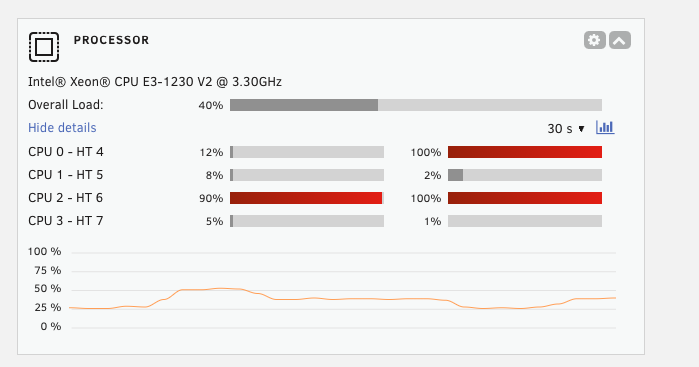
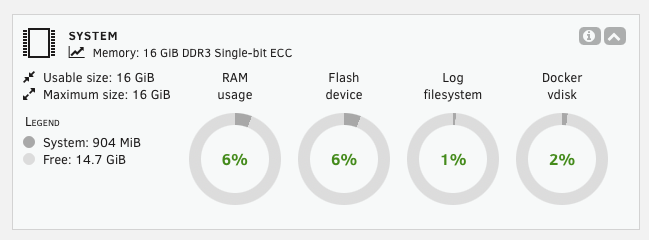
I have a HP Microserver Gen 8 with a Xeon E3-1230 V2 CPU & 12GB RAM. 2 x 4TB parity drives and 2 x 2TB array drives all connected to a LSI 9205-8i with active cooling. No cache yet, I am just trying to get a copy of my data on to the box so I can start testing Unraid again. Diagnostics zip attached. I have enabled "reconstruct write" as mentioned in some of the forum posts but I don't think it has made a difference. I am copying from my backup box via rsync: rsync -avh --progress /tank/backup/media/ [email protected]:/mnt/user/MEDIA I see the transfer speeds from over 100MB/sec to 1MB/sec - nothing else is happing on the system part from the remote file copy. CPU is also spiking: Heaps of free RAM: unraid01-diagnostics-20251026-1309.zip