





AndyS
Members
-
Joined
-
Last visited
Everything posted by AndyS
-
Thanks, I don't really want to disable the cache, just stop it from writing to multiple disks at the same time.
-
Have you disabled the RAM cache or are you not using the NVMe/SSD cache?
-
Is it not possible to make the linux RAM cache operate in FIFO mode? Then we can use Turbo Writes.
-
I'm not sure you understand what I am talking about. I'm not doing Turbo to multiple disks. Unraid is due to the way the RAM disk cache works. If what you say is correct, Mover won't ever work with Turbo Writes - just in case the data is split across disks.
-
Not really a great answer, suppose I have data in the NVMe cache that needs to be placed on 14 different disks due to the share setup for the array. Currently that data will be concurrently written to all the drives at the same time using Read Modify Write. Making the cache FIFO means that each disk is written to one at a time.
-
Yes, the Linux disk RAM cache is what I mean. It's not FIFO, you can test this by copying data to a share that's housed on one array disk, then copy to another share that's housed on a different array disk. I wanted it to wait on disk writes before starting to write to the 2nd disk. That to me is the logical way to handle a cache for an Unraid array (due to performance limitations). For an array that's on an NVMe raid, concurrent writes may be possible, but I would still assume that it's best to get the first job done before starting others.
-
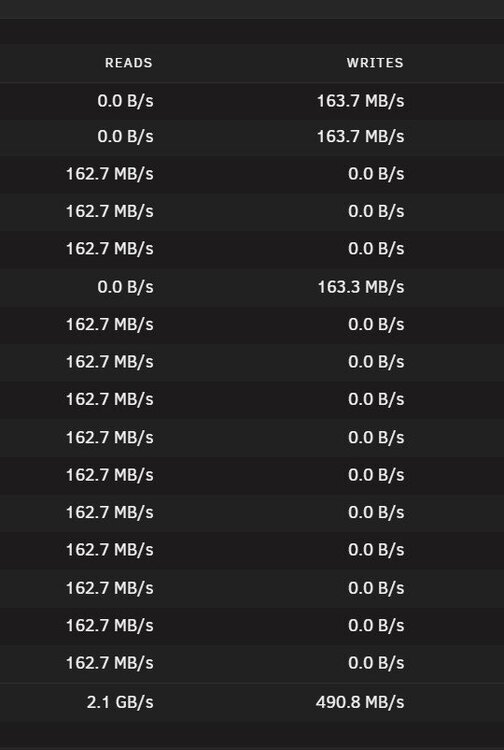
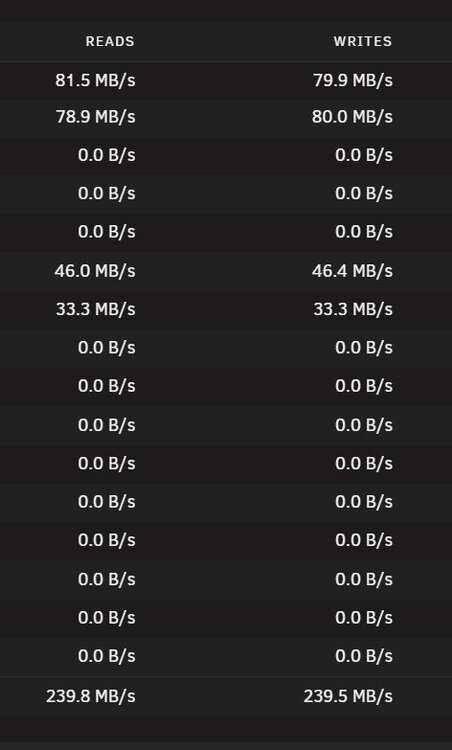
Hi all, There seems to be a problem with parallelism when writing to the array using Reconstruct Write. I have data in my NVMe cache that needs to be transferred to the array. My server has a large amount of RAM which is used as a disk cache automatically. The data in the NVMe cache is split by folders to different drives in the array. If I move one folder using Midnight Commander to the user0 folder I get full speed writes: However, the MC move finishes quickly as it is copying to the RAM cache. When I start another folder move to the array (which uses a different drive), the write performance tanks and the disks are noticeably louder: It appears that the RAM cache doesn't operate as a FIFO buffer and that Turbo Writes are switched off when two operations are executed. Now you may say, "simply wait until disk activity has stopped before starting another move", it's difficult to know when this has happened programmatically, which means that when Mover executes, it defaults to Read/Modify/Write if it's moving data to multiple disks. Is there a way that Mover can stop additional moves until the single disk activity has finished? Or can Unraid be clever enough to calculate parity for all drives for multiple disk writes without resorting to Read/Modify/Write? Thanks, Andy.
-
Hi and thanks for the great plugin and all the work you're putting in to try to fix it. I wondered if there was something you could suggest for one of my drives that spins down and immediately spins up again. It's unfortunately a Seagate ST20000NM002D - I have 5 of them and 4 behave perfectly, just one has this problem. I've removed this from the array and wiped it, so it shouldn't nothing should be accessing it. I'm not using fan control either. Some information follows: root@Srvr:/mnt/cache/system/custom/SeaChest# ./SeaChest_PowerControl -d /dev/sg5 --spinDown ========================================================================================== SeaChest_PowerControl - Seagate drive utilities - NVMe Enabled Copyright (c) 2014-2025 Seagate Technology LLC and/or its Affiliates, All Rights Reserved SeaChest_PowerControl Version: 3.7.2 X86_64 Build Date: Oct 10 2025 Today: 20260221T210511 User: root ========================================================================================== /dev/sg5 - ST20000NM002D - - E005 - SCSI Successfully sent command to spin down device. Please wait 15 seconds for it to finish spinning down. root@Srvr:/mnt/cache/system/custom/SeaChest# ./SeaChest_PowerControl -d /dev/sg5 --transitionPower standby_z ========================================================================================== SeaChest_PowerControl - Seagate drive utilities - NVMe Enabled Copyright (c) 2014-2025 Seagate Technology LLC and/or its Affiliates, All Rights Reserved SeaChest_PowerControl Version: 3.7.2 X86_64 Build Date: Oct 10 2025 Today: 20260221T210616 User: root ========================================================================================== /dev/sg5 - ST20000NM002D - - E005 - SCSI Power Mode Transition Successful. Please give device a few seconds to transition. Hint:Use --checkPowerMode option to check the new Power Mode. root@Srvr:/mnt/cache/system/custom/SeaChest# ./SeaChest_PowerControl -d /dev/sg5 --transitionPower sleep ========================================================================================== SeaChest_PowerControl - Seagate drive utilities - NVMe Enabled Copyright (c) 2014-2025 Seagate Technology LLC and/or its Affiliates, All Rights Reserved SeaChest_PowerControl Version: 3.7.2 X86_64 Build Date: Oct 10 2025 Today: 20260221T210648 User: root ========================================================================================== /dev/sg5 - ST20000NM002D - - E005 - SCSI Transitioning power modes not allowed on this device Thanks!
-
Hi all, I've 5 20Tb Seagate SAS X20 drives - ST20000NM002D. 4 of these are successfully spinning down using the SAS Spindown plugin from doron. However one of these will spindown, but immediately spins back up again. I have removed this from the array and it's now an unassigned device that has been wiped and formatted. It still refuses to remain spun down. Are there any commands or firmware upgrades that I can do to make this behave correctly? Thanks in advance.
-
Same issue here. Is this still being looked at?
-
Found the problem. It appears that Power Mode in 7.2 has a really significant change from Efficientcy to Best Performance on my R730XD. Everything is incredibly snappy when changed to to Best Performance - even increasing network transfer speed.
-
Hi, just upgraded to 7.2 and changing between tabs in the UI is much slower than before. For instance from Dashboard to a simple tab such as Settings pauses for 3-5 seconds before starting to render the page. Chrome is indicating that LCP is 5.09s. I also have access (via tailscale) to a 7.14 Unraid that is the oposite side of the planet that changes tabs within half a second. Is this normal behaviour for 7.2 onwards? Thanks, Andy.
-
Just tested it by using /mnt/cache - the moves are instant. It appears that /mnt/user/ doesn't think the folders are both on the cache.
-
Should I be using the /mnt/cache folder to do the moves?
-
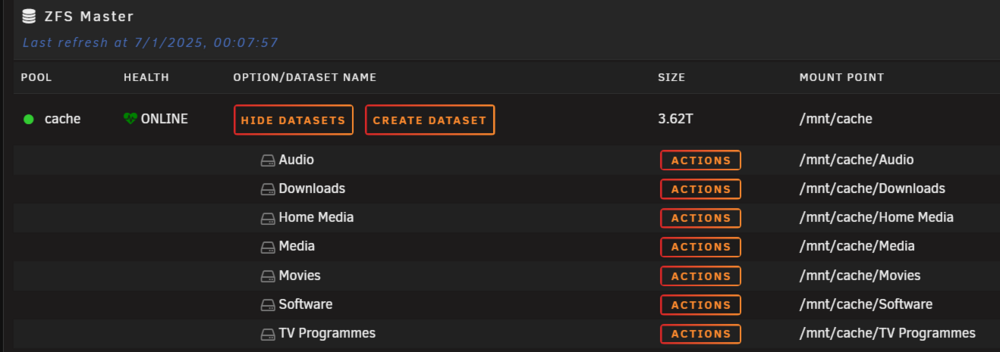
All the same ZFS dataset:
-
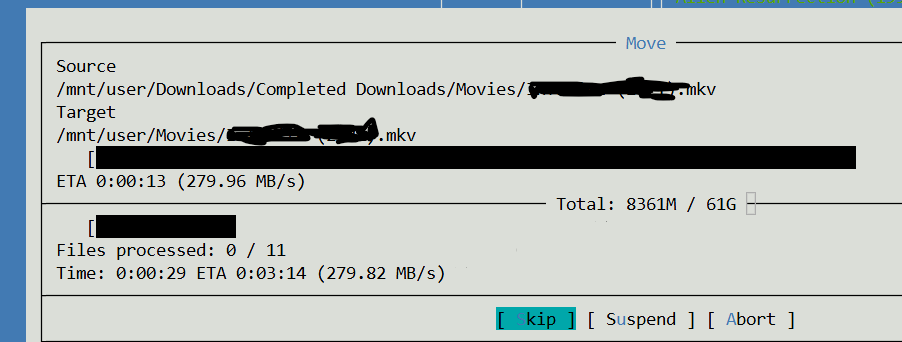
Hi everyone, I've set up Unraid in a similar fashion as others with a Downloads share on the Cache (4 x 1Tb NVMe RAID Z1) and a Movies share that is Cache to Array. If I move files from one folder to another folder in the Downloads folder, the moves are instant. If I move them from the Downloads folder to the Movies folder, they can take 15 to 20 seconds (depending on the number). I am using a SMB root share that is mapped to /mnt/user. The PC doing the moves is a VM on the Unraid server. When I check the /mnt/cache folder, the Movies are on there, not on the array disks. When I use Midnight Commander to move the files, it takes a very long time - it appears it's copying to the array: The SMB extra configuration I'm using to create the share: [MountRoot] path = /mnt/user comment = browseable = no # Private writeable = yes read list = write list = user1 valid users = user1 vfs objects = Does anyone have any ideas? Thanks, Andy.
-
Hi all, I have a download share that is mapped to my PC and a VM on the Unraid server. When Tdarr, console or the other Windows client write to this share, it automatically updates in Windows Explorer on the VM and the other users of the SMB. However, when the SABNZBD Docker writes files to this folder, they do not appear unless F5 is pressed on the Windows VM and PC. Is there a specific thing a piece of software has to do to announce a change to the SMB share? Is SabNZBD not doing this? Thanks, Andy.
-
Thanks for your detailed response. You are correct, this is entirely my fault for running this on my cache drive and not on the downloads share - which would have helped. I suppose I'm more used to a UI holding your hand a little more, if it saw that you were going to run this on the appdata or system folder, maybe another warning would be useful? Maybe default to Shares as the first option - not Disks? The unfortunate fallout from this is that I've had to set all files in appdata and system to +x. I hope that this doesn't have a knock on problem. I'm tempted to destroy the docker folder and start again - if it wasn't for the rebuild of plex and sonarr. Thanks for the help though.
-
Hi, I'm just getting to grips with Unraid and Linux and I was having problems where folders deleted from a Windows 10 VM on the share weren't being deleted, (they would still appear but with an access denied error). Deleting with mc worked fine. Stupidly, I ran the "New Permissions" command - this was based on some old advice on this forum. As docker apps no longer reside in a single image file, it proceded to remove all execute permissions from all of the files. This proceeded to kill every docker app I had loaded. Why is there a button to basically kill your apps still available on Unraid? I realise there is a note at the end that says it "may" affect docker, but I'm sure I'm not the only one that has basically caused their server to commit suicide?


