





.png.fa61e82833871c9256e0ec57fb84cbd0.png)
oitsjustjose
Members
-
Joined
-
Last visited
-
Ah, great. What ARC card did you move to and how did you set it up? Curious to hear others’ experiences.
-
Yeah I give up -- grabbed a refurb'd P4000 and just going to try that out. The A770 is still within the return window so I'll return it. Thanks for all the help!
-
I do! Which is super weird.
-
Alright, disabled the iGPU on my 12600K and still having the same issue. I'm wondering if it may be easier, since I'm still within the return window, to swap for a refurb'd P4000 🤔
-
I’ll give that a shot - I do currently have my NanoKVM’s HDMI hooked into the A770 and it does output after UNRAID starts booting, but I don’t have the iGPU disabled.
-
It attempts to transcode but always falls back to the CPU. I don’t see the (hw) indicator and my CPU utilization spikes.
-
Yes and yes. I just have intel_gpu_top and GPU Statistics.
-
Yep! Verified multiple times to be certain.
-
And I've now updated to Unraid 7.1.3 -- I had updated to 7.1.2 a few weeks back and had to revert as my cache pool had become an invalid configuration, but it seems to have taken and worked out just fine this time around. Also updated my BIOS to the latest build for this model (TUF Z790-PLUS WIFI)
-
Oh right, and I've also upgraded the kernel to the Thor build for Unraid 7.0.1: 6.14.5-thor-Unraid+
-
Worth noting, I have a NanoKVM hooked up to my NAS since it's in the basement so it keeps things really convenient. I've tested and confirmed that the issue persists when: Only the HDMI on the motherboard is plugged into the NanoKVM, and Only the HDMI on the A770 is plugged into the NanoKVM In both cases, I get video out on my NanoKVM's web UI, but the iGPU disappears when I have the NanoKVM plugged into the A770 only.
-
oitsjustjose changed their profile photo
-
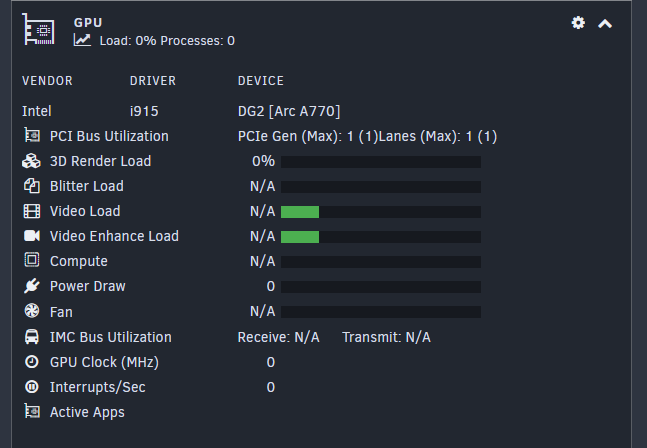
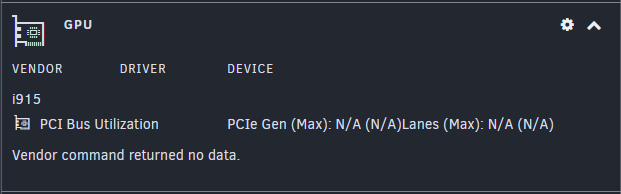
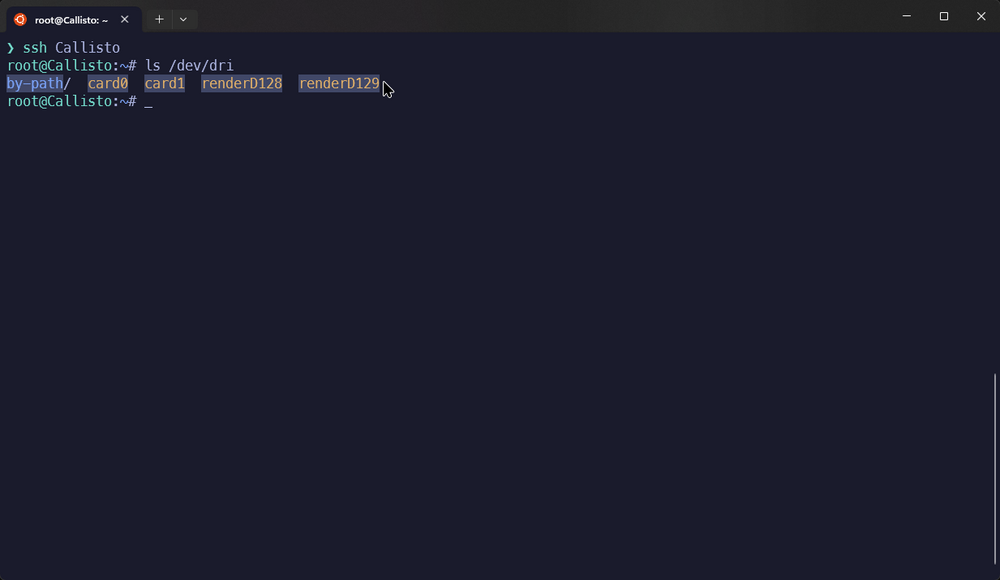
Hey all, looking for some help with getting my Arc A770 working with Plex and intel_gpu_topand/or GPU Statistics. I've tried a few debugging steps and have hit a bit of a wall: echo "blacklist i915" > /boot/config/modprobe.d/i915.conf I have uninstalled intel_gpu_top, rebooted, reinstalled, then rebooted again to no avail My containers (one JellyFin, one Plex) both have /dev/dri mapped as a device Plex even shows both my iGPU and Arc A770 in the listing In some of my latest debugging steps, I went from being able to see my A770 in the GPU Dashboard, to not Before: Now: I suspect this is because I've blacklisted the i915 driver in modprobe.d, but I've tried undoing this step and still have no luck... /dev/dri shows both cards, and running intel_gpu_top -d drm:/dev/dri/card1 to see the top for my A770 returns intel_gpu_top: ../tools/intel_gpu_top.c:1871: init_engine_classes: Assertion `max >= 0' failed. Where as running the same on /dev/dri/card0 (my iGPU) works perfectly fine. I do see these errors when running dmesg | grep i915 | grep -E "error|fail" to see any i915 errors: [ 110.819814] i915 0000:03:00.0: [drm] *ERROR* GT0: GUC: CT: Sending action 0x550a failed (-ETIMEDOUT) status=0X0 [ 110.819946] i915 0000:03:00.0: [drm] *ERROR* GT0: GuC initialization failed -ETIMEDOUT [ 110.819947] i915 0000:03:00.0: [drm] *ERROR* GT0: Enabling uc failed (-5) [ 113.064542] mei_gsc i915.mei-gsc.768: wait hw ready failed [ 113.064569] mei_gsc i915.mei-gsc.768: hw_start failed ret = -62 fw status = 00000345 80210400 00000000 00000000 80020002 00000000 [ 115.201034] mei_gsc i915.mei-gsc.768: wait hw ready failed [ 115.201060] mei_gsc i915.mei-gsc.768: hw_start failed ret = -62 fw status = 00000345 80210400 00000000 00000000 80020002 00000000 [ 117.331254] mei_gsc i915.mei-gsc.768: wait hw ready failed [ 117.331280] mei_gsc i915.mei-gsc.768: hw_start failed ret = -62 fw status = 00000345 80210400 00000000 00000000 80020002 00000000 [ 117.331307] mei_gsc i915.mei-gsc.768: reset failed ret = -19 [ 117.331310] mei_gsc i915.mei-gsc.768: link layer initialization failed. [ 117.331312] mei_gsc i915.mei-gsc.768: init hw failure. [ 119.464431] mei_gsc i915.mei-gscfi.768: wait hw ready failed [ 119.464453] mei_gsc i915.mei-gscfi.768: hw_start failed ret = -62 fw status = 00000345 80210400 00000000 00000000 80020002 00000000 [ 121.597865] mei_gsc i915.mei-gscfi.768: wait hw ready failed [ 121.597891] mei_gsc i915.mei-gscfi.768: hw_start failed ret = -62 fw status = 00000345 80210400 00000000 00000000 80020002 00000000 [ 123.731277] mei_gsc i915.mei-gscfi.768: wait hw ready failed [ 123.731303] mei_gsc i915.mei-gscfi.768: hw_start failed ret = -62 fw status = 00000345 80210400 00000000 00000000 80020002 00000000 [ 123.731331] mei_gsc i915.mei-gscfi.768: reset failed ret = -19 [ 123.731334] mei_gsc i915.mei-gscfi.768: link layer initialization failed. [ 123.731337] mei_gsc i915.mei-gscfi.768: init hw failure. Any help would be appreciated -- this all started because while Plex was seeing my A770, the transcode process was never using hardware acceleration and would just slam the CPU regardless of my config. Listing of /dev/dri has also been attached, as well as
.thumb.png.581941457bb2c597b1a3a589d8b2c283.png)
