





NoGames749
Members
-
Joined
-
Last visited
-
Thank you so much — you saved me there! Maybe consider adding a small note to the FAQ mentioning that all remaining devices need to be included, not just the vdev ones (that part tripped me up).
-
So I would create a new pool with 7 devices instead of 6?
-
Hi everyone, I followed this guide 'How can I remove a subpool from a zfs pool using Unraid v7.0?' in https://forums.unraid.net/topic/46802-faq-for-unraid-v6/ to remove my slog mirror. After I started the array I got the error "Unmountable: unsupported or no file system". It only gives me the option to format the drives. If I stop the array again I can import the zfs pool manually and list the datasets, so I guess and I hope my data is still existing. What should I do? unraid-server-diagnostics-20260209-1754.zip
-
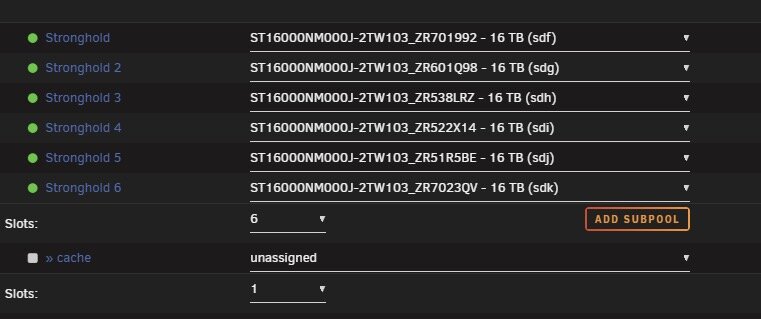
Everything I say here happened after this step: I recreated the pool without the L2ARC subpool, I started the array but the mounting wouldn't finish. The zpool status output was: root@S1:~# zpool status pool: stronghold state: ONLINE status: Some supported and requested features are not enabled on the pool. The pool can still be used, but some features are unavailable. action: Enable all features using 'zpool upgrade'. Once this is done, the pool may no longer be accessible by software that does not support the features. See zpool-features(7) for details. scan: resilvered 637M in 7 days 14:58:59 with 0 errors on Thu Jun 12 01:50:56 2025 config: NAME STATE READ WRITE CKSUM stronghold ONLINE 0 0 0 raidz2-0 ONLINE 0 0 0 sdf1 ONLINE 0 0 0 sdg1 ONLINE 0 0 0 sdh1 ONLINE 0 0 0 sdi1 ONLINE 0 0 0 sdj1 ONLINE 0 0 0 sdk1 ONLINE 0 0 0 cache wwn-0x5002538f42611244-part1 ONLINE 0 0 0 wwn-0x5002538f4261126a-part1 ONLINE 0 0 0 wwn-0x5002538f4261121c-part1 ONLINE 0 0 0 wwn-0x5002538f42611220-part1 ONLINE 0 0 0 errors: No known data errorsAs you can see, the L2ARC cache is still there even though I didn't add it again. I waited about an hour, so I had to reboot the server because I don't know of any way to stop the array while its "starting". After rebooting, I was shown the cache with one slot and no drive assigned in the GUI, which is what the screenshot in my last post shows. First, I tried setting the slot count to 4, assigning my cache drives, and starting the array, but I got this error: Wrong Pool State: cache - invalid config. So I unassigned the cache drives and set the slot count to 0. I started the array and it was mounted successfully. zpool status was then: root@S1:~# zpool status pool: stronghold state: ONLINE status: Some supported and requested features are not enabled on the pool. The pool can still be used, but some features are unavailable. action: Enable all features using 'zpool upgrade'. Once this is done, the pool may no longer be accessible by software that does not support the features. See zpool-features(7) for details. scan: resilvered 637M in 7 days 14:58:59 with 0 errors on Thu Jun 12 01:50:56 2025 config: NAME STATE READ WRITE CKSUM stronghold ONLINE 0 0 0 raidz2-0 ONLINE 0 0 0 sdf1 ONLINE 0 0 0 sdg1 ONLINE 0 0 0 sdh1 ONLINE 0 0 0 sdi1 ONLINE 0 0 0 sdj1 ONLINE 0 0 0 sdk1 ONLINE 0 0 0 errors: No known data errors Then I stopped the array again, added a 4-slot L2ARC subpool with my drives, started the array, and the zpool status output now shows: root@S1:~# zpool status pool: stronghold state: ONLINE status: Some supported and requested features are not enabled on the pool. The pool can still be used, but some features are unavailable. action: Enable all features using 'zpool upgrade'. Once this is done, the pool may no longer be accessible by software that does not support the features. See zpool-features(7) for details. scan: resilvered 637M in 7 days 14:58:59 with 0 errors on Thu Jun 12 01:50:56 2025 config: NAME STATE READ WRITE CKSUM stronghold ONLINE 0 0 0 raidz2-0 ONLINE 0 0 0 sdf1 ONLINE 0 0 0 sdg1 ONLINE 0 0 0 sdh1 ONLINE 0 0 0 sdi1 ONLINE 0 0 0 sdj1 ONLINE 0 0 0 sdk1 ONLINE 0 0 0 cache sdb1 ONLINE 0 0 0 sdc1 ONLINE 0 0 0 sdd1 ONLINE 0 0 0 sde1 ONLINE 0 0 0 errors: No known data errorsEverything now works as I am used to.
-
Everything is working normally again now. A few more comments: I created the pool with only the 6 HDDs from the vdev, meaning no cache. Then I started the array, but it didn't finish mounting. I had to restart the server because I couldn't stop the array. After the restart, the cache was there with one slot: zpool import even showed me all 4 cache drives. I then set the slot to 0, and then I was able to start the array and the mounting was successful. Maybe this will help the next person with the same issue. Thank you so much for your help.
-
I tried the first steps and they worked. The pool is currently being exported again. Just to clarify: Why 10 slots? Am I including the cache devices? Because the RaidZ2 only had 6 devices.
-
I actually thought that might be the case, but didn't want to seem pushy by posting again, just to say that I attached it to my original post. Anyway, thank you for your response, here’s the console output: root@S1:~# zpool import -d /dev/disk/by-id pool: light id: 12952846355415526821 state: ONLINE status: Some supported features are not enabled on the pool. (Note that they may be intentionally disabled if the 'compatibility' property is set.) action: The pool can be imported using its name or numeric identifier, though some features will not be available without an explicit 'zpool upgrade'. config: light ONLINE mirror-0 ONLINE nvme-eui.0025384a21401ef6-part1 ONLINE nvme-eui.0025384a2141525c-part1 ONLINE mirror-1 ONLINE nvme-eui.0025384a21401ecf-part1 ONLINE nvme-eui.0025384a21401f2b-part1 ONLINE pool: stronghold id: 17308197520914921262 state: ONLINE status: One or more devices were being resilvered. action: The pool can be imported using its name or numeric identifier. config: stronghold ONLINE raidz2-0 ONLINE wwn-0x5000c500dc103c47-part1 ONLINE wwn-0x5000c500dc109abd-part1 ONLINE wwn-0x5000c500dc24a2c2-part1 ONLINE wwn-0x5000c500db68a192-part1 ONLINE wwn-0x5000c500db3fda93-part1 ONLINE wwn-0x5000c500dc279672-part1 ONLINE cache sdf1 sdg1 sdh1 sdi1 wwn-0x5002538f42611244-part1 wwn-0x5002538f4261126a-part1 wwn-0x5002538f4261121c-part1 wwn-0x5002538f42611220-part1
-
NoGames749 joined the community
-
After a view crashes of my system, caused by a faulty mainboard, I have an issue with my zfs pool. Somehow, four of my raidz2 HDDs are also listed in the l2arc subpool. Here is the output of zpool import: As you can see sdf1, sdg1, sdh1 and sdi1 are listed in the raidz2 and in the cache. I can start the array and the filesystem is mounting the drives. All data is still appears to be there, but if i do a zpool status I get this: The scrub starts immediately, and I’m concerned that the resilvering might corrupt the data. I’m not sure if that risk is real. I tried "zpool remove stronghold sdf1" but I got this error: cannot remove sdf1: operation not supported on this type of pool. Then I tried deleting the pool and creating it again without the subpool, but after that the pool won't mount anymore: Unmountable: wrong or no file system So I restored from a USB backup I created after my server crashed and the mainboard swap, but the duplicate drives were already there at that time. Any guidance appreciated. tower-diagnostics-20250605-1103.zip

