





Sn0w90
Members
-
Joined
-
Last visited
-
Hey zusammen. Danke noch mal für die ganzen Tipps. Kreuzbude88 hat dann aber der den ausschlaggebenden Tipp gegeben. Habe mal nur den Parameter --runtime=nvidia eingegeben. Das hat bei mir gereicht und ollama startet wieder durch.
-
Danke schon mal für die schnellen Antworten. Das Plugin habe ich jetzt schon 3 mal komplett gelöscht und neu installiert. Der Fehler bleibt leider weiterhin. Habe die Deinstallationen / Installationen auch genauso gemacht wie du beschrieben hast.
-
Oh sorry... habe oben auch ergänzt: – Unraid‑Version: 7.2.4 – Nvidia Driver Plugin: 2026.03.19 Ich komme nicht weiter. Vor einiger Zeit hat es noch alles geklappt. Jetzt klappt es nicht mehr. Habe auch schon nen Backup geladen. Brachte leider auch nichts.
-
Hallo zusammen, ich versuche auf meinem Unraid‑Server Docker‑Container mit GPU‑Support zu nutzen (u.a. Ollama). Umgebung: – Unraid‑Version: 7.2.4 – Nvidia Driver Plugin: 2026.03.19 – GPU: RTX 2080 (Host: nvidia-smi funktioniert, zeigt CUDA 13.2) Problem: Jeder Docker‑Container mit --gpus all bricht direkt beim Start ab, z.B. docker run --rm --gpus all nvidia/cuda:12.3.2-base-ubuntu22.04 nvidia-smi mit folgendem Fehler: Auto-detected mode as 'legacy' nvidia-container-cli: ldcache error: process /sbin/ldconfig failed with error code: 1: unknown. Was ich bisher gemacht habe: – Nvidia Driver Plugin komplett deinstalliert, neu installiert, Server mehrfach neu gestartet. – Symlink /sbin/ldconfig.real -> /sbin/ldconfig angelegt. – nvidia-ctk runtime configure --runtime=docker ausgeführt. – Aktuelle /etc/nvidia-container-runtime/config.toml (Auszug): [nvidia-container-cli] path = "/usr/bin/nvidia-container-cli" ldcache = "@/sbin/ld.so.cache" ldconfig = "@/sbin/ldconfig" [nvidia-container-runtime] log-level = "warning" runtimes = ["docker-runc","runc"] mode = "auto" Trotzdem schlägt jeder GPU‑Container mit obigem Fehler fehl. Habt ihr eine Idee, ob das ein bekanntes Problem mit der aktuellen Unraid‑ / Plugin‑ / Treiber‑Kombination ist oder was ich noch prüfen kann (z.B. bestimmte Log‑Files, Versionen etc.)? Vielen Dank! ### Ergänzung ### Ich habe im Server 2 Grafikkarten am laufen. Eine 2080 für den Server selbst und eine 2070 für eine VM die ich durchgereicht habe per Bind Selected to VFIO at Boot.
-
Is it necessary to store the files in a pool? If so, I would buy an SSD and mount it as a cache. It never disappears.
-
Hey, I have a similar problem, or perhaps the same problem, as frank_alex92. I installed the Ark server. Both file paths are pointing to user/appdata because I don't have a cache disk. When I install and start the server, it eventually displays "waiting for log" and then goes into sleep mode. When I restart the server, it finds older logs, but then the log window closes immediately and the whole process starts again. Restart ---Ensuring UID: 99 matches user--- usermod: no changes ---Ensuring GID: 100 matches user--- usermod: no changes ---Setting umask to 000--- ---Checking for optional scripts--- ---No optional script found, continuing--- ---Taking ownership of data...--- ---Starting...--- ---Update SteamCMD--- ---Ensuring UID: 99 matches user--- usermod: no changes ---Ensuring GID: 100 matches user--- usermod: no changes ---Setting umask to 000--- ---Checking for optional scripts--- ---No optional script found, continuing--- ---Taking ownership of data...--- ---Starting...--- ---Update SteamCMD--- Redirecting stderr to '/serverdata/Steam/logs/stderr.txt' Logging directory: '/serverdata/Steam/logs' Looks like steam didn't shutdown cleanly, scheduling immediate update check [ 0%] Checking for available updates... [----] Verifying installation... UpdateUI: skip show logo Steam Console Client (c) Valve Corporation - version 1751406682 -- type 'quit' to exit -- Loading Steam API...IPC function call IClientUtils::GetSteamRealm took too long: 52 msec OK Connecting anonymously to Steam Public...OK Waiting for client config...OK Waiting for user info...OK Unloading Steam API...OK ---Update Server--- Redirecting stderr to '/serverdata/Steam/logs/stderr.txt' Logging directory: '/serverdata/Steam/logs' [ 0%] Checking for available updates... [----] Verifying installation... UpdateUI: skip show logo Steam Console Client (c) Valve Corporation - version 1751406682 -- type 'quit' to exit -- Loading Steam API...IPC function call IClientUtils::GetSteamRealm took too long: 44 msec OK "@sSteamCmdForcePlatformType" = "windows" Connecting anonymously to Steam Public...OK Waiting for client config...OK Waiting for user info...OK Success! App '376030' already up to date. Unloading Steam API...OK ---Checking the maximum map count per process...--- ---Maximum map count per process OK...--- ---Current map count per process: 265000--- ---Checking if WINE workdirectory is present--- ---WINE workdirectory found--- ---Checking if WINE is properly installed--- ---WINE properly set up--- ---Prepare Server--- ---Server ready--- ---Start Server--- Waiting for logs... [2025.07.23-16.13.19:428][ 0]Commandline: TheIsland?listen?SessionName=Sxxx?ServerPassword=Sxxx?ServerAdminPassword=Axxx?Port=7777?QueryPort=27015?MaxPlayers=50?RCONEnabled=True?RCONPort=27020 -server -log [2025.07.23-16.13.19:428][ 0]Full Startup: 99.24 seconds (BP compile: 0.00 seconds) [2025.07.23-16.13.19:428][ 0]Number of cores 36 [2025.07.23-16.13.19:516][ 1]Server attempting to run new years event [2025.07.23-16.13.19:516][ 1]Sever Is not set to official or running NewYearEvent argument [2025.07.23-16.13.21:521][ 38]Set New Years event location: -86711.156 - -171866.203 - 430.878 [2025.07.23-16.15.42:290][922]Saving world... [2025.07.23-16.15.43:680][922]World Save Complete. Took 1.389990 [2025.07.23-16.15.43:689][923] - FPlatformMisc::RequestExit(1) [2025.07.23-16.15.43:689][923]Log file closed, 07/23/25 18:15:43 In the Docker container, I set the network value to a custom network and otherwise only changed the login credentials and the server name. I hope you can help me. Regards, Snow
-
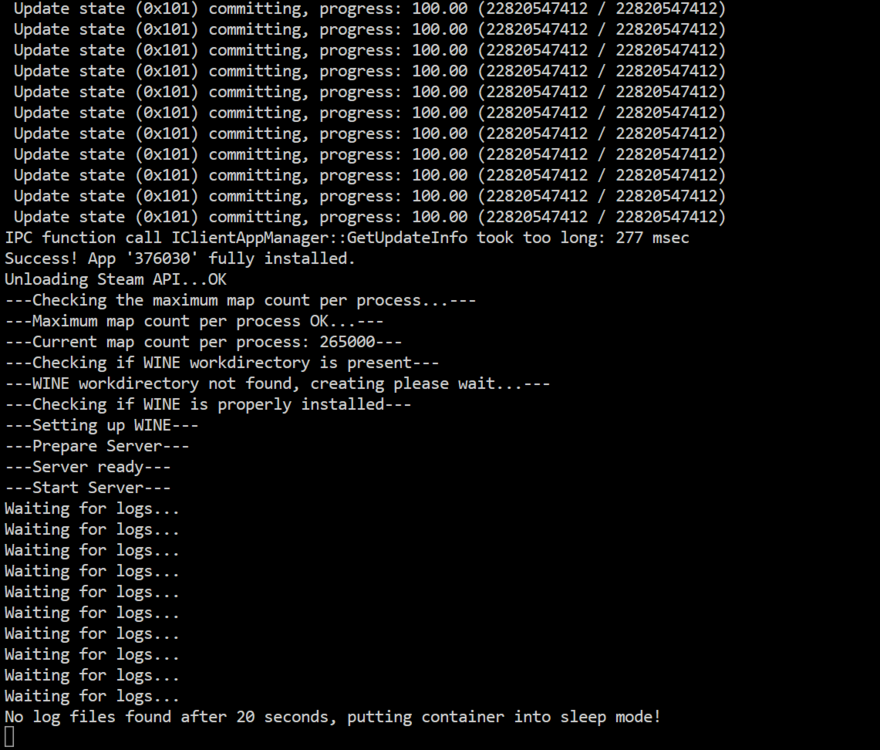
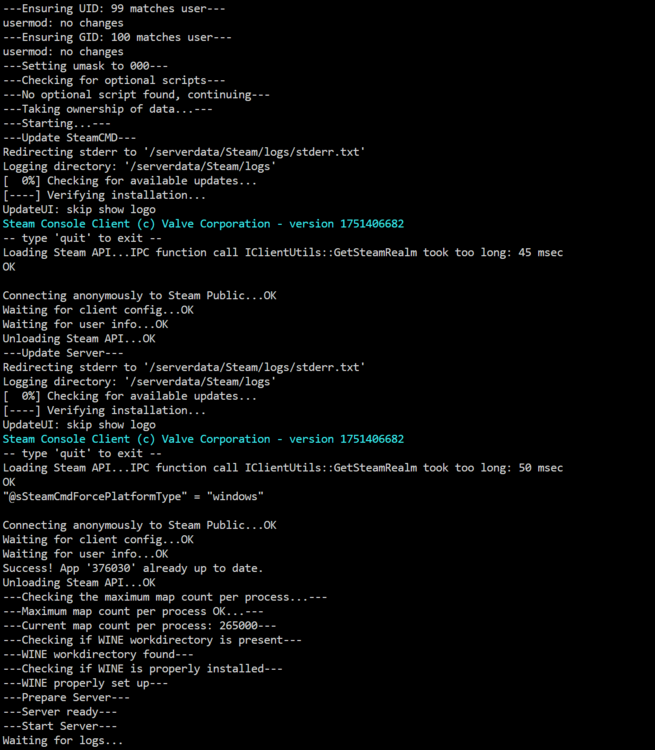
Hey everyone, I've just set up an ARKSurvivalEvolved server. But I can't get it to run. I've updated the installation several times. I even kept the default settings for the last installation. It still doesn't work. After installation, it always goes into sleep mode because it apparently can't find any logs (see the first image). When I restart the Docker, the log window closes automatically after a while. The lines from the second image are still there until it closes. Can anyone help me? Regards, Snow
-
Sn0w90 joined the community
-
Hi everyone, I was trying to set up a server for ARK: Survival Evolved today and looked for the corresponding Docker container in the available apps. However, it no longer appears – the only option I see is a gameserver for ARK: Survival Ascended. Is the Docker container for ARK: Survival Evolved no longer supported? Or is there a new recommended way to run the server via Docker? I’d really appreciate any tips or alternative solutions! Best regards, Sn0w90



