





wannabemedic33
Members
-
Joined
-
Last visited
-
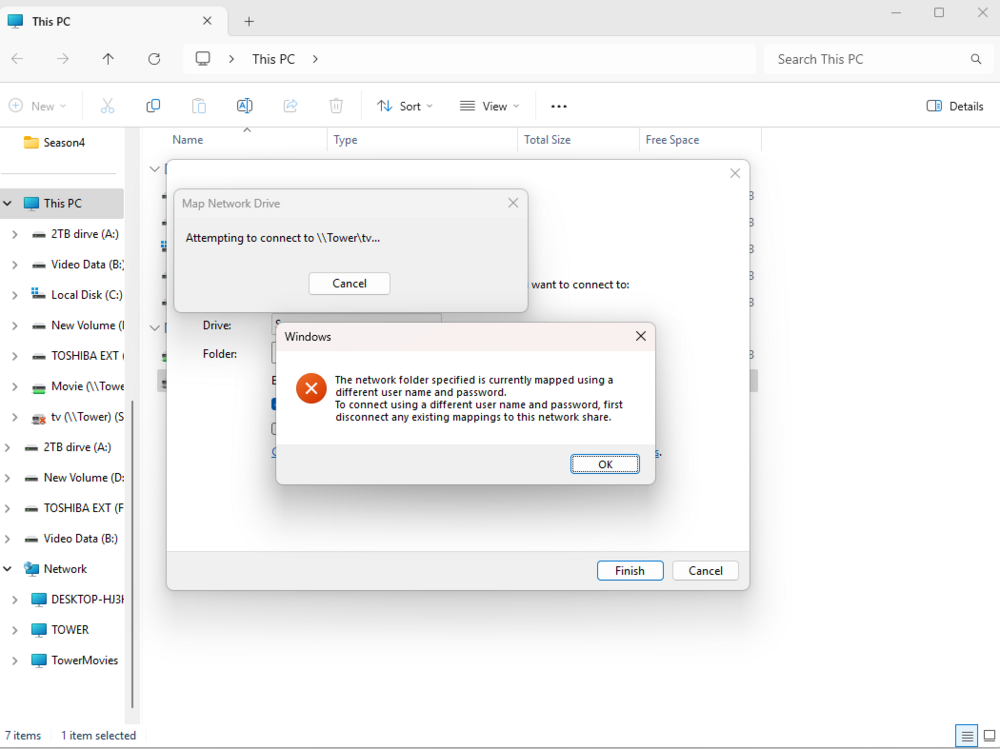
I understand. Is there a way to take the array down and start over? erasing the data and starting new? The share does show to be exporting and be in SMB. Unfortunately you were correct in that it is only showing disk 1 and not the whole array. I am went to tools and hit new config hoping that i could create a share from scratch but it does not look like that was possible and it is just recreating the old share. Here is what windows shows when i try to map the drive.
-
So what I've decided to do, which may not have been ideal is I took the array offline, did new config, and will just start from scratch. I'm not sure what else to do and that seemed like the most straight forward option since there cannot be an existing share if its a brand new share.
-
So, I used a fresh install to reapply the unraid OS to the same USB. The server rebooted and showed that the data was still on the drives, but parity had to resync. That took most of the night but on the unraid side it looks like everything came back together. When I try to map the share to windows it says that the drive is currently mapped to a user with a different username and password. I did change my SMB share from public to private, but unsure if that would stop since I know my username and password. SMB is enabled, which I confirmed in settings, and the GUI shows the array running. I have attached a picture of the running array as well.

-
I was a dummy and previously unplugged my USB stick and had to reinstall. Once reinstalled and waited until my parity drives resynced, and now my Windows 11 machine will not connect to it. I have confirmed that the server has an IP address, and when you put that address into the address bar it takes you to the server. I'm unsure how what else to do. I have also attached the diagnostic files from the server. tower-diagnostics-20250803-0634.zip
-
actually nvm starting the array seems to have kept my data. Sorry to reach out apparently im a little slow and stupid. Thank you for your time
-
no I had to reinstall on the old usb and it solved the problem but it erased my array with 2 tb of data is there any way to save the data?
-
wannabemedic33 joined the community
-
I'm brand new to UNRAID and without thinking about it pulled the USB out without doing any research. I now get a flash error. I tried rewriting the flash drive and it still didn't work. Did I just fry my system or is there a fix?

