slagathor
Members
-
Joined
-
Last visited
-
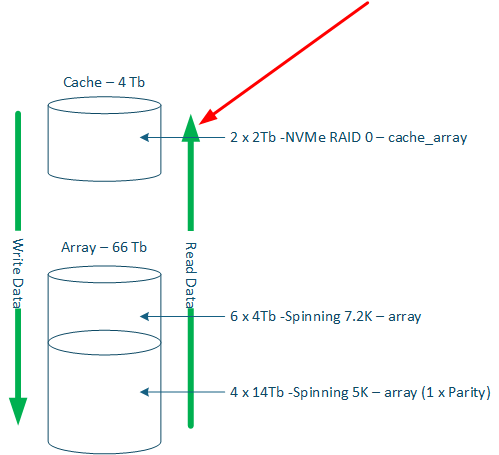
I am brand new to UnRaid, so if any of my ramblings have been covered, I do apologise. I have an array setup like the picture, 66Tb + 4Tb Cache. I have set it up to the main share to exclude the 14Tb disks and the Archive Share to exclude the 4Tb disks, both shares use the cache_arrage pool. Writing is very fast thanks to a 10Gb network, but reading is not so good after Mover has done its thing. The data is mainly Plex & streaming videos editing with a few document directories, family snaps, etc. To get around the cache direction, I open the file I am working on and then make a small change and then save it, which forces the file to the cache. Then, I work on it for the day, and Mover takes care of it when it runs overnight; it works for me. In an ideal world, I would like the cache to work as the picture with the green lines, specifically the Read File line highlighted by the red arrow. If UNRaid could manage the movement of data through the cache & array in one direction for Writes and the other for Reads, two separate cache pools may be required, one read and one write. This way, my experience would be 10Gb network to NVMe disks during the day and then the mover process sorts all the write data out at the end of the day, with the read cache data being expendible. I appreciate that this is the kind of system that people pay thousands of Euros for with block storage, and may not lend itself to the UNRaid system, but excluding the migrating of data through the spinning disks, adding a separate pool for read cache to pick up any files that have been read might be doable, and I think what the OP had in mind.