





Erfa
Members
-
Joined
-
Last visited
-
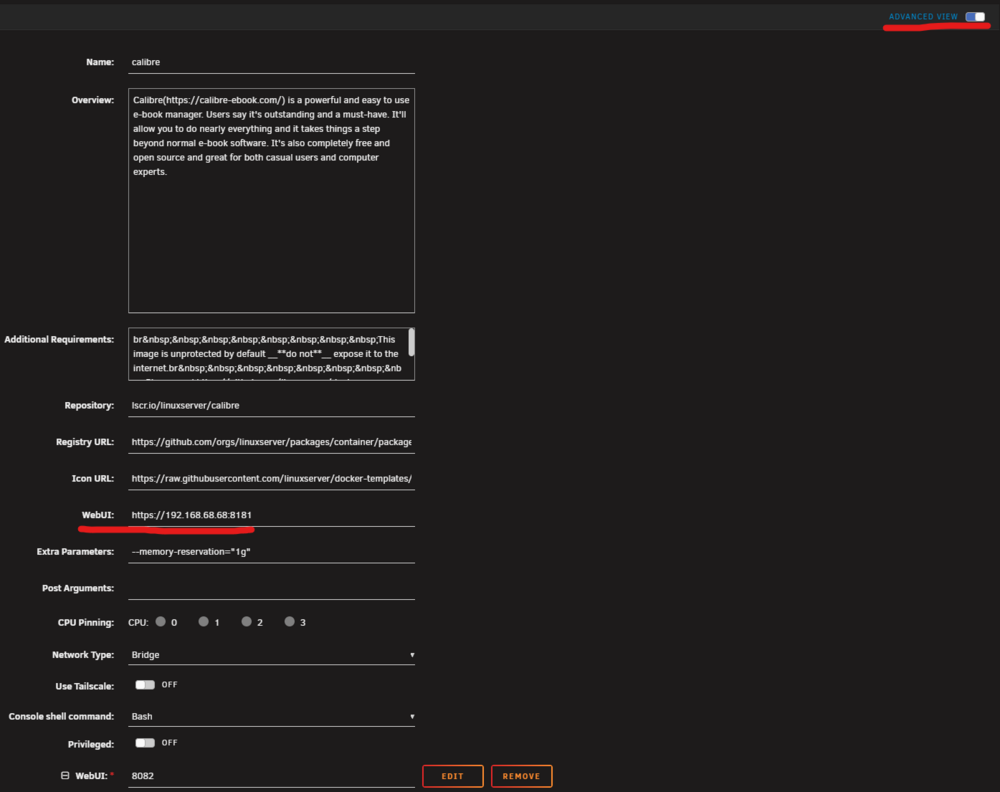
Sorry for the delay - this is not a forum I frequent... Whenever you go to create/edit a Docker container, there are a few default settings that are hidden away inside the show Advanced Options menu. Specifically, the WebUI: option will be prefilled with [hostname]:[port]. Delete that and actually type out the IP address of your NAS and the container's port (ignore the fact that Calibre has multiple WebUI ports in my screenshot). This is likely just some buggy code in the plugin that's not correctly reading the default values.
-
I had this issue back on 7.1.4 as well. Switching the WebUI address from [hostname]:[port] to a hardcoded IP address and port number fixed it.
-
Are your CPU and Memory data populating after updating to 7.2? I can still see the stats for individual containers but all the folder views now show the combined stats as 0%. Also, the expanded chart view is now blank.
