joshjjn95
Members
-
Joined
-
Last visited
-
Sorry, to clarify I meant that I thought the issue was the ethernet port that I was connected to, not that I put it on the internet. Got it, I'll change the image file location. I need to properly set up user shares, just haven't gotten to it yet, that's next on my list once I've figured out the other issues. Any idea on the HTTP 500 errors and the random SMB disconnects? I can still access whichever Dockers are running, but I'm getting that HTTP 500 error loop and the disk shares have been disconnecting, simultaneously it seems.
-
I've been having issues with my setup for about a month or so now, I thought it was an external ethernet connection but I was able to get it to run (somewhat) regularly, but now I'm getting somewhat frequent errors, such as random disconnects when accessing drives through SMB, as well as GUI HTTP 500 errors, as well as my Docker containers missing whenever I reboot my server. I'm thinking it may be my USB drive, but I ran a chkdsk on it on my Windows machine and it came back fine. I formatted + reinstalled Unraid as well but still having issues. Not sure what troubleshooting I should do next. Diag attached. tower-diagnostics-20251228-1433.zip
-
It did (eventually) import as read-only. I was able to move the data over to another drive, then both erased and re-formatted the pool, but it still stuck as mounting, so I formatted the drive and it was able to mount correctly. Are there any other tests I should run on the drive before continuing to use it? The SMART tests came back fine so I'm not sure what would cause the issue other than something on the drive itself.
-
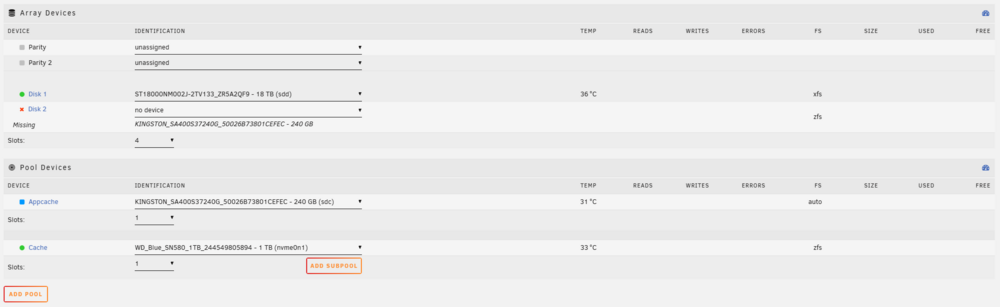
Ran the new config and started the array, diagnostics attached. tower-diagnostics-20251021-2012.zip
-
Hi all, I had an issue with my Appcache pool (used for Docker) running slowly so I rebooted the server, but when trying to start the array, the pool drive was stuck as 'Mounting'. I ran a SMART test and it came back fine, but it was still stuck as 'Mounting'. In my infinite wisdom I tried to add it to the array pool but even then it was still stuck as mounting. Now I'm left with no working Appcache pool and cannot start my array at all as it's expecting the drive to be in the pool (whoops). How can I remove it from the Array and see what the issue is so I can either re-create the pool or fix the mounting issue?