





pilgrim
Members
-
Joined
-
Last visited
-
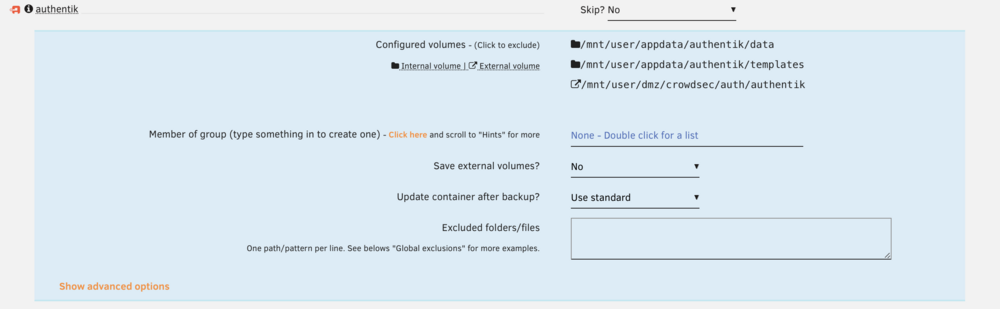
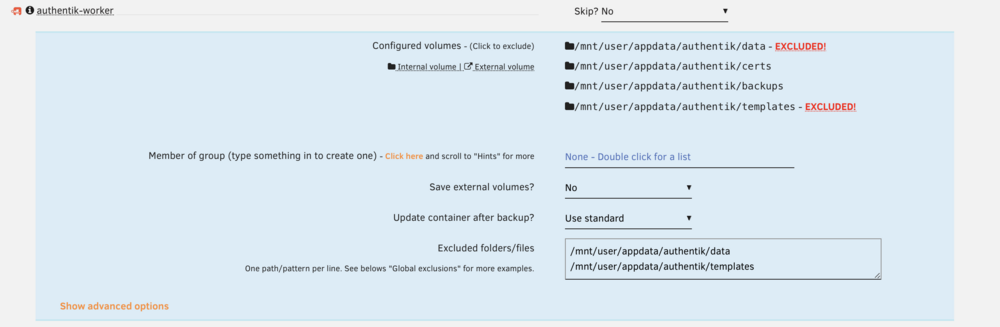
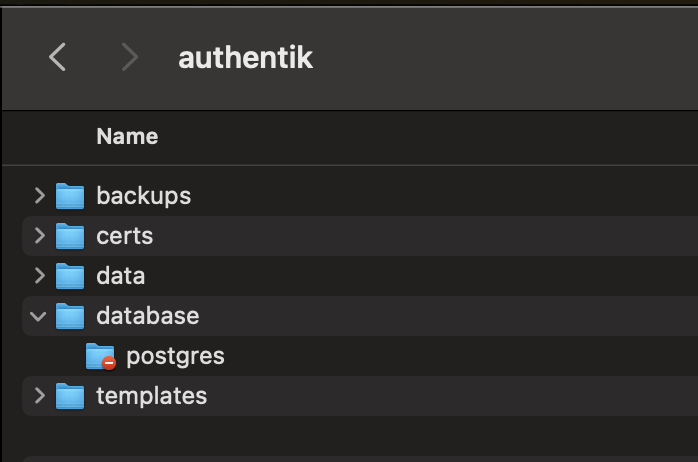
Hello everyone, hoping to get some help with a multi-mapping error As far as I can tell, my other containers are backing up fine except my authentik appdata folder which is mapped to two containers authentik and authentik-worker There was a recent update in folder structure to add a data subdirectory which works well but I think is causing issues on the backup side. I set some exclusions but I'm still getting errors. Questions: What's the best way to solve this? In the authentik appdata folder there is also a database directory that holds Postgres data but doesn't show up in any of the configured paths. how do I ensure the entire folder is backed up? I assume it is a permissions thing but I am by no means an expert. just going off what I see when I look at the files on macOS Please see my screenshots and log below Thank you! [21.01.2026 09:43:29][ℹ️][authentik-worker] Stopping authentik-worker... done! (took 1 seconds) [21.01.2026 09:43:30][ℹ️][authentik-worker] Should NOT backup external volumes, sanitizing them... [21.01.2026 09:43:30][ℹ️][authentik-worker] Calculated volumes to back up: /mnt/user/appdata/authentik/certs, /mnt/user/appdata/authentik/backups, /mnt/user/appdata/authentik/data/media [21.01.2026 09:43:30][ℹ️][authentik-worker] Backing up authentik-worker... [21.01.2026 09:43:30][ℹ️][authentik-worker] Backup created without issues (took 00:00:00 (hours:mins:secs)) [21.01.2026 09:43:30][ℹ️][authentik-worker] Verifying backup... [21.01.2026 09:43:30][❌][authentik-worker] tar verification failed! Tar said: tar: Removing leading `/' from member names; tar: /mnt/user/appdata/authentik/data/media: Not found in archive; tar: Exiting with failure status due to previous errors [21.01.2026 09:43:31][ℹ️][authentik-worker] Starting authentik-worker... (try #1) done! [21.01.2026 09:43:33][ℹ️][authentik] Stopping authentik... done! (took 0 seconds) [21.01.2026 09:43:33][ℹ️][authentik] '/mnt/user/appdata/authentik/data/media' is within mapped volume '/mnt/user/appdata/authentik/data'! Ignoring! [21.01.2026 09:43:33][ℹ️][authentik] Should NOT backup external volumes, sanitizing them... [21.01.2026 09:43:33][ℹ️][authentik] Calculated volumes to back up: /mnt/user/appdata/authentik/data, /mnt/user/appdata/authentik/templates [21.01.2026 09:43:33][ℹ️][authentik] Backing up authentik... [21.01.2026 09:43:33][ℹ️][authentik] Backup created without issues (took 00:00:00 (hours:mins:secs)) [21.01.2026 09:43:33][ℹ️][authentik] Verifying backup... [21.01.2026 09:43:33][ℹ️][authentik] Verification ended without issues (took 00:00:00 (hours:mins:secs))
-
I've never had temp issues before, but these 12tb (avg 46 celsius) drives run hotter than my original 4tb (avg 37 celsius) ones. I will adjust the threshold, think I set my default values based on the cooler 4tb drives, unless these temps are actually high Checked syslog and saw when the plugin paused the parity sync Parity Check Tuning: Paused Parity Sync/Data Rebuild (1.0% completed): Following drives overheated: parity(45C) disk1(48C)
-
think its the parity tuning plugin, turned off pause array operations for temperature changes. will see how it does now
-
might have spoken too soon but the sync keeps changing to paused every few minutes. is this expected? I pre cleared both new drives and had no errors, the existing drives also have been good and parity check was run regularly
-
Repeated the step and it accepted my assignments, parity sync is now in progress. Appreciate everyone's help 🙏
-
I think I only hit done, should I retry the new config?
-
Thanks, I'm doing it now and hit a snag. I stopped the array, powered it down and moved the disks physically. turned it back on, it started the array automatically so I stopped it again. Did a new config, preserved pools only Back on Main tab, Ive assigned the drives as I want but cant start the array because of "Invalid expansion.: You may not add new disk(s) and also remove existing disk(s)." Not sure what to do now
-
Appreciate it! I’ll follow this While the parity is being rebuilt, there will be no protection in this case right?
-
Thanks, what is the correct procedure in this case? I thought that’s what the first response from @trurl meant
-
As I understand it, Stop array Move drives around physically Restart array Go to new config Set preserve current assignments to all Make new assignments Start rebuild The old drives have data on it, this procedure keeps my info safe right? Thanks for your help
-
Hello everyone, Newbie here with a 4-bay system currently running single parity with two 4TB drives. I would like to safely add in two 12TB drives which will: replace the parity Take the slots of the old drives (New drives into slot 1 and 2 and old drives will move to 3 and 4) I have precleared both 12TB drives already and I’m ready to proceed with the safest way to do the swap. I’ve read a bit on the parity swap procedure but I don’t think I understand fully, don’t want to risk data loss so any help is greatly appreciated. Thanks!


