




-
Thank you went and searched Splunk and found it. Thank you all!
-
As a learning opportunity what log did you look into to see the container was out of memory vs the server. I’m decent at Linux not so much at all the docker stuff?
-
I reboot the server and it seems ok till the next time fix common problems runs... this is the error Event: Fix Common Problems - UNRAID02 Subject: Errors have been found with your server (UNRAID02). Description: Investigate at Settings / User Utilities / Fix Common Problems Importance: alert * Out Of Memory errors detected on your server I run snmp monitoring on the server and i dont see any issues with the memory or cpu. unraid02-diagnostics-20260910-1708.zip
-
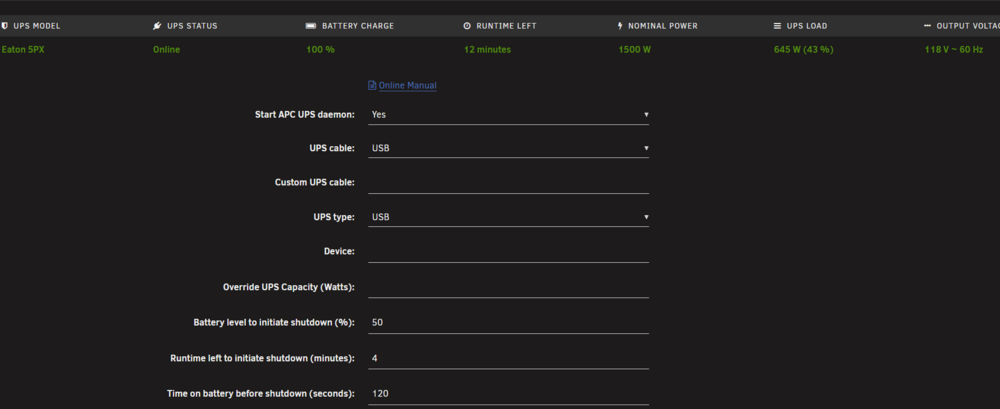
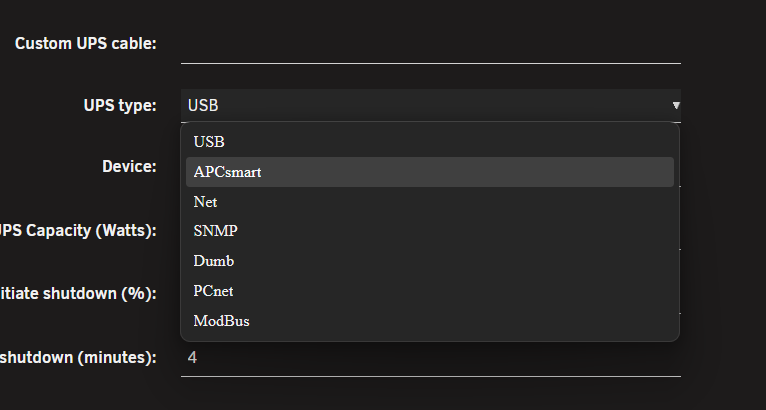
If this is still an issue id suggest trying to set the ups up on say your laptop - this is counter intuitive - lets find out what port you need. I'm leaning to the |o|o| (serial port). I run an Eaton 5PX ups and it is a USB to the RJ interface for the serial interface. suggest installing the APC Power chute software to your computer then plugging it in. the green port is for the cloud management software. if you are running a windows vm on your server you could pass that usb port through to it to do this testing. i dont have an APC smart to test with but it looks like 7.2.3 has an APCsmart in the drop down as well.
-
When you took the screen shot was parity check running? the fact its faster now means its not a disk issue which is good news Also glad to hear it is running faster in maintenance mode. I was thinking of this screen (borrowed image from another post - thanks) - using the Unraid OS Safe Mode (no plugins, no gui) the array should still be able to be run but no plugins will be loaded. when you said you stopped docker did you just stop the containers or did you go in and disable docker in setting?
-
Had one other thought as i was rereading the forms, just to test try your old parity drive - i know its the wrong direction but you could have a bad drive out of the box.
-
Do you have the Dynamix File Integrity plugin installed? I had this issue at the beginning of the month. The next question is do you have a cache drive? I noticed an issue today on mine Mover keeps running while the check is running. I saw you are running ZFS you could try upping the memory allocated to the ZFS Cache as well Something else i have seen to try is boot into safe mode so all plugins are removed as well.
-
So here is a new one on 7.2.3 i had an issue shutting the array down yesterday disks would not unmount.... so i forced rebooted the server and applied the 7.2.3 update from 7.2.2. i have a 12TB parity so it takes around 23-28 hours to complete. over night the server just stopped working all together and had to be rebooted again. Today i have been monitoring the progress. i think last night Duplicity kicked off and had to much drive access (i know this is bad... so today the app is not running.) while monitoring i saw the speed go from ~175.6 MB/sec to 3.5 MB/sec i have my syslog set to offload to another server and noticed the following lines 2025-12-28T10:00:01-05:00 R740XD move: mover: started 2025-12-28T10:05:12-05:00 R740XD move: mover: finished i was under the impression based on the web interface the mover process is disabled during parity check. about 2 minutes after mover finished the speeds returned to the 170ish range. Is this something normal or is this an undocumented feature ;)? r740xd-diagnostics-20251228-1008.zip
-
well i just removed the Dynamix File Integrity plugin and it seems to have picked up speed, i wont say that was it but was the only plugin i added since the last parity check that worked. ill know if that was it in ~29 hours.
-
I completed my parity check at the beginning of November without issues i was on 7.2.0 last week i upgraded to 7.2.2 and i have had nothing but issues since. Monday i downgraded to 7.2.0 and the parity check started off slow ~3 MB/sec i went to bed and it was running at the normal speed at 7 hours 150ishMB/sec then it failed to complete today it got stuck at 98.6% then this afternoon some of my docker containers became inaccessible and i had to force restart the server again. Its back at running the check at ~ 2.3MB/sec i did download the disk speed docker and everything seemed to check out the main array was all close to what i would expect and the SSDs seemed ok as well. r740xd-diagnostics-20251203-2034.zip

View in the app
A better way to browse. Learn more.

