





ElementG8
Members
-
Joined
-
Last visited
-
I tried everything but the forced GSP was not fixable... I know opt for a new GPU and found the Quadro RTX 2000 Ada (not the A2000), couldn't find many reports of how stable this GPU is under Unraid, is there any site i could check that? I worry about this GPU not being able to work with my MB / CPU on unraid too
-
I did all that, including the nvidia-persistance in the go file, my Bios is up to date and i don't have a BME DMA Mitigation option The red marked error on the plugin page is gone now, but the gpu still is not detected. Can't drag it in here, don't know why, sorry: https://www.swisstransfer.com/d/9ef0ffb6-34a9-4561-92e8-a5538eb2493e Then i guess my GPU won't work with that MB, ffs... How do i find out or check what GPU works with my MB, there wasn't anything on the page... From the Terminal - GSP Firmware Errors
-
Here are my Diagnostics, hope that's correct: Diagnotics Unraid
-
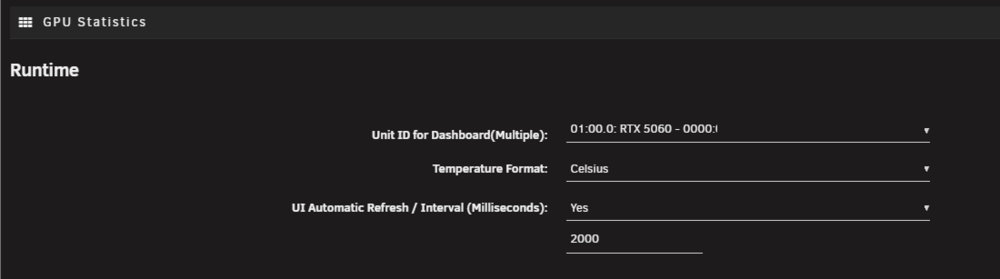
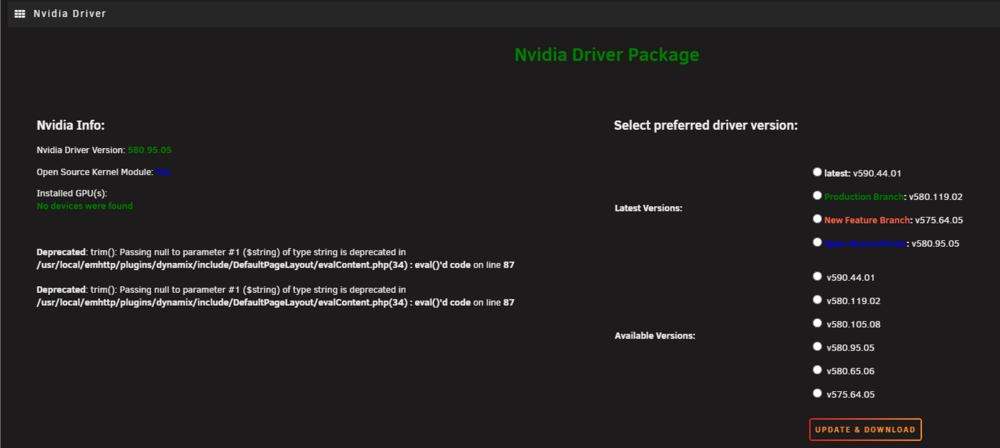
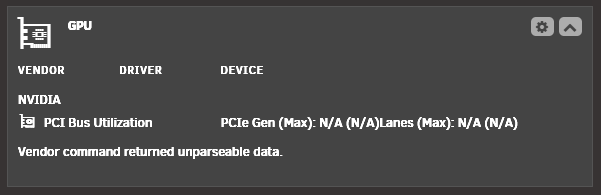
Hello, i've searched many forums but didn't quite manage to find the problem i have. I built my first HomeLab recently and have the following main specs: - AsRock B650D4U-2L2T/BCM - AMD EPYC 4345P - Nvidia RTX 5060 - Unraid 7.2.2 Ever since setting up my Server around a week ago i couldn't detect my GPU fully. The device doesn't show up in Plex when i try to choose a device for transcoding. lspci shows my GPU: 01:00.0 VGA compatible controller: NVIDIA Corporation GB206 [GeForce RTX 5060] 01:00.1 Audio device: NVIDIA Corporation GB206 High Definition Audio Controller But nvidia-smi doesn't find the device: root@Tower:~# nvidia-smi No devices were found root@Tower:~# GPU Statistics shows the GPU: But in the Dashboard, it only says "PCI Bus Utilization": Nvidia Driver does have the Open Source version that is required for 50XX cards, but the device is not found: I've also not bound anything in system devices, no checkmarks for: IOMMU group 13: [10de:2d05] 01:00.0 VGA compatible controller: NVIDIA Corporation GB206 [GeForce RTX 5060] (rev a1) [10de:22eb] 01:00.1 Audio device: NVIDIA Corporation GB206 High Definition Audio Controller (rev a1) Another output from the terminal that clearly detects my gpu: root@Tower:~# lspci -ks 0000:01:00.0 01:00.0 VGA compatible controller: NVIDIA Corporation GB206 [GeForce RTX 5060] (rev a1) Subsystem: CardExpert Technology Device f331 Kernel driver in use: nvidia Kernel modules: nouveau, nvidia_drm, nvidia root@Tower:~# The only logical reason for me is that the driver doesn't support my gpu, but in the post it clearly says i need the open source, meaning the v580.95.05 version which i have installed. I've run the latest version before, but it gave out the same results as now with the open source version.. Are there any other reasons my gpu gets detected in some ways but doesn't really work for Unraid?
-
Alright thank you!
-
Well i try it later when no one uses my server, i think this requires a restart. I might have to delete and reinstall the plugin, i can't download the driver right now.. the error massage also shows a wrong version number, i click the Production Branch but it shows the New Feature Braches number, weird: +============================================================================== | WARNING - WARNING - WARNING - WARNING - WARNING - WARNING - WARNING - WARNING | | Don't close this window with the red 'X' in the top right corner until the 'DONE' button is displayed! | | WARNING - WARNING - WARNING - WARNING - WARNING - WARNING - WARNING - WARNING +============================================================================== ----------------Downloading Nvidia Driver Package v575.64.05----------------- ---------This could take some time, please don't close this window!------------ ---------------Can't download Nvidia Driver Package v575.64.05----------------
-
According to this post: https://forums.unraid.net/topic/98978-plugin-nvidia-driver/ I have to use the open source driver, which is 580.95.05. I had the latest version installed before (v590.44.01) and this didn't work eighter. Or should i just try the Productions or New Feature branches?
-
No i've not bound it in system devices, no checkmarks for: IOMMU group 13: [10de:2d05] 01:00.0 VGA compatible controller: NVIDIA Corporation GB206 [GeForce RTX 5060] (rev a1) [10de:22eb] 01:00.1 Audio device: NVIDIA Corporation GB206 High Definition Audio Controller (rev a1) Here the output from the terminal: root@Tower:~# lspci -ks 0000:01:00.0 01:00.0 VGA compatible controller: NVIDIA Corporation GB206 [GeForce RTX 5060] (rev a1) Subsystem: CardExpert Technology Device f331 Kernel driver in use: nvidia Kernel modules: nouveau, nvidia_drm, nvidia root@Tower:~# I've not yet changed anything in regards for transcoding in Plex since i'm failing to get the device recognized in the driver plugin or fully visible in the GPU Statistic Dashboard
-
Hello, i've searched many forums but didn't quite manage to find the problem i have. I built my first HomeLab recently and have the following main specs: - AsRock B650D4U-2L2T/BCM - AMD EPYC 4345P - Nvidia RTX 5060 Ever since setting up my Server around a week ago i couldn't detect my GPU fully. The device doesn't show up in Plex when i try to choose a device for transcoding. lspci shows my GPU: 01:00.0 VGA compatible controller: NVIDIA Corporation GB206 [GeForce RTX 5060] 01:00.1 Audio device: NVIDIA Corporation GB206 High Definition Audio Controller But nvidia-smi doesn't find the device: root@Tower:~# nvidia-smi No devices were found root@Tower:~# GPU Statistics shows the GPU: But in the Dashboard, it only says "PCI Bus Utilization": Nvidia Driver does have the Open Source version that is required for 50XX cards, but the device is not found: Can anyone tell me what i'm doing wrong or why this doesn't work?


