veganbtw
Members
-
Joined
-
Last visited
-
When trying to enable tailscale in this container: Eventually: I think there's an issue with the container and the pre-defined tailscale script.
-
Well, the problem there is not knowing that plugin even exists, the terrible search, and outdated information / documentation. I didn't know about that plugin until you pointed it out. Keyword searching for "unraid subfolder sharing" brings up this reddit thread which links to an old unraid forum topic: https://www.reddit.com/r/unRAID/comments/ztwhmd/creating_smb_shares_for_subfolders/ Hard to like something you don't even know exists. At the very least they could get someone to maintain the official documentation: https://docs.unraid.net/ Oh, did you want to share a subfolder? Nope, can't be done. Here's a link to a plugin. Having to navigate through a bunch of old videos and forum posts to find new / recent information is just straight up bs. If this was free, sure, that's understandable. I mean, they could open up the docs to be edited by users and that might make it better, almost like a wiki. Anyway, just ranting a bit here that'll never get read by Limetech. Thanks for indulging me. I've already started migrating back to Windows Server because it just works™ and I don't need plugins to do basic things like sharing a subfolder. I'm too old to be paying companies for the privilege to beta test for them.
-
What does that even mean? When you make a USB, I just use the default recommended option, which is 7.2.3. Probably 7.2.4 now that it just released today.
-
It's basic stuff like this that should be built-in already which questions the design decisions of Limetech and whether or not there's a bunch of idiots behind the scenes. Stuff like Tmux should already be there. Unassigned devices plugin; why does this need to be installed separately? So many fundamentals missing that need to be manually added later is just dumb design.
-
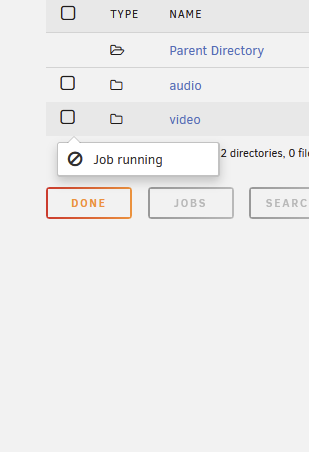
It was the move operation using the built-in file manager that I couldn't cancel from above where it just shows "job running" but I can't view it anywhere. F me for using what's built into Unraid right?
-
This is insanely stupid design. There's no freaking way to kill the process. It just gets stuck like this. There's no task manager. What the hell kind of design is this server. This is so stupid.

-
7.2.3 current latest There's nothing down there. There really should be a dedicated button at the top right like the terminal icon.

-
This seems like a major oversight. I set a move job but I cannot see the progress anymore after minimizing the initial window. And I can't do anything else in the meantime other than cancel the job apparently if I click that option. Nothing shows up at the bottom where others have had a progress message.
-
Coming from Windows Server, if I move (cut+paste) files within the same disk, it's instant. If it's between different disks, it'll read and write all the files. I can't seem to figure out how to do this on unraid. The built-in file manager through the browser (when you explore the share) doesn't seem to work. Built-in midnight commander also doesn't seem to work. They always read and write when moving between shares on the same disk. Even when I move between the disk; ex. /mnt/disk1/share-a => /mnt/disk1/share-b. It doesn't make sense to have to do that on the same disk. Think I might've found my answer here: https://forums.unraid.net/topic/176113-moving-files-on-same-disk/ I'm using ZFS pools, apparently shares are individual datasets and they always have to copy. Need to figure out a better way to manage files, maybe put them all in 1 dataset and organize from there so it's instant. Update: This doesn't work as shares can't be assigned to subfolders / subdatasets. Well that's annoying.
-
Is there a way to delete the existing generated keys and re-generate new ones? 2 of my pools doesn't unlock with the auto-unlock; they show up as incorrect fs and need to be formatted. I need to delete the key, shut down the array, and then enter the passphrase manually for those 2 pools to work properly.
-
At the top right, there's a button to open a terminal window. I ran an rclone command and closed the window, thinking it'd continue and I could check back later. It actually cancelled the command and when I re-opened later, it's a new terminal window. Is there a way to have a persistent CLI terminal? Would using the rclone GUI docker container be a suitable alternative to not requiring a window open? Thanks
-
Found this post: https://forums.unraid.net/topic/184545-unable-to-increase-zfs-arc-cache/ Apparently you have to make this file: /boot/config/modprobe.d/zfs.conf with this content (for 32GB): options zfs zfs_arc_max=32000000000 (^ 9 zeroes) Was there a way to configure this through the GUI or is this the only way? Unraid's default has it set to 1/8 of available memory, or 12.5%. Is there a way to set it as a % rather than a fixed amount?
-
Yeah, after doing some more reading, seems to be using the same parity-to-space ratio as the original configuration and a re-writing of all data is required to fix it, might as well re-create the whole pool. 🤦♂️ Why even release a feature that doesn't even work properly. Would've preferred to not even be aware of this 'feature' altogether.
-
It's also on the main screen:

-
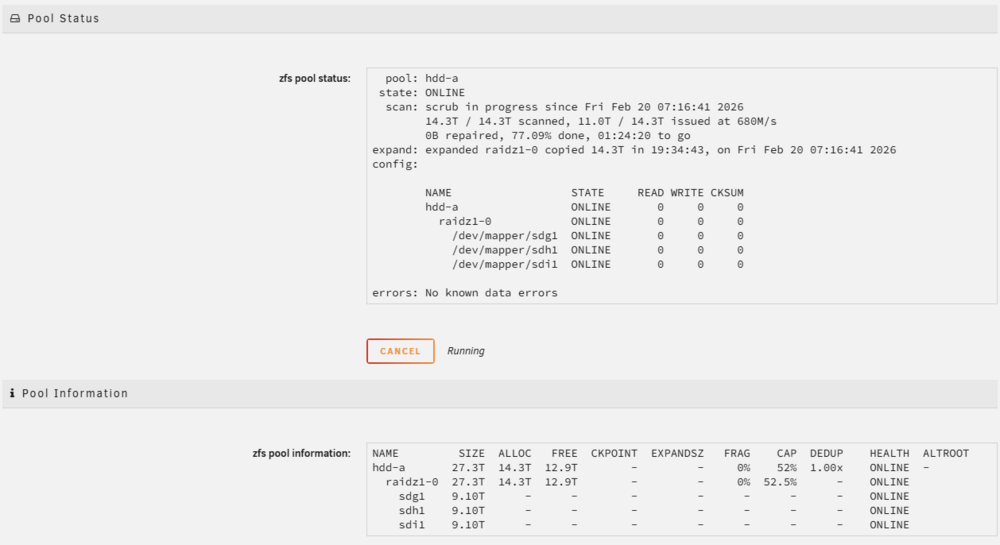
I have 3x10TB drives. I started as raidz1 with 2 disks, 10TB useable, which is correct. Once I expanded with another 10TB, only got ~5TB added of useable space. Raidz1 with 3x10TB should have 20TB useable space. It's scrubbing right now, I think it does that automatically after an expansion.