





Olivejuice
Members
-
Joined
-
Last visited
-
I looked into the router settings, looking for any traffic that is being blocked and wasn't able to find anything that caught my attention. I also went into DHCP reservation and released each static IP I had assigned. As I was going through each of my IP assigned devices and refreshing the webpage for my Netgear router, I noticed that at one point ALL devices connected to my network showed up as being a wired connection which couldn't be possible as most devices are wireless! At this point I knew that there was something wonky going on with my router and thus I factory reset it. I configured my router as it was previously leaving everything to DHCP. Then I systematically connected all of my wired devices and let my router assign IP addresses. Once my UNRAID server was back up and running, I thought I'd check the Pi-Hole WebUI once again. VIOLA!!!! I could access the WebUI from ALL of my devices. I then started to re-assigned static IP addresses to the devices that had static IP's before and now everything is working as it should....What a pain in the ass! HOW FRUSTRATING!!!!! I never thought that the router was the issue because everything seemed to be connecting and communicating as it should, or so I thought. Live and learn and not all things are as they seem. I want to say thank you to each of you that provided input along the way to help me troubleshoot this issue. Thank you, thank you, thank you! This UNRAID community is such a tremendous help. As I grow and learn this system and all of the things associated with it, no matter how frustrating, I will definitely contribute to helping others along the way!
-
While I was writing the last response I decided that I would try yet a different local machine, Lenovo Yoga Laptop(192.168.1.25) on my same WIRED LAN and this one connects to the Pi-Hole WebUI, allowing me to login. I tried yet another local machine, HP Envy (192.168.1.84) on the same LAN, this time wireless, and this one connects to the Pi-Hole WebUI as well. So what I have concluded is that the local machine that I use regularly for everyday use and to access my UNRAID server for maintenance, Lenovo Optiplex (192.168.1.34) is having an issue connecting to the Pi-Hole IP and port, (192.168.1.5:80/admin), while all other machines, wired or wireless, can connect without any issue. OK, now that I have isolated the issue to this specific machine, how can I trouble shoot it and resolve whatever is blocking the connection? Thank you! EDIT: So that lasted until I refreshed the webpage on the local machine that was working, Lenovo Yoga Laptop(192.168.1.25). Now I can't access it...
-
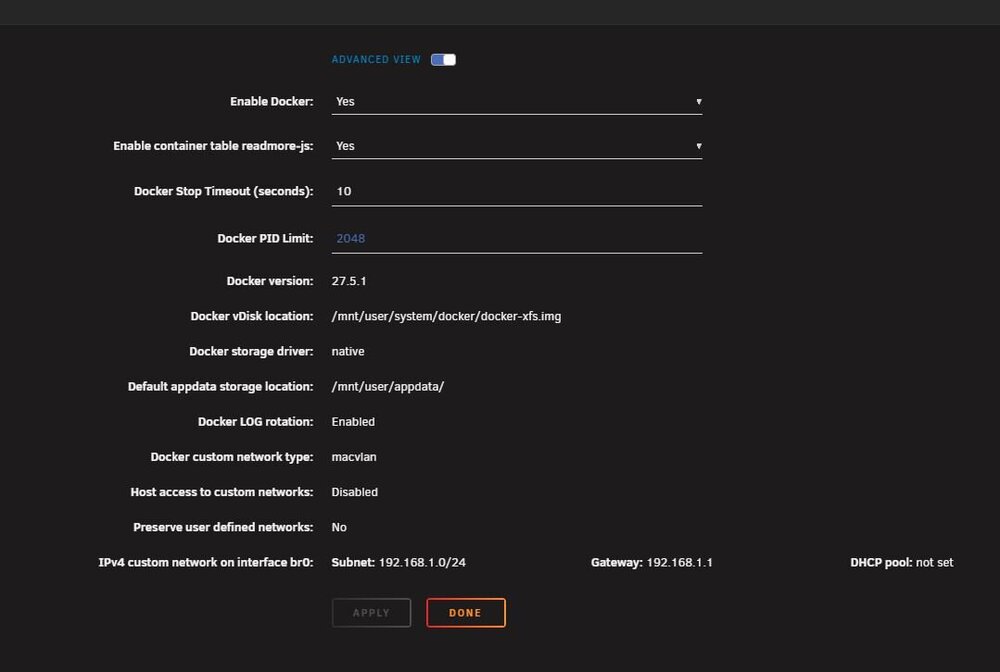
Yes, the GUI shows that the custom network is on br0.... I just want to say that I appreciate your help and the time that you are taking to try and help me resolve this issue... On a side note, couple of other things that I tried but were unsuccessful.... Using different browsers and manually entering (192.168.1.5:80/admin) which also has not worked. Eliminating the network switch and connecting to my router directly.
-
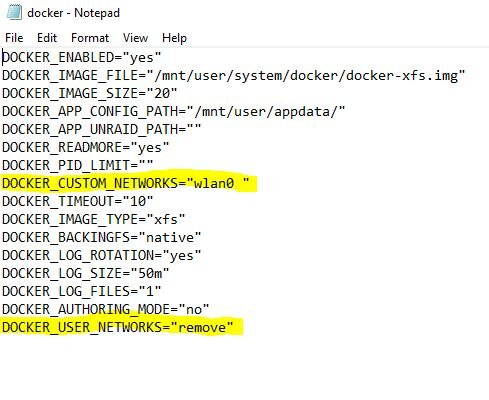
Thank you for your response. As I mentioned before, I am new to networking and all of the innerworkings of it. I can usually fumble my way around but definitely can use precise directions. So I was able to review the docker config file that you mentioned and saw that DOCKER_CUSTOM_NETWORKS="wlan0 " and that br0 and bond0 are not showing. I was able to change the Preserve user defined networks to NO, which changed the docker config to DOCKER_USER_NETWORKS="remove". I know how to change the IP and GATEWAY within the Network Settings but I don't know how to change the SUBNET. I originally set my UNRAID server with a static IP of 192.168.1.40 when setting up my server and this hasn't ever changed. Why would I want to change these settings manually? Are they not already set to the correct addresses? Please give me more directions and or something else to try to resolve my issue as it remains. I will say that I disabled docker, stopped my array, and rebooted my server and I still can't access Pi-Hole from my local machine but CAN access it from my phone. I attached the latest diagnostics file for reference. As you can see the settings that you mentioned have changed accordingly... I don't know how to change the DOCKER_CUSTOM_NETWORKS to include br0 and bond0, please advise. Thank you again for any and all advice!! olivejuice-diagnostics-20260419-0856.zip
-
Thank you for your reply and suggestion... I tried running that command in both Powershell and the UNRAID terminal and still get the same result unfortunately... :(
-
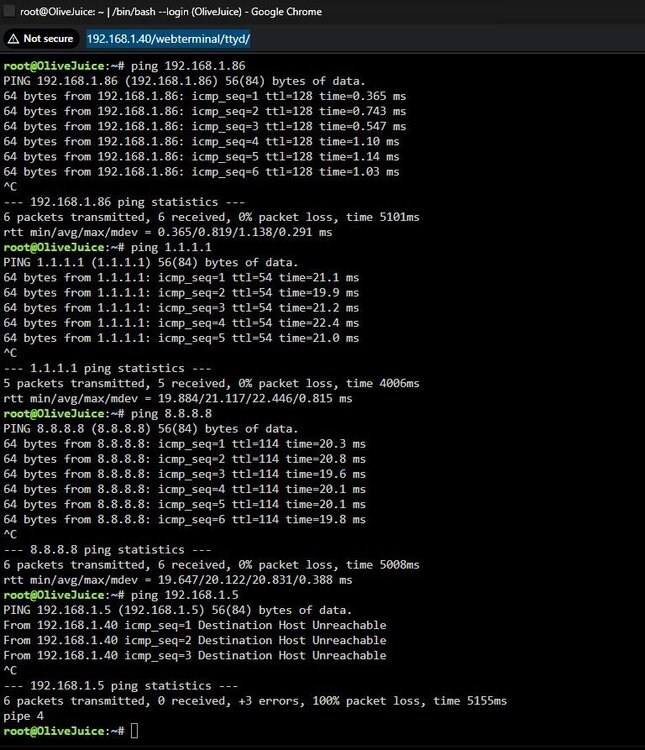
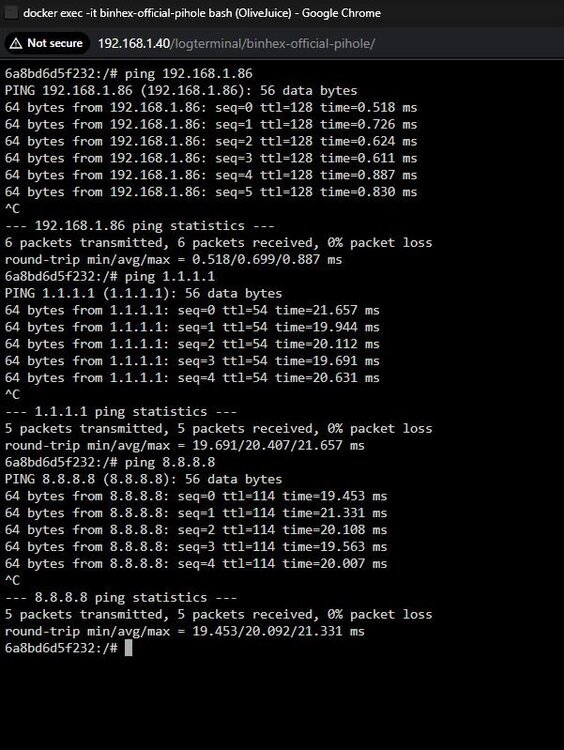
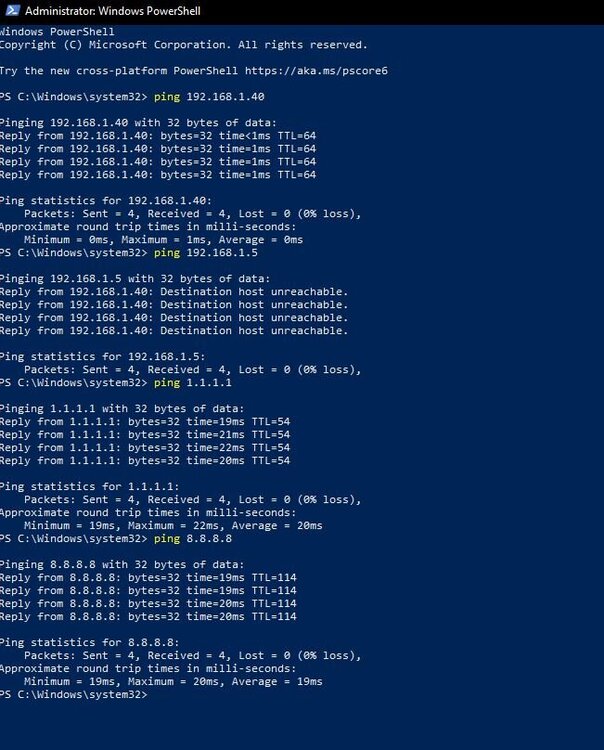
Additionally I can ping from the terminal in UNRAID (192.168.1.40) to my local machine (192.168.1.86), cloudflare (1.1.1.1), and google (8.8.8.8), but get Destination Host Unreachable when pinging Pi-Hole (192.168.1.5). I can also ping my local machine, cloudflare, and google from the Pi-Hole terminal. Additionally, I can ping to my UNRAID server (192.168.1.40), cloudflare, google, but but get Destination Host Unreachable when pinging Pi-Hole. (192.168.1.5) Maybe these will help...? I am very new to networking and trying to learn as much as I can so please forgive me if I have overlooked something simple.
-
UNRAID 7.2.4 CA - Binhex-Official-Pihole I have run into a issue that hopefully has a simple solution: I recently installed the Official Pi-Hole App from Binhex off of the CA. I configured it with a custom network and a static IP of 192.168.1.5 that is not being used by any other device. I also assigned it PRIVILEGED access from the console shell command within the configuration settings. Once the container pulled down all of the files and installed successfully I checked log and didn't have any issues or warnings. I then tried to launch the WebUI and got a blank page initially but then showed that the site can't be reached, that 192.168.1.5 took to long to respond. I have also tried to access the WebUI by manually typing in the IP address with the port i.e. (192.168.1.5:80/admin) and get the same result. I have tried making changes to the network type in the container but get the same result or a complete failure to install. Right now, I have Pi-Hole installed and running on UNRAID but can't access the WebUI from my computer, however, I can access the WebUI from my Android phone, manually typing in the IP address (192.168.1.5:80/admin). Accessing it from my phone takes me to the Pi-Hole WebUI where I can then sign in and start configuring the settings. I am fairly certain that this is a simple networking issue, hopefully... Please help. I have attached the Diagnostics Log for reference. I am very new to networking and trying to learn as much as I can so please forgive me if I have overlooked something simple. olivejuice-diagnostics-20260418-1217.zip
-
Olivejuice changed their profile photo
-
I tried replacing the libvirt.img file with the file that was the backup and couldn't figure out how to get it working so I chalked it up to a loss and am in the process of re-installing them... Oh well... Thank you so much for your help and walking me through the issues I was having. Thank you!
-
Thank you
-
Just wanted to follow up and let you know that I was able to delete everything in the /system/docker folder with the exception of the .img file and everything is working the way it should. Thank you for your input, it was very much appreciated!
-
Would I just replace the newly created .img file with the backup? Then reinstall the VM's? I am unfamiliar with this process and I looked over the Unraid documentation as it does reference restoring VM's but I could not find the steps to do so... Any assistance would be appreciated! Thank you!
-
Thank you, that was my assumption as well but I didn't want to pull the trigger without getting some feedback first. What is your opinion on the Docker data-root being vDisk or directory? It seems as if the Unraid documentation recommends using vDisk but I have heard others recommend directory....thoughts?
-
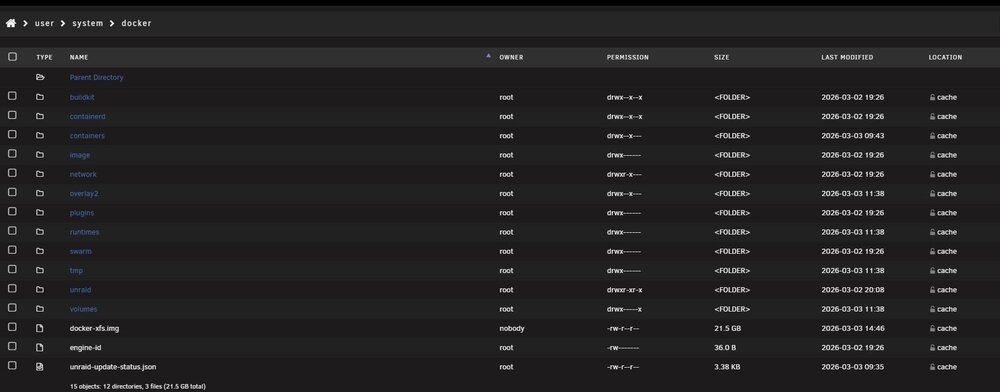
Unraid v. 7.2.4 I switched the Docker data-root from directory to xfs vDisk. In doing so Docker created the docker-xfs.img file. As I originally had the data-root set to directory, docker created individual folders for all of the pulled layers and the containers. My question is this: Can I delete all of the old files that are not not being used because docker created the .img file and now writes to this? If so, which files can I delete or all of them with the exception of the .img file? The reasoning for this is because it takes up approximately 20gb of space on the cache. Here is the latest diagnostics: olivejuice-diagnostics-20260303-1459.zip Thank you!
-
Here is everything as it sits now. olivejuice-diagnostics-20260303-1359.zip Is there a way to restore the all of the VM's that I had previously installed without going back through and doing them individually, having to set them all up from scratch?
-
So based on what you're saying and the fact that I am using this mostly as a media share, i.e. Plex and Immich, I would want to set the minimums to: media +/-15gb data +/- 5gb iso's +/- 10gb photo_immich +/- 3gb cache +/- 15gb Does this sound correct? The largest files that I will be migrating will be in the neighborhood of 10gb being movies, everything else will be smallish.




