





NewDay
Members
-
Joined
-
Last visited
-
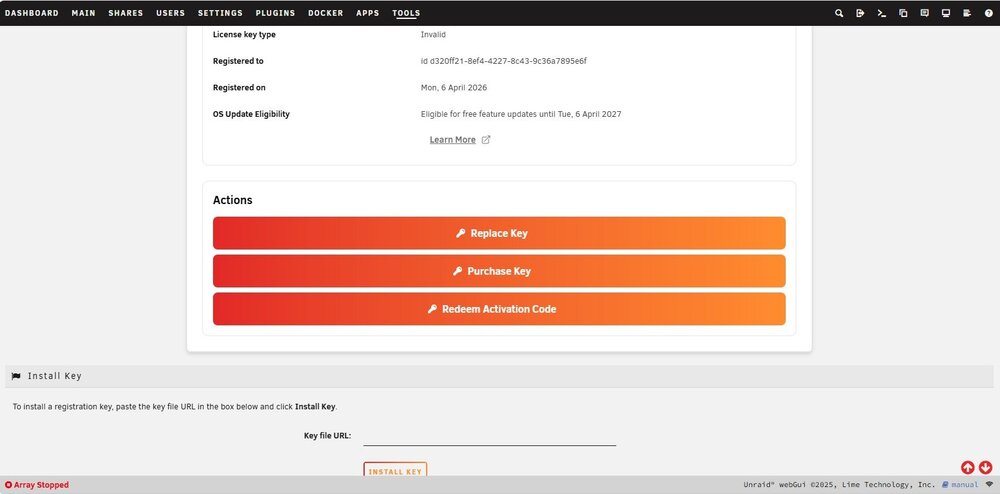
Sure enough, step 8 of replacement method. I moved it out of the folder. That by itself did not resolve the issue. So I looked closer at that 'registration' page. One of the orange bars is what I used to purchase the license. But another bar is 'replace key". I followed those steps and can report successful completion of my license issue. It allowed me to start the array and all appears normal. Dockers were all stopped but it allowed me to start them. Thank you for your help and patience @Lolight
-
Always a good idea, thanks @ConnerVT . I do have the backup I made the current flash with, too.
-
@Lolight thank you for all your time and advice. Unfortunately Unleashed.key IS in the /boot/config folder. I used Midnight Commander on the server to look for it. But Trial.key is also still in the /boot/config folder. Could that be confusing unraid?
-
Can either of these be run while the usb is actively the boot drive? With the drive plugged in You can try this program. https://www.hwinfo.com running a quick H2testw write/read test
-
Lots of great info there @Lolight Thanks. Feel free to post that data. Reformat okay. New drive loaded with a new backup Booted fine Purchased license Unraid will not accept license, cannot start array Unraid connect shows what to do: copy URL, paste in tools>registration. Popup says license installed. No change. Syslog last three lines: emhttpd: error: get_key_info, 741: Invalid argument (22): stat: /boot/config/Unleashed.key emhttpd: Unregistered Trial - invalid key (EGUID) emhttpd: Unregistered Unleashed - invalid key (EGUID) I've opened a support ticket. Probably need to manually modify that "/boot/config" file. Since I won't know what I'd be doing, my luck I would brick the system. 😄
-
FlashDriveInfoExtractor seems to have the same data: Volume: D: Controller: Phison PS2231 Possible Memory Chip(s): Toshiba TH58NVG5D4CTG20 Toshiba TH58NVG4D4CTG00 Memory Type: MLC Flash ID: 98D585A5 6A12 Chip F/W: 01.08.10 Firmware Date: 2007-07-11 VID: 154B PID: 0015 Manufacturer: PNY Product: USB 2.0 FD Query Vendor ID: PNY Query Product ID: USB 2.0 FD Query Product Revision: PMAP Physical Disk Capacity: 4127195136 Bytes Windows Disk Capacity: 4118790144 Bytes Internal Tags: 2QYP-SZ24 File System: FAT32 Relative Offset: 16 KB USB Version: 2.00 Declared Power: 200 mA ContMeas ID: 28CB-01-00 Microsoft Windows 10 x64 Build 26200
-
@Lolight I just stumbled across your thread here: https://forums.unraid.net/topic/196990-mlc-based-consumer-usb-flash-drives-2007-2012/#comment-1608708 The first drive you review on Feb 18 is almost the exact same as what I have, the PNY Optima Pro Attache 4G. The interesting variations are yours says made in China, my packaging says "assembled in USA". Only very slightly earlier Flash ID code, but chipgenius thinks mine is 70nm instead of your 56nm. And the VID/PID differ, too. Yours 0930/6545 mine 154B/0015.
-
The USB arrived. No useful info on package: copyright 2007 and product id: 91005813F-4GB-U Is there any other info I can obtain to help out? Thanks! Here is the ChipGenius output: Description: [D:]USB Mass Storage Device(PNY USB 2.0 FD) Device Type: Mass Storage Device Protocal Version: USB 2.00 Current Speed: High Speed Max Current: 200mA USB Device ID: VID = 154B PID = 0015 Serial Number: 6E7A1E08026F Device Vendor: PNY Device Name: USB 2.0 FD Device Revision: 0110 Manufacturer: PNY Product Model: USB 2.0 FD Product Revision: PMAP Controller Vendor: Phison Controller Part-Number: PS2251-31(PS2231) - F/W 01.08.10 [2007-07-11] Flash ID code: 98D585A56A12 - Toshiba TH58NVG4D4CTG00 [MLC-2K] Tools on web: http://dl.mydigit.net/special/up/phison.html Possible Flash Part-Number ---------------------------- [1CE]TH58NVG4D4CTG00(70nm) [2CE]TH58NVG5D4CTG20(70nm) Flash ID mapping table ---------------------------- [Channel 0] [Channel 1]
-
It may be purely anecdotal then, pure coincidence that modern USB flash devices fail disproportionately to smaller older drives. Just trying to be helpful by passing along what wiser minds than mine have passed along to us here in the community. What you do with the info is, of course, up to you. 😉
-
Thank you everyone. @imrobertcampbell There is a very informative thread here on the forum about the history of USB flash drives. They started small and slow with relatively large pathways for the electron flow. In order to increase capacity they shrank the pathways and also went from one layer to two, three and four. The unintended consequence is they are much more prone to data loss (random bit corruption from being too tightly packed together) and to overheating which leads to early component failure. I too use SanDisk often, they are just not good for the constant use unraid requires of them. Early (like 2007-2011) low capacity (4 to 8gb) drives fare best. Kingston and PNY are what can usually be found from that era on eBay. Not necessarily cheap, but if it saves me from one crash? Yes. @Lolight Yes, already purchased. Sub $20 and highly rated seller I felt it worth the gamble. Will verify with chipgenius before putting a license on it. Thanks. The packaging has a copyright 2007 but I could not find a mfg date.
-
@trurl Thank you. So easy when you know.
-
I'm on a trial license using a SanDisk thumb drive (hey! I didn't know any better! 🙃). I've been using the unraid server so I want to keep all my dockers and configs. But I found a good (old 4gb) drive on eBay that I want to use with the license when I buy it. buy license now using the SanDisk that I will be replacing, then transfer the license to the new (old) PNY Attache USB restore backup to new PNY drive then buy license after booting with it (GUID won't match license at boot so would this even work?) put license on new PNY drive then copy configs from old SanDisk drive What is the cleanest (least likely for me to screw up) approach? Thanks
-
Thanks Thanks trurl. That looks like it will be useful to me. Sorry to be a pest, but how do I connect your name in my reply to you so you are notified you were mentioned in my post? (or is that even how it works?)
-
I tried to post a reply, but it didn't like my email so it probably won't appear. Just as well, it wasn't complimentary. I rebooted after installing connect since there was no backup button or login button. The reboot did the trick, it now shows the backup as active and up-to-date. But what does that mean? I must say, for all that unraid wants you to use connect I have no idea why. Besides this backup (that appdata backup did better) what function does connect serve? I searched the forum for the phrase "unraid connect" and this thread was the only result on page 1. There were admittedly 257 results, so I'll go look at some more threads. But I don't feel like it is my job to search for stuff like this, it is unraid's job to provide guidance. And I mean when and where I need it, not buried in the manual. Just having an explanation of what screens and options do is mandatory in my worldview. For instance on the ManagementAccess setting there are 3 API tabs. What the heck is an API and why should I care? It never gives the slightest clue. (/rant)


