





rcollins
Members
-
Joined
-
Last visited
Everything posted by rcollins
-
Yeah, that is the problem I have been running into. I believe the ones mentioned above are all PCIe x8, and I only have an x4 and an m.2. Otherwise, I think I thinki will use a 9300-8i in m.2 to x16 adapter.
-
And to clarify, those controllers will work with the SAS drives I have in my backplane?
-
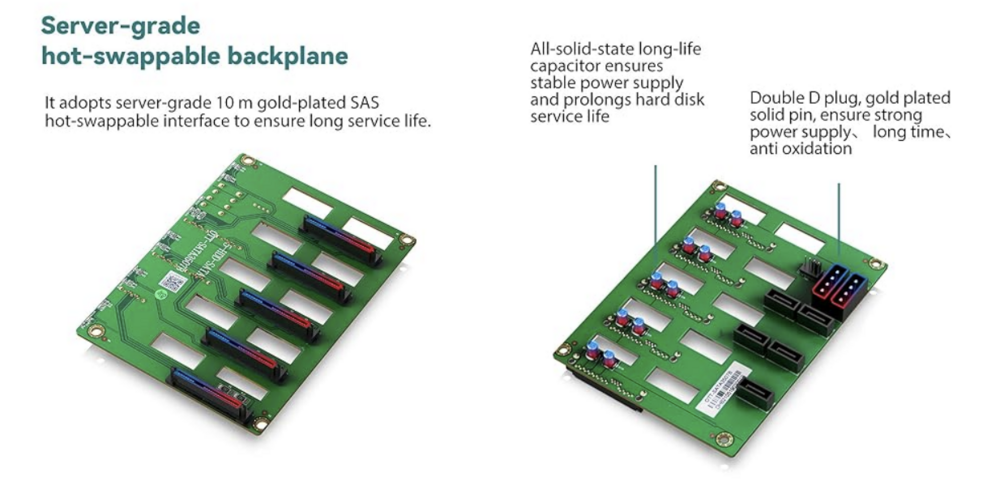
Apologies for my ignorance, this is the nas I got https://www.amazon.com/dp/B0BQJ6BCB7?ref=ppx_yo2ov_dt_b_fed_asin_title&th=1 Here is a photo of the backplane it uses.
-
I have seen the recommended controllers, but I was hoping someone could help me decide on what would work best for me. I have x5 6tb SAS drives that plug into a backplane that has SATA ports out for each drive. And my Mobo only has a PCIe x4 slot and an M. 2 slot open. I need something that can work with those constraints, and I have not seen anything that I have been confident will work. Any suggestions?
