





dolphinspanker
Members
-
Joined
-
Last visited
-
Thanks - found it! id set every other port variable I could find - just not that one! All sorted!
-
So - Have an update Turns out, Tailscale was stopping the connection to QBitorrent. It doesn't seem to stop anything else working, just QBitorrent. I worked this out, when my daughter logged into her account, and tailscale started - creating an endpoint in her name. When I went to use my account (with her logged in already) , Tailscale wouldnt start - and QBitorrent webui works! Turning Tailscale on and off blocks/lets me in! Even when I am on the same network as the server, Tailscale still prevents connection to qbitorrent. PIA also stops all connections to the server, even with split tunnel and local networks allowed - so I turn this off when Im working on the server - but this wasnt my problem - I already knew this. Now just to find a way to get the webui to open to 8085 instead of 8080 by default - 8085 connects and my arr stack points to 8085 and all works - just the webui defaults to 8080 still! - not the end of the world, just annoying! Thanks to everyone who help troubleshoot.
-
thanks for trying - its very fustrating. The most annoying bit is that it worked before just fine. its when i changed everything to align to the trash guides, that it suddentlly broke I think that sonarr and radarr and prowlar are all connunicating just fine, althoght I have stopped any activity there whilist im trying to get the webgui to behave. Everythig is working fine - I just cant get in to it to actually use it as intended! IM going to try another computer and login with that - incase my regular desktop has something buried somewhre that is causing problems. After that - ill delete it and try again to see if that fixes it ill update once i have soemthing to share thanks again
-
nope - no dice. the most annoying part is that it worked before! on the standard port settings. then it didnt. I have also rechecked that i can get to the webgui of my other apps - everythign else works - just not qbitorrent.
-
this is the strange part - im no expert, but when i looked at the log, it all seemed fine to me also. I suspect that everything is working fine including the arr stack ive setup. Im accessing from the unraid dashboard, click on the icon, and select webGUI from the menu that pops up. For some reason though, it is still defaulting to port 8080 when selecting the webgui from the unraid dashboard, howver, manually changing that to use port 8085 ends the same way (the loading circle fo death) which eventually times out .
-
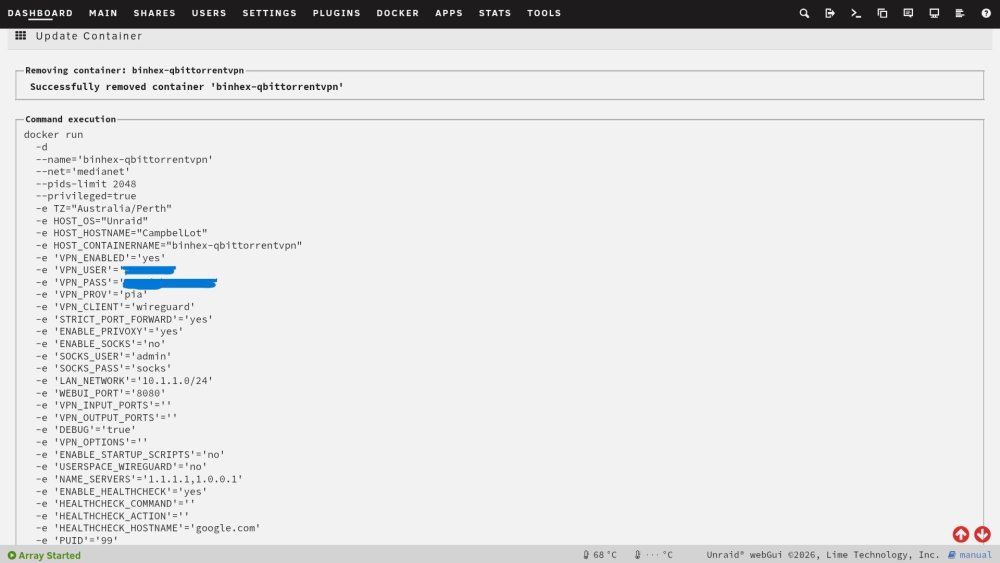
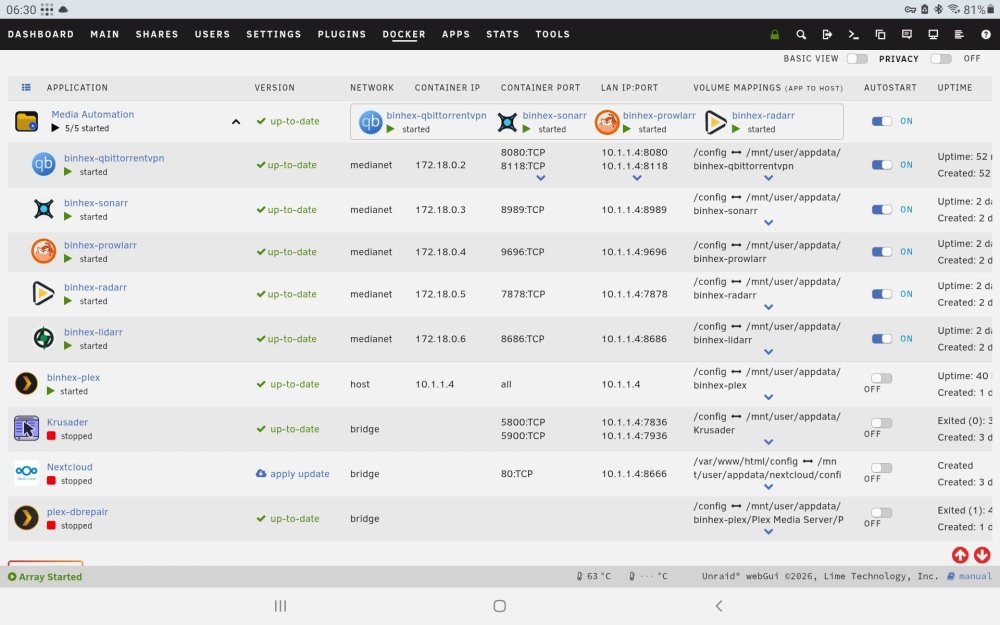
Uptime 5 days 3 hours 59 minutes Update Container Removing container: binhex-qbittorrentvpn Successfully removed container 'binhex-qbittorrentvpn' Command execution docker run -d --name='binhex-qbittorrentvpn' --net='bridge' --pids-limit 2048 --privileged=true -e TZ="Australia/Perth" -e HOST_OS="Unraid" -e HOST_HOSTNAME="CampbelLot" -e HOST_CONTAINERNAME="binhex-qbittorrentvpn" -e 'VPN_ENABLED'='yes' -e 'VPN_USER'='xxxxxxx' -e 'VPN_PASS'='xxxxxxx' -e 'VPN_PROV'='pia' -e 'VPN_CLIENT'='wireguard' -e 'STRICT_PORT_FORWARD'='yes' -e 'ENABLE_PRIVOXY'='yes' -e 'ENABLE_SOCKS'='no' -e 'SOCKS_USER'='xxxx' -e 'SOCKS_PASS'='xxxxx' -e 'LAN_NETWORK'='10.1.1.0/24' -e 'WEBUI_PORT'='8085' -e 'VPN_INPUT_PORTS'='' -e 'VPN_OUTPUT_PORTS'='' -e 'DEBUG'='true' -e 'VPN_OPTIONS'='' -e 'ENABLE_STARTUP_SCRIPTS'='no' -e 'USERSPACE_WIREGUARD'='no' -e 'NAME_SERVERS'='1.1.1.1,1.0.0.1' -e 'ENABLE_HEALTHCHECK'='yes' -e 'HEALTHCHECK_COMMAND'='' -e 'HEALTHCHECK_ACTION'='' -e 'HEALTHCHECK_HOSTNAME'='google.com' -e 'PUID'='99' -e 'PGID'='100' -e 'UMASK'='000' -l net.unraid.docker.managed=dockerman -l net.unraid.docker.webui='http://[IP]:[PORT:8080]' -l net.unraid.docker.icon='https://raw.githubusercontent.com/binhex/templates/main/unraid/binhex/images/qbittorrent-icon.png' -p '8118:8118/tcp' -p '9118:9118/tcp' -p '8085:8085/tcp' -p '58946:58946/tcp' -p '58946:58946/udp' -v '/mnt/user/appdata/binhex-qbittorrentvpn':'/config':'rw' -v '/mnt/user/Data/torrents/':'/data/torrents/':'rw' --sysctl="net.ipv4.conf.all.src_valid_mark=1" 'ghcr.io/binhex/arch-qbittorrentvpn' fdb627223d2c1566584684946f1c44598cd52b22969f78714c6dbb6f9c63d898 The command finished successfully! View Container Log Done supervisord.log
-
OK So an update finally Rebuild array Rebuild docker Reclaim plex server Rebuild plex metadata and library And back to qbitorrentvpn webui issue I've followed the guide on the FAQ pages and successfully changed the port to 8085 And NO DICE Looking at the logs it seems everything Is working as expected. VPN is connecting I'm running out of things to try. My next step is to delete the container and the appdata folder and any saved templates and reinstall and hope it works
-
Yes - Starting the WebUi from inside Unraid, from the docker box in the dashboard. Yes the computer I do this from is on the same network as the server. OK Ill try that next - ill update once I have arsult But you wouldnt believe it - or maybe you will - and so you dont think im ignoring everyone after helping out - thanks for everything so far. I go to log into the server today to fix this qbitorrent issue - and find that plex has dropped the server claim token and all the media is unavailable - unhelpful! So start to try and resolve that, and following a reboot, i find that a hdd is now disabled and the docker service wont start! so I have rechecked all the physical connections, dropped it from the array and have just readded it back - currently rebuilding the drive. when the drive is rebuilt, ill then trouble shoot why docker has fallen over. then ill come back to plex, and then qbitorrent! arrgh!
-
Thanks for that. Have stopped container, rechecked the usrname and psssword. Deleted the supervisord.log file. started container and run for a few minutes - No access to WebGui Attached is the recent log file - this time ive deleted everything I could find. supervisord (2).log
-
Far out! Thanks for letting me know - Changeed now. I thought I removed all the references and tokens - must have missed one. - So embarrassing. I have also changed the network to bridge now 1 - The reason its in a separate docker network was on the advice following the Trash Guides setup to allow the arr stack and qbitorrentvpn to talk to each other better. 2 - Changing to bridge hasnt helped yet. - Just get the loading circle of death before it eventually times out
-
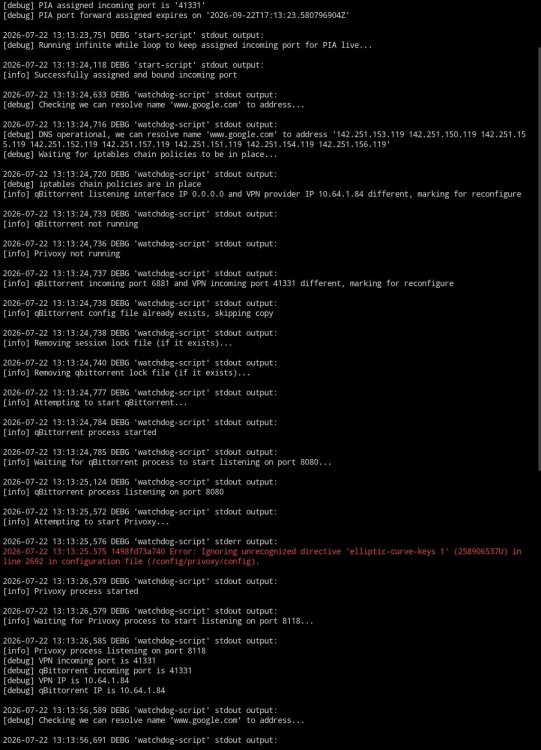
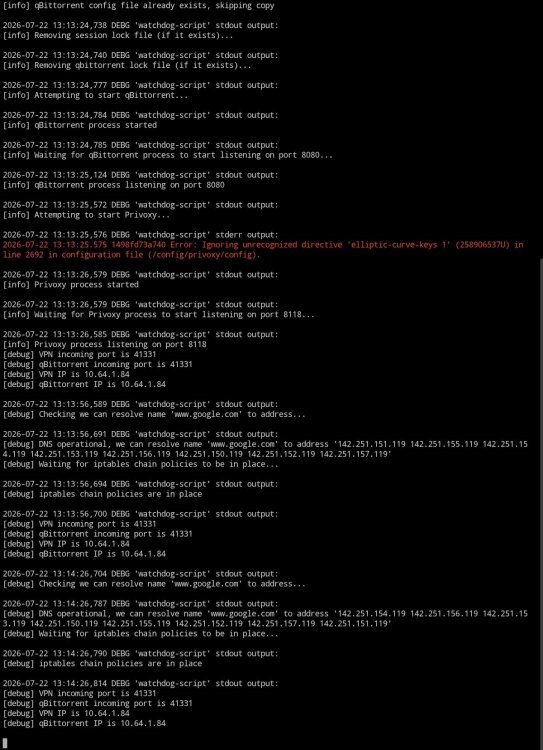
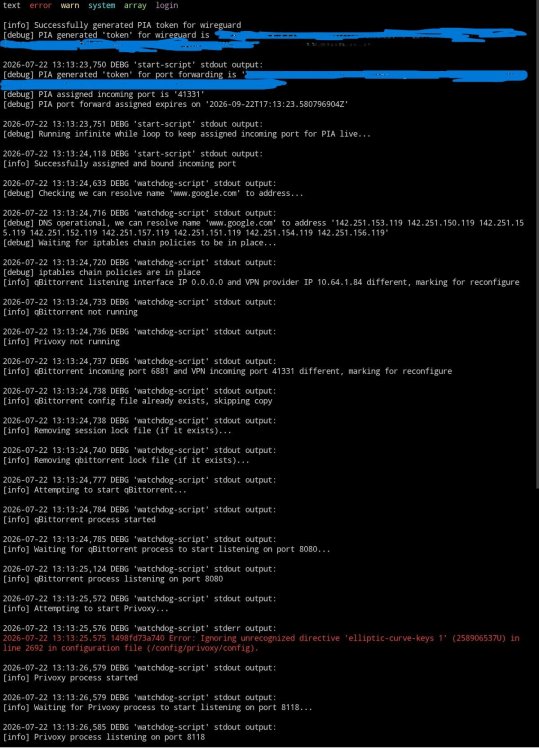
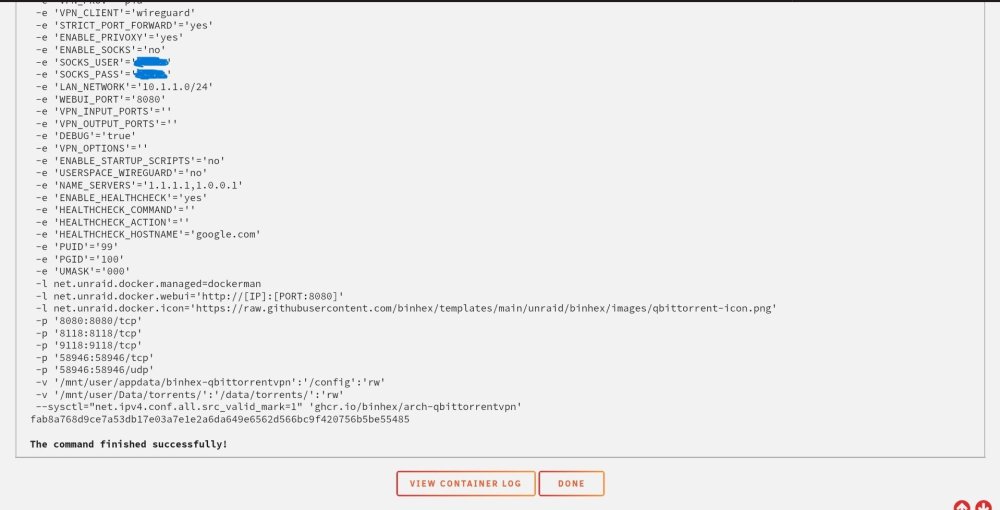
Sorry - thought I have attached the right logs - try again supervisord log screen shots of the containers logs available from the gui. supervisord (1).log
-
Hi BinHex, I am reaching out as I have tried a few different things to try and get access to qbitorrentvpn via the GUI, but no joy. Im pretty fresh to unraid in general Brief history. Installed qbittorrentvpn, setup PIA VPN. Everything connected and was working great. Confirmed that it was going through the VPN, and no leaks (checked via leaks detection webapge) Setup Sonarr and Radarr - tested and all working correctly with qbittorrentVPN. Even had a successful request from Prowler to sonarr to qbitorrent and moved it into the folder after finishing for plex, and plex updated - it worked! The did some reading and realised that I hadnt setup the folders in the best way (trash guides) So start the process of adjusting the folder structure (to trash guides) . This of course breaks all the links with the arr stack and qbittorrent and PLEX! Fix plex - now working as expected. Problem Can no longer get into qbittorrect via the GUI with the VPN enabled. Unraid shows it as running fine. If I turn off the VPN (via the settings in qbittorrent) , i can then log straight in, and everything is working away, sans VPN. Switch VPN back on - locked out of the Webgui from Unraid. What I have done so far. Checked that there are no conflicting ports - none. Changed the webGui port number away fro 8080 (default) - locked me out of the gui with the VPN on and off - its worse. Checked usernames and passwords for PIA - are correct. Checked that I am using a VPN with port forwarding server (confirmed via the github listing marked as July 2026) Checked the Logs, it looks to me that everything is working, the VPN is starting and all is well - just no webgui access. It doesn't seem to matter what i do, once the VPN is on, im locked out of the WebGui. My next step is to delete and reinstall QbitorrentVPN, and hope that a fresh install fixes whatever ive broken in the backend when i changed around the folder structure and repointed things to the new locations. Attached is the most recent log screenshots from qbitorrent- but it all seems fine to me. The error that throws is apparently a normal error code that doesn't impact anything. Any tips or tricks?
-
Thanks to everyone for their help - I think i am on the right path now. Have created the array, with parity - running the parity check now (I'm surprised that it has taken 14 hours, when there is nothing to check - oh well...) Have removed the second drive from the 'Data' pool, and its happy running in single drive mode. This hdd will be removed eventually to join the array. Found an article about turbo write. Once the parity has been setup correctly, will enable this and start sending data to the array directly (not to the cache first). Feel like i am on the right path now. Thanks again.
-
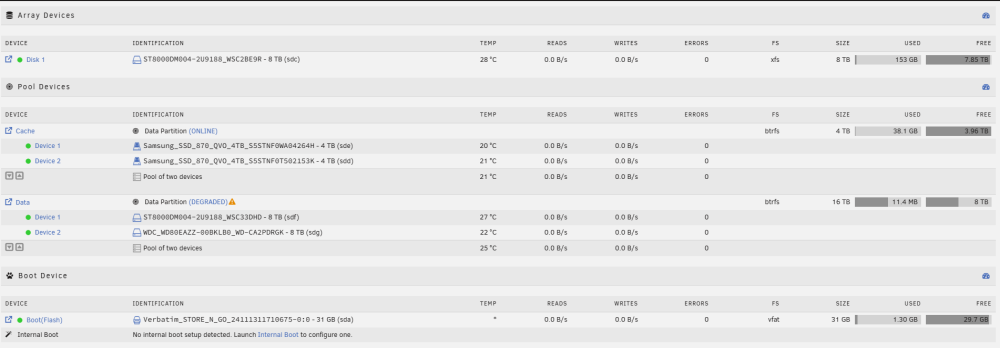
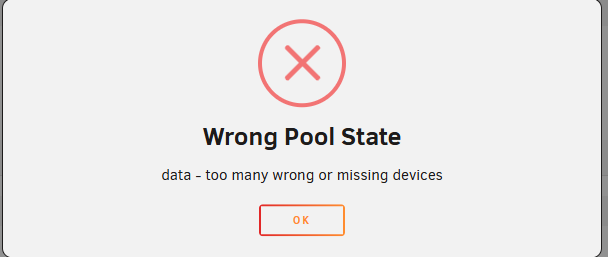
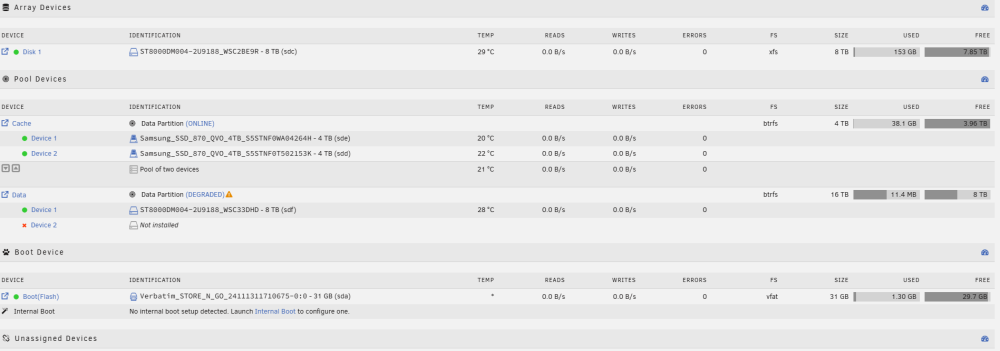
Hi JorgeB, I have , after much fluffing about, managed to get all my data off the pool drives. Opening up all the directories /locations that i placed data shows nothing there. Consolidated all my data across multiple hdds outside the server. (basically back to where it came from). The external drives with the data show everything located there. And freed up one of the 8tb hdds i have pegged for the array, formatted as xfs. No parity at this stage until i move the pool disks over. So next steps, as far as I can tell. 1 - dismantle the data pool. (2 x 8tb) - No need for this once i setup the array (which is what i meant to do the first time!) 2 - reallocate 1 as parity, and the second as data for the array. This will yield 1 x 8tb as parity, and 2 x 8tb as data. So - I attempt to remove the second hdd from the pool 'data' to force it to single drive mode to let it rebalance, and it throws this error, and wont let me progress. So - Find the instructions to rectify this error - remove a pool and re-add it back. Have done this and now the second drive reports as 'Not installed" I'm starting to think that I should just reallocate the second drive that is reporting as not installed into the array, reformat it as parity, and go from there. The folder structure should appear as available in the array, so I can start to copy data back. campbellot-diagnostics-20260705-1731.zip
-
I've been trying to understand how the Unraid parity setup is different from a Raid 1 pool. What I am trying to achieve is fairly simple (I think). Place to store data (mostly media) that has redundancy incase a HDD fails. Basically a Plex server at this point. Once I have that setup right, Ill look at other things - one step at a time. Low write speeds are fine, will be using various hdd sizes, but using docker containers to run bits a bobs. Containers at this stage will be Plex and torrent, considering the arr collection, krusader, reverse proxy for remote access, local cloud storage and a family planner of sorts for future use. Looking about, it seems that the UnRaid parity setup would be the best option - hence why I think i have mucked this up. In order to move the data pool I have in place currently over to the Unraid Array, with parity. 1 - move any data I want to keep off the data pool to external location ( currently doing - 4 hours to go) 2 - delete the shares I have created 3 - remove the disks from the pool and add back to the unraoid array, with the biggest disk (8tb) as the parity and anything else as data disks. 4 - recreate the shares, folder structure for media, and repoint Plex to the new media locations. I think thats it. Have I missed anything?




