





NLS
Members
-
Joined
-
Last visited
Everything posted by NLS
-
Here is a (intentionally low res and blurry) video... I hope you can make out what I do... I am in dashboard. I click to go to Disk Location. I go back to dashboard. I close browser. (I could even shutdown in between) I open browser. I am magically back to Disk Location!!!
-
OK I wake up my own thread, because this is still happening. I have numerous tabs (pinned and non-pinned) and this only happens with UNRAID. I go to a subpage (for example these last two days it insists on /Tools/DiskLocation), I return to dashboard, I close Edge before shutdown, I boot again, open my Edge (which reverts all open pages) and voila! My UNRAID tab is now again on DiskLocation page! (or whichever is in fashion for the period) Note that default page for my UNRAID IS set to be dashboard and (again to clarify) I left it in dashboard before closing edge and shutting down. I would blame some extension (although I doubt I have any relative extension), I would blame the stars, but this only happens with UNRAID. Am I the only one that this happens?
-
I missed this thread, I actually found out about this in a recent blog entry about UNRAID future. Such is life, we go, our work and footprint sometimes stays. I remember him, as I first used UNRAID about 20 years ago... I remember the change from a simple system, not able to see other "servers" in the eye, to something more user friendly and more modular. Ronald was there to help this evolution. RIP, my condolences to his family. (and I hope that easter egg is in the system now)
-
I can probably go in the shell, as locally the gui doesn't work, but the limited desktop of UNRAID does work, so I can invoke the shell. I need that gui reset command if there is one. If there isn't maybe it should finally be implemented. Also if I fail to reset gui and need to reboot, the logs will be nuked and the issue will not be identified. (assuming gui DOES work after reboot) Which is why also the diagnostic script should be able to run in command line. (anybody?)
-
So I got an email from my server that my plugins/containers would auto-update last night, something that has happened many many many times before - although I usually update things manually before my schedule. In any case I discover now that my GUI is dead (even in own desktop, if I select to see "unraid web interface" I get "unable to connect"). Everything else is working, containers, vms etc. - but I cannot manage the server. So... 1) Is there a way to reset the gui from command line? (btw this should be a ready-made command or script to handle that) 2) If my GUI cannot be (fully) reset, is there a way to safely shutdown (and restart) the server? (I mean I know how to reboot a linux machine - but I wonder if there are any other steps for unraid specifically) Latest UNRAID 7.3.1, (usually) updated plugins/containers, boot/licensing migrated to SSD/mobo.
-
...yeah happened to me again. Seems with every update we need to manually delete that file (can that not be done with some startup script or smth?)... And as I said I remember this years back happening again.
-
Seems you never replied to my mail 2 years ago (!) although you periodically visit the forums... but today I write again because fetchmail stopped working and in the logs I keep seeing: fetchmail: SMTP error: 452 4.3.1 Insufficient system storage ...I have no space issues for my docker folder (it is a folder not a file). What could be the issue?
-
OK this keeps going periodically. Since yesterday for example, I am at dashboard page (I have visited docker page, but have returned from it). I close my Edge, re-open it and I am back to docker page, NOT the dashboard page (that was the last page before I closed Edge). Note that if I see the URL bar, I briefly see /dashboard (before anything renders in the content window) and it changes to /docker! So it doesn't look like something coming from Edge, as Edge is attempting to open the real last page I left there. Something triggers the change. I attach my diags although I don't think they will help in this case. The easiest way I "fix" this is to middle-click dashboard link, so it opens an new tab, close the first tab, so indeed after I restart Edge, it remembers that. But this is a work-around, not a fix. Note that this is the only page this happens and I have several pinned (and unpinned) pages, all the time, kept between reboots - again: without this issue. diagnostics-20260515-1242.zip
-
Confirm too. The "problem" is that it happened twice in two days. (no gui, delete file, fixed, no gui next day, delete file, fixed) I hope the forgotten lockfile eventually IS deleted when updating the container. BTW, I remember the same issue a few years ago (!) in same container.
-
I use this for years. Today although the container "works" (?), I don't have any gui! Any ideas?
-
I found the reason. For some reason "open files 2" and "open files" were mixing somehow - some internal name or repository conflict? I removed "open files" (although it showed as 2 was installed), and re installed from apps and this worked.
-
Now ALSO "open files v2" doesn't show update status. Is the project dead or what?
-
And yes there is another update: Now it shows properly as 1TB the cache and DOES show that it is balancing. It just needed a few minutes to "catch up" with the changes?
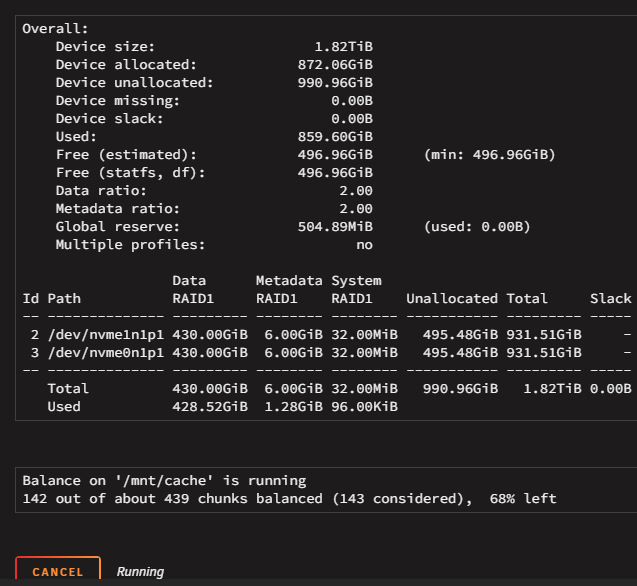
-
One more screenshot, while it rebuilds... ...it shows the 500GB as missing, It doesn't show here that balancing IS taking place. I am waiting to see what will happen after it finishes the balancing.
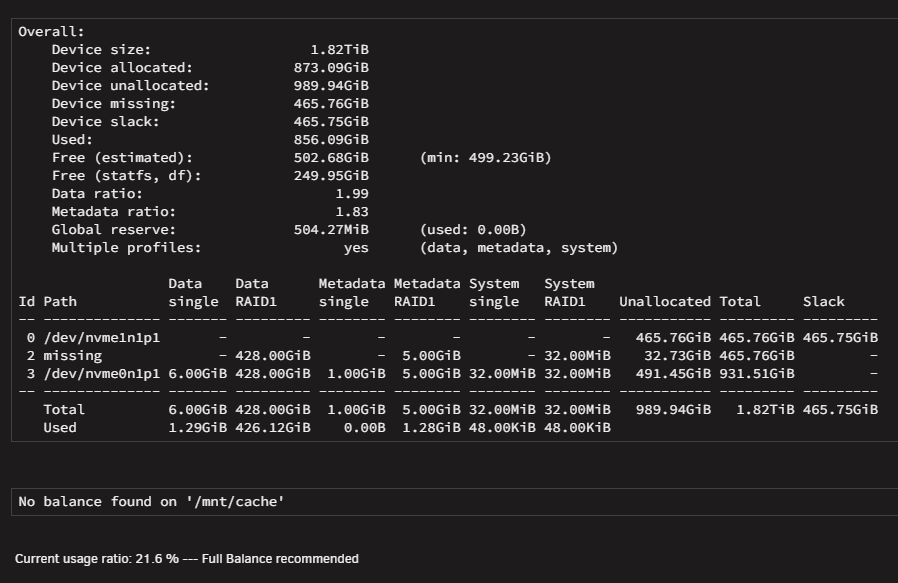
-
Final (?) update. After rebooting (with new second 1TB) and assigning the new disk, it started rebuilding the raid1 as it seems (see screen shots). Remember this DID NOT happen when I did the first switch (and why I started this thread). So I think we are good now, except one thing: For some reason when I had 500GB with data and 1TB empty but system confused, it showed me a total of 750GB size??? Now that I am with 2 x 1TB cache, rebuilding the second 1TB, it still shows 750GB... Not 500GB, not 1TB. I want to believe that after the syncing, it will raise to 1TB. after-reboot.zip
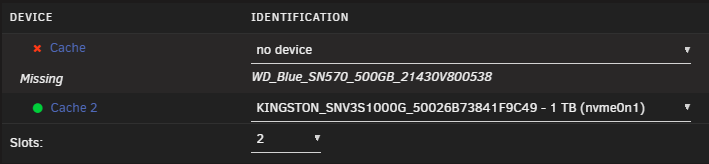



-
It finished, I think it looks ok and I see writes at the same time to both disks. I attach new diagnostics for the sole purpose of keeping log in case something goes wrong with second swap.spezierixl-diagnostics-20260502-1609.zip
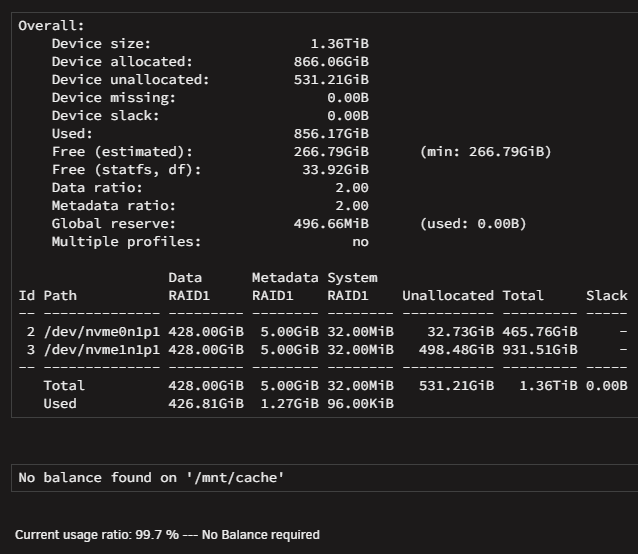
-
...btw why ID is 2 and 3? Is this correct? It finishes in 20-30 min. If you can quickly like above give me the correct process to then swap the 500GB with the second 1TB, it would be great. (worst case scenario, I will follow official docs, in other words, stop, remove disk, add disk, start, without any bringing online of array in the middle steps - unlike when replacing array disk) (and if it does again the same problem with the second disk, I will do the same recovery steps that you say above, using the first 1TB as the "mother")
-
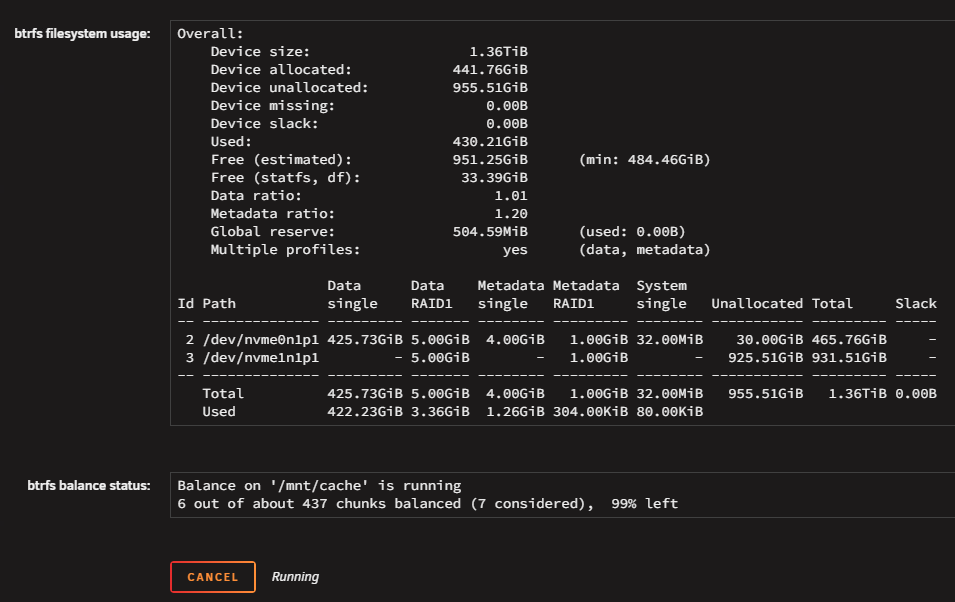
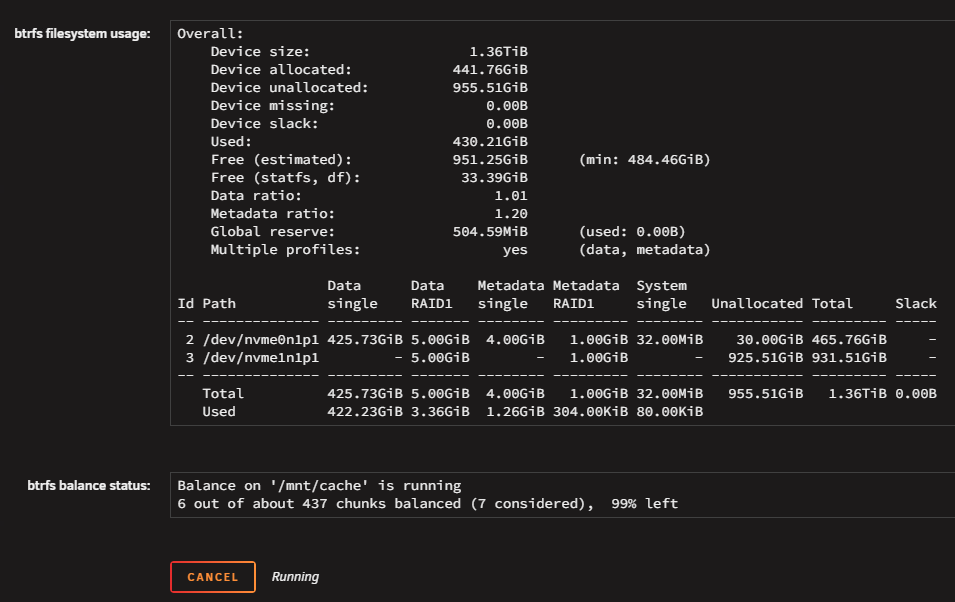
I did and it seems to go ok. This time it doesn't show anything missing and DOES write things to 1TB disk while the contents are actually active (VMs are running and containers). This will probably take around 1-1:30 h. Can you follow up (regardless of instructions in documentation) and tell me exactly how to properly remove the (remaining, active) 500G and replace it with the (second, empty) 1TB and re-sync the raid1? Thank you. ...attached progress.
-
Thanks I will try these.
-
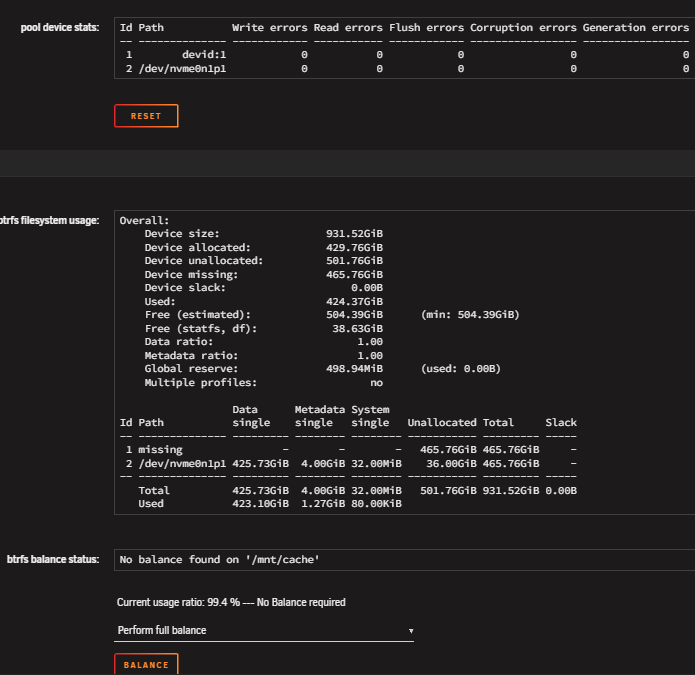
As I say above, before replacing any disk (when there were two 500GB disks) I checked "balance" and it was clearly showing "no balance needed" and "raid1". I didn't keep a screen capture of this because I expected it would work fine. What I need now and I suspect is the solution is this (please tell me if this plan is correct): Actually make it a single disk pool (the one 500GB disk that remained on the machine and has all the latest content - make it NOT need the 1TB disk that is unused after all or the old 500GB). Re-add the 1TB disk and actually this time MAKE IT get a mirror of the 500GB (so maybe make single pool again multi disk pool). Then replace the original 500GB with the second 1TB and again "balance". (but verify it doesn't show as "missing" this time) I think the instructions are not correct. I probably had to start the array after unassigning one of the 500GB disks and stop it again (like we do for array disk replacements) or maybe it needed TWICE to balance? (one with second disk unassigned and AGAIN with new disk added?). What I need now, is a way out, as I have the system not-expanded and not-redundant (so worse than when I started) and for some reason it still "needs" (!?!?!?) the unused 1TB disk. This is very wrong.
-
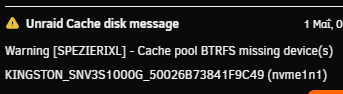
So, in this specific setup, we had a space issue with cache. Cache pool was 2 x M.2 500GB each, btrfs in RAID1 configuration. We bought 2 x M.2 1TB. I checked btrfs balance and it was declaring raid1 as expected and fully balanced. In "MAIN" tab it showed "Cache" and "Cache 2". Clicking "Cache" shows me btrfs balance status, clicking "Cache 2" doesn't show me such details. I followed the OFFICIAL (in documentation) instructions of replacing a cache disk with a larger one. They seem to differ a bit with array disk replace instructions. I followed cache disk replace instructions to the letter: https://docs.unraid.net/unraid-os/using-unraid-to/manage-storage/cache-pools/#replace-a-disk-in-a-pool So I stopped server, DID NOT unassign the disk I was going to replace (this is where instructions differ from array disk), replaced one of the M.2 disks and booted server. Server shows missing for one of the cache pool disks (actually the "Cache" one, not the "Cache 2" one - this was because I chose a random M.2 from the two motherboard slots). I assigned the new 1TB to "Cache" and started the array. This according to instructions, should "show" immediately that balance is broken and supposedly start balancing to the new 1TB by itself? (i.e. rebuild raid1) It did not! So I thought, maybe I should start "full balance" myself. So I did. It took almost 1.5 hours. When it finished, I thought I would then be able to now swap the SECOND 500GB to 1TB and do a new balancing afterwards. ...and here is where things go boom. Although the 1TB SHOWS as assigned to the pool (see screen grab), in actual balance status shows as missing (still expects the old one?) and the balance I did before (and waited 1.5 hours) did nothing? ...and now I cannot proceed. I cannot replace the second 500GB with my second 1TB because the first 1TB actually never got built. I cannot unassign the 1TB, because it tells me "too many disks missing"!!! (this is the most weird) THIS IS WHAT IS THE WORSE AS I CANNOT FOLLOW THE "remove disk from pool" procedure. I cannot put back the "old" 500GB (although it expects it, see warning in screen grab below), because the "old" 500GB does not have proper sync any more (because the live 500GB cache runs VMs and containers and they have worked and changed content since the time I removed the "old" 500GB). So I cannot just put it back. I cannot unassign both 1TB and 500GB (and "reset" the cache pool somehow), because it again says "too many disks missing". I cannot start even in mainenance mode when the 1TB or both the 500GB and 1TB are unassigned!!! ...in other words the 1TB is empty, BUT STILL NEEDS IT!!! So now I cannot just "reset" my cache pool (without losing cache contents)!!! What can I do??? I suspect that I POSSIBLY need to make this a "single" disk pool? (but make sure to keep the 500GB that is in "Cache 2" position now) AND THEN re-add the 1TB? AND THEN how to replace the second one? Because as it seems, the official instructions ARE NOT VALID. Right now, so that the system stays in production for now, I just let it work with 1 500GB cache (Cache 2) and 1 1TB (empty and as you can see from first screen grab above... actually unused as there are no reads/writes to it). The VMs are online, containers work fine. But no cache redundancy, nor solved the space issue. I include diags. Help please? I hope to fix this within the weekend. Note in the attached diags it might show that parity is rebuilding. This is normal, since the original issue could not be resolved, at least I swapped a data disk that I wanted to replace with larger, so that this finishes by the time I know how to fix the cache. Note also that my array has plenty of space and in theory I can move VMs and containers (?) to the (slower) array and remove cache fully temporarily if needed? spezierixl-diagnostics-20260501-2122.zip

-
So, parity in a dual disk setup is really a mirror?
-
Yeah, never showed that. This indicates a bug, as if it failed it should say so. The only message I got, I showed you above. Thing is what you ask to do, takes several hours (around 8-9 I think it took) and without any change, I suspect I will end up with the same (non) result. Question is, would itimpi proposal work maybe? In two disk setup the parity is a mirror or a "negative" mirror? Because if it is a mirror (and NOT a negative mirror), I can simply re-assign it as data and add a fresh larger parity instead (with new config). Anybody can verify? --- EDIT: I suspect it would not work and parity would just be XOR contents. Also adding a (temporary) second parity (the new larger disk) probably will not help as it will try to use old parity and old (unreliable and freezing) data disk to rebuild second parity. So, this doesn't help. I am at a loss.
-
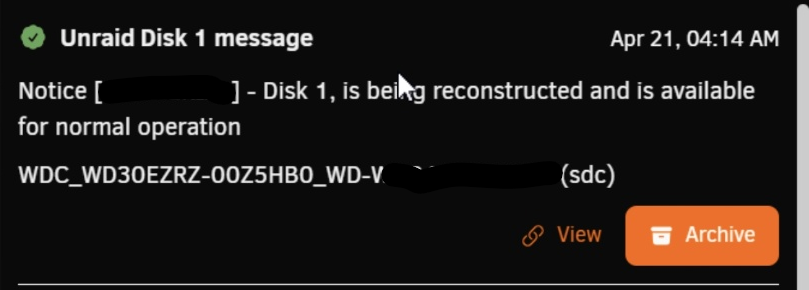
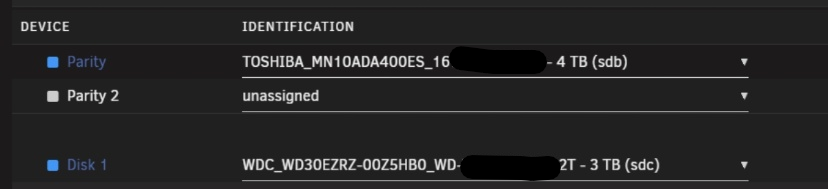
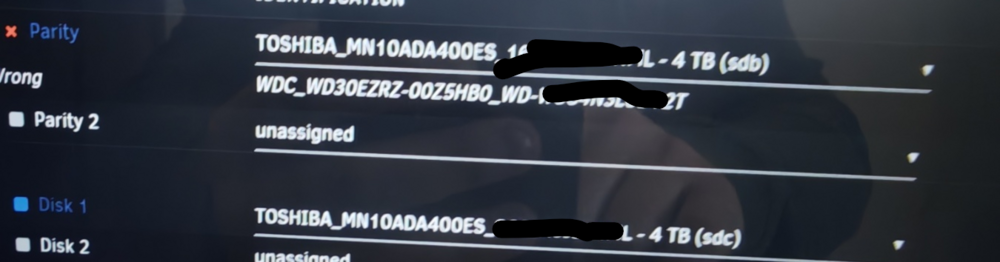
I cannot post diags since I am several steps (and reboots) after that. I can tell you that copy finished seemingly successfully (see photo), ...this left the array in a stopped state. No errors. Also no way to start the array after that: Neither "as is" (with new parity copy and old parity disk being in data disk position assigned), to render the old parity as new data. There was no start button. Only a "copy" button still. I think it was clickable (like copy never happened - in contrast with having that status message above and me actually SEEING the copy happening until almost 20% -then had to leave it continue unattended). \ (above 2 screenshots are AFTER copy seemingly finished) Or by unassigning old parity and stay with copied parity and no data disk so that data are "emulated". ...so I was forced to reboot, as there was nothing to do with the above setup. And the rest is as I describe in my previous message. I tried to replace the old parity disk (that was in a data possition as "parity swap" dictates) with new fresh data disk. No go. As you can see (the below is just before I eventually tried "new config") it ignored the copy it (seemingly) performed over several hours that finished WITHOUT error and shows parity as "wrong". Somehow it expected the old parity in place!!! ...after this I was forced to make "new config", that as I said, demanded I rebuild my (copied - valid?) parity using the data from the... empty new data disk. Of course I didn't allow that and reverted to both OLD disks (old parity, old data, accept parity as valid). So now they are back to square one.

-
FOLLOW UP: NO GO. I unmarked the solution. Does not work properly with two disks. After the above. I removed the old parity, installed new to-be-data disk. Initially I tried with only parity drive awsigned. The new copied parity. It didn't allow me to start. Then I tried to assign new data disk. No go. Too many changed. Then I selected new config. This allowed minimum of 3 disks. 2 parity and 1 data. I assigned new (copied) parity to parity and the empty data disk to data. I clicked that parity is valid. It still said it would overwrite parity and destroy it's data. So, no go. Replaced both old disks back and for now started the system as it was before parity swap. This method is no go with 2 disks and always 2 disks. (might work differently if I added a 3rd disk... Maybe 2nd parity) So I am still looking for a method that works.




