bhinkle50
Members
-
Joined
-
Last visited
-
Thanks, I knew it was something simple but I was used to a server level board and this BIOS has way too many options in it I never saw that. Luckily it does have a search function so I found "fast boot" options and disabled them and we're good to go. Thanks again.
-
New build using ASUS Prime z790-p board. I have everything configured and I can consistently get it to boot off the usb if I go into the bios menu at startup and then exit making no changes. On the restart it will boot off the USB. If I just reboot and don't go into the bios menu, it won't boot off the usb. I'm sure there's a setting I'm missing, but haven't done a build in awhile so not sure if I'm missing something obvious.
-
Tried switching to the VNC and then back again for this VM. Here's the libvrt log entries. I'm kind of at a loss what to do to recover. 2023-05-25 15:10:49.636+0000: 13707: error : qemuDomainAgentAvailable:8610 : Guest agent is not responding: QEMU guest agent is not connected 2023-05-25 15:11:05.861+0000: 13702: error : virNetSocketReadWire:1791 : End of file while reading data: Input/output error 2023-05-25 15:12:23.758+0000: 22579: error : qemuMonitorIORead:440 : Unable to read from monitor: Connection reset by peer 2023-05-25 15:12:23.759+0000: 22579: error : qemuProcessReportLogError:2056 : internal error: qemu unexpectedly closed the monitor: 2023-05-25T15:12:23.730373Z qemu-system-x86_64: -device pcie-pci-bridge,id=pci.8,bus=pci.1,addr=0x0: Bus 'pci.1' not found 2023-05-25 15:14:29.607+0000: 13803: error : virPCIGetHeaderType:2897 : internal error: Unknown PCI header type '127' for device '0000:04:00.0' 2023-05-25 15:14:45.234+0000: 13707: error : qemuDomainAgentAvailable:8610 : Guest agent is not responding: QEMU guest agent is not connected
-
So this was a pretty weird one. It started in the AM with my server losing it's network connection. I also experienced some other networking issues which caused me to reboot the network and at the same time I rebooted my server. The server began to hang at the boot steps above, so I believed the issue was all related to my server. Then I had to reboot my network again, and again, and again. Now I can't get my server to boot, and my router appears to be going out. I pulled every piece of hardware out of the server. 17 drives and 4 exp cards. I then went one by one. It started booting!!!! With that success, I slowly added pieces back into the mix. I eventually got it to boot fully - ran a parity check, backed up VMs, appdata, and flash. I then rebooted and it STOPPED again, but this time the flash didn't even load to get to the boot. Restarted again, and it got to a different part before it stopped. Then it dawned on me that my flash is obviously failing. So I swapped out the flash drive, booted perfectly, I transferred the key and it has been rock solid. Well, until I started messing with the VMs in prep for my migration and screwed it all up. But that's another thread that you can see here. Oh, almost forgot the best part. The original networking issue? It was because ASUS sucks at devops. They released a security file to their routers that consumed all the memory and caused routers to consistently crash. They suck and you can read about it here.
-
I am preparing to migrate to a new server and thought I could switch my VMs GPU to the other one that I have in my case but after making the switch, I remembered the reason I had this other GPU in there was because it's a server board with no graphics, so it's the system video. The reason I was trying to make the switch is I wanted to free up my 1060 NVIDIA card to run vdarr to convert my media library to h265. So I installed the NVIDIA plug in, moved the 710 GPU to the VM, and then realized that I couldn't pass that one through. So I uninstalled the NVIDIA plugin, remapped the VM to the 1060, but it won't come up. I've turned VM and Docker off and on, and rebooted server a few times. I am getting the following error in the libvrt log: 2023-05-25 02:30:48.049+0000: 13707: error : qemuDomainAgentAvailable:8610 : Guest agent is not responding: QEMU guest agent is not connected Diagnostics attached. Any thoughts appreciated. hydra-diagnostics-20230524-2138.zip
-
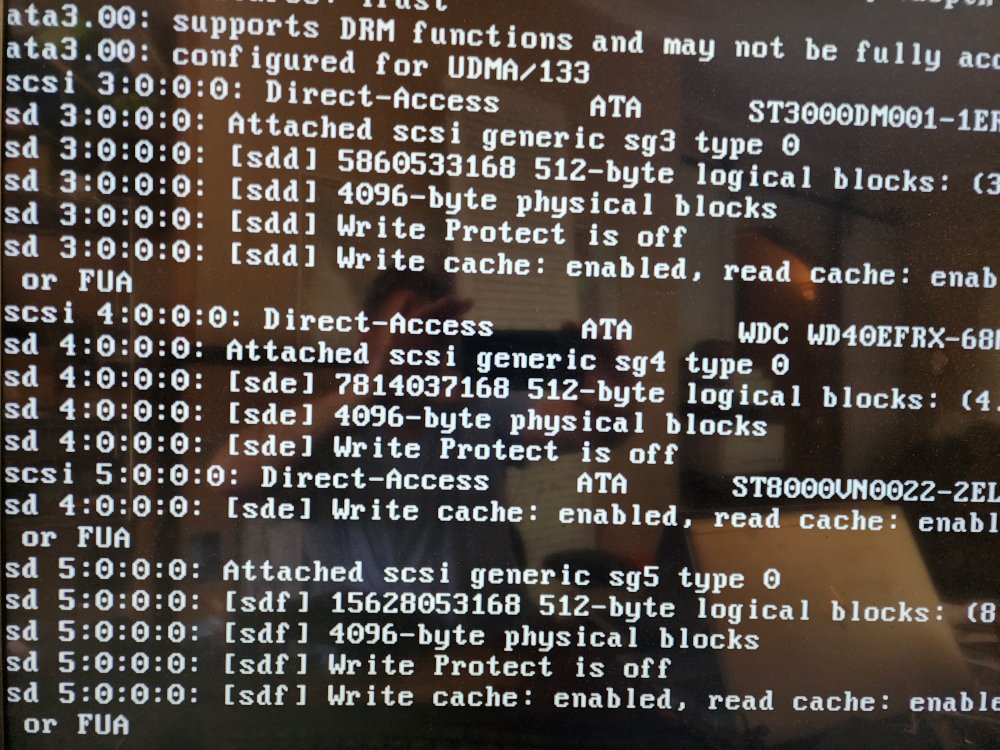
I woke up this morning to a VM that had no ethernet. I rebooted the server to see if it would clear it up and it had same issue once it came back up. I went into network settings and it showed that one of my ports was down and it required me to shut down Docker and VMs to edit network settings to remove that port. I made a change to disable the port, but the server didn't appear to take the save and then hung. I did a hard power down and the server isn't coming back up. It appears to keep getting stuck on the mount of disks, but it isn't consistent which disk it stops on. I have pulled all cables and reseated them to make sure it's not a cable issue. I'm currently trying to reboot in safe mode and it was stuck at the step in the photo for 15 min. I have since powered off and pulled the diagnostics from the last successful boot. Any thoughts are appreciated. Thanks. hydra-diagnostics-20230517-1114.zip
-
Thanks for the quick reply. I had re-downloaded the cert and openvpn file, but I guess I didn't get the openvpn file copied correctly as I just deleted them and re-did it and it's working. Thanks again.
-
I'm getting the no remote error as well. I removed the container and re-installed and it's still present. Attached is my supervisord.log file. I don't see the script it's referencing in the /config directory, but I may not have followed the container paths correctly. supervisord.log
-
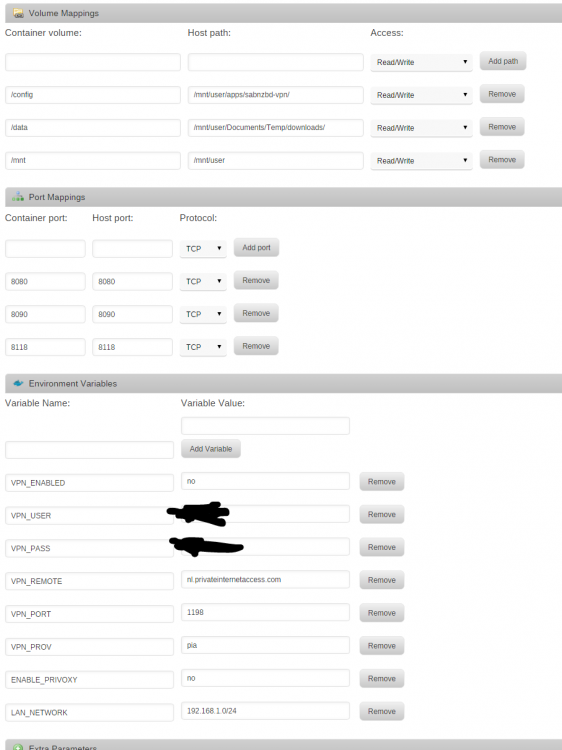
I am having the same behavior. Disabling the VPN works, but I get the same log: [info] Env var PUID defined as 99 [info] Env var PGID defined as 100 [info] Permissions already set for /config and /data [info] Starting Supervisor... 2016-07-29 11:19:25,627 CRIT Set uid to user 0 2016-07-29 11:19:25,627 INFO Included extra file "/etc/supervisor/conf.d/sabnzbdvpn.conf" during parsing 2016-07-29 11:19:25,630 INFO supervisord started with pid 12 2016-07-29 11:19:26,631 INFO spawned: 'start-script' with pid 15 2016-07-29 11:19:26,632 INFO spawned: 'sabnzbd-script' with pid 16 2016-07-29 11:19:26,633 INFO spawned: 'privoxy-script' with pid 17 2016-07-29 11:19:26,637 DEBG 'sabnzbd-script' stdout output: [info] VPN is enabled, checking VPN tunnel local ip is valid 2016-07-29 11:19:26,638 INFO success: start-script entered RUNNING state, process has stayed up for > than 0 seconds (startsecs) 2016-07-29 11:19:26,638 INFO success: sabnzbd-script entered RUNNING state, process has stayed up for > than 0 seconds (startsecs) 2016-07-29 11:19:26,638 INFO success: privoxy-script entered RUNNING state, process has stayed up for > than 0 seconds (startsecs) 2016-07-29 11:19:26,640 DEBG 'start-script' stdout output: [info] VPN is enabled, beginning configuration of VPN 2016-07-29 11:19:26,642 DEBG 'privoxy-script' stdout output: [info] VPN is enabled, checking VPN tunnel local ip is valid 2016-07-29 11:19:26,650 DEBG 'start-script' stdout output: [info] VPN provider defined as pia 2016-07-29 11:19:26,651 DEBG 'start-script' stdout output: [info] VPN default certs defined, copying to /config/openvpn/... 2016-07-29 11:19:26,653 DEBG 'start-script' stdout output: [info] VPN config file (ovpn extension) is located at /config/openvpn/openvpn.ovpn 2016-07-29 11:19:26,654 DEBG 'start-script' stdout output: [info] VPN provider remote gateway defined as nl.privateinternetaccess.com [info] VPN provider remote port defined as 1198 2016-07-29 11:19:26,654 DEBG fd 8 closed, stopped monitoring <POutputDispatcher at 47222288448040 for <Subprocess at 47222288374312 with name start-script in state RUNNING> (stderr)> 2016-07-29 11:19:26,654 DEBG 'start-script' stdout output: [crit] VPN provider remote protocol not defined (via -e VPN_PROTOCOL), exiting... 2016-07-29 11:19:26,654 INFO exited: start-script (exit status 1; not expected) 2016-07-29 11:19:26,655 DEBG received SIGCLD indicating a child quit Attached my current config. You're issue is not the same, the issue you have is the missing VPN_PROTOCOL env var, create this and set the value to UDP and it should start. Sent from my SM-G900F using Tapatalk Thanks for the quick solution, have a beer.
-
I am having the same behavior. Disabling the VPN works, but I get the same log: [info] Env var PUID defined as 99 [info] Env var PGID defined as 100 [info] Permissions already set for /config and /data [info] Starting Supervisor... 2016-07-29 11:19:25,627 CRIT Set uid to user 0 2016-07-29 11:19:25,627 INFO Included extra file "/etc/supervisor/conf.d/sabnzbdvpn.conf" during parsing 2016-07-29 11:19:25,630 INFO supervisord started with pid 12 2016-07-29 11:19:26,631 INFO spawned: 'start-script' with pid 15 2016-07-29 11:19:26,632 INFO spawned: 'sabnzbd-script' with pid 16 2016-07-29 11:19:26,633 INFO spawned: 'privoxy-script' with pid 17 2016-07-29 11:19:26,637 DEBG 'sabnzbd-script' stdout output: [info] VPN is enabled, checking VPN tunnel local ip is valid 2016-07-29 11:19:26,638 INFO success: start-script entered RUNNING state, process has stayed up for > than 0 seconds (startsecs) 2016-07-29 11:19:26,638 INFO success: sabnzbd-script entered RUNNING state, process has stayed up for > than 0 seconds (startsecs) 2016-07-29 11:19:26,638 INFO success: privoxy-script entered RUNNING state, process has stayed up for > than 0 seconds (startsecs) 2016-07-29 11:19:26,640 DEBG 'start-script' stdout output: [info] VPN is enabled, beginning configuration of VPN 2016-07-29 11:19:26,642 DEBG 'privoxy-script' stdout output: [info] VPN is enabled, checking VPN tunnel local ip is valid 2016-07-29 11:19:26,650 DEBG 'start-script' stdout output: [info] VPN provider defined as pia 2016-07-29 11:19:26,651 DEBG 'start-script' stdout output: [info] VPN default certs defined, copying to /config/openvpn/... 2016-07-29 11:19:26,653 DEBG 'start-script' stdout output: [info] VPN config file (ovpn extension) is located at /config/openvpn/openvpn.ovpn 2016-07-29 11:19:26,654 DEBG 'start-script' stdout output: [info] VPN provider remote gateway defined as nl.privateinternetaccess.com [info] VPN provider remote port defined as 1198 2016-07-29 11:19:26,654 DEBG fd 8 closed, stopped monitoring <POutputDispatcher at 47222288448040 for <Subprocess at 47222288374312 with name start-script in state RUNNING> (stderr)> 2016-07-29 11:19:26,654 DEBG 'start-script' stdout output: [crit] VPN provider remote protocol not defined (via -e VPN_PROTOCOL), exiting... 2016-07-29 11:19:26,654 INFO exited: start-script (exit status 1; not expected) 2016-07-29 11:19:26,655 DEBG received SIGCLD indicating a child quit Attached my current config.
-
I rebuilt my Docker image and it fixed this problem. I don't think the image was full, but all seems to be working again. Thanks for the good work binhex.
-
I'm having an issue getting SABVPN to start. This is also happening with my binhex SickBeard container. I removed the container and image and reloaded from the most recent. I don't have a perms.txt in the config directory. Here's the error I'm getting - [info] Env var PUID defined as 99 [info] Env var PGID defined as 100 [info] Setting permissions recursively on /config... I do not have those variables set right now, but couldn't find anywhere listing what they would need to be set to. Any help is appreciated.
-
** Sorry I posted in wrong container thread, I am actually using the VPN version please disregard this post***** I'm having a similar issue. I removed the container and image and reloaded from the most recent. I don't have a perms.txt in the config directory. Here's the error I'm getting - [info] Env var PUID defined as 99 [info] Env var PGID defined as 100 [info] Setting permissions recursively on /config... I do not have those variables set right now, but couldn't find anywhere listing what they would need to be set to. Any help is appreciated.
-
Happened to me as well. Upgraded to 6.1.4 today, and Plex stopped working. I see there's some issues being reported with Plex, but I'm positive I was on 0.9.14.2 yesterday and it was working fine with 6.1.3. I'm trying to revert Plex right now, but it seems to me like something in 6.1.4 stopped working with Plex.
-
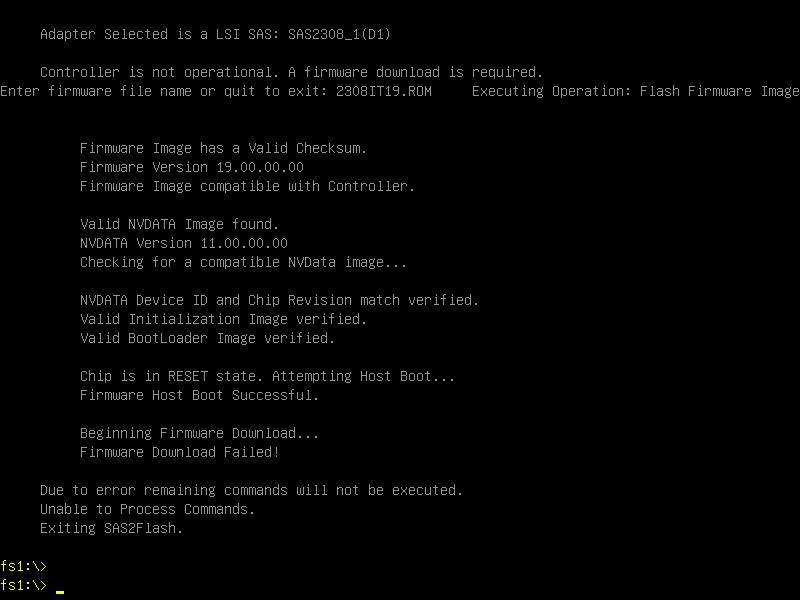
I have a SuperMicro X10SL7-F with an onboard LSI 2308 that I can't get operational. I think it may have been defective since I purchased board over 12 months ago, but I just attempted to expand array and can't seem to get any of the onboard ports for this controller to work. I've been at it off and on for a couple weeks and I think I've been doing everything correctly. I've followed all instructions to flash it w/ the v19 firmware into IT mode but this is the error I keep getting. Any thoughts would be appreciated.