





roastdawgg
Members
-
Joined
-
Last visited
-
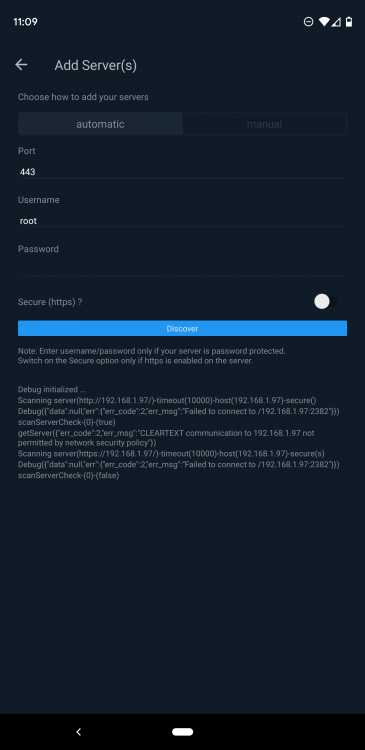
jbrodriguez, so I got the issue remedied and through some research this appears to be a specific Android issue. Here is a post about the issue, which has been around a while. https://medium.com/@son.rommer/fix-cleartext-traffic-error-in-android-9-pie-2f4e9e2235e6 It would appear that your app needs to add something the manifest to enable CLEARTEXT connections. I enabled SSL on my unRAID and the app connected right away with the right settings enabled. Hope this helps and helps others that are having the same problem.
-
I am having the same issue some others are, I can't add my server. I've tried the steps in the faq, I've tried forcing ssl and port 443, I did enable debugging and it looks like somewhere you are prepending a / to the IP address. The debug shows failure to connect to /192.168.1.100. This errant slash is present with both the 80 and 443 attempts. I am on 6.7.2 and Controlr is running on my Google Pixel 3XL running Android 10. I see a message in debug that also says CLEARTEXT communication not allowed by network policy. I connect to unraid from my phone over 80 in chrome just fine.
-
Same rig I posted the other. I cleaned up the SATA cables and decided to take some artsy shots while I was at it. Enjoy.
-
I put the jumper on and started preclearing the EADS and EARS drives last night. Added a few more photos to the gallery on the site. Thought I would put this one up though...the EARS drive with the jumper on (hard to see since it's black on black). I also redid the SATA cables because when I added the additional drives to complete my array there wasn't enough room to have them arranged like I did. I still do not like how it looks though so it will be changed again. I am fairly obsessive I know...especially since this server will sit in a closet with the sides on and nobody will ever see the immaculate insides. Oh well. You people will know and that's good enough for me
-
Nice job roastdawgg, but what I think that I see from your parts list and from your pics is that you appear to have NOT jumpered your EARS drives, or did you? I have only 1 EARS drive, and it was full of files that needed to be transferred to my array. Now that the files are off and safely into the array (the parity just finished) I will set the jumper and clear the EARS and EADS 1TB drives so they too can be added to the array. I know I probably didn't make that clear at all in my write up...I will update the page.
-
Thanks. The SATA Cables are from www.monoprice.com (another great site I learned about from this forum). They are KGear GC18AKM SATA3 cables. I ordered them color-coded. Red = Data Blue = Parity Black = Cache
-
Hey everyone, I am new to the forums but fell in love with unRAID quickly and just finished my first unRAID server build. ~6TB of storage. My previous solution was using internal SATA drives in a USB-SATA dock. Worked just fine but offered no protections. Here are some pictures. I did a whole writeup to include my parts list, cost, and a brief walk-through of how I made the server. You can see the whole detailed parts list and a few more pictures here Thanks for the great forums and wiki....both were integral in getting this server built.
