





Everything posted by dlandon
-
I have developed a plugin called "Advanced Directory Extras" so we can work with the Samba configuration settings related to AD. The problem is I do not have a Windows Server and cannot do any testing, so I rely on users to give me feedback on what works for them. We are trying to do what we can to get AD working as it should, but Windows SMB and Samba are changing to address security issues and we are subject to dealing with their changes. Sometimes their changes break things.
-
Ok, if your problem is solved you are good to go.
-
Your flash drive was corrupted. @Frank1940 gave you some steps to fix it.
-
What is your network configuration and how are these servers connected. What is the Wireguard tunnel used for? Are both servers supposed to access 10.253.0.1? Have you looked into this?
-
If that is happening, you have other problems being masked by having it turned on. I would suggest you are dealing with network issues. Multichannel is a feature of SMB to use several NICs to enable multiple channels to be open at once and has nothing to do with permissions.
-
SMB Multichannel off should have nothing to do with creating folders or copying files. That doesn't make much sense.
-
You have different SMB listening interfaces on each server: rbk-server interfaces = 192.168.1.10/24 10.253.0.1/24 127.0.0.1 home interfaces = 192.168.1.200/24 127.0.0.1 These are from the testparm listing that shows the interfaces being used for SMB. What is 10.253.0.1? It looks like you are using Wireguard. Does this need to be setup on "home"? You have "macOS Interoperability" enabled on rbk-server, but not home. This would be enabled if you want to access SMB shares with a Mac. If you only use Windows PCs, turn it off.
-
Turn off Enable SMB Multi Channel. It is difficult to set up correctly and can cause issues. I'm still going through the diagnostics.
-
I do that to force me to find and fix any php errors and warnings in UD.
-
Yes, cache_dirs 2.2.8. The only changes are to the GUI.
-
There is a replacement cache_dirs plugin that should solve several of the issues here. Uninstall the current cache_dirs then go to CA and install the new one. You will notice that the 'exclude' folders has been removed and appropriate shares are enabled by default. This keeps cache_dirs from caching everything like when default settings were used in the past. Because all shares are now included by default, you should go to Settings->Floder Caching and uncheck any folders that you don't need cached. For example, don't cache shares only on SSD disks. It's not necessary.
-
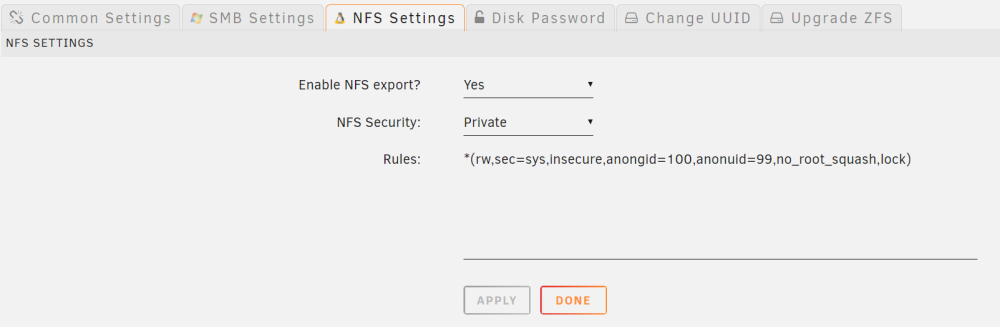
Set the "Enable NFS Export" to "Yes":
-
Don't double post. Response is in your other post. I'm going to lock this post.
-
Try setting up a Wireguard tunnel between the two servers.
-
Be sure you have the latest version of UD, then go to a command line and type 'ud_diagnostics'. Post the /flash/logs/ud_diagnostics.zip file.
-
Seeing this when I go to CA: Something really wrong went on during force_update Post the ENTIRE contents of this message in the Community Applications Support Thread https://forums.unraid.net/topic/38582-plug-in-community-applications/ OS: 6.12.10 Browser: Mozilla/5.0 (Windows NT 10.0; Win64; x64) AppleWebKit/537.36 (KHTML, like Gecko) Chrome/124.0.0.0 Safari/537.36 Language: <br /> <b>Warning</b>: Array to string conversion in <b>/usr/local/emhttp/plugins/community.applications/include/exec.php</b> on line <b>372</b><br /> {"status":"ok","script":"feedWarning('Primary Server');$('.statistics').attr('title','April 26, 2024 @ 5:06 am');"} EDIT: Also see aphp warning: [26-Apr-2024 08:53:50 America/Chicago] PHP Warning: Array to string conversion in /usr/local/emhttp/plugins/community.applications/include/exec.php on line 372
-
Yes, and none unless you want UD to manage the device again. Historical devices only remembers device settings so they are restored when a drive is reinstalled. This is how a auto mounted USB device for backups works. The settings are remembered in the historical devices so UD knows what to do with the drive when it is re-installed or hot plugged.
-
I suppose it is possible you have a bad disk.
-
You will get the same issue. Post your diagnostics here.
-
Working for me. Try again, there may have been a temporary issue.
-
I forgot that different versions of tmux require different versions of libc. The version of libc in Unraid varies by Unraid version, so I have to do a version check to see which version of tmux can be installed for the version of Unraid running. I can't update libc, because it will break Unraid. It was an easy fix once I remembered what I needed to do.
-
Update the plugin and reboot to clear up the tmux issue. Uninstalling and re-installing the plugin will not work.
-
I'm working on a fix and will update the plugin shortly.
-
Try some of the ideas mentioned earlier in this forum post. If I can get ideas from users on what additional settings the AD Extras plugin needs, I can implement those. Unfortunately, I don't have any way of testing AD because I do not have a Windows server. I rely on the users here to give me ideas on what is needed.
-
This is your rule. IP address and options.




