





Everything posted by dlandon
-
Update UD Preclear and see if it solves your issue.
-
At the end of a disk, the write takes longer and the dd write may time out too soon on a very large disk. I've already extended the time out, but it might need to be even longer.
-
No, here: Go to Settings->Unassigned Devices.
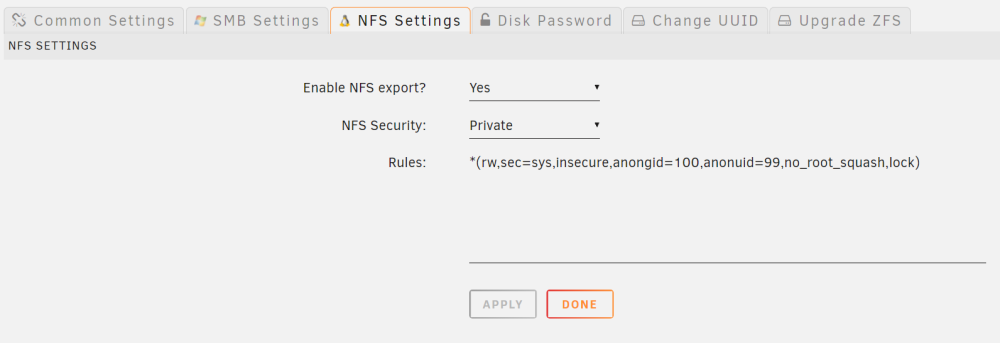
-
You are using UD to mount that disk. Go to the unassigned devices settings and enter your rule there. UD will then apply it to the exports file.
-
Go to a command line and run this command: ud_diagnostics Then post the /flash/logs/ud_diagnostics.zip file. There are some things I need to confirm in your setup.
-
Ok, it's not timing out. The issue is the NFS port (2049) on your remote server is not open.
-
Try this command: /usr/bin/nice /usr/bin/timeout 2 bash -c '(echo >/dev/tcp/100.67.144.43/2049) &>/dev/null'; echo $? I've adjusted the timeout. I think the command is timing out and returning a value that indicates the server is not available.
-
As noted on the "Active Directory Extras" page, if you change the backend database, you need to re-enter all your permissions. The default backend database in Unraid is 'hash' and if you change to 'tdb', you have to reset all your permissions.
-
On the UD page, do the device settings show as 'Dev X'?
-
UD no longer pings remote servers. Instead it checks that the NFS port is open on the remote server. Because of security, some servers don't respond to a ping. Run this command and post the result: /usr/bin/nice /usr/bin/timeout 1 bash -c '(echo >/dev/tcp/100.67.144.43/2049) &>/dev/null'; echo $?
-
Yes, but please do the refresh so the device designations show up correctly.
-
New UD release: Fixed several situations where all unassigned disks don't show on the UD page. Added a diagnostics script for collecting information specific to UD that doesn't show in the Unraid diagnostics. This should make it easier to troubleshoot UD specific issues. It has gotten more difficult to shoot down some of the issues comming up now. This should help. For the moment, it is a command line tool only.
-
Update UD and see if the situation is fixed. After updating, click the double arrows in the upper right of the UD page to refresh the udev and hot plug info.
-
Try clicking on the "Clear Cache" button.
-
Did you make any adjustments to the settings?
-
Nowhere in the logs is there an attempt to mount a remote share either manually or auto mount. It doesn't indicate any remote shares added. When UD gets to the point where remote shares are to be auto mounted, it will either mount the remote share or indicate it is not set for auto mount. I see none of this.
-
I see several issues: Apr 21 17:18:48 Tower unassigned.devices: Mounting 'Auto Mount' Remote Shares... ... Apr 21 17:18:54 Tower unassigned.devices: Mounting Remote Share '100.67.144.43:/mnt/user/Backup-Vegard'... Apr 21 17:18:54 Tower unassigned.devices: Remote Server '100.67.144.43' is offline and remote share '/mnt/user/Backup-Vegard' cannot be mounted. Then later: Apr 21 17:25:37 Tower unassigned.devices: Warning: 'Backup-Vegard' is already added as a 'NFS' share. Things to look at: You have the default 5 seconds delay before trying to mount remote shares, but in the log I see where later you set 20 seconds. That should help. Can you mount the remote share after Unraid is fully started and running? I don't understand the "Warning: 'Backup-Vegard' is already added as a 'NFS' share.". Are you duplicating this NFS share?
-
Post diagnostics.
-
Cache_dirs will cache everything when you use default share settings. It will even cache UD Remote Shares, which is very inappropriate. Set up cache_dirs to only include shares you want cached. Don't set it to cache SSD disks, that's not necessary.
-
Please install the "Active Directory Extras" plugin from CA and make the adjustments you think you need to get AD working. If there are other settings required, let me know and I'll make adjustments to the plugin. I believe it will let you make the changes needed to get AD working.
-
Fixed in latest release. Update again,
-
Install the OC docker container.
-
New release of UD: Fixed a case where UD could potentially cause an unclean shutdown if you have a rootshare mounted. Fixed a few issues related to remote server name lookup. Improved adding remote share to show which protocol you are working with.
-
I'm adding an 'Array' indicator to the mount button to indicate a possible array disk dropped offline so UD won't allow any operations on the disk. The device sdX indicates that Unraid doesn't see the disk as an unassigned disk.
-
Are you using a docking station or drive bay?


