





Zan
Members
-
Joined
-
Last visited
Everything posted by Zan
-
I've got a Windows11 VM with VF passthrough working but getting the same "Host Encoder" errors in Parsec. Using Remote Desktop Connection from a separate machine works well, it looks like GPU acceleration and a separate audio device are all added without any additional driver install or anything. In order to avoid using a separate machine for RDP, I'm trying to get rdesktop or maybe Reminna working within unRAID GUI boot screen. Steps so far: Installed these packages: https://slackware.uk/slackware/slackware64-15.0/slackware64/xap/rdesktop-1.9.0-x86_64-4.txz https://slackware.uk/slackware/slackware64-15.0/slackware64/l/libsamplerate-0.2.2-x86_64-1.txz Disabled NLA in Win11 System Properties->Remote tab (Win+R - sysdm.cpl) to bypass CredSSP error: But getting this error when running rdesktop via the GUI boot terminal: Core(error): locale_to_utf16(), iconv_open[UTF-8 -> UTF-16LE] fail 0xffffffffffffffff Aborted Parsec I assume has faster streaming but RDP seems the easier to setup - if I can get rdesktop or Reminna working and audio enabled in unRAID GUI boot mode this might be a good option.

-
I'm seeing the same issue. Can see a list of peers but connections can't be established. Is there a log that can be enabled in qbittorrent to identify why or maybe a bash command in the docker container I could run to check? I'm assuming it's maybe that UDP and TCP port 6881 in the qbittorrent docker config aren't able to work through the VPN Manager's wireguard config as a regular wireguard docker with qbittorrent works fine. @bonienl any thoughts?Yeah those parameters worked. Thanks for your help.I've only got a server witih 16GB RAM, I thought docker get maybe 12GB to itself if needed but the container was getting killed at around 7GB utilisation. Thanks, if you can think of anything I can tweak, let me know.Hey Goobaroo, thanks for your work on these dockers. Just tried installing 10.0.0 and the container gets killed. Logs attached, any help you can provide would be great. VaultHunters3.log.gzIf you have your own domain and cloudflare is your registrar then I'd recommend setting up an argo tunnel and using the cloudflared docker. Otherwise use the swag docker. SpaceInvaderOne has a video for swag. For cloudflared there's site with good instructions.If you don't have another docker container using port 80 then it is probably unRAID (Check this in Settings -> Management Access -> HTTP Port). Just use another number instead. 8080 is another common port number to use, then just use numbers up from there.I've set up VPN tunneled access for Docker using KeepSolid. Prowlarr docker works fine but qBittorrent is stuck on "Downloading metadata" for anything I throw at it - I've checked the IP address used within qBittorrent and it's the VPN IP address. Any ideas on what I can do to get downloads working?I've used vfio-bind on all devices in IOMMU group 10 and passed through the audio device to the Win10 VM, and it's all working perfectly. [8086:a348] 00:1f.3 Audio device: Intel Corporation Cannon Lake PCH cAVS (rev 10) If the USB3 to SATA cables continue without issue this might be an option for anyone wanting a tiny unRAID setup.I have unRAID running on an i3-8100b Mac Mini (2018 model). I wanted to build the smallest rig possible - previously I'd considered a mini-ITX board in an Inwin Chopin case with HDDs in a Kingwin MKS-535TL enclosure connected via SATA cables hanging out of the case. I know I'm risking HDD drop-outs with them being connected via USB3 to SATA cables (HDDs are in the Kingwin enclosure) but I'll continue monitoring for a few days, and so far so good. I formatted the internal nvme to be used as cache, and this has the benefit of forcing the Mac to boot from USB automatically 🙂 I have managed to get a Win10 VM running with IGD passthrough (VFIO-PCI machine i440fx-6.1, SeaBIOS, GPU ROM from https://github.com/patmagauran/i915ovmfPkg) but the audio is on a separate IOMMU group and I can't pass it/them through. I will try downstream and multifunction PCIe ACS override settings shortly, hopefully the 1f.3 device will be freed up for passthrough. IOMMU group 10: [8086:a30e] 00:1f.0 ISA bridge: Intel Corporation Cannon Lake LPC Controller (rev 10) [8086:a348] 00:1f.3 Audio device: Intel Corporation Cannon Lake PCH cAVS (rev 10) [8086:a323] 00:1f.4 SMBus: Intel Corporation Cannon Lake PCH SMBus Controller (rev 10) [8086:a324] 00:1f.5 Serial bus controller [0c80]: Intel Corporation Cannon Lake PCH SPI Controller (rev 10) IOMMU group 11: [106b:2005] 02:00.0 Mass storage controller: Apple Inc. ANS2 NVMe Controller (rev 01) [N:0:0:1] disk APPLE SSD AP0128M__1 /dev/nvme0n1 121GB [106b:1801] 02:00.1 Non-VGA unclassified device: Apple Inc. T2 Bridge Controller (rev 01) [106b:1802] 02:00.2 Non-VGA unclassified device: Apple Inc. T2 Secure Enclave Processor (rev 01) [106b:1803] 02:00.3 Multimedia audio controller: Apple Inc. Apple Audio Device (rev 01) Just thought I'd post here to see if others have tried a Mac Mini with unRAID.Thanks for the reply, tankertux. Couple questions: 1. Do I leave the port mappings as is for the wireguard and jackett containers? 2. What port mappings do I need for the nginx container? 3. Can you provide a sample of your nginx config file/s?Sorry to dig up this old thread but I've been trying to achieve the same outcome as OP. I had this running on Docker for Mac, and want to achieve the same on unRAID via dockerMan rather than using docker-compose: version: "3.9" networks: vpn: services: jackett: image: lscr.io/linuxserver/jackett container_name: jackett environment: - PUID=1000 - PGID=1000 - TZ=Europe/London #- AUTO_UPDATE=true #optional #- RUN_OPTS=<run options here> #optional volumes: - ./jackett:/config - /mnt/user/Downloads/watched:/downloads #ports: #- 9117:9117 restart: unless-stopped networks: - vpn network_mode: "service:wireguard" wireguard: networks: - vpn image: lscr.io/linuxserver/wireguard container_name: wireguard privileged: true cap_add: - NET_ADMIN - SYS_MODULE environment: - PUID=1000 - PGID=1000 - TZ=Europe/London #- SERVERURL=wireguard.domain.com #optional #- SERVERPORT=51820 #optional #- PEERS=1 #optional #- PEERDNS=auto #optional #- INTERNAL_SUBNET=10.13.13.0 #optional #- ALLOWEDIPS=0.0.0.0/0 #optional volumes: - ./wireguard:/config - /lib/modules:/lib/modules ports: - 51821:51820/udp - 9117:9117 #jackett sysctls: - net.ipv4.conf.all.src_valid_mark=1 - net.ipv4.conf.all.rp_filter=2 restart: unless-stopped So I've set up the wireguard docker and added port 9117 to it, removed port 9117 from the jackett docker and set --network="container:wireguard" then in the wireguard docker added port 9117, but pointing the browser to port 9117 times out. curl canhazip.com in both wireguard and jackett dockers shows that they're using the VPN, but I can't figure out how to get the request to port 9117 to reach the jackett docker and return a response. Any ideas?Thanks @ich777, really appreciate your help - thanks for helping the unRAID community with your plugins/development and assistance on the forums.My WinTV-quadHD card has been having issues for a week or so, probably since a recent re-start. I'm getting a bunch of cx23885 errors including the common "mpeg risc op code error". This page indicates it's likely due to Vt-d/Vt-x https://github.com/b-rad-NDi/Ubuntu-media-tree-kernel-builder/issues/69 Is anyone else seeing similar issues wiith their WinTV-quadHD card recently? I had this at the end of my /boot/config/go file for some time now but it doesn't seem to help anymore. echo "options cx23885 dma_reset_workaround=2" >> /etc/modprobe.d/cx23885.confHere's a workaround, open a console within the container and run this code. Replace google.com with the site you're having issues with. If anyone has a better solution please post here echo | openssl s_client -servername google.com -connect google.com:443 | sed -ne '/-BEGIN CERTIFICATE-/,/-END CERTIFICATE-/p' >> /etc/ssl/certs/ca-certificates.crttt-rss docker: I've setup my tt-rss docker as a subdomain with reverse proxy (linuxserver.io swag docker) Unfortunately I'm getting this error when attempting to subscribe to a feed: Couldn't download the specified URL: ; 60 SSL certificate problem: unable to get local issuer certificateI saw a youtube clip by IBRACORP on installing Discourse via an Ubuntu VM on Unraid and there was a comment about using bitnami's docker-compose to install it without using a VM, so I thought I'd give it a try, and I got it mostly working, it just needs some tweaks which I don't have the time for, to stop chromium (edge/chrome) from flagging it as untrusted. For anyone interested here were my steps: 1. Setup CNAME for discourse.<mydomain> 2. Change ddclient.conf to enable dynamic DNS for CNAME 3. Installed portainer docker through Community Apps, and docker-compose via pip from command line (and in unraid /boot/config/go for future re-starts) 4. I wanted to use gmail for SMTP for my discourse installation so created an app-specific password for Discourse via account.google.com 5. Made the following changes to bitnami's docker-compose.yml file: Changed port to - '3000:3000' Added /mnt/user/appdata/discourse prefix for all volumes (eg. redis_data -> /mnt/user/appdata/discourse/redis_data) Added the following environment variables for discourse and sidekiq services: - DISCOURSE_HOSTNAME=discourse.<mydomain> - SMTP_HOST=smtp.gmail.com - SMTP_PORT=587 - SMTP_USER=<my gmail login> - SMTP_PASSWORD=<app specific password> Added your reverse proxy docker network to discourse service networks: - proxynet Added the following to the end of the docker-compose.yml file to flag it as an externally-created docker network: networks: proxynet: external: true 6. Added discourse subdomain to swag subdomains variable to have swag create a new certificate for the subdomain. 7. Added the following proxy conf to nginx (/mnt/cache/appdata/swag/nginx/proxy-confs/discourse.subdomain.conf) for discourse (note that the IP address was hard-coded by getting the IP address for the discourse docker after first start, as I couldn't figure out how to modify the line #set $upstream_app discourse_discourse_1; in order to have nginx automatically figure out the IP address): ## Version 2020/12/09 # make sure that your dns has a cname set for discourse and that your discourse container is not using a base url server { listen 443 ssl; listen [::]:443 ssl; server_name discourse.*; include /config/nginx/ssl.conf; client_max_body_size 0; # enable for ldap auth, fill in ldap details in ldap.conf #include /config/nginx/ldap.conf; # enable for Authelia #include /config/nginx/authelia-server.conf; location / { # enable the next two lines for http auth #auth_basic "Restricted"; #auth_basic_user_file /config/nginx/.htpasswd; # enable the next two lines for ldap auth #auth_request /auth; #error_page 401 =200 /ldaplogin; # enable for Authelia #include /config/nginx/authelia-location.conf; include /config/nginx/proxy.conf; resolver 127.0.0.11 valid=30s; #set $upstream_app discourse_discourse_1; set $upstream_app 172.18.0.12; set $upstream_port 3000; set $upstream_proto http; proxy_pass $upstream_proto://$upstream_app:$upstream_port; } } Hope this helps anyone who wants to give discourse on their server a try. I'm trying to put together a site for a sport club and ultimately decided that discourse wouldn't suit my needs, so haven't bothered to https and proxy-conf issues that I came across.Hi @Picha, can you post your current kernel settings? I'm now getting this error after trying out 6.9.0-rc2, and when I reverted back to 6.8.3 I'm still getting the error.No worries. Good to have that as a fall-back. I appreciate your help and thanks for this plug-in and the kernel helper docker. Keep up the great work.Attached is photo of the console messages showing dvb_core not found. Also syslog.txt and lsmod.txt from a second boot of the machine. There are mxl5007t errors. I've tried modprobe mxl5007t in /boot/config/go and that didn't help. lsmod.txt syslog.txt
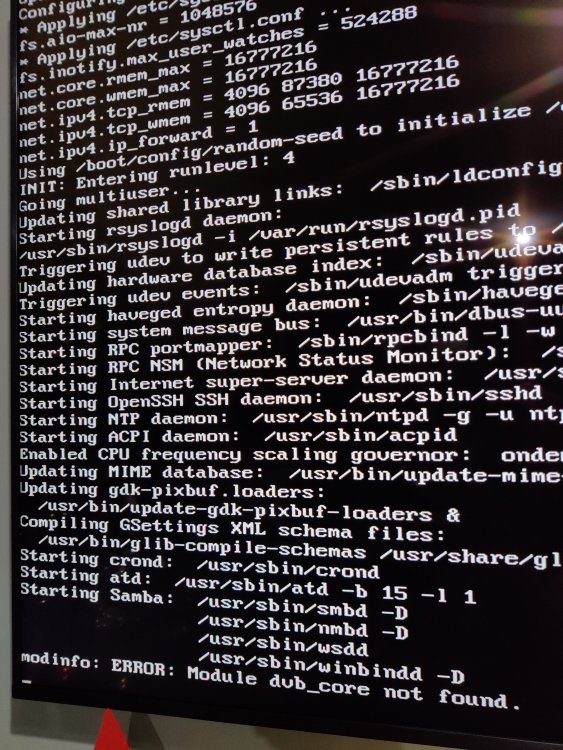 Hi @ich777, thanks for your work on this new plugin. I'm also getting a "dvb_core not found" error during system startup. Subsequently my AF9015 USB sticks aren't getting initialised properly, but I think it's due to the AF9015 firmware not being available during initialisation first time, as when I remove the sticks and re-insert them, the firmware is loaded fine, and /dev/dvb gets created. Attached is my syslog syslog.zipSuccess! Downloaded the Intel VGA drivers (v15.40.16.64.4364) off the Gigabyte website for my Mobo (Z97-D3H) and that added an Audio Output device. Then in the Sound Control Panel->Playback->Properties->Advanced, changed default format to 24 bit, 48000Hz.Windows 10 with i5-4460 - I've got iGPU video working fine however audio is not working under LibreElec (no matter which Audio device I select in System settings) or Win10 VMs, but it works perfectly in a Win7 VM after installing the Intel HD 4600 Graphics driver (version I downloaded off Intel's website for Win7 is 15.36). In Win10, the Audio icon in the system tray shows "No Audio Output device is installed". After installing the latest drivers off Intel's website (win64_15.40.47.5166), still no Audio. Either the Win10 driver architecture changed or Intel made a change to their Win10 drivers that prevents Audio over HDMI when using iGPU passthrough. If anyone has a solution for Win10, would really appreciate it.Nice work, I also gave this a try on the weekend but even though the app has analysed my 300 photos, I'm not getting any face/person results. I used model 3 (HOG) as model 1 (CNN) errored when I tried running occ face:setup -m 1 Are you getting any faces/persons detected?


