





AaronA
Members
-
Joined
-
Last visited
-
Deluge and qBitorrent both not showing WebGUI anymore, this used to work previously. I had been running the Deluge for a while, and only just recently about a week or so the webGUI had stopped working, the only change was upgrading the Unraid version, as i had the Deluge locked into version 2.1.1-6-03 Original version with issues: binhex/arch-delugevpn:2.1.1-6-03 Are others seeing this same issue, i saw another post similar, but the response was talk to the support thread, but that is not helpful response since the common area here is unraid. Deluge version: ghcr.io/binhex/arch-delugevpn qBittorrent: ghcr.io/binhex/arch-qbittorrentvpn There is no errors that exist in the logs unfortunately
-
Now i feel silly, i thought i was doing the correct process. Thanks for the update
-
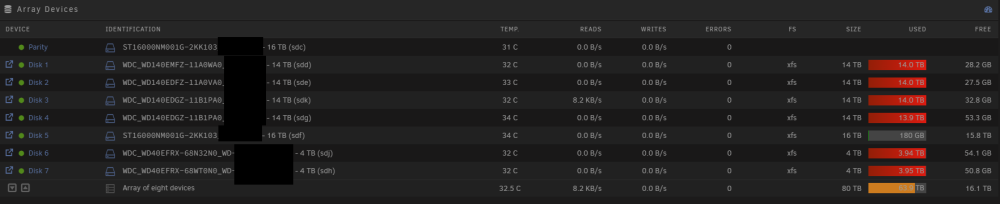
This is a strange one, as I have replaced many a drive, but this time i lost a whole 4TB of data when upgrading from a 4TB to a 16TB drive, the drive showing as only 181 GB used. Unraid Version: 6.12.4 1. I removed the drive 2. Insert new drive 3. Started array 4. Clicked format So i guessing above was correct unless i missed a step Luckily i was replacing the drive so i still have the data to restore it, but wanted to raise this and see if i missed a step or something has changed for next drive
-
I have currently installed 6.10 sometimes the GUI is unresponsive frozen like, I can still access the SSH, but normal "Reboot" and "shutdown now -r" doesn't work Is there another way to do a hard reset remotely via SSH?
