





demonmaestro
Members
-
Joined
-
Last visited
-
After hours of messing with this trying to get it to work finally did. Question: Will the regular system(docker) (non cron version) scan and network check if using normal network and not the docker bridge?
-
Good day, So I had noticed that the log file has gotten full. A bunch of suggestions was to just delete the old log files that I had done but the log file just fills back up. I'm not really seeing anything off the log button that would cause it to fill up. Even the "Fix Common Problems" app is suggesting me to post here. My uptime is only 185 days. Thank you for your time and help. tower-diagnostics-20220118-0930.zip
-
When I go to set eth2 (along with eth3) to 802.3ad it still keeps reverting it to Active-backup
-
That didn't work. tower-diagnostics-20210619-0224.zip
-
Here you go. It's a brand new install. This has happened on a couple different Supermicro systems. Both with onboard NICS. tower-diagnostics-20210618-1942.zip
-
Anyone?
-
I am trying this again on a fresh new install of 6.9.2 and still same issue on a brand new machine. Select 802.3ad and hit save. Once I hit save it will revert to active-backup. I've also notice that its saying the Interface Ethernet port 2 is down. but when I go to terminal and do a "ip a" its showing the eth2 and eth3 as up and showing the bond2 as up. The switch is also showing the connections as up and is configured for 802.3ad.
-
Good day, So I had rebooted the machine multiple of times and it never did recreate it. I had went up to the DC and "reinstalled" the backup (6.8.3) that I had of the Thumb drive. everything was working as entended. I had then installed 6.9.1 and it broke the 802.3ad again and set it to active-backup. I had reverted back to 6.8.3 and things are back working. Thank you for responding John_M
-
I had also noticed that its not putting a bond4 in the "ip a" list. Just as proof 6.9.1 is not good i downgraded to 6.8.3 and it worked\ at least the 802.3 but its still not setting it right in the actual networking config deleted the networking. then went in and reconfigured the networks. restarted. networking.cfg gone for good. rebooted. nothing This box is in a DC. Don't have local access. I do have IPMI to the box.
-
I am having the same issues basically. So this is an OS issue.
-
I am on 6.9.1, 802.3ad was working before upgrading. Now when I try to set it back to 802.3ad it will revert back to active-backup when I click on save
-
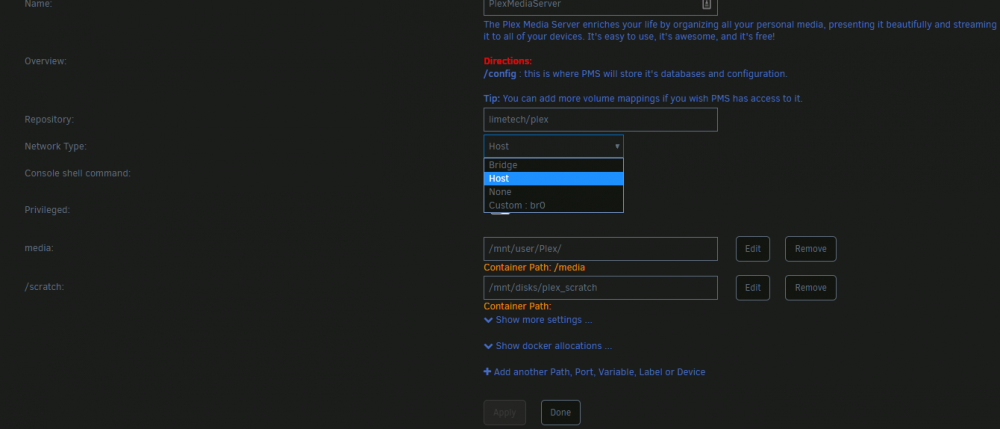
I am trying to move my plex from one network br0 over to my other network on br2. However I am not seeing any option to move it. I am running VMs on br2 so I know its working. What am I missing? Under Network type: it only shows br0. Thank you for the help.
-
here is my findings.. It doesn't like using a custom IP with using br0 (refuse to connect when trying to go to webui) Try changing it back to bridge0. Still wont connect. delete docker container and reinstall. still same situation. Go into terminal and force remove the folder and reinstall. works. follow Spaceinvader One instructions on deleting admin out of as.conf. then i do a force update. (refuse to connect) this thing is more temperamental then a damn car going to a mechanic.
-
Thank you this helped on my issue as well.
-
Only 256GB but have the ability up to 2TB ECC 3DS LRDIMM or 1TB ECC RDIMM. But thats minor details.

