





Blacknd
Members
-
Joined
-
Last visited
-
This is the first thing I did! I appreciate the help man!
-
Well... That was easy. Everything seems to be working good now. What did I lose by deleting the config?
-
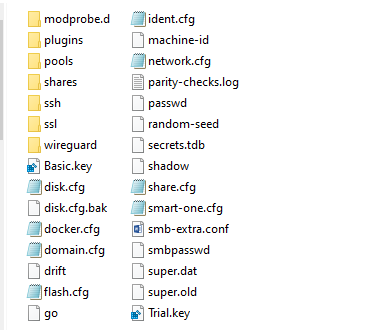
I don't see /config/smart-all.cfg, only /config/smart-one.cfg. Is that a problem?
-
I'm having issues to where my unRAID GUI is partially unresponsive. I can click the tabs at top (dashboard, main, shares, users, etc.) but I cant click anything inside the tabs. I have errors like this all over the GUI. Warning: syntax error, unexpected '"' in /boot/config/smart-one.cfg on line 3 in /usr/local/emhttp/plugins/dynamix/include/CustomMerge.php on line 20 Warning: Use of undefined constant disk - assumed 'disk' (this will throw an Error in a future version of PHP) in /usr/local/emhttp/plugins/dynamix/include/DashUpdate.php on line 132 I'm unable to make a backup of the flash drive through the GUI. I pulled out the drive and made a copy of the drive on a windows PC. Will this be OK for a backup? Diagnostic log is attached. I'm very limited on my knowledge of unRAID so any help would be appreciated. tower-diagnostics-20210906-0837.zip

