





sublevel4
Members
-
Joined
-
Last visited
Everything posted by sublevel4
-
Thank you for your time and assistance.
-
I was able to move the data off the drive. From my understanding(please correct me if i am wrong) i can then go through a process to remove that drive and rebuild the parity based on the remaining drives, correct? I have 4 2tb drives that are old but not a lot of hours.
-
Yes, I get a read failure. I will have a 2tb that I can replace it with, so I will have to shrink my array.
-
Ok here is where i stand right now. Sorry about the file. the-matrix-diagnostics-20250506-0711.zip
-
I had another issue, so I am back in this state. I have attached a new diagnostics file. the-matrix-diagnostics-20250503-1104.zip
-
Yes, I think so. I did try to put it back in, but when I did that, it said that the drive was too small. That was a few days ago.
-
If start the array, the little wavy logo animation shows and stays that way for over 30 minutes. Usually, that's when I refresh the page. It says the array is "starting" and that the 1tb drive is mounting. I have attached the diagnostic at that stage. I also attached a screenshot of the array starting and after I refresh it, I hope that helps. the-matrix-diagnostics-20250502-1407.zip
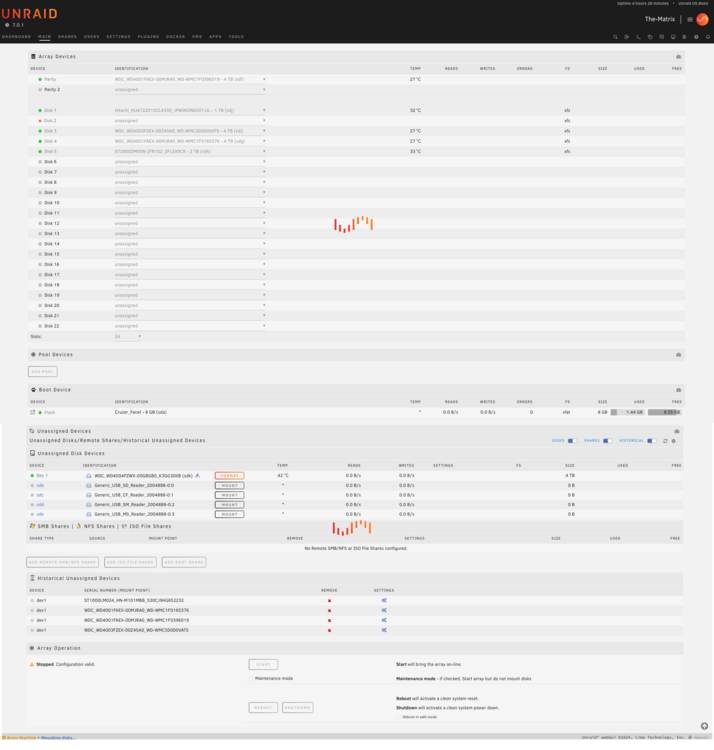
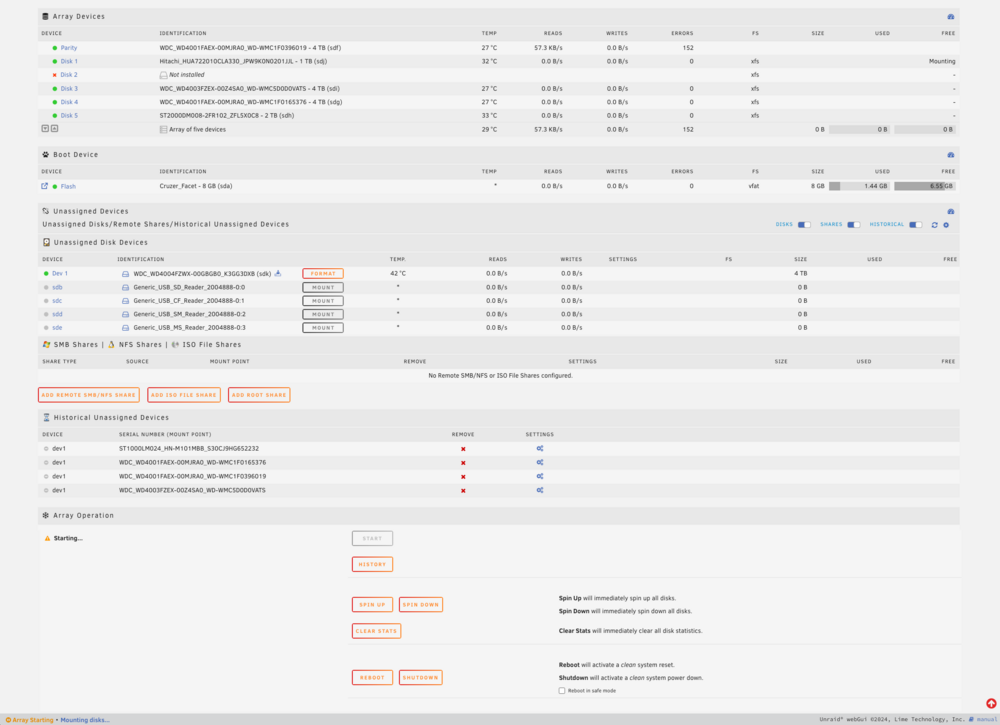
-
The only way I can get the array to start is to remove that drive. Will that still provide useful information?
-
I am replacing a 1tb drive with a 4tb to increase capacity. When I try to start the array to rebuild the data for that drive, I have a separate drive that I have not previously had issues with, the drive won't mount so the array never starts. It kinda locks up the system as I can't restart or shutdown since it is still trying to mount the drive. I have hard restarted and started the array in maintenance mode, the xfs status comes back with no errors, and the long SMART test comes back with no errors. Where do I go from here?
-
I will get a new diagnostics file. I started a fix from the webUI about an hour ago. I still have the animation on the screen. I haven't ever needed to do this so i am not sure how long it should take.
-
In my unraid system i replaced a 1tb drive with a 4tb. I was able to format, mount and assign the 4tb to disk3 replacing the 1tb. I started the array, it started the data rebuild. after 12 hours that process completed but now the drive is unmountable. I have tried to repair the xfs and got a report that it was successfully repaired. I rebooted the system and the drive is unmountable again. I have tried this with 2 different 4tb drives. How do I fix this? the-matrix-diagnostics-20250424-2222.zip
-
Did you ever find a solution for this issue? I have one folder that will not move and i get a message similar to yours about the directory and file permissions. I have used the common problems plugin and don't get anything relevant back from that. I have run the Docker Safe New Permissions several times and i still get the • 198 folder(s) with a permission other than 'drwxrwxrwx'. Trying to figure this out.
-
Well, I guess I will be doing this the manual way. I will look up how to do that, I am guessing there is documentation on that. My motherboard only has two slots so might find some larger ram. Thank you for your help!
-
hmmm.. it is only 1GB I have attached the system diagnostics zip file jarvis-diagnostics-20181005-1655.zip
-
I click on the check for updates it says there is one. current is 6.3.5 available is 6.5.3. click update and i see the following plugin: updating: unRAIDServer.plg plugin: downloading: https://s3.amazonaws.com/dnld.lime-technology.com/stable/unRAIDServer-6.5.3-x86_64.zip ... failed (File I/O error) plugin: wget: https://s3.amazonaws.com/dnld.lime-technology.com/stable/unRAIDServer-6.5.3-x86_64.zip download failure (File I/O error) never gets past 50% What am I missing?

