vonnaone
Members
-
Joined
-
Last visited
Everything posted by vonnaone
-
JoregeB, Thank you for the support. I measured the RAM and it seems that the notch is incorrectly placed, the blanked area on the module in the middle is on the wrong side of the notch. I measured it with calipers and the dimensions per the spec don't align. oh well, sending it back to Newegg. Thanks again for your support.
-
So I'm not really sure where to start to troubleshoot a new server build. I have an X13SAE-F-O board, I have Kingston KTL-TS548D8-32G sticks for RAM. For the life of me, I can't get the RAM installed. The notch in the RAM does not align (even checking both orientations on the RAM). In what appears to be the correct orientation it is off just a little bit and I can not seat it. The X13 has one side static and one side with a clip on the RAM installation area. I've been struggling to get these installed but I don't want to damage the RAM/MB. Has anyone reported similar issues? Thank you in advance.
-
So just to circle back I had some time this weekend to play with it all. In short, it is all working. Still not sure where it went wrong. Step 1 of my process was to update my flash drive which was only 2 MB and causing me grief on the updates. That went well and I went with a Sandisk 32GB USB 2.0 drive. Somehow my H310 adapter went out of IT mode in the process, not sure what triggered that which was the cause of my frustration thinking everything was good. Who knows, I don't work in IT and only play it on the weekends. Step 2, follow the guide here to re-right everything on the H310. Site: https://fohdeesha.com/docs/H310-full.html All well and good and thanks to @JorgeB , many kudos for his help on the diagnostics file. I'm no As an aside, I was able to convince my wife that our 12 year old server needs replacement so she agreed to that commitment to modernize. :)
-
Thanks @JorgeB . I'll give that a shot, not sure what changed on my side as it has been up and running for about 10 years. I appreciate your support. Best, TC
-
Thank you JorgeB for the tip. Diagnostic file attached. I'm not good with the Mac so it is zip.downlaod.zip. Not sure if there is better way to submit to the group. TC unraid-diagnostics-20250728-1640.zip.download.zip
-
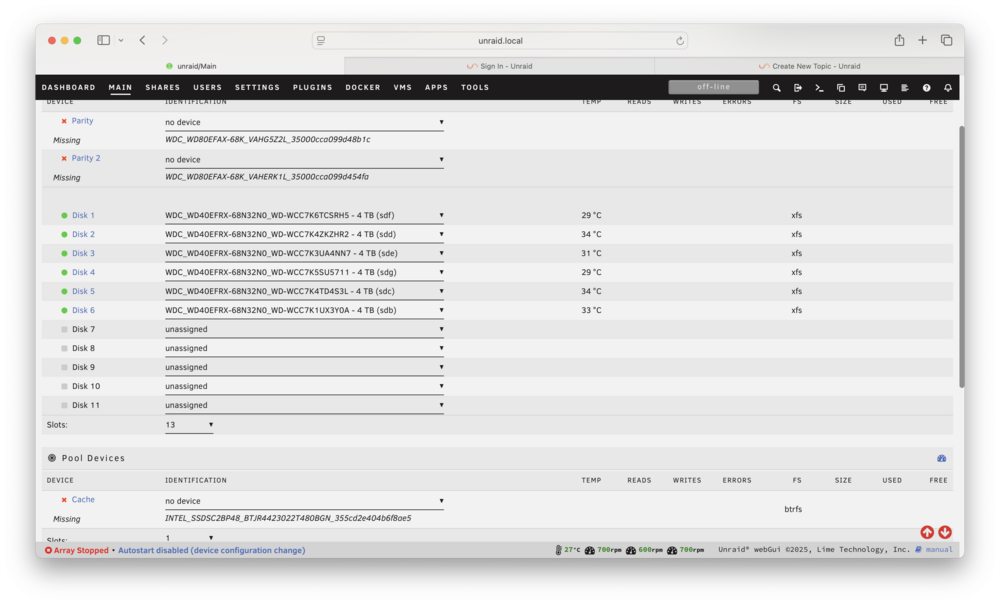
So I updated my USB boot drive to a larger format. That all went fine and I have access to the GUI with the new flash drive. I have a PERC H310 SAS that had been working just fine in IT mode for the last 10 years but after the update to latest production release, the three drives associated with it are not showing up so I have not started the array for fear of loosing the cache drive. The parity drives I'm willing to risk. I went into the SAS BIOS screen on original boot of the H310 and the drives show up but they are not pulling through to unRaid and thus can't assign them to the preferred locations leaving those 3 slots empty. Any thoughts on how to troubleshoot? Attached is my dmesg log and screenshot of the drive assignment page. What is causing me grief is Parity 1, Parity 2 and Cache...all attached to the SAS. Everything was working until I replaced the boot USB stick. The only system change was updating the boot USB stick (via Unraid upgrade online path) for expanded memory in the USB stick and its CID number. Everything else was static. Thanks unraid.txt