





hoosierdaddy
Members
-
Joined
-
Last visited
Everything posted by hoosierdaddy
-
I forgot to update the gateway in network settings on my new router. I found the solution from Squid on another post. Thanks Squid!
-
Hello. I recently moved my server from Mexico to the US and am having some issues with CA. I get the "Download of appfeed failed" error. I never had that before. New ISP and new router... I am running Unraid 6.4.0. Actually my problem started with Binhex deluge not working when using my vpn (worked in Mexico). It worked without the VPN and after much troubleshooting, I decided to try to delete and reload the app. So, I deleted the app and went to re-install and that is when I discovered CA not working. I set my DNS address to 8.8.8.8 and 8.8.4.4 with no success in solving the problem. I have rebooted my modem and router. Thanks in advance for your help!
-
Well after another reinstall and a reboot, everything is working. Strange. Not sure the exact problem but thanks to you 3 guys for your support.
-
I put my mapping back to how it was 3 days ago (matches the recommendations above unless I'm still overlooking something). I still get no imports, also now my "activity" section in Sonarr is blank. I only get this error: Error during RSS Sync: Root element is missing. To confirm my mapping: App Name Container Volume Host Volume Transm. /config /mnt/cache/appdata/Transmission/ /downloads /mnt/user/_temp/downloads/ sonarr /config /mnt/cache/appdata/sonarr/ /downloads /mnt/user/_temp/downloads/
-
Still no luck. I am still getting this error: 17-4-28 19:51:09.3|Error|DownloadedEpisodesImportService|Import failed, path does not exist or is not accessible by Sonarr: /downloads/finished/The.Island.With.Bear.Grylls.S04E01.720p.HDTV.x264-QPEL 17-4-28 19:51:09.3|Error|DownloadedEpisodesImportService|Import failed, path does not exist or is not accessible by Sonarr: /downloads/finished/Tiny.House.Hunters.S04E15.Freedom.in.Going.Tiny.720p.WEBRip.h.264-TOPKEK In Sonarr, I AM able to see all Activity of things that have been grabbed and progress during download. I test the connection with Transmission and it is good. Download path for transmission docker is: /mnt/user/_temp/downloads/ - Inside of transmission app download is to: /downloads/finished/ Download path for sonarr docker is: /mnt/user/_temp/downloads/finished/ * If I change this path to match transmission (/mnt/user/_temp/downloads/), I get NO import and NO errors The files are for sure downloading to "_temp/downloads/finished" folder (verify in windows explorer). I'm wondering now if I have a permissions issue. I've clicked around in multiple places and tried changing somethings (then changing back) but no dice so far. Any ideas?
-
I found the problem started from last Wednesday. That's the same day I upgraded to 6.3.3. I did find tonight that somehow the download path got changed on Sonarr and it was looking in the wrong directory. I fixed that but I'm still having issues. I get the following log(s) for every file in my download directory: [Error] DownloadedEpisodesImportService: Import failed, path does not exist or is not accessible by Sonarr: /downloads/finished/Frontline.S2017E08.Last.Days.Of.Solitary.720p.WEBRiP.H.264-TOPKEK The access mode is set to "read/write" inside of the Sonarr docker so I'm a bit lost. Thanks for your help.
-
Hello. Sonnar had been working very well for me for quite some time but last week I noticed that it had downloaded shows but would not copy them into my media folder. If I manually copy them over and refresh then Sonarr will update and see that the media is in my media folder. I was running version 2.0.0.4613 when the problem started so I updated to version 2.0.0.4689. I see this version information inside of the Sonar app. Strangely, when I look at the docker in Unraid, it shows that an update is ready, even after I update, it still says an update is ready. I deleted the docker and resinstalled but have the same result. I am getting this log information: [Info] DownloadDecisionMaker: Processing 200 releases [Info] DownloadService: Report sent to Transmission. The.Last.Man.On.Earth.S03E15.Name.20.Picnics.Now.1080p.WEB-DL.DD5.1.H264-BTN[rartv] [Info] DownloadService: Report sent to Transmission. Bobs.Burgers.S07E18.The.Laser-inth.1080p.WEB-DL.DD5.1.H264-BTN[rartv] [Info] RssSyncService: RSS Sync Completed. Reports found: 200, Reports grabbed: 2 [Info] RssSyncService: Starting RSS Sync [Error] FetchAndParseRssService: Error during RSS Sync [v2.0.0.4689] System.Xml.XmlException: Root element is missing. at System.Xml.XmlTextReaderImpl.Throw (System.Exception e) [0x0002a] in <7a7beac9df414bd3b6be31930c5e0f8b>:0 at System.Xml.XmlTextReaderImpl.ThrowWithoutLineInfo (System.String res) [0x00017] in <7a7beac9df414bd3b6be31930c5e0f8b>:0 at System.Xml.XmlTextReaderImpl.ParseDocumentContent () [0x0041e] in <7a7beac9df414bd3b6be31930c5e0f8b>:0 at System.Xml.XmlTextReaderImpl.Read () [0x00097] in <7a7beac9df414bd3b6be31930c5e0f8b>:0 at System.Xml.Linq.XDocument.Load (System.Xml.XmlReader reader, System.Xml.Linq.LoadOptions options) [0x0001c] in <ecc1cf0a613547549e04fcee8cd17cf8>:0 at System.Xml.Linq.XDocument.Load (System.Xml.XmlReader reader) [0x00000] in <ecc1cf0a613547549e04fcee8cd17cf8>:0 at NzbDrone.Core.Indexers.TorrentRss.TorrentRssSettingsDetector.IsEZTVFeed (NzbDrone.Core.Indexers.IndexerResponse response) [0x0003c] in M:\BuildAgent\work\b69c1fe19bfc2c38\src\NzbDrone.Core\Indexers\TorrentRss\TorrentRssSettingsDetector.cs:200 at NzbDrone.Core.Indexers.TorrentRss.TorrentRssSettingsDetector.GetEzrssParserSettings (NzbDrone.Core.Indexers.IndexerResponse response, NzbDrone.Core.Indexers.TorrentRss.TorrentRssIndexerSettings indexerSettings) [0x00000] in M:\BuildAgent\work\b69c1fe19bfc2c38\src\NzbDrone.Core\Indexers\TorrentRss\TorrentRssSettingsDetector.cs:80 at NzbDrone.Core.Indexers.TorrentRss.TorrentRssSettingsDetector.GetParserSettings (NzbDrone.Core.Indexers.IndexerResponse response, NzbDrone.Core.Indexers.TorrentRss.TorrentRssIndexerSettings indexerSettings) [0x00000] in M:\BuildAgent\work\b69c1fe19bfc2c38\src\NzbDrone.Core\Indexers\TorrentRss\TorrentRssSettingsDetector.cs:63 at NzbDrone.Core.Indexers.TorrentRss.TorrentRssSettingsDetector.Detect (NzbDrone.Core.Indexers.TorrentRss.TorrentRssIndexerSettings indexerSettings) [0x0007d] in M:\BuildAgent\work\b69c1fe19bfc2c38\src\NzbDrone.Core\Indexers\TorrentRss\TorrentRssSettingsDetector.cs:58 at NzbDrone.Core.Indexers.TorrentRss.TorrentRssParserFactory.DetectParserSettings (NzbDrone.Core.Indexers.TorrentRss.TorrentRssIndexerSettings indexerSettings) [0x00000] in M:\BuildAgent\work\b69c1fe19bfc2c38\src\NzbDrone.Core\Indexers\TorrentRss\TorrentRssParserFactory.cs:55 at NzbDrone.Core.Indexers.TorrentRss.TorrentRssParserFactory+<>c__DisplayClass4_0.<GetParser>b__0 () [0x00000] in M:\BuildAgent\work\b69c1fe19bfc2c38\src\NzbDrone.Core\Indexers\TorrentRss\TorrentRssParserFactory.cs:32 at NzbDrone.Common.Cache.Cached`1[T].Get (System.String key, System.Func`1[TResult] function, System.Nullable`1[T] lifeTime) [0x0006a] in M:\BuildAgent\work\b69c1fe19bfc2c38\src\NzbDrone.Common\Cache\Cached.cs:81 at NzbDrone.Core.Indexers.TorrentRss.TorrentRssParserFactory.GetParser (NzbDrone.Core.Indexers.TorrentRss.TorrentRssIndexerSettings indexerSettings) [0x00020] in M:\BuildAgent\work\b69c1fe19bfc2c38\src\NzbDrone.Core\Indexers\TorrentRss\TorrentRssParserFactory.cs:32 at NzbDrone.Core.Indexers.TorrentRss.TorrentRssIndexer.GetParser () [0x00000] in M:\BuildAgent\work\b69c1fe19bfc2c38\src\NzbDrone.Core\Indexers\TorrentRss\TorrentRssIndexer.cs:31 at NzbDrone.Core.Indexers.HttpIndexerBase`1[TSettings].FetchReleases (NzbDrone.Core.Indexers.IndexerPageableRequestChain pageableRequestChain, System.Boolean isRecent) [0x0000c] in M:\BuildAgent\work\b69c1fe19bfc2c38\src\NzbDrone.Core\Indexers\HttpIndexerBase.cs:119 at NzbDrone.Core.Indexers.HttpIndexerBase`1[TSettings].FetchRecent () [0x00015] in M:\BuildAgent\work\b69c1fe19bfc2c38\src\NzbDrone.Core\Indexers\HttpIndexerBase.cs:51 at NzbDrone.Core.Indexers.FetchAndParseRssService+<>c__DisplayClass3_0.<Fetch>b__0 () [0x00000] in M:\BuildAgent\work\b69c1fe19bfc2c38\src\NzbDrone.Core\Indexers\FetchAndParseRssService.cs:51 Thanks for any suggestions or support.
-
Well I think the problem was just my lack of patience (and my slow internet speed). All is working well after leaving it overnight. Thanks for your help!
-
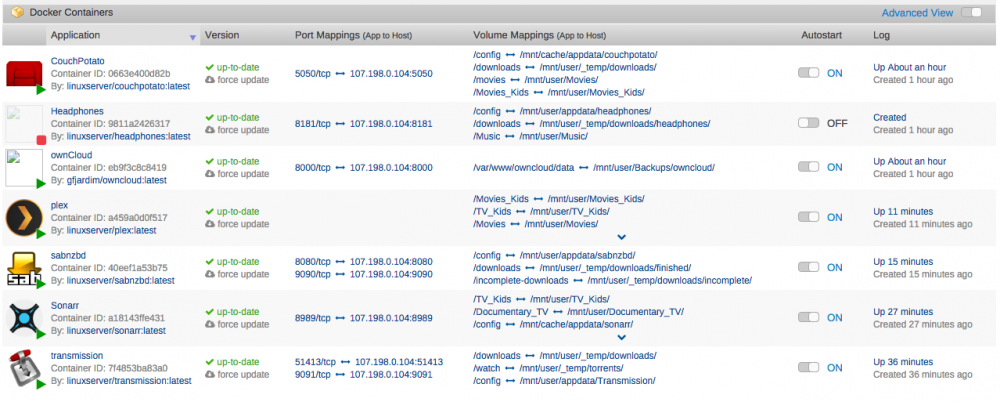
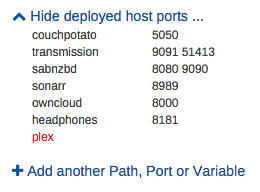
My port mappings are blank like that for Plex.... maybe something to do with the network set to Host. Why not take a look in the Plex Docker log to see what's up? Well I let it run for 33 minutes and I just get the below. Seems its still trying to update. Bed time for me. I'll check in the AM. Any other advice, please share!
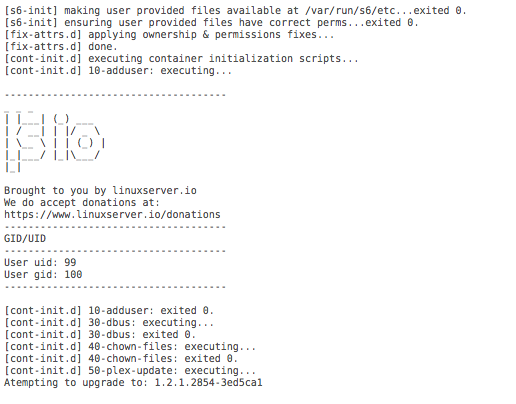
-
Upon update of container, I get this message. I can't see the problem.
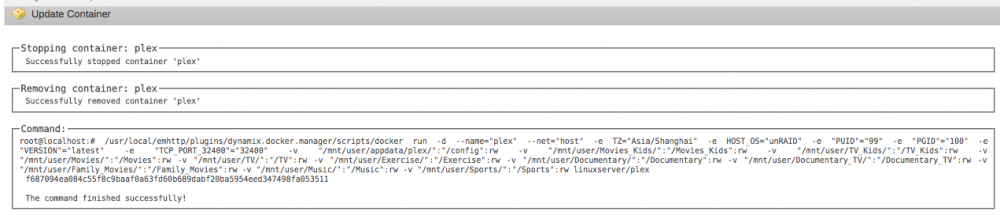
-
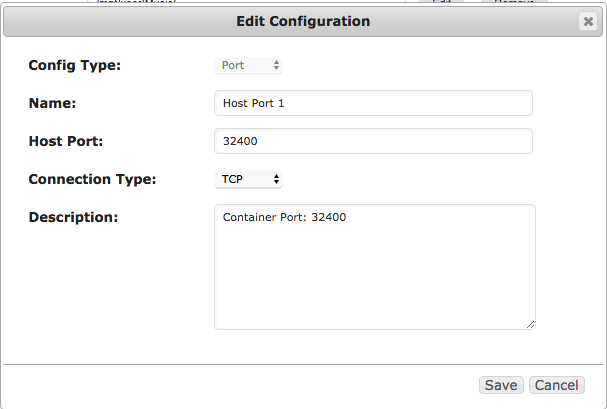
I was looking at the same thing. I mapped a host port but need to do something else?
-
Thanks. Just read through it again and then switched back to net=host. Still not working. Wondering if I have something wrong with the PUID or PGID values. I didn't change those and not really sure how to check what I should put in there. I see that its the only docker without port mapping applied.
-
I see my mistake of 3400 instead of 32400 above! Trying that now!
-
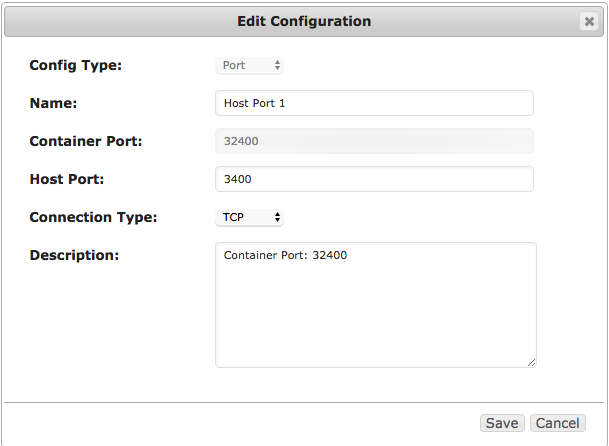
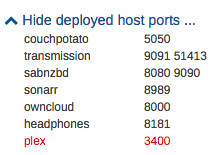
Set Network Type to Host Tried. Got same result. All other dockers are "Bridge"... I set as "Bridge" and setup a host port (32400). Still not working though... Can you confirm what you have for the webUI?
-
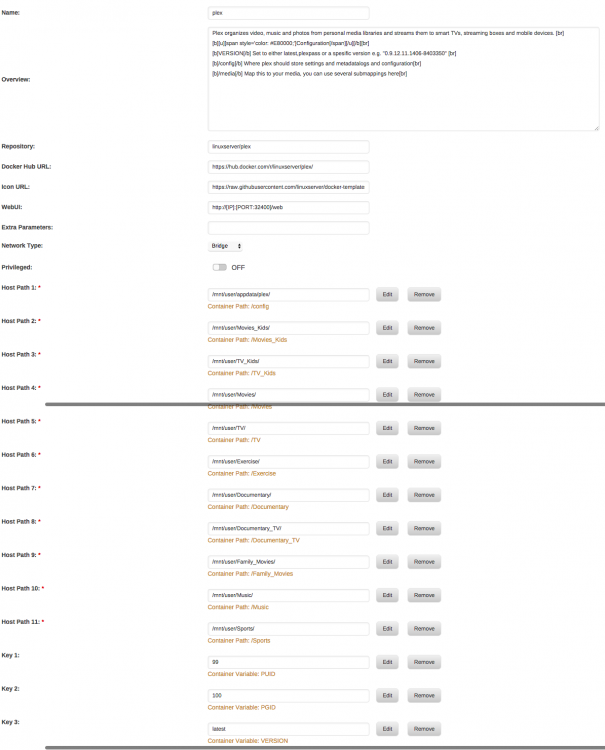
Hey guys. Just upgraded unraid to 6.2 and forced the update on Plex docker. Its not working now. I noticed that the Port Mappings Section is blank on just that 1 docker. I went into settings and started to tinker. Stupid me didn't take a screenshot of the settings before playing... Here are my current settings. Suggestions?
-
Hello. CP had been working like a champ until about a week ago (I think thats when it crapped out). Its seems to have all of a sudden stopped working. I reset it, reinstalled it, etc. I can never get the WebUI to load. When I check the log, it just keeps cycling through this loop. Advice? runCouchPotato(self.options, base_path, sys.argv[1:], data_dir = self.data_dir, log_dir = self.log_dir, Env = Env) File "/app/couchpotato/couchpotato/runner.py", line 140, in runCouchPotato db.open() File "/app/couchpotato/libs/CodernityDB/database_super_thread_safe.py", line 43, in _inner res = f(*args, **kwargs) File "/app/couchpotato/libs/CodernityDB/database_super_thread_safe.py", line 93, in open res = super(SuperThreadSafeDatabase, self).open(*args, **kwargs) File "/app/couchpotato/libs/CodernityDB/database.py", line 571, in open index.open_index() File "/app/couchpotato/libs/CodernityDB/tree_index.py", line 156, in open_index raise IndexException("Doesn't exists") IndexException: Doesn't exists 19:31:30 CRITICAL [ __main__] Traceback (most recent call last): File "/app/couchpotato/CouchPotato.py", line 133, in l.run() File "/app/couchpotato/CouchPotato.py", line 89, in run
-
It really sounds like the transcoding is still being done in the docker image. There are two steps to moving it outside of the docker image: 1) Add a volume mapping for /transcode to /tmp (or a location on your cache drive) 2) In Plex, go to Settings -> Server -> Transcoder. Hit Show Advanced. In the "Transcoder temporary directory" put "/transcode" That should solve it for you. Edit - I expanded on this idea and added it to the Docker FAQ If Plex is your only Docker, and transcoding really is happening outside of the docker image, and you are still getting to 98%, then your docker image is probably just too small. Mine is 20gb. Thank you. I had done both steps but maybe I messed something up. I'll double check again. Either way, after doing both steps before, I got the alert one more time. Since then, I increased the container size to 20 gb and haven't gotten an alarm. I've since started installing other dockers and so far, so good. Crossing my fingers!
-
I'm also getting this Docker Utilization alert. Mine is actually going up to 98% sometimes before then dropping down to normal. The only Docker I'm using is needo/Plex. During this time, if I'm using PLEX, the movie will stop playing like the file has an error. I can then normally restart it and it will play. Frustrating. I need to pay attending to exactly what files it is happening on. I setup to have the transcoding done on my cache drive. This seems to help but I still have the problem... Not installing any other dockers until I get this figured out.


