





net2wire
Members
-
Joined
Everything posted by net2wire
-
That fixed it. Thank you.
-
Ditto
-
Smooth update. No issues so far. Thank you.
-
Thanks Binhex. Thanks Pugnacious.
-
DEBG 'start-script' stderr output: /home/nobody/getvpnip.sh: line 12: awk: command not found
-
After an update I experienced the same issue. Deleting docker image and reinstalling does not correct the error.
-
LOL . Thanks. As per the instructions it reads that the KEY should be bond0. That's how it's read imo. It's a little confusing. But all good. I finally got it to work.
-
One would think so but this is the only way it works. I tried the method that was described here and it doesn't work. If in deed my setup is wrong then I would not be able to view the webgui, login to the web admin or successfully connect from any device. This will lead me to the conclusion that there is something amiss with the docker.
-
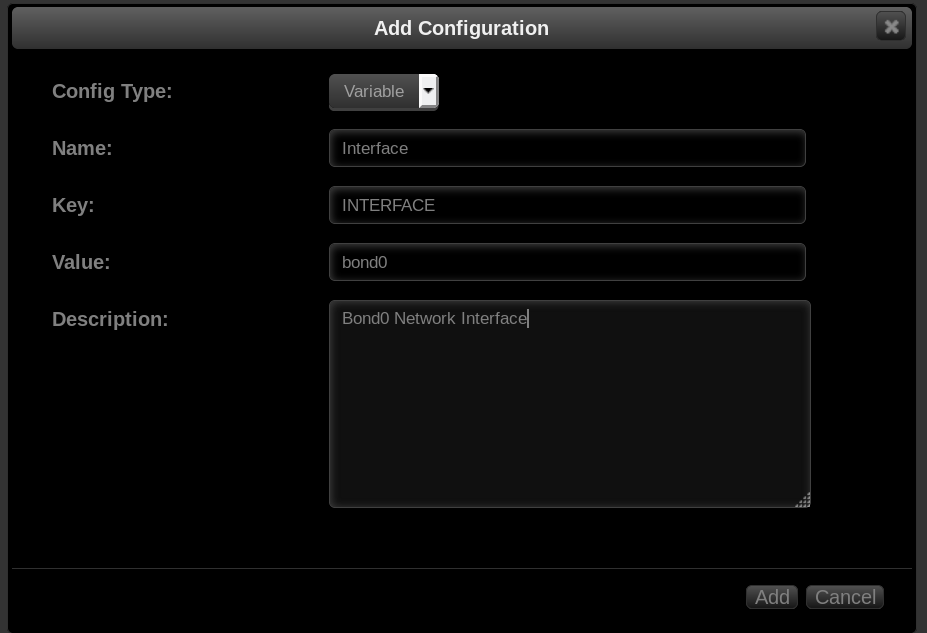
My setup:
-
My OpenVPN-AS setup to use Bond0: 1. Config Type: Variable 2. Name: Interface (I think you can name it whatever you like) 3. Key: INTERFACE 4. Value: bond0
-
I haven't experienced this issue before either and no matter how many times I had restarted Plex or rebooted unRAID the issue persists. Though, the host to bridge to host change did make a difference for like two minutes. Now back to same issue as master.h
-
Experiencing the same issues with OpenVPN-AS while testing bonded interfaces (bond0). Seems to be the only docker that is affected by bonding as far as I have experienced.
-
btw after several tries of editing as suggested I ended up removing docker+image files and instead reinstalled via CA. Several of the fields seemed different than the previous install, and I added field paths as necessary (ex: "incomplete" field) and all is well now. Logs look good. No speed issues. usermod: no changes [info] Env var PUID defined as 99 [info] Env var PGID defined as 100 [info] Permissions already set for /config and /data [info] Starting Supervisor... 2016-07-14 14:57:13,075 CRIT Set uid to user 0 2016-07-14 14:57:13,075 INFO Included extra file "/etc/supervisor/conf.d/sabnzbdvpn.conf" during parsing 2016-07-14 14:57:13,079 INFO supervisord started with pid 25 2016-07-14 14:57:14,081 INFO spawned: 'start-script' with pid 28 2016-07-14 14:57:14,082 INFO spawned: 'sabnzbd-script' with pid 29 2016-07-14 14:57:14,083 INFO spawned: 'privoxy-script' with pid 30 2016-07-14 14:57:14,091 DEBG 'sabnzbd-script' stdout output: [info] VPN is enabled, checking VPN tunnel local ip is valid 2016-07-14 14:57:14,091 INFO success: start-script entered RUNNING state, process has stayed up for > than 0 seconds (startsecs) 2016-07-14 14:57:14,091 INFO success: sabnzbd-script entered RUNNING state, process has stayed up for > than 0 seconds (startsecs) 2016-07-14 14:57:14,091 INFO success: privoxy-script entered RUNNING state, process has stayed up for > than 0 seconds (startsecs) 2016-07-14 14:57:14,091 DEBG 'privoxy-script' stdout output: [info] VPN is enabled, checking VPN tunnel local ip is valid 2016-07-14 14:57:14,094 DEBG 'start-script' stdout output: [info] VPN is enabled, beginning configuration of VPN 2016-07-14 14:57:14,105 DEBG 'start-script' stdout output: [info] VPN provider defined as pia 2016-07-14 14:57:14,107 DEBG 'start-script' stdout output: [info] VPN strong certs defined, copying to /config/openvpn/... 2016-07-14 14:57:14,110 DEBG 'start-script' stdout output: [info] VPN config file (ovpn extension) is located at /config/openvpn/openvpn.ovpn 2016-07-14 14:57:14,113 DEBG 'start-script' stdout output: [info] Env vars defined via docker -e flags for remote host, port and protocol, writing values to ovpn file... 2016-07-14 14:57:14,123 DEBG 'start-script' stdout output: [info] VPN provider remote gateway defined as XXX.XXXXXXXX.com [info] VPN provider remote port defined as 1197 [info] VPN provider remote protocol defined as udp 2016-07-14 14:57:14,132 DEBG 'start-script' stdout output: [info] VPN provider username defined as "username" 2016-07-14 14:57:14,139 DEBG 'start-script' stdout output: [info] VPN provider password defined as "password" 2016-07-14 14:57:14,142 DEBG 'start-script' stdout output: [warn] Password contains characters which could cause authentication issues, please consider changing this if possible 2016-07-14 14:57:14,161 DEBG 'start-script' stdout output: [info] Default route for container is 172.17.0.1 2016-07-14 14:57:14,170 DEBG 'start-script' stdout output: [info] Setting permissions recursively on /config/openvpn... 2016-07-14 14:57:14,180 DEBG 'start-script' stdout output: [info] Adding 192.168.2.0/24 as route via docker eth0 2016-07-14 14:57:14,180 DEBG 'start-script' stdout output: [info] ip route defined as follows... -------------------- 2016-07-14 14:57:14,181 DEBG 'start-script' stdout output: default via 172.17.0.1 dev eth0 172.17.0.0/16 dev eth0 proto kernel scope link src 172.17.0.11 192.168.2.0/24 via 172.17.0.1 dev eth0 2016-07-14 14:57:14,181 DEBG 'start-script' stdout output: -------------------- 2016-07-14 14:57:14,185 DEBG 'start-script' stdout output: [info] iptable_mangle support detected, adding fwmark for tables 2016-07-14 14:57:14,204 DEBG 'start-script' stdout output: [info] Adding additional incoming port 8087 for eth0 2016-07-14 14:57:14,232 DEBG 'start-script' stdout output: [info] Adding additional outgoing port 8087 for eth0 2016-07-14 14:57:14,241 DEBG 'start-script' stdout output: [info] iptables defined as follows... -------------------- 2016-07-14 14:57:14,242 DEBG 'start-script' stdout output: -P INPUT DROP -P FORWARD ACCEPT -P OUTPUT DROP -A INPUT -i tun0 -j ACCEPT -A INPUT -s 172.17.0.0/16 -d 172.17.0.0/16 -j ACCEPT -A INPUT -i eth0 -p udp -m udp --sport 1197 -j ACCEPT -A INPUT -i eth0 -p tcp -m tcp --dport 8080 -j ACCEPT -A INPUT -i eth0 -p tcp -m tcp --sport 8080 -j ACCEPT -A INPUT -i eth0 -p tcp -m tcp --dport 8090 -j ACCEPT -A INPUT -i eth0 -p tcp -m tcp --sport 8090 -j ACCEPT -A INPUT -i eth0 -p tcp -m tcp --dport 8087 -j ACCEPT -A INPUT -i eth0 -p tcp -m tcp --sport 8087 -j ACCEPT -A INPUT -i eth0 -p tcp -m tcp --dport 8118 -j ACCEPT -A INPUT -i eth0 -p tcp -m tcp --sport 8118 -j ACCEPT -A INPUT -p udp -m udp --sport 53 -j ACCEPT -A INPUT -p icmp -m icmp --icmp-type 0 -j ACCEPT -A INPUT -i lo -j ACCEPT -A OUTPUT -o tun0 -j ACCEPT -A OUTPUT -s 172.17.0.0/16 -d 172.17.0.0/16 -j ACCEPT -A OUTPUT -o eth0 -p udp -m udp --dport 1197 -j ACCEPT -A OUTPUT -o eth0 -p tcp -m tcp --dport 8080 -j ACCEPT -A OUTPUT -o eth0 -p tcp -m tcp --sport 8080 -j ACCEPT -A OUTPUT -o eth0 -p tcp -m tcp --dport 8090 -j ACCEPT -A OUTPUT -o eth0 -p tcp -m tcp --sport 8090 -j ACCEPT -A OUTPUT -o eth0 -p tcp -m tcp --dport 8087 -j ACCEPT -A OUTPUT -o eth0 -p tcp -m tcp --sport 8087 -j ACCEPT -A OUTPUT -o eth0 -p tcp -m tcp --dport 8118 -j ACCEPT -A OUTPUT -o eth0 -p tcp -m tcp --sport 8118 -j ACCEPT -A OUTPUT -p udp -m udp --dport 53 -j ACCEPT -A OUTPUT -p icmp -m icmp --icmp-type 8 -j ACCEPT -A OUTPUT -o lo -j ACCEPT 2016-07-14 14:57:14,242 DEBG 'start-script' stdout output: -------------------- 2016-07-14 14:57:14,242 DEBG 'start-script' stdout output: [info] nameservers 2016-07-14 14:57:14,243 DEBG 'start-script' stdout output: nameserver 8.8.8.8 nameserver 8.8.4.4 2016-07-14 14:57:14,244 DEBG 'start-script' stdout output: -------------------- [info] Starting OpenVPN... 2016-07-14 14:57:14,249 DEBG 'start-script' stdout output: Thu Jul 14 14:57:14 2016 OpenVPN 2.3.11 x86_64-unknown-linux-gnu [sSL (OpenSSL)] [LZO] [EPOLL] [MH] [iPv6] built on May 12 2016 Thu Jul 14 14:57:14 2016 library versions: OpenSSL 1.0.2h 3 May 2016, LZO 2.09 Thu Jul 14 14:57:14 2016 WARNING: file 'credentials.conf' is group or others accessible 2016-07-14 14:57:14,285 DEBG 'start-script' stdout output: Thu Jul 14 14:57:14 2016 UDPv4 link local: [undef] Thu Jul 14 14:57:14 2016 UDPv4 link remote: [AF_INET]172.98.67.53:1197 2016-07-14 14:57:14,372 DEBG 'start-script' stdout output: Thu Jul 14 14:57:14 2016 WARNING: this configuration may cache passwords in memory -- use the auth-nocache option to prevent this 2016-07-14 14:57:14,820 DEBG 'start-script' stdout output: Thu Jul 14 14:57:14 2016 WARNING: 'link-mtu' is used inconsistently, local='link-mtu 1570', remote='link-mtu 1542' Thu Jul 14 14:57:14 2016 WARNING: 'cipher' is used inconsistently, local='cipher AES-256-CBC', remote='cipher BF-CBC' Thu Jul 14 14:57:14 2016 WARNING: 'auth' is used inconsistently, local='auth SHA256', remote='auth SHA1' Thu Jul 14 14:57:14 2016 WARNING: 'keysize' is used inconsistently, local='keysize 256', remote='keysize 128' 2016-07-14 14:57:14,820 DEBG 'start-script' stdout output: Thu Jul 14 14:57:14 2016 [88ayd890089d77d8fdfd788df7d8fd87] Peer Connection Initiated with [AF_INET]172.98.67.53:1197 2016-07-14 14:57:17,351 DEBG 'start-script' stdout output: Thu Jul 14 14:57:17 2016 TUN/TAP device tun0 opened Thu Jul 14 14:57:17 2016 do_ifconfig, tt->ipv6=0, tt->did_ifconfig_ipv6_setup=0 Thu Jul 14 14:57:17 2016 /usr/bin/ip link set dev tun0 up mtu 1500 2016-07-14 14:57:17,352 DEBG 'start-script' stdout output: Thu Jul 14 14:57:17 2016 /usr/bin/ip addr add dev tun0 local 10.118.1.6 peer 10.118.1.5 2016-07-14 14:57:17,362 DEBG 'start-script' stdout output: Thu Jul 14 14:57:17 2016 Initialization Sequence Completed 2016-07-14 14:57:17,481 DEBG 'privoxy-script' stdout output: [info] Configuring Privoxy... 2016-07-14 14:57:17,492 DEBG 'sabnzbd-script' stdout output: [info] All checks complete, starting SABnzbd... 2016-07-14 14:57:17,533 DEBG 'privoxy-script' stdout output: [info] All checks complete, starting Privoxy... 2016-07-14 14:57:17,534 DEBG 'privoxy-script' stderr output: 2016-07-14 14:57:17.534 2b7432906dc0 Info: Privoxy version 3.0.24 2016-07-14 14:57:17.534 2b7432906dc0 Info: Program name: /usr/bin/privoxy
-
Thanks for the stronger encryption Binhex. I don't see very much difference in speed if any at all.
-
Interested.
-
Interested.
-
Curious: has anyone tried checking ssllabs.com to test the Nextcloud/Nginx install? My Nextcloud installation showed graded as B with a few vulnerability issues. If the plain vanilla install I did grades as B then I would imagine everyone else's will as well. As someone previously suggested with owncloud a while back, I went ahead and made the same changes to /nextcloud/config/nginx/config.php: server { listen 443 ssl; server_name _; ### Set Certificates ### ssl_certificate /config/keys/cert.crt; ssl_certificate_key /config/keys/cert.key; ### Add Diffie–Hellman key exchange ### ssl_dhparam /config/keys/dhparam.pem; ### Disable SSL by enforcing TLS ### ssl_protocols TLSv1 TLSv1.1 TLSv1.2; ### Add some ciphers and reject weaker ones ### ssl_ciphers "EECDH+AESGCM:EDH+AESGCM:ECDHE-RSA-AES128-GCM-SHA256:AES256+EECDH:DHE-RSA-AES128-GCM-SHA256:AES256+EDH:ECDHE-RSA-AES256-GCM-SHA384:DHE-RSA-AES256-GCM-SHA384:ECDHE-RSA-AES256-SHA384:ECDHE-RSA-AES128-SHA256:ECDHE-RSA-AES256-SHA:ECDHE-RSA-AES128-SHA:DHE-RSA-AES256-SHA256:DHE-RSA-AES128-SHA256:DHE-RSA-AES256-SHA:DHE-RSA-AES128-SHA:ECDHE-RSA-DES-CBC3-SHA:EDH-RSA-DES-CBC3-SHA:AES256-GCM-SHA384:AES128-GCM-SHA256:AES256-SHA256:AES128-SHA256:AES256-SHA:AES128-SHA:DES-CBC3-SHA:HIGH:!aNULL:!eNULL:!EXPORT:!DES:!MD5:!PSK:!RC4"; ssl_prefer_server_ciphers on; ssl_session_cache shared:SSL:10m; ssl_session_timeout 10m; ssl_verify_depth 2; # Add headers to serve security related headers add_header Strict-Transport-Security "max-age=15768000; includeSubDomains; preload;"; add_header X-Content-Type-Options nosniff; add_header X-Frame-Options "SAMEORIGIN"; add_header X-XSS-Protection "1; mode=block"; add_header X-Robots-Tag none; add_header X-Download-Options noopen; add_header X-Permitted-Cross-Domain-Policies none; Hope this helps.
-
Thanks for your efforts BTW. As long as the tools are available within the docker(s) I think most people will be able to perform their own maintenance as needed.
-
I was wondering the same thing. Need to run ./occ upgrade manually to migrate from owncloud, and to do maintenance away from the GUI. I'm sure there's an easy solution?
-
Same issue here.
-
1. The easiest way to check is to setup one of your browsers to use the proxy and open a tab to privateinternetaccess.com and at the top it should read: "Your IP Address: X.X.X.X You are protected by PIA". 2. Using PIA windows client or SABnzbdVPN I get similar bandwidth as I do whether the VPN is used or not.
-
Just updated. Looking good from what I can tell. Thanks a bunch Binhex.
-
I can't find a Binhex PayPal Donate button........ it's payday so i can spare some change...
-
Yes that's potentially a limited solution. I've deployed several remote wifi routers with DD-WRT / OpenVPN to be able to access remote media servers, but I think the simplicity of deploying the solution binhex is suggesting would be more practical and less limiting since one wouldn't need to have additional hardware, cabling etc, and to be able to pick and choose which applications need to use a VPN. From my recollection Plex does not work with any VPN and the network connection will be lost on the LAN and WAN so things like (local and remote) Roku's and Plex Home Theater won't connect to the server (unless you use something like openelec-kodi to access the smb share on the LAN).
-
+1 This type of solution is very much needed. Having the ability to choose which application uses the VPN provides a great amount of control and flexibility. As an example VPNing docker applications like Sickbeard, Sickrage, Sonarr, Couchpotato, Sabnzbd, to name a few, but not VPNing Plex Server since it has an issue with losing it's connection once a VPN connection is established. Hope to see this type of solution come to fruition in the future.

