





TopTrainer
Members
-
Joined
-
Last visited
Everything posted by TopTrainer
-
Jorge Unfortunately i am not able to do that, are there any other options open to me to get to the GUI
-
Sorry but I dont know what or where that is, could you explain where to find, I would also add the array is not started.
-
Hi Jorge I can not post diags as I cant get to the GUI, all I get is an error site cant be reached took too long to respond.
-
I have replaced an ageing router and I am now unable to get to my GUI from my browser using //192.168.1.100 the server is listed as wired in the routers list and was previously connecting without issue before the router change the new router is Asus RT-AX58U OS Windows 11 unraid 6. 12. browser is Brave I would be grateful for some advice on the way forward Thanks
-
Thanks the drive is now rebuilding.
-
JorgeB Many apologies for the delay, I have now undertaken the work, replacing both cables to the drive in question, and it would appear to be exactly the same, I have attached the diags taken immediately after starting the array with the new cables installed. Peter tower-diagnostics-20250304-1201.zip
-
Apologies for the delay, after writing, I suffered an arm injury which prevented me moving the server, so the issue is still outstanding please keep open.
-
UN 6.12.3 ReiserFS Hello I am in the process of converting my drives 1 at a time to XFS , and I have a non converted drive red x, I have run a check file system, and was not offered an option to rebuild etc. The drive is currently showing as unassigned in the array and is not listed in the drop down I a have attached a diag taken after the check file system. Some advice please on the way forward. Peter tower-diagnostics-20250206-2331.zip
-
Could someone please clarify here, are the proposed patches likely to have any issues with windows 11 connecting to to the server(s) I have already had issues in that respect with Windows 11 security and I definitely do not want to revisit the problems again by adding security patches to the servers that Windows 11 is going to be unhappy to connect to.
-
Thanks !!!
-
Thanks for your reply, I have not as yet upgraded to 7.0 I am still using 6.12.10, and am having the problems in that, I can already see highlighted issues with realtek i definitely have something realtek on the machine. Peter
-
No sooner than one issue is sorted another happens along faster than the next bus! I have recently acquired a new machine as my old windows 10 machine blue screened to destruction, but I would point out I never had any issues with logging to my unraid servers. My new machine runs windows 11 home 64, surprise surprise it cant connect, there seems to be a myriad of information relative to windows 10 (which I had no issue with) but I am trying to find anything relative to Windows 11, if there is a short circuit to information on the subject please point me. Peter
-
trooper1-diagnostics-20250122-1600.zip
-
Thanks for your help, I have diligently checked all the connections and all seemed to be fairly secure, however, what I did notice was an unprecedented amount of dust in the general area, so have performed some house keeping and the drive started fine.
-
Details :UnRaid 6.12.10 , Windows 11 home 64 Circumstances, server has not been started for approx 4 week period due to a blue screen windows 10 failure which necessitated the building of a new windows 11 machine. On connecting the new network this morning the parity issue appeared, there was previously no issues with parity prior. There was no disturbance to the server during this period and the case not opened.trooper1-diagnostics-20250122-1006.zip I have attached a diag which was taken without any shutdown for your pursual and advice. Thanks Peter
-
Yes, I understand that, I will not be trying to change the file system before or during, I was just concerned that the already progressed other disks may affect the rebuild?
-
I perhaps did not explain that question very well, I have already converted one of the disks to xfs, and moved content off another, before Disk 1 red balled, will Disk 1 rebuild ok under those circumstances,?
-
Quick question, as | am already 50% of way to converting one of the disks, will the replacement disk for the emulated disk, still rebuild? and could I conclude the conversion before replacing?
-
I will acquire a replacement disk before continuing with the conversion, though that will not be until next week as I am away.
-
I have run an extended test and have a read failure.
-
tower-diagnostics-20241001-1212.zip
-
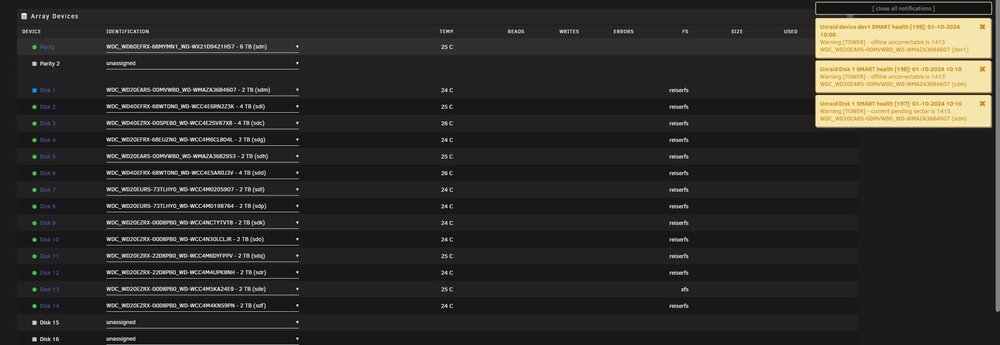
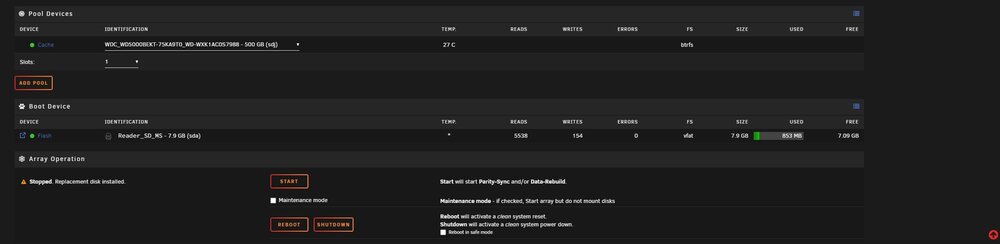
I have checked cables as best I can and they appear to be ok as in nothing very obvious, I have attached screen shots, as the disk appeared unsigned on boot up, I assigned the disk and now it shows blue New Device.............also see pending sector count on notifications. I have not started the array awaiting your further advice
-
tower-diagnostics-20240930-1502.zip
-
Hello I am currently in the process converting my older server from RSF to XFS, I have completed the process on one disk successfully, and 50% on another disk when I noticed one of the disks had red balled, which looks to be and overheating issue though I am not sure if there are unlying age issues also. My question is can I continue to convert the already started second drive or is the red balled drive going to prevent it, I have already moved the data from the drive, it is just a question of changing it to XFS and formating it.
-
trooper1-diagnostics-20240918-1812.zip


