





TopTrainer
Members
-
Joined
-
Last visited
Everything posted by TopTrainer
-
Well have gone through the process again, and rebuilt the drive, it appears to be still shown as unmountable, but is offering the option of formatting it, which of course will delete anything on the drive... ? is that my only option? as I said in the very first instance i knew there would be loss of data, I just seem to have spend ages rebuilding for nothing.

-
I have unassigned the new 10tb disk, and now have this option .... "Start will disable the missing disk and then bring the array on-line. Install a replacement disk as soon as possible."....................I am assuming that means disable the old drive and not the new which is currently unassigned?
-
I dont understand, I wasnt rebuilding at the same time, I had already rebuilt the disk and it mounted also, adding the new disk was after that. Currently I cant even re assign it either?
-
My apologies for that, it seems I now have an additional issue, my array is stopped, with Invalid expansion "You may not add new disk(s) and also remove existing disk(s)." Having precleared the new 10tb drive and assigned it, I was thinking I could remove the drive with the corruption issues (the old Disk5) which was unassigned, this has apparantly caused the current issue. I have attached two screen shots of the server interface. Grateful for your continued support.
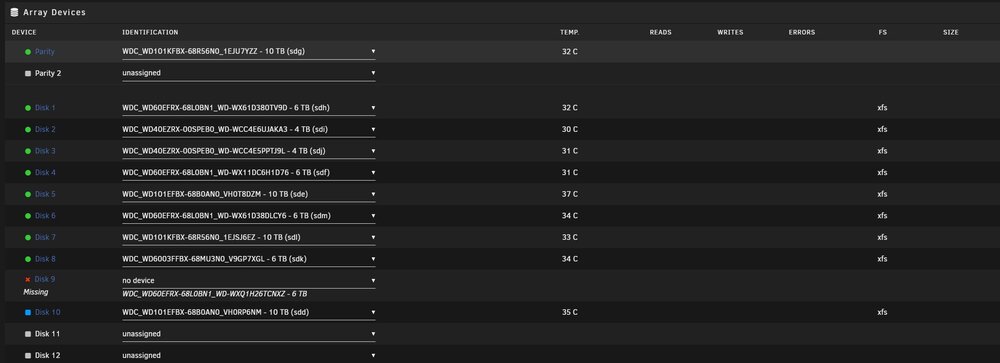
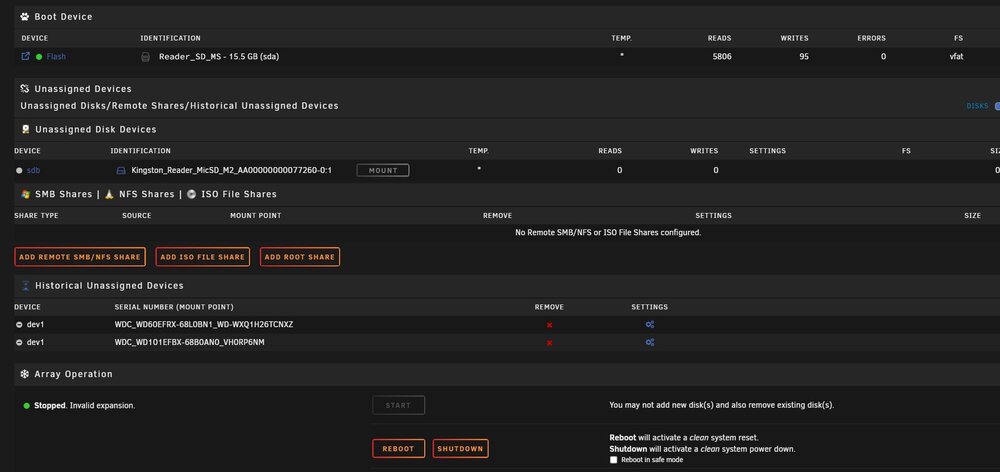
-
This is a brand new disk, its not the disk that originally had the errors on.
-
It went through a rebuild then went to pre clear
-
That is the disk the 10tb disk
-
The post read after pre clear is taking a disproporiant amount of time to finish, does it need to conclude completely? it is currently at 70% with 11 hourse to go! there are no aparent errors.
-
be interesing to see what is on there...
-
Here is the lastest trooper1-diagnostics-20240913-1806.zip
-
So what exactly is being constructed here?
-
I have now assigned the new drive, and its reconstructing, and the drive details are correct, but it shows it as 6tb drive and not 10tb which it is?
-
The main issue is/was Uraid was not seeing the drive for me to assign it
-
I have run a test on the disk currently in slot 9 which is the old Disk 5 and it has completed with a read failure. I am currently running a pr-clear in UD on the new drive.
-
Sorry my mistake, I did not mean UD, I meant UR I placed the brand new drive in the slot that I removed the old drive from and UR is not showing its details to assign it, there is nothing to suggest it is faulty, both this drive and the one employed in disk 5 were bought together. I just want to format it?
-
I have removed the old disk from slot 9, inserted the new disk but UD is not seeing it, there is no provision to format it or assign it
-
I would prefer to remove the disk currently in slot 9 and insert a new 10 tb drive. What is the best way to achieve that outcome?
-
Yes I see it has mounted, but this is the Disk that had the file corruption. Are you saying it is useable? I do not have much confidence in it, it is also showing now a blue square, and advising that that starting the arrray will will start Parity-Sync and/or Data-Rebuild. Would that data build be Disk 5 data ? unless it was going to be completely restored, which I do not think it will be, as I have already replaced it with data loss, I really want to remove it and put a new larger disk in that slot, but even after unassigning it UD still does no see the new disk ?
-
As requested I instigated the mount of the replaced Disk 5 which I had initially put into slot 9 to ascertain if there was any more data I could get from it. The diag is attached. trooper1-diagnostics-20240913-0904.zip
-
In the Disk 9 slot, as shown in the screen capture, sits the original Disk 5, it shown as NOT INSTALLED, it is also shown in unassigned disks but is not mountable even though UR is offering to mount it. I have a new disk I wish to run from slot 9, but UR does not see it when I remove the current occupying disk. Would a new configuration sort the issue ? grateful for any advice. Pete
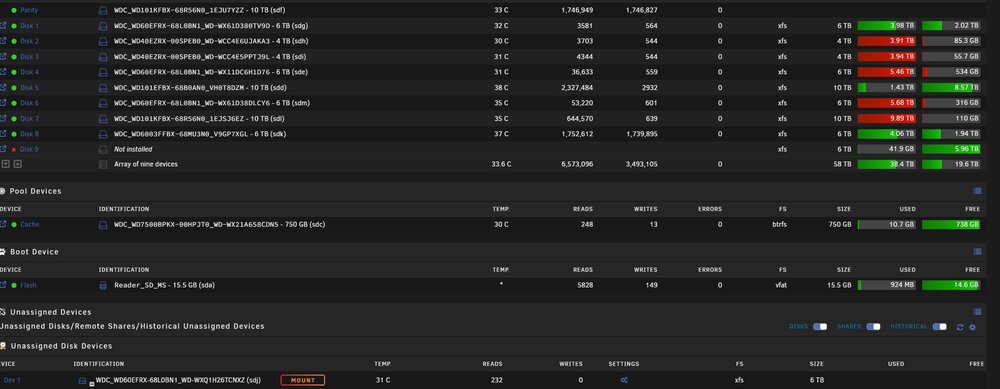
-
I have the original failed drive in a slot that I wish to place a new drive in, but I am unable to remove its details from the system even though its not present in the server the details are still showing in GUI and the new drive is not being seen?
-
I have run the repair system on this drive which has been successful and repaired the file corruption and created the folder of lost data.
-
I have run this file system check using -n and it shows meta data corruption? I am not sure how i send that data?
-
Do you mean the replaced Disk 5, or the old Disk 5 either way I know there is corruption I already stated that , I want to access the new disk 5, and currently replace the old Disk 5 with is currently occupying slot 9
-
UR 6.12.10 Win 64 Pro I have replaced Disk 5 in my server after write issues which later also showed up to be corruption, I already know that I have lost data as a result. I seized the opportunity of increasining the Disk size to 10TB. Unraid commenced to rebuild the drive, no availabilty for parity was shown, I only have 1 parity drive. The rebuild took several days, at the conclusion I tried to access the drive purely to see what data I had lost, and I had the credentials Name & Password box co up. I had never seen this box before and was confused as all the other drives were accessible without that box coming up. I then inserted the failed Disk 5 into a slot to ascertain if anything was redeamable, the drive was unreadable but stragely enough I had a small window of opportunity to look at the new replacement drive, and could see substantial data loss. The old drive is currently shown unassigned, when I try to replace it with a new drive, the new drive is not seen. I have downloaded all of Frank1940 PDF's relating to credentials but have not seen the credentials box again? On running fix common problems, It states Cannot write to Disk 5, it is read only, well the Disk is not write protected, neither can I read it. On trying to access it I currently get a timed out error 1460 (I access my server via Opus a superior option to the windows file manager offering). There is currently no option to check parity, only a read check of all array disks....................I have clearly done something wrong along the way. Pete trooper1-diagnostics-20240911-1142.zip


