





Sniff
Members
-
Joined
-
Last visited
-
Thank you very much for looking over the log. Rules out unRaid as being the issue.... A few weeks ago I had some disk problems that you were able to help out with, turned out swapping the power supply to a new unit fixed it.... I had gone thru the usual hardware checks of memtest, swapping cables, LBA in/out, etc.... but now this problem is popping up.... PSU is a brand new Toughpower GF1. System is an old Supermicro x8sil-f with a Xeon x3450... is there any way to tell or test if that's starting to give up the ghost?
-
Hi all..... Been having the issue of random reboots for a few weeks now. Seems like every few days to a week I'll notice that the server had restarted itself. I happen to get lucky and catch it just now.... I've attached the log, been using the syslog server for a bit now trying to get it.... I pulled this log right immediately upon reboot. Would someone be so kind as to take a peek? Thanks all syslog-10.0.1.2.log
-
This why you make the big money....... Thank you, sir!
-
Long story short,,, the drive worked for a few years, then got the red X. Replaced the drive, same issue with new one... turned out to be my power supply, replaced that, smooth sailing with the new drive. The old drive (WD 10tb) went into another system for a check up,, read and wrote just fine, extended SMART showed no errors/warnings. Formatted without issue. Tried to re install the WD to unraid, it's not recognized. Checked the BIOS, it's not listed..... Plugged it in via USB external dock, appeared right away in unassigned devices. I formatted via the GUI, no issues. Installed the disk again internally, not recognized. I swapped SATA cables and ports for known good ones, nothing. Swapped power cables, nothing. Tried it on the LSI card, nothing. Still doesn't appear in BIOS. Went back to external, pops right up. Any idea what I'm missing? tower-diagnostics-20230810-1204.zip
-
Small update..... Swapped power and sata cables, rebooted, Exos showed up again Installed a new power supply, all new sata cables... ditched the LSI card for now, all drives plugged into the MB. Tried a file check on the Exos, no good... running a re-build now, 18 hours in, still going...
-
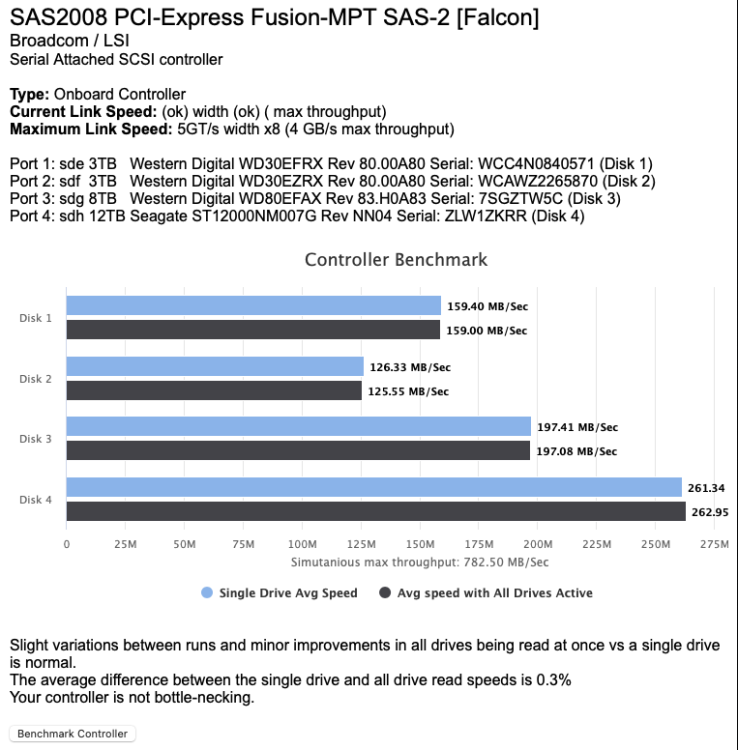
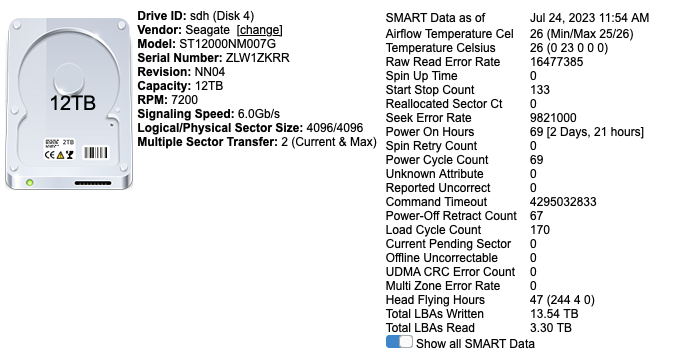
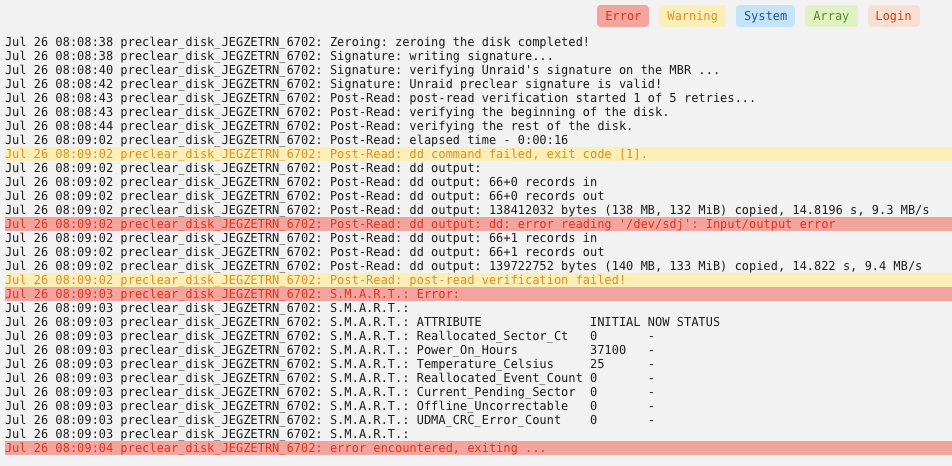
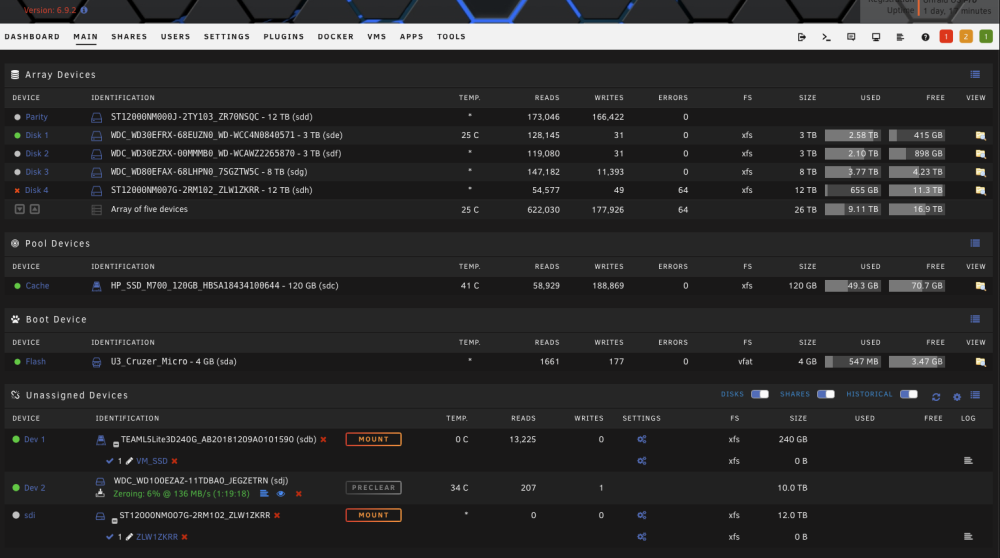
Update..... The Preclear failed at the final stage. After the failure, I can longer see or access disk 4 (Exos), completely dropped out... lsblk doesn't show any disk attached either.... I unplugged all the power cables, rearranged them... no splitters used, no more than two drives on any one line from the psu. I removed the lsi card and plugged all six drives in the motherboard sata ports using all new sata cables. Rebooted,,,, still no disk 4, doesn't show in unraid or by command line. The 10tb that failed pre clear won't show either. The original parity, other three data disks, and cache all show up and function just fine. Ran memtest, all passed without issue.... At this point, am I looking at more of a power or mobo problem? I don't have another system to throw the Exos or 10tb drive into to test... When the Exos was attached and functioning (for a short time), this was taken from diskspeed docker.
-
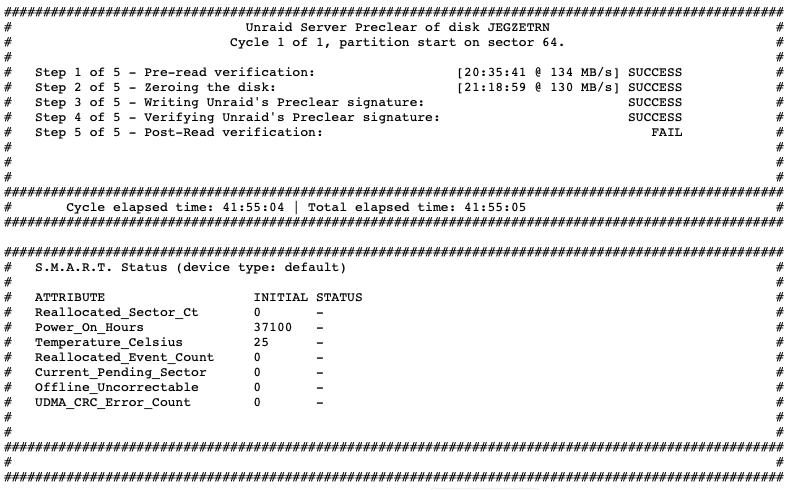
Short version of the story.... Been using Unraid for a few years now,,, LOVE it. Older hardware, but has been running like a top, and don't feel the need for more speed or power. Fits my use case perfectly. Four data drives, single parity. Two SSD's, one for cache, one for VM's and random use... The VM SSD lives in Unassigned Devices. Parity and SSD's are plugged into the SATA MB ports, the data drives are on an LSI controller. Been running like this for years, never a hiccup. Last week I had my first "Red X" on a drive. Slot 4 was occupied by a WD 10tb. Got the X, checked SMART data, looked ok... rebuilt parity. Ran fine for about two days, then dropped out again. Decided to swap it out, so ordered a refurb Exos 12tb. Plugged the Exos into the controller, showed up in Unassigned Devices, but kept failing format, failed pre-clear within 20 mins. Swapped around the cables from the controller, same result. Plugged the Exos directly to MB SATA ports, and seemed to work just fine, formatted and added to array, rebuilt, 24+ hours, and all ok. I put the Exos back onto the controller, but swapped cables into the other controller port to test. Seemed fine with Diskspeed docker and SMART. Yesterday I put the old 10tb on MB SATA to run pre clear. The Exos showed up in UA, and was still listed in the array... weird,,, pre clear is still running on the 10tb without issue, 20 hours later. The Exos has now dropped out again... No more than 2 drives are on a single line from the power supply. I just don't know enough about reading diagnostics,,, lots of errors from sr0 (I don't and have never had an optical drive) Please help tower-diagnostics-20230725-1120.zip
-
I did look at that file, but there is very little in there.... I'll try adding the line and see what happens. Don't know if it helps or not,,, attached a log. This one doesn't show the scans, but has a hell of a lot of TCP and UDP requests.... normal? Sync Log.rtf
-
Is there a method to change some of the settings within resilio sync? Specifically the advanced power settings. Sync is set by default to rescan the directories every 10 minutes. Folder_Rescan_Interval is set to 600 seconds. Sync allows the change in the menu, then advises to restart to take effect. Upon restart, all changes revert. Is there a config file somewhere that we can alter? Sync is spinning up my drives numerous times per day just to scan.
-
I'm a dumbass,,,, thank you bin.......
-
I also seem to have the issue of the port closed. I deleted the line in the docker setup for VPN_INCOMING_PORT. This didn't seem to change anything. The little red circle is still at the bottom of the screen, reporting 49160: Port is closed. I haven't altered the rtorrent.rc file at all, and I'm connecting to PIA's Toronto servers (also tried the NL servers, with no change). thank you for any help you can offer..... Please see attached debug supervisord log supervisord.log


