





bigjme
Members
-
Joined
-
Last visited
Everything posted by bigjme
-
Hey Saarg I didn't think it would be but thank you for confirming. Regards, Jamie
-
Hi All, So i did an update to the docker around an hour ago so its on :latest with no further updates available and the startup logs now have started to show this: [cont-init.d] executing container initialization scripts... [cont-init.d] 10-adduser: executing... usermod: no changes ------------------------------------- _ () | | ___ _ __ | | / __| | | / \ | | \__ \ | | | () | |_| |___/ |_| \__/ Brought to you by linuxserver.io We gratefully accept donations at: https://www.linuxserver.io/donate/ ------------------------------------- GID/UID ------------------------------------- User uid: 911 User gid: 911 ------------------------------------- [cont-init.d] 10-adduser: exited 0. [cont-init.d] 20-config: executing... [cont-init.d] 20-config: exited 0. [cont-init.d] 30-keygen: executing... using keys found in /config/keys [cont-init.d] 30-keygen: exited 0. [cont-init.d] 99-custom-scripts: executing... [custom-init] no custom scripts found exiting... [cont-init.d] 99-custom-scripts: exited 0. [cont-init.d] done. [services.d] starting services [services.d] done. nginx: [alert] detected a LuaJIT version which is not OpenResty's; many optimizations will be disabled and performance will be compromised (see https://github.com/openresty/luajit2 for OpenResty's LuaJIT or, even better, consider using the OpenResty releases from https://openresty.org/en/download.html) nginx: [error] lua_load_resty_core failed to load the resty.core module from https://github.com/openresty/lua-resty-core; ensure you are using an OpenResty release from https://openresty.org/en/download.html (rc: 2, reason: module 'resty.core' not found: no field package.preload['resty.core'] no file './resty/core.lua' no file '/usr/share/luajit-2.1.0-beta3/resty/core.lua' no file '/usr/local/share/lua/5.1/resty/core.lua' no file '/usr/local/share/lua/5.1/resty/core/init.lua' no file '/usr/share/lua/5.1/resty/core.lua' no file '/usr/share/lua/5.1/resty/core/init.lua' no file '/usr/share/lua/common/resty/core.lua' no file '/usr/share/lua/common/resty/core/init.lua' no file './resty/core.so' no file '/usr/local/lib/lua/5.1/resty/core.so' no file '/usr/lib/lua/5.1/resty/core.so' no file '/usr/local/lib/lua/5.1/loadall.so' no file './resty.so' no file '/usr/local/lib/lua/5.1/resty.so' no file '/usr/lib/lua/5.1/resty.so' no file '/usr/local/lib/lua/5.1/loadall.so') I've never seen these before and its happening on all my dockers using this image so it doesn't seem to be a configuration fault or anything else Having a quick google this doesn't seem to be a huge issue but is something worth mentioning in case it does have an affect on anything i'm unaware of Regards, Jamie
-
I installed the user scripts plugin to unraid, added a new script named Fix Gpu Passthrough and set the content to #!/bin/bash echo 0 > /sys/class/vtconsole/vtcon0/bind echo 0 > /sys/class/vtconsole/vtcon1/bind echo efi-framebuffer.0 > /sys/bus/platform/drivers/efi-framebuffer/unbind I then set it to run "At first array start only" and just reboot. It will then run that command automatically when the array starts which occurs prior to any VM's being booted so happens early enough to cause no issues
-
OK I did not think of this at all.... Safe to say this would be a much easier approach than what I was thinking of as it's more scalable Looks like I'm going to need to learn some docker potentially! Thanks both for your replies. As I say, it was a bit of an odd one and one I didn't really expect a response from
-
This is a bit of an odd one so forgive me and i know it may sound totally mad For years i've hosted various servers and websites on an unraid server. Its my job so i host test sites and everything else when i'm working remotely I have a custom reverse proxy coded and working in nginx and a number of nginx backend server. This allows me to route different websites to different instances of nginx entirely. Sometimes i get stuck with older websites or those that have bugs with certain php versions and i need to change it Right now the nginx docker ships with php 7.1.17 which is great. My question is, is there any way to change the php version without manually removing and installing a new one each load? I was thinking perhaps a set of stable php versions all installed at the same time but with fast-cgi on different ports. You could then change the fast-cgi port used by nginx and therefore change the php version used The most commonly selectable options i've seen are: 4.4 5.1 5.2 5.3 5.4 5.5 5.6 7.0 7.1 7.2 My idea is to use dockers instead of something like MultiPHP so everything was truely isolated. I know the idea behind it is mad and likely not usable by many but its worth a shot
-
Hi All So my unraid server uses an adaptec hba and sadly I'm unable to monitor it right now as I'm using unraid - primarily its just to check on the hba temperature as I have no other way to check it I was wondering if there was anyone with a built docker file for this or that would be able to create one? I know this topic was brought up around 2 years ago and there were issues with having the software compiled into the docker and I believe it was decided the software would have to be downloaded and installed on docker run which is fine I've found the following 2 Dockers that do this but their all on github so I've got no idea how to use them https://github.com/Fish2/docker-storman https://github.com/nheinemans/docker-storman I'm not sure if there are still licensing issues I'm not aware of, or it may be the case that this simply won't work at all but it would perhaps be useful to have for anyone on here running adaptec maybe now that their a lot more supported? Jamie
-
Hmm, I'm not entirely sure then. I followed a fix someone else found so I don't really know how they found what to do Jamie
-
It may be something unsupported on the Web terminal, try it from an actual ssh connection, echo should always be available For mine I ssh'd in as the root user (same details as the gui), you may find the Web terminal user may be different to root Regards, Jamie
-
Thanks johnnie.black, i will write something to use the UUID instead
-
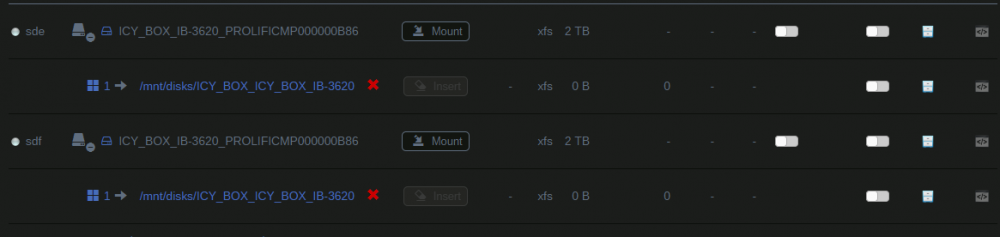
Hi All, Really sorry if this has been covered but there is just so much about this plugin that i'm struggling to find what i need I'm testing something for backups so i have attached an old usb cradle to my machine. This cradle accepts 2 HDD's and shows them as a JBOD to the host. Unassigned devices detects them as in the attached screen shot. Problem is, if i try and change the mount point names (as right now it would try and mount them both in the same place), it changes the path of both devices. Checking the config is adds this: [ICY_BOX_IB-3620_PROLIFICMP000000B86] mountpoint.1 = "/mnt/disks/ICY_BOX_ICY_BOX_IB-362" So i can't actually give them separate names as its linking to the main device names. Does anyone know how to fix this issue or work around it? I'm trying to use rsync and want to keep the permissions hence using xfs Regards, Jamie
-
Ok so i tried the above on my main card, and my other card which i currently pass to a VM. they are both 750ti's, the same make and model. Both had been passed through to a vm in a secondary slow at the time. The exported roms both times were a tiny 62KB Safe to say, booting the vm i get no error saying the device is in use, but the vm has no video output at all Having read through the export i noticed my gpu was on an older bios then the one i fetched from techpower so i went and fetched n older version, edited it to remove the jump, and booted the vm I have video output and the windows startup recovery launched. So i restarted it to boot windows. Again like before, the windows loading screen comes up, and the seconds windows starts to initialise the nvidia drivers, i get the same error 2018-05-03T20:11:39.036200Z qemu-system-x86_64: vfio_region_write(0000:04:00.0:region3+0x1088, 0x7ffe11,8) failed: Device or resource busy KVM internal error. Suberror: 1 emulation failure RAX=ffffe3fca3011000 RBX=ffffe3fca3011000 RCX=ffffe3fca3011000 RDX=0000000000000000 RSI=ffff8f8b58f44830 RDI=ffff8f8b58fb1000 RBP=ffff8f8b58efc000 RSP=ffffa30c4d3868f8 R8 =0000000000001000 R9 =0101010101010101 R10=fffff80a6783c4ac R11=ffffa30c4d3866b0 R12=ffff8f8b56a72ab0 R13=ffff8f8b58f43010 R14=0000000000000000 R15=0000000000100000 RIP=fffff80a67abb038 RFL=00010216 [----AP-] CPL=0 II=0 A20=1 SMM=0 HLT=0 ES =002b 0000000000000000 ffffffff 00c0f300 DPL=3 DS [-WA] CS =0010 0000000000000000 00000000 00209b00 DPL=0 CS64 [-RA] SS =0018 0000000000000000 00000000 00409300 DPL=0 DS [-WA] DS =002b 0000000000000000 ffffffff 00c0f300 DPL=3 DS [-WA] FS =0053 0000000000000000 00017c00 0040f300 DPL=3 DS [-WA] GS =002b ffffd401e8712000 ffffffff 00c0f300 DPL=3 DS [-WA] LDT=0000 0000000000000000 ffffffff 00c00000 TR =0040 ffffd401e8721000 00000067 00008b00 DPL=0 TSS64-busy GDT= ffffd401e8722fb0 00000057 IDT= ffffd401e8720000 00000fff CR0=80050033 CR2=ffffe40646de7000 CR3=000000026416e000 CR4=001506f8 DR0=0000000000000000 DR1=0000000000000000 DR2=0000000000000000 DR3=0000000000000000 DR6=00000000ffff0ff0 DR7=0000000000000400 EFER=0000000000000d01 Code=66 66 66 66 0f 1f 84 00 00 00 00 00 66 48 0f 6e c2 0f 16 c0 <0f> 11 01 4c 03 c1 48 83 c1 10 48 83 e1 f0 4c 2b c1 4d 8b c8 49 c1 e9 07 74 2f 0f 29 01 0f 2018-05-03T20:11:57.679635Z qemu-system-x86_64: terminating on signal 15 from pid 12367 (/usr/sbin/libvirtd) 2018-05-03 20:11:58.880+0000: shutting down, reason=destroyed I've double checked the device is in its owm iommu group and it is I've also checked the gpu is not bound to the vfio-pci driver and its not My next thought is that its because i'm booting unraid into gui mode and thats using something perhaps? --Edit Ok so i just did a fresh reboot with unraid in console mode and still, the exact same behaviour -- Edit 2 Ok so i found this post elsewhere on the forum So it says to run these 3 lines echo 0 > /sys/class/vtconsole/vtcon0/bind echo 0 > /sys/class/vtconsole/vtcon1/bind echo efi-framebuffer.0 > /sys/bus/platform/drivers/efi-framebuffer/unbind I've ran them and the vm has started up and the rom errors have vanished I'm going to run some tests and have added it into my user scripts to run on array start up to see if that is fine on a fresh restart
-
So, another topic on this but there are a few things I want to check with my systems as I think it may just be me So I've followed spaceinvader ones video on getting a vbios for tech power up, modifying it, and using that All went well, passed through the primary gpu from unraid to a vm, did a full windows 10 install and basic setup with the gpu passed through, perfect So I installed the new nvidia drivers for my 750ti, and carried on tinkering. I then decided to reboot the vm so the video drivers could finish installing and it will no longer boot I don't get error 43 like most others. Windows starts to load, showing the loading icon with the uefi splash screen and then the vm pauses This is the vm log from boot up to shutdown 2018-05-02T20:54:30.216302Z qemu-system-x86_64: -device vfio-pci,host=04:00.0,id=hostdev0,bus=pci.4,addr=0x0,romfile=/mnt/cache/VMImages/GPURoms/msi-750ti.rom: Failed to mmap 0000:04:00.0 BAR 3. Performance may be slow 2018-05-02T20:57:26.776428Z qemu-system-x86_64: vfio_region_write(0000:04:00.0:region3+0x1088, 0x7ffe11,8) failed: Device or resource busy KVM internal error. Suberror: 1 emulation failure RAX=ffffab7e37c11000 RBX=ffffab7e37c11000 RCX=ffffab7e37c11000 RDX=0000000000000000 RSI=ffffac04d77445c0 RDI=ffffac04d6055000 RBP=ffffac04d7f12000 RSP=ffff80890cd8d8f8 R8 =0000000000001000 R9 =0101010101010101 R10=fffff80fc1dcc4ac R11=ffff80890cd8d6b0 R12=ffffac04d3a75910 R13=ffffac04d77441e0 R14=0000000000000000 R15=0000000000100000 RIP=fffff80fc204b038 RFL=00010216 [----AP-] CPL=0 II=0 A20=1 SMM=0 HLT=0 ES =002b 0000000000000000 ffffffff 00c0f300 DPL=3 DS [-WA] CS =0010 0000000000000000 00000000 00209b00 DPL=0 CS64 [-RA] SS =0018 0000000000000000 00000000 00409300 DPL=0 DS [-WA] DS =002b 0000000000000000 ffffffff 00c0f300 DPL=3 DS [-WA] FS =0053 0000000000000000 0000fc00 0040f300 DPL=3 DS [-WA] GS =002b ffff9b8042cb9000 ffffffff 00c0f300 DPL=3 DS [-WA] LDT=0000 0000000000000000 ffffffff 00c00000 TR =0040 ffff9b8042cc8000 00000067 00008b00 DPL=0 TSS64-busy GDT= ffff9b8042cc9fb0 00000057 IDT= ffff9b8042cc7000 00000fff CR0=80050033 CR2=ffffd180f654a000 CR3=0000000268559000 CR4=001506f8 DR0=0000000000000000 DR1=0000000000000000 DR2=0000000000000000 DR3=0000000000000000 DR6=00000000ffff0ff0 DR7=0000000000000400 EFER=0000000000000d01 Code=66 66 66 66 0f 1f 84 00 00 00 00 00 66 48 0f 6e c2 0f 16 c0 <0f> 11 01 4c 03 c1 48 83 c1 10 48 83 e1 f0 4c 2b c1 4d 8b c8 49 c1 e9 07 74 2f 0f 29 01 0f 2018-05-02T20:57:45.189655Z qemu-system-x86_64: terminating on signal 15 from pid 12367 (/usr/sbin/libvirtd) Now I did have unraid booted in gui mode but I'm assuming that as it passed through for setup, this isn't the problem. So I'm a little stuck on exactly what would be causing this error as the error says its in use, but this only occurs after installing the nvidia driver. After so many boots I am able to get into the windows recovery menus which all function fine so it seems to pause the second the drivers initialized I'm on unraid 6.5.1 with the vbios passed through the gui. The vm is ovmf with Hyper-V off on Q35-2.11. I can post the full xml if it would help Any ideas as I am a little stumped? Regards, Jamie ----------- ANSWER -------- For easy reading, this was the answer needed. In the event that you get mmap errors on passing through the rom, or you install the nvidia drivers and get errors like the above, try running the following in command line and try again echo 0 > /sys/class/vtconsole/vtcon0/bind echo 0 > /sys/class/vtconsole/vtcon1/bind echo efi-framebuffer.0 > /sys/bus/platform/drivers/efi-framebuffer/unbind I added these to a user script that triggers on first array boot up. I have now successfully remove a gpu i no longer need from my system and am able to reboot unraid and have the vm auto start on the primary gpu
-
It is indeed. The issue has been happening for a few versions now but I didn't spot it for a little while. It does seem to follow that yes, I've started some extended smart scans on my drives anyway Jamie
-
So having had a response from Luke on Emby Server's forum i decided to move my EMBY docker to my cache drive and try again, amazingly the docker came up instantly with no issues at all So it seems to be something to do with the fact that my EMBY server is stored in the main array, i would imagine its not a drive fault since everything else is able to write to the array fine but i am going to run an extended smart scan on the system anyway just to check Is there some weird symlink issue i've missed recently? Jamie Edit Ok so this is where i am at now. A fresh install works mapped by disk1 A fresh install works mapped by disk2 A fresh install works mapped by cache A fresh install fails by user0 A fresh install fails by user Seems like a symlink issue maybe? Regards, Jamie
-
Hi hurricane, Will do, if it's something anyone else is having the link to the forum post is: https://emby.media/community/index.php?/topic/42998-disk-io-error/ Jamie
-
Hey Everyone, So i'v been unable to use EMBY for around 19 days now at all on my server so i'm wondering if anyone can help with my previous post? I've attached my full system diagnostics as well as logs from 2 dockers, EmbyServer normal and the beta branch. I have 8 dockers other than Emby on the server and none of them are having this problem. Originally it was just filling up the log files with errors but would still load and was still usable. Since then it has done a number of updates and now won't start at all (on live or beta) Things i've tried: Deleting and re-installing both dockers Force updating both dockers Changing both dockers to using the user0 mnt instead of the normal user mnt I have no idea what could be causing this at all, reading the log it seems to all be related to MediaBrowser.Server.Mono.exe and SQLlite issues, help would be amazing. One thing i have yet to try is deleting the entire docker folder and starting again from scratch in case the Emby database is corrupt some how, but i don't want to go down that route yet unless i have to Regards, Jamie Edit: So i just tried a fresh EMBY install in a new folder so it was fresh. I even tried adding in the PUID and PGID values just in case but this has the exact same problems as the others archangel-diagnostics-20161226-1455.zip EmbyServer-log.txt EmbyServerBeta-log.txt
-
So i have no idea if anyone else is having this but the EMBY docker managed to fill my docker image today with thousands of entries like this: Info, App, Application configuration: {"EnableUPnP":false,"PublicPort":8096,"PublicHttpsPort":8920,"HttpServerPortNumber":8096,"HttpsPortNumber":8920,"EnableHttps":false,"CertificatePath":"","EnableInternetProviders":true,"IsPortAuthorized":true,"EnableCaseSensitiveItemIds":false,"MetadataPath":"/mnt/EMBY Meta Data","SeasonZeroDisplayName":"Specials","SaveLocalMeta":false,"PreferredMetadataLanguage":"en","MetadataCountryCode":"GB","SortReplaceCharacters":[".","+","%"],"SortRemoveCharacters":[",","&","-","{","}","'"],"SortRemoveWords":["the","a","an"],"MinResumePct":5,"MaxResumePct":90,"MinResumeDurationSeconds":300,"LibraryMonitorDelay":60,"EnableDashboardResponseCaching":true,"EnableDashboardResourceMinification":true,"DashboardSourcePath":"","ImageSavingConvention":"Compatible","MetadataOptions":[{"ItemType":"Book","ImageOptions":[{"Type":"Backdrop","Limit":1,"MinWidth":1280}],"DisabledMetadataSavers":[],"LocalMetadataReaderOrder":[],"DisabledMetadataFetchers":[],"MetadataFetcherOrder":[],"DisabledImageFetchers":[],"ImageFetcherOrder":[]},{"ItemType":"Movie","ImageOptions":[{"Type":"Backdrop","Limit":1,"MinWidth":1280},{"Type":"Art","Limit":0,"MinWidth":0},{"Type":"Disc","Limit":0,"MinWidth":0},{"Type":"Primary","Limit":1,"MinWidth":0},{"Type":"Banner","Limit":0,"MinWidth":0},{"Type":"Thumb","Limit":1,"MinWidth":0},{"Type":"Logo","Limit":1,"MinWidth":0}],"DisabledMetadataSavers":["Emby Xml"],"LocalMetadataReaderOrder":[],"DisabledMetadataFetchers":[],"MetadataFetcherOrder":[],"DisabledImageFetchers":[],"ImageFetcherOrder":[]},{"ItemType":"MusicVideo","ImageOptions":[{"Type":"Backdrop","Limit":1,"MinWidth":1280},{"Type":"Art","Limit":0,"MinWidth":0},{"Type":"Disc","Limit":0,"MinWidth":0},{"Type":"Primary","Limit":1,"MinWidth":0},{"Type":"Banner","Limit":0,"MinWidth":0},{"Type":"Thumb","Limit":1,"MinWidth":0},{"Type":"Logo","Limit":1,"MinWidth":0}],"DisabledMetadataSavers":["Emby Xml"],"LocalMetadataReaderOrder":[],"DisabledMetadataFetchers":[],"MetadataFetcherOrder":[],"DisabledImageFetchers":[],"ImageFetcherOrder":[]},{"ItemType":"Series","ImageOptions":[{"Type":"Backdrop","Limit":1,"MinWidth":1280},{"Type":"Art","Limit":0,"MinWidth":0},{"Type":"Primary","Limit":1,"MinWidth":0},{"Type":"Banner","Limit":1,"MinWidth":0},{"Type":"Thumb","Limit":1,"MinWidth":0},{"Type":"Logo","Limit":1,"MinWidth":0}],"DisabledMetadataSavers":["Emby Xml"],"LocalMetadataReaderOrder":[],"DisabledMetadataFetchers":[],"MetadataFetcherOrder":[],"DisabledImageFetchers":[],"ImageFetcherOrder":[]},{"ItemType":"MusicAlbum","ImageOptions":[{"Type":"Backdrop","Limit":0,"MinWidth":1280},{"Type":"Disc","Limit":0,"MinWidth":0}],"DisabledMetadataSavers":["Emby Xml"],"LocalMetadataReaderOrder":[],"DisabledMetadataFetchers":[],"MetadataFetcherOrder":[],"DisabledImageFetchers":[],"ImageFetcherOrder":[]},{"ItemType":"MusicArtist","ImageOptions":[{"Type":"Backdrop","Limit":1,"MinWidth":1280},{"Type":"Banner","Limit":0,"MinWidth":0},{"Type":"Art","Limit":0,"MinWidth":0},{"Type":"Logo","Limit":0,"MinWidth":0}],"DisabledMetadataSavers":["Emby Xml"],"LocalMetadataReaderOrder":[],"DisabledMetadataFetchers":[],"MetadataFetcherOrder":[],"DisabledImageFetchers":[],"ImageFetcherOrder":[]},{"ItemType":"BoxSet","ImageOptions":[{"Type":"Backdrop","Limit":1,"MinWidth":1280},{"Type":"Primary","Limit":1,"MinWidth":0},{"Type":"Thumb","Limit":1,"MinWidth":0},{"Type":"Logo","Limit":1,"MinWidth":0},{"Type":"Art","Limit":0,"MinWidth":0},{"Type":"Disc","Limit":0,"MinWidth":0},{"Type":"Banner","Limit":0,"MinWidth":0}],"DisabledMetadataSavers":[],"LocalMetadataReaderOrder":[],"DisabledMetadataFetchers":[],"MetadataFetcherOrder":[],"DisabledImageFetchers":[],"ImageFetcherOrder":[]},{"ItemType":"Season","ImageOptions":[{"Type":"Backdrop","Limit":0,"MinWidth":1280},{"Type":"Primary","Limit":1,"MinWidth":0},{"Type":"Banner","Limit":0,"MinWidth":0},{"Type":"Thumb","Limit":0,"MinWidth":0}],"DisabledMetadataSavers":["Emby Xml"],"LocalMetadataReaderOrder":[],"DisabledMetadataFetchers":["TheMovieDb"],"MetadataFetcherOrder":[],"DisabledImageFetchers":[],"ImageFetcherOrder":[]},{"ItemType":"Episode","ImageOptions":[{"Type":"Backdrop","Limit":0,"MinWidth":1280},{"Type":"Primary","Limit":1,"MinWidth":0}],"DisabledMetadataSavers":["Emby Xml"],"LocalMetadataReaderOrder":[],"DisabledMetadataFetchers":["The Open Movie Database","TheMovieDb"],"MetadataFetcherOrder":[],"DisabledImageFetchers":["TheMovieDb"],"ImageFetcherOrder":[]},{"ItemType":"Video","ImageOptions":[{"Type":"Backdrop","Limit":3,"MinWidth":1280}],"DisabledMetadataSavers":["Emby Xml"],"LocalMetadataReaderOrder":[],"DisabledMetadataFetchers":[],"MetadataFetcherOrder":[],"DisabledImageFetchers":[],"ImageFetcherOrder":[]}],"EnableAutomaticRestart":false,"SkipDeserializationForBasicTypes":false,"SkipDeserializationForPrograms":false,"PathSubstitutions":[],"ServerName":"","WanDdns":"","UICulture":"en-GB","PeopleMetadataOptions":{"DownloadActorMetadata":true,"DownloadDirectorMetadata":true,"DownloadProducerMetadata":false,"DownloadWriterMetadata":false,"DownloadComposerMetadata":false,"DownloadOtherPeopleMetadata":false,"DownloadGuestStarMetadata":false},"SaveMetadataHidden":false,"ContentTypes":[],"RemoteClientBitrateLimit":0,"SharingExpirationDays":30,"Migrations":["5767.1","MediaBrowser.Server.Startup.Common.Migrations.OmdbEpisodeProviderMigration","MediaBrowser.Server.Startup.Common.Migrations.MovieDbEpisodeProviderMigration","FolderViewSettingMigration","CollectionGroupingMigration","CollectionsViewMigration"],"MigrationVersion":23,"SchemaVersion":109,"SqliteCacheSize":0,"EnableAnonymousUsageReporting":false,"EnableStandaloneMusicKeys":false,"EnableLocalizedGuids":true,"EnableFolderView":false,"EnableGroupingIntoCollections":true,"DisplaySpecialsWithinSeasons":true,"DisplayCollectionsView":false,"LocalNetworkAddresses":[],"CodecsUsed":[],"EnableChannelView":false,"EnableExternalContentInSuggestions":true,"EnableSimpleArtistDetection":false,"ImageExtractionTimeoutMs":0,"EnableDebugLevelLogging":false,"EnableAutoUpdate":true,"SystemUpdateLevel":"Release","LogFileRetentionDays":3,"RunAtStartup":false,"IsStartupWizardCompleted":true,"CachePath":"/mnt/EMBY Meta Data"} Info, App, Loading MediaBrowser.Api, Version=3.0.8500.0, Culture=neutral, PublicKeyToken=null Info, App, Loading MediaBrowser.WebDashboard, Version=3.0.8500.0, Culture=neutral, PublicKeyToken=null Info, App, Loading MediaBrowser.Model, Version=3.0.8500.0, Culture=neutral, PublicKeyToken=null Info, App, Loading MediaBrowser.Common, Version=3.0.8500.0, Culture=neutral, PublicKeyToken=null Info, App, Loading MediaBrowser.Controller, Version=3.0.8500.0, Culture=neutral, PublicKeyToken=null Info, App, Loading MediaBrowser.Providers, Version=3.0.8500.0, Culture=neutral, PublicKeyToken=null Info, App, Loading MediaBrowser.Common.Implementations, Version=3.0.8500.0, Culture=neutral, PublicKeyToken=null Info, App, Loading MediaBrowser.Server.Implementations, Version=3.0.8500.0, Culture=neutral, PublicKeyToken=null Info, App, Loading MediaBrowser.MediaEncoding, Version=3.0.8500.0, Culture=neutral, PublicKeyToken=null Info, App, Loading MediaBrowser.Dlna, Version=3.0.8500.0, Culture=neutral, PublicKeyToken=null Info, App, Loading MediaBrowser.LocalMetadata, Version=3.0.8500.0, Culture=neutral, PublicKeyToken=null Info, App, Loading MediaBrowser.XbmcMetadata, Version=3.0.8500.0, Culture=neutral, PublicKeyToken=null Info, App, Loading MediaBrowser.IsoMounting.Linux, Version=1.0.5131.24779, Culture=neutral, PublicKeyToken=null Info, App, Loading MediaBrowser.Server.Mono, Version=3.0.8500.0, Culture=neutral, PublicKeyToken=null Info, App, Loading MediaBrowser.Server.Startup.Common, Version=3.0.8500.0, Culture=neutral, PublicKeyToken=null Error, Main, UnhandledException *** Error Report *** Version: 3.0.8500.0 Command line: /usr/lib/emby-server/bin/MediaBrowser.Server.Mono.exe -programdata /config -ffmpeg /bin/ffmpeg -ffprobe /bin/ffprobe -restartpath /usr/lib/emby-server/restart.sh Operating system: Unix 4.8.12.0 Processor count: 16 64-Bit OS: True 64-Bit Process: True Program data path: /config Mono: 4.6.2 (Stable 4.6.2.7/08fd525 Mon Nov 21 15:56:40 UTC 2016) Application Path: /usr/lib/emby-server/bin/MediaBrowser.Server.Mono.exe One or more errors occurred. System.AggregateException at System.Threading.Tasks.Task.WaitAll (System.Threading.Tasks.Task[] tasks, System.Int32 millisecondsTimeout, System.Threading.CancellationToken cancellationToken) [0x00242] in <8f2c484307284b51944a1a13a14c0266>:0 at System.Threading.Tasks.Task.WaitAll (System.Threading.Tasks.Task[] tasks, System.Int32 millisecondsTimeout) [0x00000] in <8f2c484307284b51944a1a13a14c0266>:0 at System.Threading.Tasks.Task.WaitAll (System.Threading.Tasks.Task[] tasks) [0x00000] in <8f2c484307284b51944a1a13a14c0266>:0 at MediaBrowser.Server.Mono.MainClass.RunApplication (MediaBrowser.Server.Implementations.ServerApplicationPaths appPaths, MediaBrowser.Model.Logging.ILogManager logManager, MediaBrowser.Server.Startup.Common.StartupOptions options) [0x000cf] in <8385af0cf454438f8df15fa62f41afa4>:0 at MediaBrowser.Server.Mono.MainClass.Main (System.String[] args) [0x0008a] in <8385af0cf454438f8df15fa62f41afa4>:0 InnerException: System.Data.SQLite.SQLiteException disk I/O error disk I/O error at System.Data.SQLite.SQLite3.Prepare (System.Data.SQLite.SQLiteConnection cnn, System.String strSql, System.Data.SQLite.SQLiteStatement previous, System.UInt32 timeoutMS, System.String& strRemain) [0x0033c] in <eb7ac4c09bbe4cd784c2e9d33e014c35>:0 at System.Data.SQLite.SQLiteCommand.BuildNextCommand () [0x00068] in <eb7ac4c09bbe4cd784c2e9d33e014c35>:0 --- End of stack trace from previous location where exception was thrown --- at System.Runtime.ExceptionServices.ExceptionDispatchInfo.Throw () [0x0000c] in <8f2c484307284b51944a1a13a14c0266>:0 at System.Runtime.CompilerServices.TaskAwaiter.ThrowForNonSuccess (System.Threading.Tasks.Task task) [0x0004e] in <8f2c484307284b51944a1a13a14c0266>:0 at System.Runtime.CompilerServices.TaskAwaiter.HandleNonSuccessAndDebuggerNotification (System.Threading.Tasks.Task task) [0x0002e] in <8f2c484307284b51944a1a13a14c0266>:0 at System.Runtime.CompilerServices.TaskAwaiter.ValidateEnd (System.Threading.Tasks.Task task) [0x0000b] in <8f2c484307284b51944a1a13a14c0266>:0 at System.Runtime.CompilerServices.ConfiguredTaskAwaitable+ConfiguredTaskAwaiter.GetResult () [0x00000] in <8f2c484307284b51944a1a13a14c0266>:0 at MediaBrowser.Server.Implementations.Persistence.SqliteExtensions+<ConnectToDb>c__async0.MoveNext () [0x0016e] in <8385af0cf454438f8df15fa62f41afa4>:0 --- End of stack trace from previous location where exception was thrown --- at System.Runtime.ExceptionServices.ExceptionDispatchInfo.Throw () [0x0000c] in <8f2c484307284b51944a1a13a14c0266>:0 at System.Runtime.CompilerServices.TaskAwaiter.ThrowForNonSuccess (System.Threading.Tasks.Task task) [0x0004e] in <8f2c484307284b51944a1a13a14c0266>:0 at System.Runtime.CompilerServices.TaskAwaiter.HandleNonSuccessAndDebuggerNotification (System.Threading.Tasks.Task task) [0x0002e] in <8f2c484307284b51944a1a13a14c0266>:0 at System.Runtime.CompilerServices.TaskAwaiter.ValidateEnd (System.Threading.Tasks.Task task) [0x0000b] in <8f2c484307284b51944a1a13a14c0266>:0 at System.Runtime.CompilerServices.ConfiguredTaskAwaitable`1+ConfiguredTaskAwaiter[TResult].GetResult () [0x00000] in <8f2c484307284b51944a1a13a14c0266>:0 at MediaBrowser.Server.Implementations.Persistence.BaseSqliteRepository+<CreateConnection>c__async0.MoveNext () [0x00089] in <5f52323923d14541af0ff808a42a1dbd>:0 --- End of stack trace from previous location where exception was thrown --- at System.Runtime.ExceptionServices.ExceptionDispatchInfo.Throw () [0x0000c] in <8f2c484307284b51944a1a13a14c0266>:0 at System.Runtime.CompilerServices.TaskAwaiter.ThrowForNonSuccess (System.Threading.Tasks.Task task) [0x0004e] in <8f2c484307284b51944a1a13a14c0266>:0 at System.Runtime.CompilerServices.TaskAwaiter.HandleNonSuccessAndDebuggerNotification (System.Threading.Tasks.Task task) [0x0002e] in <8f2c484307284b51944a1a13a14c0266>:0 at System.Runtime.CompilerServices.TaskAwaiter.ValidateEnd (System.Threading.Tasks.Task task) [0x0000b] in <8f2c484307284b51944a1a13a14c0266>:0 at System.Runtime.CompilerServices.ConfiguredTaskAwaitable`1+ConfiguredTaskAwaiter[TResult].GetResult () [0x00000] in <8f2c484307284b51944a1a13a14c0266>:0 at MediaBrowser.Server.Implementations.Persistence.SqliteUserRepository+<Initialize>c__async0.MoveNext () [0x0006f] in <5f52323923d14541af0ff808a42a1dbd>:0 --- End of stack trace from previous location where exception was thrown --- at System.Runtime.ExceptionServices.ExceptionDispatchInfo.Throw () [0x0000c] in <8f2c484307284b51944a1a13a14c0266>:0 at System.Runtime.CompilerServices.TaskAwaiter.ThrowForNonSuccess (System.Threading.Tasks.Task task) [0x0004e] in <8f2c484307284b51944a1a13a14c0266>:0 at System.Runtime.CompilerServices.TaskAwaiter.HandleNonSuccessAndDebuggerNotification (System.Threading.Tasks.Task task) [0x0002e] in <8f2c484307284b51944a1a13a14c0266>:0 at System.Runtime.CompilerServices.TaskAwaiter.ValidateEnd (System.Threading.Tasks.Task task) [0x0000b] in <8f2c484307284b51944a1a13a14c0266>:0 at System.Runtime.CompilerServices.ConfiguredTaskAwaitable+ConfiguredTaskAwaiter.GetResult () [0x00000] in <8f2c484307284b51944a1a13a14c0266>:0 at MediaBrowser.Server.Startup.Common.ApplicationHost+<GetUserRepository>c__async4.MoveNext () [0x000b5] in <71f4f88d363a45928c030d235137fa16>:0 --- End of stack trace from previous location where exception was thrown --- at System.Runtime.ExceptionServices.ExceptionDispatchInfo.Throw () [0x0000c] in <8f2c484307284b51944a1a13a14c0266>:0 at System.Runtime.CompilerServices.TaskAwaiter.ThrowForNonSuccess (System.Threading.Tasks.Task task) [0x0004e] in <8f2c484307284b51944a1a13a14c0266>:0 at System.Runtime.CompilerServices.TaskAwaiter.HandleNonSuccessAndDebuggerNotification (System.Threading.Tasks.Task task) [0x0002e] in <8f2c484307284b51944a1a13a14c0266>:0 at System.Runtime.CompilerServices.TaskAwaiter.ValidateEnd (System.Threading.Tasks.Task task) [0x0000b] in <8f2c484307284b51944a1a13a14c0266>:0 at System.Runtime.CompilerServices.ConfiguredTaskAwaitable`1+ConfiguredTaskAwaiter[TResult].GetResult () [0x00000] in <8f2c484307284b51944a1a13a14c0266>:0 at MediaBrowser.Server.Startup.Common.ApplicationHost+<RegisterResources>c__async2.MoveNext () [0x0025e] in <71f4f88d363a45928c030d235137fa16>:0 --- End of stack trace from previous location where exception was thrown --- at System.Runtime.ExceptionServices.ExceptionDispatchInfo.Throw () [0x0000c] in <8f2c484307284b51944a1a13a14c0266>:0 at System.Runtime.CompilerServices.TaskAwaiter.ThrowForNonSuccess (System.Threading.Tasks.Task task) [0x0004e] in <8f2c484307284b51944a1a13a14c0266>:0 at System.Runtime.CompilerServices.TaskAwaiter.HandleNonSuccessAndDebuggerNotification (System.Threading.Tasks.Task task) [0x0002e] in <8f2c484307284b51944a1a13a14c0266>:0 at System.Runtime.CompilerServices.TaskAwaiter.ValidateEnd (System.Threading.Tasks.Task task) [0x0000b] in <8f2c484307284b51944a1a13a14c0266>:0 at System.Runtime.CompilerServices.ConfiguredTaskAwaitable+ConfiguredTaskAwaiter.GetResult () [0x00000] in <8f2c484307284b51944a1a13a14c0266>:0 at MediaBrowser.Common.Implementations.BaseApplicationHost`1+<Init>c__async0[TApplicationPathsType].MoveNext () [0x00240] in <0038e6318ee94551828e37fd569b145e>:0 UnhandledException One or more errors occurred. System.AggregateException at System.Threading.Tasks.Task.WaitAll (System.Threading.Tasks.Task[] tasks, System.Int32 millisecondsTimeout, System.Threading.CancellationToken cancellationToken) [0x00242] in <8f2c484307284b51944a1a13a14c0266>:0 at System.Threading.Tasks.Task.WaitAll (System.Threading.Tasks.Task[] tasks, System.Int32 millisecondsTimeout) [0x00000] in <8f2c484307284b51944a1a13a14c0266>:0 at System.Threading.Tasks.Task.WaitAll (System.Threading.Tasks.Task[] tasks) [0x00000] in <8f2c484307284b51944a1a13a14c0266>:0 at MediaBrowser.Server.Mono.MainClass.RunApplication (MediaBrowser.Server.Implementations.ServerApplicationPaths appPaths, MediaBrowser.Model.Logging.ILogManager logManager, MediaBrowser.Server.Startup.Common.StartupOptions options) [0x000cf] in <8385af0cf454438f8df15fa62f41afa4>:0 at MediaBrowser.Server.Mono.MainClass.Main (System.String[] args) [0x0008a] in <8385af0cf454438f8df15fa62f41afa4>:0 InnerException: System.Data.SQLite.SQLiteException disk I/O error I'm presuming this is a fault within EMBY and nothing else? To confirm i have checked the disk is fine to write to, changed the location so it is skipping and going directly to user0 instead, and tried re-installing it from scratch again Jamie
-
This needs to be added to the boot command you can access it by going to the main tab of the unraid gui and clicking the flash option. I have been having this issue for months and have gone through all the mentioned fixes above but the final option. I have just enabled it on my system to see if this fixes the problem One thing I will say is that I have had a vm playing up for ages where it would try to boot then turn off. I would then have to tell it to boot again before it started I have enabled this and the vm started instantly. As an idea of what I have tried I have updated all bios, reseated cards, changed slots entirely, flashed device bios including my sas controller and none of that helped. Time to see if this works, huge thanks Jamie
-
I didn't think it was possible but worth checking. Now just to figure out my weird cpu usage as it doesn't seem to use multi cores at all It may be something new in 6.3rc1 but worth checking first
-
I've noticed an oddity with this docker. I'm on 6.3rc1 and when the library scan runs it seems to only be using my first core pair, in this case cores 0 and 8 It will 100% one then 100% the other. It uses only 1 of them at a time and never both. I haven't cpu pinned the docker so it should have use of all 16 cores as I would rather it didn't max out single cores making them a lot hotter than the rest Has anyone else seen anything similar? Realistically I want to allow it full usage of my cpu Also with the newer versions there are a lot of acceleration options. Has anyone tried using any of them or is everyone sticking with acceleration off?
-
I've had my nvme drive in the cache array for a while now, I plan to move it out and put in some ssds as I want my nvme for vms and the cache for caching on ssds
-
I've done a quick search and can't find out for sure but are nvme drives working fine? I know support was added in May but has anyone tested it yet? Jamie
-
Just as a confirmation to anyone needing it, i'm running the latest beta 21 and have just set up a 32GB swap file on my NVMe drive with no issues, htop reports the 32GB correctly so all seems to be working as expected
-
The dev release is sticking around it seems even with new updates available - looks the the auto update system is still not working properly I'm also having some issues but only when playing videos on my Amazon prime fire tv stick (playback failures, audio playing fine but video being almost at the end of the film at 20 seconds in)
-
Just to add to this one, i am running beta 21 of 6.2 and still get this error. 1 usb controller works fine (passed to OVMF) but the other fails like this on boot of a vm so no usbs work (seabios) Apr 24 12:29:34 Archangel kernel: DMAR: DRHD: handling fault status reg 2 Apr 24 12:29:34 Archangel kernel: DMAR: DMAR:[DMA Read] Request device [06:00.0] fault addr ee000 Apr 24 12:29:34 Archangel kernel: DMAR:[fault reason 06] PTE Read access is not set


