





Syco54645
Members
-
Joined
-
Last visited
-
Nice, glad it worked out for you!
-
No problem. I wish you the best of luck. Before I did the conversion I was super anxious but after I started it really wasn't that bad. Just takes forever.
-
There was no issue leaving them "unbalanced". I do not have any VM but I would think home assistant will be ok. I am running my Home Assistant in a docker container but want to switch to home assistant os at some point.
-
If your containers write to the array you'd have to turn those off. Or if you store your docker image on the array. Stuff that only reads and stores data on the cache drive (like Plex) can be left running. You don't need to copy the contents back to the now empty drive. You are missing the formatting of the xfs disk but otherwise your steps seem correct to me.
-
This I did not know. I have a legacy install that has no value entered, it is just a blue 0 in the box. I will have to go make some changes. Thank you for explaining that.
-
Thank you. I had somehow missed that. edit: I cannot change this value to 0 for some odd reason. Is there something per device that must be set up as well?
-
So I am in the midst of creating a new server and I currently have a 1tb disk for the cache pool and a 12tb disk for the array. There is no parity configured at this time. On the Main tab in the UI it shows the disk/array has 1.2tb free yet when I try to move anything else to the array it is reporting no space left on the device. Does anyone have any ideas? indigojr-diagnostics-20240320-2003.zip
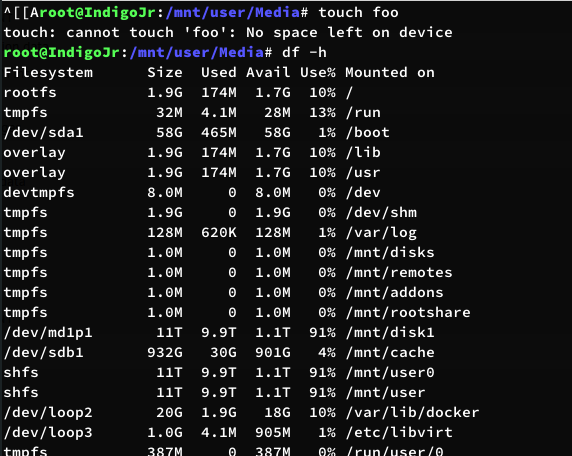

-
I don't really care how it happened just making it known that the setting was apparently enabled automatically on my server. The last time I went into disk settings was to set the default from reiserfs to xfs. I did this when xfs was being pushed over reiserfs. I don't even see how I could have accidentally done this. For me to make a change to the md_write_setting I would have to go into disk settings, change it, and then click save. Regardless. It is solved and that is all that truly matters.
-
I have not. Speed of writes has never been a concern of mine. Just odd that it was on as I never turned it on, I did not even know this option existed. It has been probably 4 years since I went into a disk settings.
-
I solved it. Not sure why the md_write_method was set to reconstruct write... I did not do it, I did not know it even existed. I assume an update did and that is slightly concerning.
-
So I have been having an issue for a while that nearly all of the drives in my array are always spun up. Currently only 1 out of 13 are in standby mode. Yesterday I tried stopping all docker containers and enable them 1 by 1 until it happened. There does not appear to be a correlation there, randomly the drives are just spinning back up. Leaving the containers stopped I saw drives randomly spin up. There was no file access going on during this time. Oddly the read/write counts do not change and the speed is at 0.0B/s for all of the drigves I have tried to use the OpenFiles plugin and the only files being accessed are on disk12 by frigate (issue existed well before frigate was installed), I need to move that off of the array but it is known. Attaching my diagnostics to see if anyone can figure it out. essex-diagnostics-20230411-0823.zip
-
So I updated the container today and it is failing to boot. Attaching the log below. *** Running /etc/my_init.d/00_regen_ssh_host_keys.sh... *** Running /etc/my_init.d/05_set_the_time.sh... Setting the timezone to : America/New_York *** Running /etc/my_init.d/00_regen_ssh_host_keys.sh... *** Running /etc/my_init.d/05_set_the_time.sh... Setting the timezone to : America/New_York Current default time zone: 'America/New_York' Local time is now: Sun Nov 13 17:59:49 EST 2022. Universal Time is now: Sun Nov 13 22:59:49 UTC 2022. Date: Sun Nov 13 17:59:49 EST 2022 *** Running /etc/my_init.d/10_syslog-ng.init... syslog-ng: Error setting capabilities, capability management disabled; error='Operation not permitted' [2022-11-13T17:59:49.440067] file ../../../glib/gthread-posix.c: line 1339 (g_system_thread_new): error 'Operation not permitted' during 'pthread_create' /etc/my_init.d/10_syslog-ng.init: line 32: 33 Trace/breakpoint trap /usr/sbin/syslog-ng --pidfile "$PIDFILE" -F $SYSLOGNG_OPTS *** /etc/my_init.d/10_syslog-ng.init failed with status 1 *** Killing all processes...
-
Thanks for confirming that will work. And woops, thanks for pointing that out. That was more of a pseudo command as I am actually doing it per folder on old-disk-12 but this will be useful for someone else if they are trying to do the same things.
-
Why not just use the old disk and issue the following command. This would avoid having to do a parity resync and fat fingering the new config setup. Not to mention I will maintain parity protection through this process. rsync -rav /mnt/disks/old-disk-12 /mnt/disk12
-
I did exactly that and had no option to rebuild, it showed only the option to format.

