





daze
Members
-
Joined
-
Last visited
Everything posted by daze
-
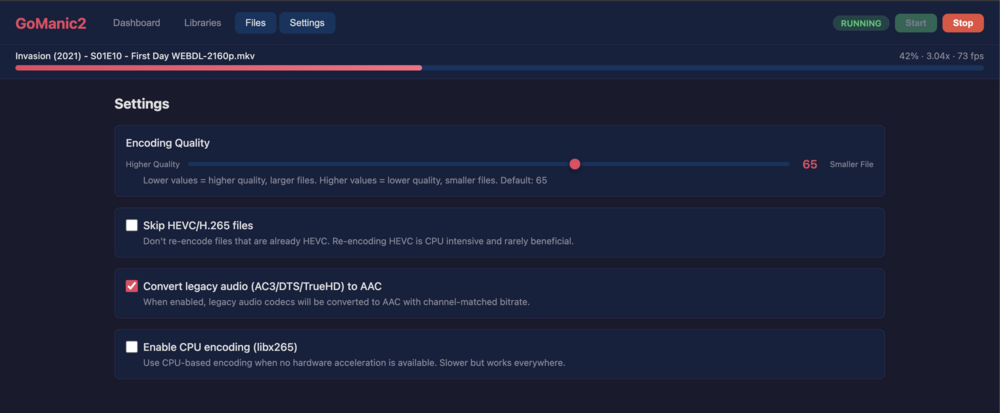
I am running a beta test currently for transcode application that works and takes advantage of HW acceleration in Linux (vaapi) and macOS (Mac ARM M series). If there is any interested please comment in the thread.
-
Hi guys, On this board from CWWK with the 8845HS AMD CPU+780M iGPU causes call traces/panics on bootup and sometimes randomly. Can this be looked at please? I've populated it with Kingston Fury 64GB SODIMM non-ECC RAM. [ 39.912428] WARNING: CPU: 3 PID: 1331 at drivers/gpu/drm/amd/amdgpu/../display/dc/dce/dce_aux.c:393 dce_aux_transfer_raw+0x5b6/0x71d [amdgpu] [ 39.912763] Modules linked in: edac_mce_amd amdgpu(+) edac_core intel_rapl_common iosf_mbi kvm_amd zfs(PO) kvm drm_exec amdxcp drm_buddy gpu_sched drm_ttm_helper ttm i2c_algo_bit drm_suballoc_helper crct10dif_pclmul drm_display_helper crc32_pclmul crc32c_intel ghash_clmulni_intel sha512_ssse3 sha256_ssse3 sha1_ssse3 drm_kms_helper aesni_intel crypto_simd cryptd input_leds spl(O) drm thunderbolt hid_apple agpgart k10temp acpi_cpufreq rapl i2c_piix4 led_class cdc_acm igc i2c_core ahci ccp libahci video thermal wmi backlight tpm_crb tpm_tis tpm_tis_core tpm button [ 39.912816] CPU: 3 PID: 1331 Comm: udevd Tainted: P W O 6.6.66-Unraid #1 [ 39.912819] Hardware name: Default string Default string/Default string, BIOS FMA01_P5C9V03 05/07/2024 [ 39.912821] RIP: 0010:dce_aux_transfer_raw+0x5b6/0x71d [amdgpu] [ 39.913102] Code: 48 2c 48 8b 43 40 45 8b 64 24 08 0f b6 50 0b 48 8b 43 30 8b 70 18 e8 00 81 0e 00 0f ba e0 09 73 10 45 0f be ed e9 34 01 00 00 <0f> 0b e9 1a 01 00 00 83 7c 24 04 00 74 e9 48 8b 53 40 45 31 c9 48 [ 39.913105] RSP: 0018:ffffc900006bb188 EFLAGS: 00010246 [ 39.913107] RAX: 0000000060000000 RBX: ffff888107693d80 RCX: ffffffffa23e0210 [ 39.913109] RDX: 0000000000000000 RSI: 0000000000015130 RDI: ffff888145980000 [ 39.913111] RBP: ffffc900006bb1fc R08: 00000000000001df R09: 0000000000000000 [ 39.913112] R10: 0000000000000045 R11: 0000000000000001 R12: ffffc900006bb200 [ 39.913114] R13: 0000000000000001 R14: ffff888108100a30 R15: ffffc900006bb250 [ 39.913116] FS: 000014a203ccc740(0000) GS:ffff888ffe4c0000(0000) knlGS:0000000000000000 [ 39.913118] CS: 0010 DS: 0000 ES: 0000 CR0: 0000000080050033 [ 39.913120] CR2: 000000000053a460 CR3: 0000000105582000 CR4: 0000000000750ee0 [ 39.913121] PKRU: 55555554 [ 39.913122] Call Trace: [ 39.913124] <TASK> [ 39.913126] ? __warn+0x99/0x11a [ 39.913132] ? report_bug+0xd9/0x153 [ 39.913135] ? dce_aux_transfer_raw+0x5b6/0x71d [amdgpu] [ 39.913395] ? handle_bug+0x53/0x7c [ 39.913399] ? exc_invalid_op+0x13/0x60 [ 39.913403] ? asm_exc_invalid_op+0x16/0x20 [ 39.913417] ? dce_aux_transfer_raw+0x5b6/0x71d [amdgpu] [ 39.913565] ? srso_alias_return_thunk+0x5/0xfbef5 [ 39.913568] dm_dp_aux_transfer+0xa3/0x142 [amdgpu] [ 39.913717] drm_dp_dpcd_access+0x9c/0x127 [drm_display_helper] [ 39.913725] drm_dp_dpcd_write+0x37/0x61 [drm_display_helper] [ 39.913731] dm_helpers_dp_write_dpcd+0x3b/0x46 [amdgpu] [ 39.913861] core_link_write_dpcd+0x60/0x76 [amdgpu] [ 39.914010] dpcd_write_rx_power_ctrl+0x3b/0x59 [amdgpu] [ 39.914143] power_down_all_hw_blocks+0x3b/0x152 [amdgpu] [ 39.914282] dce110_enable_accelerated_mode+0x1e5/0x24f [amdgpu] [ 39.914409] ? srso_alias_return_thunk+0x5/0xfbef5 [ 39.914412] ? srso_alias_return_thunk+0x5/0xfbef5 [ 39.914413] ? dm_read_reg_func+0x3c/0x96 [amdgpu] [ 39.914562] ? srso_alias_return_thunk+0x5/0xfbef5 [ 39.914565] dc_commit_state_no_check+0x229/0xa74 [amdgpu] [ 39.914704] dc_commit_streams+0x1e5/0x2dc [amdgpu] [ 39.914831] amdgpu_dm_atomic_commit_tail+0x3f8/0x1fb0 [amdgpu] [ 39.914971] ? srso_alias_return_thunk+0x5/0xfbef5 [ 39.914973] ? dcn314_validate_bandwidth+0x227/0x2ae [amdgpu] [ 39.915113] ? srso_alias_return_thunk+0x5/0xfbef5 [ 39.915116] ? dc_validate_global_state+0x122/0x22d [amdgpu] [ 39.915246] ? srso_alias_return_thunk+0x5/0xfbef5 [ 39.915249] ? srso_alias_return_thunk+0x5/0xfbef5 [ 39.915250] ? dma_resv_iter_first_unlocked+0x37/0x41 [ 39.915252] ? srso_alias_return_thunk+0x5/0xfbef5 [ 39.915254] ? dma_resv_get_fences+0xf3/0x11b [ 39.915257] ? srso_alias_return_thunk+0x5/0xfbef5 [ 39.915260] ? srso_alias_return_thunk+0x5/0xfbef5 [ 39.915261] ? dm_plane_helper_prepare_fb+0x1e9/0x212 [amdgpu] [ 39.915403] commit_tail+0x89/0xd9 [drm_kms_helper] [ 39.915415] drm_atomic_helper_commit+0xde/0xf8 [drm_kms_helper] [ 39.915422] drm_atomic_commit+0xa8/0xcb [drm] [ 39.915437] ? __pfx___drm_printfn_info+0x10/0x10 [drm] [ 39.915454] ? __pfx___drm_printfn_info+0x10/0x10 [drm] [ 39.915468] drm_client_modeset_commit_atomic+0x152/0x1e5 [drm] [ 39.915485] drm_client_modeset_commit_locked+0x3b/0x12e [drm] [ 39.915499] drm_client_modeset_commit+0x28/0x3d [drm] [ 39.915513] __drm_fb_helper_restore_fbdev_mode_unlocked+0x4e/0x8c [drm_kms_helper] [ 39.915521] drm_fb_helper_set_par+0x2c/0x3b [drm_kms_helper] [ 39.915528] fbcon_init+0x339/0x408 [ 39.915530] visual_init+0xbb/0x10e [ 39.915532] do_bind_con_driver.isra.0+0x1a3/0x29b [ 39.915535] do_take_over_console+0x155/0x168 [ 39.915538] do_fbcon_takeover+0x5c/0x9c [ 39.915540] fbcon_fb_registered+0x157/0x17e [ 39.915541] register_framebuffer+0x1bd/0x1f1 [ 39.915545] __drm_fb_helper_initial_config_and_unlock+0x37c/0x450 [drm_kms_helper] [ 39.915554] drm_fbdev_generic_client_hotplug+0x69/0x94 [drm_kms_helper] [ 39.915561] drm_client_register+0x5a/0x8f [drm] [ 39.915576] amdgpu_pci_probe+0x231/0x38e [amdgpu] [ 39.915699] ? __pfx___driver_attach+0x10/0x10 [ 39.915701] local_pci_probe+0x3d/0x81 [ 39.915703] pci_device_probe+0x17c/0x1d0 [ 39.915705] ? sysfs_do_create_link_sd+0x7a/0xab [ 39.915708] really_probe+0x115/0x269 [ 39.915711] __driver_probe_device+0xc0/0xf2 [ 39.915713] driver_probe_device+0x1f/0x77 [ 39.915716] __driver_attach+0xdc/0xf5 [ 39.915718] bus_for_each_dev+0x7b/0xc2 [ 39.915721] bus_add_driver+0xf4/0x1df [ 39.915723] driver_register+0x9e/0xdc [ 39.915725] ? __pfx_amdgpu_init+0x10/0x10 [amdgpu] [ 39.915838] do_one_initcall+0x80/0x1a4 [ 39.915840] ? srso_alias_return_thunk+0x5/0xfbef5 [ 39.915842] ? kmalloc_trace+0x43/0x52 [ 39.915844] do_init_module+0x60/0x20d [ 39.915846] __do_sys_init_module+0xbc/0xfd [ 39.915850] do_syscall_64+0x57/0x7b [ 39.915852] entry_SYSCALL_64_after_hwframe+0x78/0xe2 [ 39.915853] RIP: 0033:0x14a2044c79aa [ 39.915854] Code: 48 8b 0d 61 a4 0d 00 f7 d8 64 89 01 48 83 c8 ff c3 66 2e 0f 1f 84 00 00 00 00 00 0f 1f 44 00 00 49 89 ca b8 af 00 00 00 0f 05 <48> 3d 01 f0 ff ff 73 01 c3 48 8b 0d 2e a4 0d 00 f7 d8 64 89 01 48 [ 39.915856] RSP: 002b:00007ffe54deccb8 EFLAGS: 00000246 ORIG_RAX: 00000000000000af [ 39.915857] RAX: ffffffffffffffda RBX: 000000000044fb30 RCX: 000014a2044c79aa [ 39.915858] RDX: 000014a2045c5379 RSI: 00000000010b5118 RDI: 000014a2028b2010 [ 39.915859] RBP: 000014a2028b2010 R08: 0000000000000007 R09: 0000000000000006 [ 39.915859] R10: 0000000000000071 R11: 0000000000000246 R12: 000014a2045c5379 [ 39.915860] R13: 0000000000020000 R14: 0000000000456540 R15: 0000000000000000 [ 39.915863] </TASK> [ 39.915864] ---[ end trace 0000000000000000 ]--- [ 39.918762] [drm] REG_WAIT timeout 10us * 240 tries - get_channel_status line:350 Thanks, daze seahag-diagnostics-20241220-0920.zip
-
This works a treat on the cwwk motherboarrd with the 8845hs in Plex. HOWEVER, I have is a bunch of these traces for the amdgpu even on bootup with no docker, VMs... [ 3777.431745] ------------[ cut here ]------------ [ 3777.431747] WARNING: CPU: 10 PID: 91511 at drivers/gpu/drm/amd/amdgpu/../display/dc/dce/dce_aux.c:393 dce_aux_transfer_raw+0x5b6/0x71d [amdgpu] [ 3777.431971] Modules linked in: i2c_dev xt_CHECKSUM ipt_REJECT nf_reject_ipv4 xt_tcpudp ip6table_mangle iptable_mangle vhost_net tun vhost vhost_iotlb tap xt_conntrack xt_MASQUERADE nf_conntrack_netlink nfnetlink xfrm_user xfrm_algo ip6table_nat iptable_nat nf_nat nf_conntrack nf_defrag_ipv6 nf_defrag_ipv4 xt_addrtype br_netfilter md_mod ip6table_filter ip6_tables iptable_filter ip_tables x_tables efivarfs af_packet 8021q garp mrp bridge stp llc bonding tls igc zfs(PO) spl(O) amdgpu edac_mce_amd edac_core intel_rapl_common iosf_mbi kvm_amd kvm drm_exec amdxcp drm_buddy gpu_sched drm_ttm_helper ttm i2c_algo_bit crct10dif_pclmul drm_suballoc_helper crc32_pclmul crc32c_intel ghash_clmulni_intel sha512_ssse3 drm_display_helper sha256_ssse3 sha1_ssse3 aesni_intel input_leds drm_kms_helper crypto_simd cryptd drm thunderbolt agpgart rapl i2c_piix4 hid_apple led_class acpi_cpufreq k10temp i2c_core ccp ahci libahci thermal video wmi backlight tpm_crb tpm_tis tpm_tis_core tpm button [last unloaded: igc] [ 3777.432030] CPU: 10 PID: 91511 Comm: sensors-detect Tainted: P W O 6.6.62-Unraid #1 [ 3777.432032] Hardware name: Default string Default string/Default string, BIOS FMA01_P5C9V03 05/07/2024 [ 3777.432033] RIP: 0010:dce_aux_transfer_raw+0x5b6/0x71d [amdgpu] [ 3777.432155] Code: 48 2c 48 8b 43 40 45 8b 64 24 08 0f b6 50 0b 48 8b 43 30 8b 70 18 e8 af 7f 0e 00 0f ba e0 09 73 10 45 0f be ed e9 34 01 00 00 <0f> 0b e9 1a 01 00 00 83 7c 24 04 00 74 e9 48 8b 53 40 45 31 c9 48 [ 3777.432157] RSP: 0018:ffffc9003820fb48 EFLAGS: 00010246 [ 3777.432158] RAX: 0000000060000000 RBX: ffff88810562d080 RCX: ffffffffa0f221d0 [ 3777.432159] RDX: 0000000000000000 RSI: 0000000000015130 RDI: ffff888140500000 [ 3777.432160] RBP: ffffc9003820fbbc R08: 00000000000001df R09: ffffffff824406b0 [ 3777.432161] R10: 0000000000000003 R11: 0000000000000001 R12: ffffc9003820fbc0 [ 3777.432162] R13: 0000000000000000 R14: 0000000000000000 R15: 0000000100350eb1 [ 3777.432163] FS: 00001468bdb86080(0000) GS:ffff888f21e80000(0000) knlGS:0000000000000000 [ 3777.432165] CS: 0010 DS: 0000 ES: 0000 CR0: 0000000080050033 [ 3777.432166] CR2: 000015003adfc484 CR3: 00000002b93de000 CR4: 0000000000750ee0 [ 3777.432167] PKRU: 55555554 [ 3777.432167] Call Trace: [ 3777.432169] <TASK> [ 3777.432170] ? __warn+0x99/0x11a [ 3777.432173] ? report_bug+0xd9/0x153 [ 3777.432175] ? dce_aux_transfer_raw+0x5b6/0x71d [amdgpu] [ 3777.432297] ? handle_bug+0x53/0x7c [ 3777.432300] ? exc_invalid_op+0x13/0x60 [ 3777.432302] ? asm_exc_invalid_op+0x16/0x20 [ 3777.432306] ? dce_aux_transfer_raw+0x5b6/0x71d [amdgpu] [ 3777.432432] ? number+0x143/0x2ce [ 3777.432436] dm_dp_aux_transfer+0xa3/0x142 [amdgpu] [ 3777.432571] drm_dp_i2c_do_msg+0x94/0x2f9 [drm_display_helper] [ 3777.432579] drm_dp_i2c_xfer+0x1e1/0x20c [drm_display_helper] [ 3777.432586] ? __kmalloc+0xa2/0xb2 [ 3777.432590] ? srso_alias_return_thunk+0x5/0xfbef5 [ 3777.432593] __i2c_transfer+0x2f0/0x3b3 [i2c_core] [ 3777.432599] i2c_smbus_xfer_emulated+0x363/0x4af [i2c_core] [ 3777.432605] ? srso_alias_return_thunk+0x5/0xfbef5 [ 3777.432607] ? __accumulate_pelt_segments+0x29/0x3f [ 3777.432610] __i2c_smbus_xfer+0x1b6/0x31e [i2c_core] [ 3777.432615] ? srso_alias_return_thunk+0x5/0xfbef5 [ 3777.432617] ? update_cfs_rq_load_avg+0x176/0x189 [ 3777.432620] i2c_smbus_xfer+0xab/0xd4 [i2c_core] [ 3777.432626] i2cdev_ioctl_smbus+0x139/0x18f [i2c_dev] [ 3777.432631] i2cdev_ioctl+0x201/0x271 [i2c_dev] [ 3777.432635] vfs_ioctl+0x1e/0x32 [ 3777.432636] __do_sys_ioctl+0x52/0x77 [ 3777.432638] do_syscall_64+0x57/0x7b [ 3777.432641] entry_SYSCALL_64_after_hwframe+0x78/0xe2 [ 3777.432642] RIP: 0033:0x1468bdca5098 [ 3777.432644] Code: 00 00 48 8d 44 24 08 48 89 54 24 e0 48 89 44 24 c0 48 8d 44 24 d0 48 89 44 24 c8 b8 10 00 00 00 c7 44 24 b8 10 00 00 00 0f 05 <89> c2 3d 00 f0 ff ff 77 07 89 d0 c3 0f 1f 40 00 48 8b 15 39 fd 0d [ 3777.432645] RSP: 002b:00007fffe65457f8 EFLAGS: 00000246 ORIG_RAX: 0000000000000010 [ 3777.432647] RAX: ffffffffffffffda RBX: 00000000004052a0 RCX: 00001468bdca5098 [ 3777.432648] RDX: 0000000000985f00 RSI: 0000000000000720 RDI: 0000000000000003 [ 3777.432649] RBP: 0000000000985f00 R08: 0000000000000001 R09: 000000000098ee78 [ 3777.432650] R10: 00007fffe6545780 R11: 0000000000000246 R12: 0000000000000720 [ 3777.432651] R13: 00000000009397c8 R14: 000000000071df98 R15: 000000000071df50 [ 3777.432655] </TASK> [ 3777.432656] ---[ end trace 0000000000000000 ]--- [ 3777.436067] [drm] REG_WAIT timeout 10us * 240 tries - get_channel_status line:350 [ 3777.436084] ------------[ cut here ]------------ Here's the CPU/procinfo: processor : 0 vendor_id : AuthenticAMD cpu family : 25 model : 117 model name : AMD Ryzen 7 8845HS w/ Radeon 780M Graphics stepping : 2 microcode : 0xa705203 cpu MHz : 1600.000 cache size : 1024 KB physical id : 0 siblings : 16 core id : 0 cpu cores : 8 apicid : 0 initial apicid : 0 fpu : yes fpu_exception : yes cpuid level : 16 wp : yes flags : fpu vme de pse tsc msr pae mce cx8 apic sep mtrr pge mca cmov pat pse36 clflush mmx fxsr sse sse2 ht syscall nx mmxext fxsr_opt pd pe1gb rdtscp lm constant_tsc rep_good amd_lbr_v2 nopl nonstop_tsc cpuid extd_apicid aperfmperf rapl pni pclmulqdq monitor ssse3 fma cx16 sse4_1 sse4 _2 x2apic movbe popcnt aes xsave avx f16c rdrand lahf_lm cmp_legacy svm extapic cr8_legacy abm sse4a misalignsse 3dnowprefetch osvw ibs skinit wdt t ce topoext perfctr_core perfctr_nb bpext perfctr_llc mwaitx cpb cat_l3 cdp_l3 hw_pstate ssbd mba perfmon_v2 ibrs ibpb stibp ibrs_enhanced vmmcall fs gsbase bmi1 avx2 smep bmi2 erms invpcid cqm rdt_a avx512f avx512dq rdseed adx smap avx512ifma clflushopt clwb avx512cd sha_ni avx512bw avx512vl xsav eopt xsavec xgetbv1 xsaves cqm_llc cqm_occup_llc cqm_mbm_total cqm_mbm_local avx512_bf16 clzero irperf xsaveerptr rdpru wbnoinvd arat npt lbrv svm_l ock nrip_save tsc_scale vmcb_clean flushbyasid decodeassists pausefilter pfthreshold v_vmsave_vmload vgif x2avic v_spec_ctrl vnmi avx512vbmi umip pk u ospke avx512_vbmi2 gfni vaes vpclmulqdq avx512_vnni avx512_bitalg avx512_vpopcntdq rdpid overflow_recov succor smca fsrm flush_l1d bugs : sysret_ss_attrs spectre_v1 spectre_v2 spec_store_bypass srso ibpb_no_ret bogomips : 7585.73 TLB size : 3584 4K pages clflush size : 64 cache_alignment : 64 address sizes : 48 bits physical, 48 bits virtual power management: ts ttp tm hwpstate cpb eff_freq_ro [13] [14] [15]
-
I'd pay extra one-time fee for the ARM build. For the armchair experts saying RISC-V will overtake ARM, you're dreaming. It'll take a good decade for it to get anywhere close to current ARM performance / watt. Besides, give us something that runs awesomely on an ARM chip not a panacea.
-
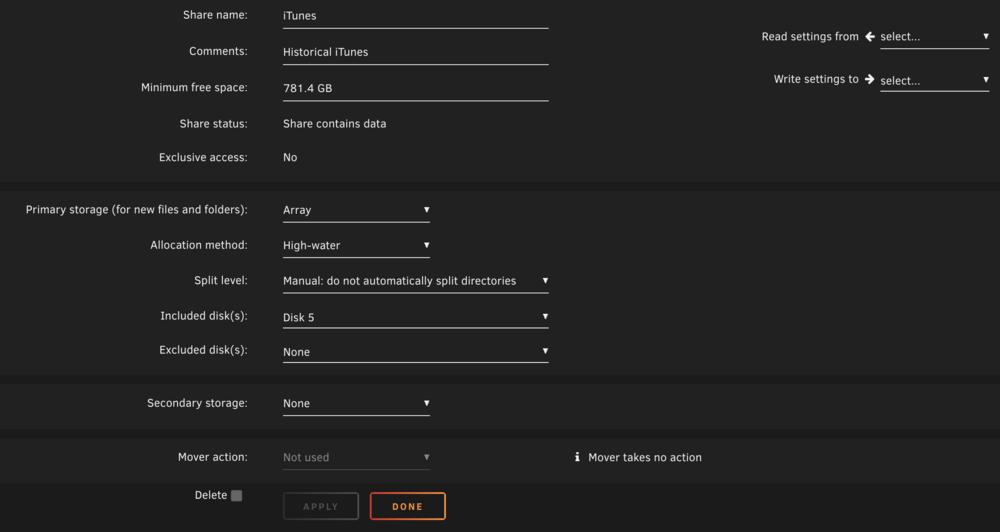
That was it. Folder was present only on Disk 1, which I guess I removed at some point and set to Disk 5 only. Added Disk 1 to the included drives, and viola! Thanks for all the help!!!
-
-
Here's the screenshot:
-
# btrfs fi usage -T /mnt/disk5 Overall: Device size: 7.28TiB Device allocated: 6.28TiB Device unallocated: 1019.00GiB Device missing: 0.00B Device slack: 0.00B Used: 5.72TiB Free (estimated): 1.55TiB (min: 1.05TiB) Free (statfs, df): 1.55TiB Data ratio: 1.00 Metadata ratio: 2.00 Global reserve: 512.00MiB (used: 0.00B) Multiple profiles: no Data Metadata System Id Path single DUP DUP Unallocated Total Slack -- ----------------- ------- -------- --------- ----------- ------- ----- 1 /dev/mapper/md5p1 6.26TiB 18.00GiB 16.00MiB 1019.00GiB 7.28TiB - -- ----------------- ------- -------- --------- ----------- ------- ----- Total 6.26TiB 9.00GiB 8.00MiB 1019.00GiB 7.28TiB 0.00B Used 5.71TiB 6.56GiB 784.00KiB If I go directly to that mount (/mnt/disk5), I can write. But writing to this share /mnt/user/iTunes, where disk5 is the only "included" drive causes it to show the "No free space" error.
-
Attached are diags. titan-diagnostics-20241119-2052.zip Note: I did fix the bad share names for disk4, cache, etc.
-
I have been using Unraid for a very long time. Lately, on /mnt/disk5, which is a btrfs drive, it has 1TB free but says "No space left no device." How do I resolve this? This mount is fixed to write on /mnt/disk5. root@titan:/mnt/user/iTunes# mkdir x mkdir: cannot create directory ‘x’: No space left on device
-
Hey guys, I have the process for the unraid-api constantly running between 15-20%. I've seen another thread on it, but I saw no way to have it use a same amount of CPU. What could it be possibly doing at that CPU rate at all times? (I develop software, and API services, so I can't understand why it is doing this...) Any help would be appreciated. Thanks, daze
-
Thanks for the info. I nVidia plugin (new one) works great. Though I need a 1660 to use it for my needs. But it does work, I had to restart Docker before it would accept --runtime=nvidia.
-
I do need it. ZFS is not installed by any other tool, and the nVidia plugin has issues (at least for me) with looooong load splash times, or completely getting stuck. Nevermind, just found the new plugin, I'll try it and see how it goes. Not sure if I need ZFS that much, but would be nice to have. One can wish.
-
Just need the nVidia modules, and maybe ZFS for playing around. I think the problem is simpler. The kernel did build, but it was -beta35 not -rc1. I'll try again. I assume I have to set beta as true again (regardless of rc1, which technically is not a beta, but a release candidate, but can qualify as a beta for our purposes). Maybe some wording change to say, "If beta or rc, set beta to true). Thanks for the awesome and mainly solid work. Impressive stuff!
-
I was able to compile fine for 6.9.0-beta35 by pointing to the . But now I can't get it to compile for rc1. Any clues would be great!
-
Is it possible to get squashfs and squashfuse included?
-
Yes, and I changed it after you asked and it started! Thanks!!!
-
Just installed radarr. It keeps complaining though I've cleared out the appdata/radarr folder many times and restart this thing... [v0.2.0.980] NzbDrone.Core.Datastore.CorruptDatabaseException: Database file: /config/nzbdrone.db is corrupt, restore from backup if available. See: https://github.com/Radarr/Radarr/wiki/FAQ#i-am-getting-an-error-database-disk-image-is-malformed ---> System.Data.SQLite.SQLiteException: disk I/O error disk I/O error Any hints would be appreciated.
-
kenji, I was able to create a switch port to have multiple tagged VLANs. All fine. Dockers run fine in the new subnet, but can't access the host IP space for older containers that I couldn't switch over yet (by re-doing them, some are home grown)... Would a secondary NIC be a work around to this? Since it would be bound to eth1, and ingress through the switch to the server?
-
H265ize is still providing the same error: [h265ize]: [alert] The following videos (1) were not encoded: - /mnt/user/h265ize/input/[redacted].mkv: ffmpeg exited with code 1: Could not write header for output file #0 (incorrect codec parameters ?): Invalid argument This is the mediainfo on the input file: Video ID : 1 Format : AVC Format/Info : Advanced Video Codec Format profile : [email protected] Format settings : CABAC / 5 Ref Frames Format settings, CABAC : Yes Format settings, ReFrames : 5 frames Codec ID : V_MPEG4/ISO/AVC Duration : 39 min 29 s Bit rate : 3 487 kb/s Width : 1 280 pixels Height : 720 pixels Display aspect ratio : 16:9 Frame rate mode : Constant Frame rate : 59.940 (60000/1001) FPS Color space : YUV Chroma subsampling : 4:2:0 Bit depth : 8 bits Scan type : Progressive Bits/(Pixel*Frame) : 0.063 Stream size : 985 MiB (90%) Writing library : x264 core 157 r2935 545de2f Encoding settings : cabac=1 / ref=5 / deblock=1:0:0 / analyse=0x3:0x113 / me=hex / subme=8 / psy=1 / psy_rd=1.00:0.00 / mixed_ref=1 / me_range=16 / chroma_me=1 / trellis=2 / 8x8dct=1 / cqm=0 / deadzone=21,11 / fast_pskip=1 / chroma_qp_offset=-2 / threads=12 / lookahead_threads=2 / sliced_threads=0 / nr=0 / decimate=1 / interlaced=0 / bluray_compat=0 / constrained_intra=0 / bframes=3 / b_pyramid=2 / b_adapt=1 / b_bias=0 / direct=3 / weightb=1 / open_gop=0 / weightp=2 / keyint=250 / keyint_min=25 / scenecut=40 / intra_refresh=0 / rc_lookahead=50 / rc=crf / mbtree=1 / crf=18.0 / qcomp=0.60 / qpmin=0 / qpmax=69 / qpstep=4 / ip_ratio=1.40 / aq=1:1.00 Default : Yes Forced : No Audio ID : 2 Format : AC-3 Format/Info : Audio Coding 3 Codec ID : A_AC3 Duration : 39 min 29 s Bit rate mode : Constant Bit rate : 384 kb/s Channel(s) : 6 channels Channel positions : Front: L C R, Side: L R, LFE Sampling rate : 48.0 kHz Frame rate : 31.250 FPS (1536 SPF) Bit depth : 16 bits Compression mode : Lossy Stream size : 108 MiB (10%) Language : English Service kind : Complete Main Default : Yes Forced : No Text ID : 3 Format : UTF-8 Codec ID : S_TEXT/UTF8 Codec ID/Info : UTF-8 Plain Text Duration : 39 min 17 s Bit rate : 329 b/s Count of elements : 1318 Stream size : 94.8 KiB (0%) Language : English Default : No Forced : No It just seems to exit even if no files are found in input dir. Are you planning on fixing this?
-
Useful thread, my older drives are picking up single reallocated sectors. I'm keeping an eye on them, and if that value increase, I'm replacing these 5 year old 1 to 2TB WD green drives. But not before time. I have dual parity, and only one drive is showing 1 reallocation at the moment.
-
Nerd tools is the best plugin. I sent the maintainer a PR and was amazed to see it accept in a jiffy. Just love the maintainer. Can't imagine using any other platform. PS: They were for lrzip and zpaq. If you're looking for a great compressor for not often used files, give zpaq a try with -m3 compression. It even does block level deduplication.
-
Or make it available in the distro, to be consistent since the distro is installing Docker, and it should install part of the important tool as well since it is the right thing to do.
-
pwm -- Thank you for that perspective. I may have jumped the gun and converted back to XFS for little reason. And if you're curious, when I ran the balance command on the cache drive, I saw it churn a lot and saw Used space decrease. And another factor, albeit wrong, was that my Docker image was full which I wrongly attributed to BTRFS. Thank you for the learnings.
-
True. But my 750GB SSD is fast enough that I don't feel the need to tinker with this until BTRFS becomes more mainstream and irons out some things. Rest of my drives are all BTRFS which I will slowly convert to XFS, and add another parity drive.



