





Adam64
Members
-
Joined
-
Last visited
Everything posted by Adam64
-
Hello, I recently replaced a P400 (that had been in my system for years) with a P2000 for hardware transcoding -- all else stayed the same. With the P2000 Plex hangs when I try to transcode something, but Emby works fine. I've removed and reinstalled the Nvidia plugin, but no help. Someone suggested that I do a clean install of the Nvidia drivers, but I can't figure out how to do that. Can anyone point me in the right direction on that? Edit: Nevermind. I happened to see a note on the last page that said that Plex is bugged when using the web browser to change the resolution on the fly. Tried it with an app and works fine.
-
Did you ever get anywhere with this? Today I replaced a P400 with a P2000 and am having the same symptoms as you. It's starts playing fine, but after about 10 seconds it just stops with a spinning circle. Everything else in my system is the same. Works fine in Emby.
-
Good call! I tried that plugin when it came out, but had removed it from my system a long time ago. Apparently there was an artifact left. I installed the plugin, the errors stopped, then I uninstalled it. All good now. Thanks!
-
Hello, My server seems to be working fine, but when I log in I notice that my log fills up with these errors: Feb 22 15:44:12 Server nginx: 2024/02/22 15:44:12 [error] 7802#7802: *154727 FastCGI sent in stderr: "Primary script unknown" while reading response header from upstream, client: 10.0.3.106, server: , request: "POST /plugins/dynamix.my.servers/include/unraid-api.php HTTP/1.1", upstream: "fastcgi://unix:/var/run/php5-fpm.sock:", host: "10.0.3.20", referrer: "http://10.0.3.20/Main" I've googled it and it seems like people have seen this happen caused by plugins, but my plugins haven't changed for years so it doesn't seem like it's that. It happens with both Firefox and Edge.
-
I think I've been having this problem as well. I just happened to be up this morning when my backup was happening and Plex seemed to restart too fast, so I checked and found that the backup was failing -- and had failed the last couple of weeks without a notification. I tried a couple of times to backup manually and it failed each time. Changing the backup type to "stop all containers, backup, start all containers" fixed it for me.
-
Force update did it. Thanks.
-
Hello, I've been running the 4.6 beta and now that it's released I'd like to switch to the released version (4.6.50). When I change the tag from beta to latest, the docker downloads 4.5. Does lsio need to do something to the docker to indicate that the release is 4.6.50?
-
Thanks!
-
Love this docker so far! Having read this article: https://www.techrepublic.com/article/docker-containers-are-filled-with-vulnerabilities-heres-how-the-top-1000-fared/ I'm wondering about docker security. Any thoughts on that for this docker (as it's internet facing). Thanks!
-
Thanks!
-
Well.. not sure that that fixes it, but it does make it work. :) Here's what I got in the log when I made that change: 2018-12-03 15:35:06,510 DEBG 'start-script' stdout output: /root/getvpnport.sh: line 43: ca-vancouver.privateinternetaccess.com (CA Vancouver): command not found 2018-12-03 15:35:06,510 DEBG 'start-script' stdout output: [warn] PIA endpoint 'ca-vancouver.privateinternetaccess.com' doesn't support port forwarding, DL/UL speeds will be slow [info] Please consider switching to an endpoint that does support port forwarding, shown below:- [info]
-
Brilliant! Thanks.
-
Good morning. Woke up to DelugeVPN not working this morning and this in the log: 2018-12-03 15:24:27,033 DEBG 'start-script' stdout output: /root/getvpnport.sh: line 42: syntax error near unexpected token `(' /root/getvpnport.sh: line 42: ` ("ca-vancouver.${pia_domain_suffix} (CA Vancouver)" \' Here's the area in the script: pia_port_forward_enabled_endpoints_array=\ ("ca-vancouver.${pia_domain_suffix} (CA Vancouver)" \ "ca-toronto.${pia_domain_suffix} (CA Toronto)" \ "ca-montreal.${pia_domain_suffix} (CA Montreal)" \ "czech.${pia_domain_suffix} (Czech Republic)" \ "spain.${pia_domain_suffix} (Spain)" \ "swiss.${pia_domain_suffix} (Switzerland)" \ "sweden.${pia_domain_suffix} (Sweden)" \ "france.${pia_domain_suffix} (France)" \ "de-berlin.${pia_domain_suffix} (Germany)" \ "de-frankfurt.${pia_domain_suffix} (Germany)" \ "ro.${pia_domain_suffix} (Romania)" \ "israel.${pia_domain_suffix} (Israel)") Apparently it doesn't like the parenthesis around the list. Delugevpn will start if I remove them, but obviously I don't want to mess with it too much. :)
-
Thanks!
-
Thanks!
-
Thanks for the update.
-
Works great Brett. Thanks!!!
-
Awesome.
-
This is awesome. I have a Windows VM dedicated to my Unifi Controller, so it'll be great when I can use this instead. Gotta wait until you start using 5.6.10 though as my config file won't import to 5.6.7.
-
FWIW I installed Binhex's sonarr docker and it seems to be working correctly. Since it's the same app I think there's a memory leak in this docker (though it's odd that I'm the only one seeing the issue). Sent from my SM-T810 using Tapatalk I would argue that the fact that you're the only one seeing it would go against it being a memory leak. Especially as most of us are running it on less powerful hardware than you. Fair enough. I wish there was some way to troubleshoot it further. After a few days on Binhex's docker the constant 30% CPU utilization started and RAM usage started increasing. So... i guess this is a Sonarr issue. Not sure what's special about my setup as I'm not doing anything fancy.
-
FWIW I installed Binhex's sonarr docker and it seems to be working correctly. Since it's the same app I think there's a memory leak in this docker (though it's odd that I'm the only one seeing the issue). Sent from my SM-T810 using Tapatalk
-
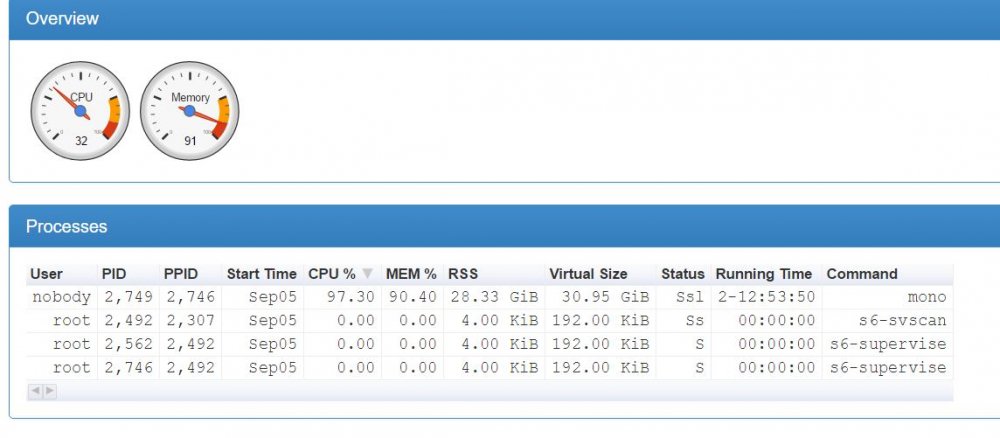
Well, my issue started again. The Sonarr docker constantly using 30% of my processor power, and 28GB of my 32GB of RAM. Attached is a screenshot from cAdvisor. Not sure where to go from here on this. Any other ideas? Nothing in the queue (in fact, I disabled the download client and the indexer to see if it made any difference) and no tasks running that I can tell. edit: the processor is a corei7-4770, so that's quite a bit of processing power being used.
-
That was my only good idea Unless it is running a task my Sonarr docker uses hardly any resources Thanks. I just got an update to the docker that seemed to update everything, so I'm crossing my fingers that it solves it. And it apparently did solve it. Thanks for the help all.
-
That was my only good idea Unless it is running a task my Sonarr docker uses hardly any resources Thanks. I just got an update to the docker that seemed to update everything, so I'm crossing my fingers that it solves it.
-
I'm on the stable version.


