





bb12489
Members
-
Joined
-
Last visited
Everything posted by bb12489
-
I just wanted to add to this thread that the above suggestion also fixed my issues with my OWC Thunderbay 8 enclosure not being visible under Unraid 7. Selecting the following devices to bind to VFIO at boot solved the issues. The drives in the enclosure showed up right after a reboot. This is on my Intel Serpent Canyon NUC

-
After upgrading from 6.12.4 to 7.0 beta 1 my OWC thunderbay 8 is no longer detected over thunderbolt. None of my array drives are visible. I've attached the logs from 6.12.4 and 7.0. (6.12.4) tower-diagnostics-20240701-1816.zip (7.0) tower-diagnostics-20240701-1826.zip
-
This fixed it for me as well! Thanks.
-
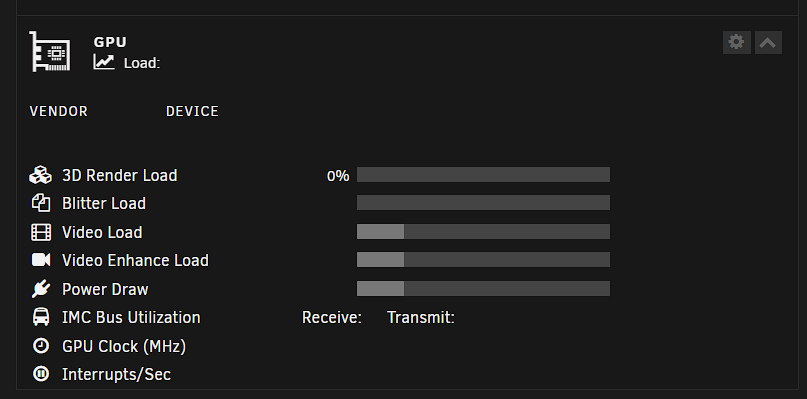
My Arc a770m isn't showing up properly on my dashboard, but intel_gpu_top shows proper activity when transcoding.
-
I'm looking for the same solution to this.
-
I just learned that this issue is related to the Minisforum NPB7 computer. It seems it has a serious thermal issue that is causing it to crash.
-
Server has crashed yet again. I thought it may have been temperature related with my NVME drive, but that doesn't appear to be the case. I've attached my diagnostics and syslog. tower-diagnostics-20230524-1930.zip syslog (1)
-
I just upgraded my Unraid server to an entirely new setup. I'm probably part of a very small group who have their drives attached to a small form factor system over USB4/Thunderbolt. My 8 data drivers reside in an OWC Thunderbay 8, and are connected to my new Minisforum NPB7 (Intel 13700H, 64GB Crucial DDR5 5200, 2TB 980 Pro NVME). Initially I just swapped over my 6.11 install and everything started without any issue. No problems detecting the drives, or starting containers. Even QSV transcoding is working between Plex, Tdarr, and Jellyfin. However there seems to be random crashes that happen without much warning. From what I can tell, it's not heat related, although I am going to try and adjust the TDP of the 13700H from it's 90w default. My NVME drives spikes up to the 60's in temp, but also has active cooling on it. I tried a few suggested fixes related to the built in Iris XE graphics that could be causing the crashes, but still no luck. I finally decided to take the leap and upgrade to 6.12RC6 since it has a much newer kernel. My thinking was that there is much more stable support for my 13th gen CPU and graphics engine. I even applied a fix of adding "i915.enable_dc=0" to my boots parameters as suggested in another thread. The system still randomly crashes. I just setup my syslog settings this morning to mirror the syslog to my flash drive. I haven't ever needed to pull logs before since I've never had crashes like this in all my years of using Unraid. Once another crash occurs, I will attach diagnostics and the syslog. I'm just at a loss of what is causing this. On a possibly unrelated note....my docker containers no longer auto-start, but I this started happening after upgrading to 6.12RC6.
-
Can confirm that this fixed my issue as well. I changed my password, then couldn't access any of my libraries with the not authorized messaged. After running this command with the claim code; everything seems to be back to normal.
-
I'm having this same issue after upgrading from 6.9 to 6.10. Edit: Just restored 6.9 on my flash drive and it's booting normally now.
-
Is this still being actively maintained by the dev? Is Heimdall still a top contender for a dashboard? I know there's others floating around.
-
This helped! I deleted the server and cert files from my appdata/sabnzbd/admin/ directory. Started up normally. Thanks!
-
After an update to the Sab docker this morning, It appears that there is an error keeping it from starting up. I've tried removing the container completely, and re-creating it, but it still ends with the same error as posted below. Is anyone else running into this? My sab docker was working just fine before going to bed. 2019-02-27 08:52:31,667::ERROR::[_cplogging:219] [27/Feb/2019:08:52:31] ENGINE Error in 'start' listener <bound method Server.start of <cherrypy._cpserver.Server object at 0x150cfe541b90>> Traceback (most recent call last): File "/usr/share/sabnzbdplus/cherrypy/process/wspbus.py", line 207, in publish output.append(listener(*args, **kwargs)) File "/usr/share/sabnzbdplus/cherrypy/_cpserver.py", line 167, in start self.httpserver, self.bind_addr = self.httpserver_from_self() File "/usr/share/sabnzbdplus/cherrypy/_cpserver.py", line 158, in httpserver_from_self httpserver = _cpwsgi_server.CPWSGIServer(self) File "/usr/share/sabnzbdplus/cherrypy/_cpwsgi_server.py", line 64, in __init__ self.server_adapter.ssl_certificate_chain) File "/usr/share/sabnzbdplus/cherrypy/wsgiserver/ssl_builtin.py", line 56, in __init__ self.context.load_cert_chain(certificate, private_key) SSLError: [SSL: CA_MD_TOO_WEAK] ca md too weak (_ssl.c:2779) 2019-02-27 08:52:31,769::INFO::[_cplogging:219] [27/Feb/2019:08:52:31] ENGINE Serving on http://0.0.0.0:8080 2019-02-27 08:52:31,770::ERROR::[_cplogging:219] [27/Feb/2019:08:52:31] ENGINE Shutting down due to error in start listener: Traceback (most recent call last): File "/usr/share/sabnzbdplus/cherrypy/process/wspbus.py", line 245, in start self.publish('start') File "/usr/share/sabnzbdplus/cherrypy/process/wspbus.py", line 225, in publish raise exc ChannelFailures: SSLError(336245134, u'[SSL: CA_MD_TOO_WEAK] ca md too weak (_ssl.c:2779)') 2019-02-27 08:52:31,770::INFO::[_cplogging:219] [27/Feb/2019:08:52:31] ENGINE Bus STOPPING 2019-02-27 08:52:31,773::INFO::[_cplogging:219] [27/Feb/2019:08:52:31] ENGINE HTTP Server cherrypy._cpwsgi_server.CPWSGIServer(('0.0.0.0', 8080)) shut down 2019-02-27 08:52:31,773::INFO::[_cplogging:219] [27/Feb/2019:08:52:31] ENGINE HTTP Server None already shut down 2019-02-27 08:52:31,774::INFO::[_cplogging:219] [27/Feb/2019:08:52:31] ENGINE Bus STOPPED 2019-02-27 08:52:31,774::INFO::[_cplogging:219] [27/Feb/2019:08:52:31] ENGINE Bus EXITING 2019-02-27 08:52:31,774::INFO::[_cplogging:219] [27/Feb/2019:08:52:31] ENGINE Bus EXITED
-
EDIT: Never mind my post. iD10T error here.
-
I did add the cores I wanted isolated in my syslinux.cfg. It's just that the XML looked odd to me.
-
Hey guys, I'm just finally getting started with setting up a Gamestream VM to use with my Nvidia Shield TV. I think I've gotten the CPU pinning set correctly, but I'm hoping someone could give it a second look. My system is running dual Xeon L5640's (6 core 12 thread), so I have 24 threads to work with. My thought was to isolate the last 3 cores (bolded below) which would give me 6 threads for the VM. Is my thinking correct? The only thing that looks off to me in the XML is the "cputune". Shouldn't this be showing 9,21,10,22,11,23? My thread pairing is as follows.... cpu 0 <===> cpu 12 cpu 1 <===> cpu 13 cpu 2 <===> cpu 14 cpu 3 <===> cpu 15 cpu 4 <===> cpu 16 cpu 5 <===> cpu 17 cpu 6 <===> cpu 18 cpu 7 <===> cpu 19 cpu 8 <===> cpu 20 cpu 9 <===> cpu 21 cpu 10 <===> cpu 22 cpu 11 <===> cpu 23
-
Just a heads up for anyone that is wondering... I tried installing this on my Unraid 6.2.2 server, and the WebUI would fail to load. Finally had to add in an extra command when setting up the app. --net=bridge -p 0.0.0.0:8123:8123 Found the solution here https://community.home-assistant.io/t/docker-on-mac-install-front-end-nowhere-to-be-found/5553/5
-
I never set up an icon, so that's why it looks like that. Oh weird. In community apps it shows an icon, so I thought it had an icon. My bad! Sent from my XT1575 using Tapatalk
-
For some reason the Grafana icon isn't showing on my Unraid Dashboard. Just shows as a broken img. I don't believe it's an issue with my server. All other dashboard icons are working.
-
Just checking in here to see if anyone has been able to reverse proxy their DDWRT web gui's ?
-
So for some reason my Library updates have stopped with my Kodi-headless install. I haven't changed anything about the config, and the kodi web interface seems to work, so I imagine kodi is running correctly. However when I issue a library update command I get this in the kodi docker logs.... tdb(__NULL__): tdb_open_ex: called with name == NULL Can someone help me out with this?
-
Hey bb12489, I wrote a guide a while back for Apache (https://www.linuxserver.io/index.php/overview-reverse-proxy-with-docker/). I just converted over to nginx and do not have a write up yet (i plan too, just been busy) Here is my old apache config - https://www.seandion.com/owncloud/index.php/s/R4tJqfqb4opuOsp Here is my new nginx config - https://www.seandion.com/owncloud/index.php/s/XpFigScMblZO2dJ Those should help a bit more and I will be doing an nginx addition to that guide. Thank you! This will be a weekend project for sure.
-
Is there a guide somewhere on how to get the reverse proxy working? I've always wanted to do this to make all the different services such as Sabnzbd and Sickrage easier to access. I've been messing with it for about 2 hours now and I'm completely lost...
-
Just an unraid noob here.... How does ones repo get added so it shows up in Community Applications?

