be4con
Members
-
Joined
-
Last visited
-
Yep, followed the guide, using the tool to copy the backup zip to the new thumb drive
-
I need to replace my flash drive with a larger capacity one to allow me to continue with Unraid updates. I followed the guide here When I put the newly created flash drive in the server, though, Unraid fails to boot, so I can't proceed. Not sure what to do next, or how to troubleshoot the issue. Can anyone help?
-
Bingo! That was so simple, thank you!
-
Ah, you can tell I'm not a power user... I was trying to start the array from the Dashboard, but received no error message. When I try to start it from the Main page, I get the error "Wrong Pool State cache - too many wrong or missing devices" Under Pool it shows as 'unassigned', there is no option in the drop-down to assign. tower-diagnostics-20260125-1228.zip
-
Thanks so much EDIT: My array will not start, I tried new config with all allocations preserved and it the array still won't start Any suggestions?
-
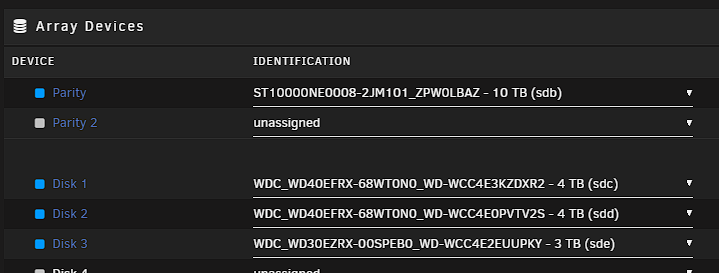
Apologies for yet another resurrection. About to do this and wanted to check my understanding before I do. I have 2 new 10TB drives to replace my parity (currently 4TB) and a 3TB data drive. I have 3 data drives, and all available SATA slots are filled. My understanding is that my safest approach is as follows: 1) Stop the array 2) Unallocate the parity disk 3) Power down and physically swap out the existing parity with the new disk 4) Reboot 5) Allocate the new disk as parity 6) Start the array and let it rebuild the parity on the new drive 7) Once complete follow the process for data drive replacement
-
My trusty Proliant Gen 8 Microserver seems to have given up the ghost. I have no budget for replacement at this time, so my initial plan is probably to replace it with a 2nd hand Gen 10 for a like-for-like swap to make the transition seamless - my hope being that I can just put my existing drives and thumbstick in the new microserver, and it will be as if nothing has changed. However, I have an old Windows 10 PC sitting under my desk, it's got an old but decent enough CPU and lots of space in the case, so I can feasibly turn it into a server, at least short-term, so I can at least access my files whilst I save for a long-term server replacement. It was a long, long time ago that I set up my Unraid server, so I remember almost nothing of the initial setup process on the Proliant. My questions are: 1) Do I just need to set the BIOS to boot from the thumb drive, completely bypassing Windows, or do I need to replace Windows with a different OS 2) Will Unraid recognise the drives still, based on serial numbers, and automatically know which is the parity and which are the data drives 3) Is there anything else that I need to do to ensure my data is safe (bear in mind my current server will not boot, so I can't access them at all) before I connect everything and power up 4) What other questions have I not thought to ask? Thanks in advance for any help
-
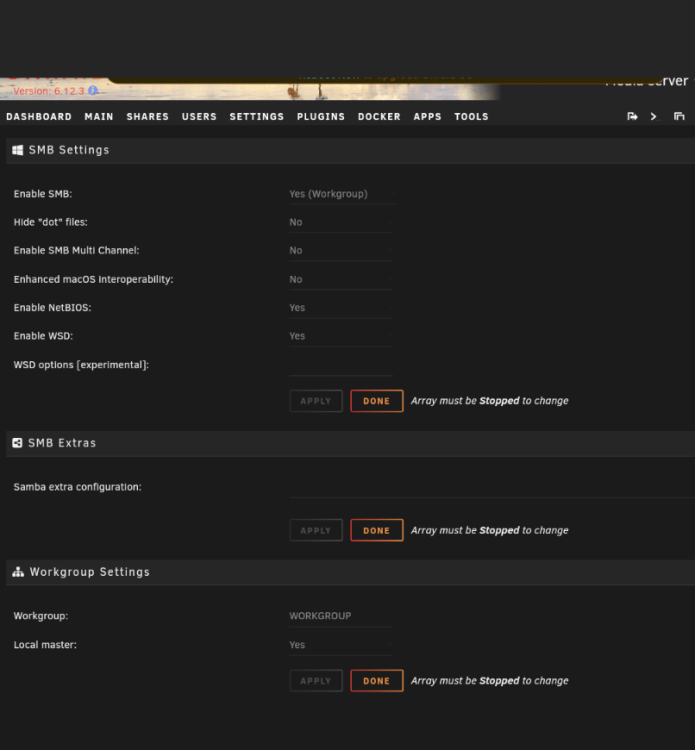
Thanks for the reply, sorry for the delay I've been away. I don't recall doing anything with SMB. The settings look standard and all my mounts are local drives.
-
Hi I seem to be getting this error and a reboot does not clear it. My server appears to functioning normally so I don't know whether it's anything I need to be concerned about. Can anyone advise? Thanks in advance tower-diagnostics-20231027-2232.zip
-
Thanks - I think I'm going to have to try rolling back. Unfortunately, I have also done the 6.12.2 upgrade so I can't just rollback within Unraid. I'll also do as you suggested and try with a small library. Thanks.
-
Any suggestions please? This is driving me nuts
-
Getting nowhere with MyMedia support they are ignoring my ticket requests. Can anyone help at all?
-
Thanks Oh, it's definitely misbehaving. I've got another support chat running about that container, although the support thread for the docker is pretty much dead. I've been having problems with it constantly stopping and refusing to autostart. So, I can't really check whether stopping that resolves anything because more often than not it's in the stopped state. I went through the process of uninstalling that container, deleting the image and the container's appdata folder and performing a fresh install but the issue with it continually stopping just returned as soon as I reinstalled it, and it's not really behaving normally since I reinstalled it either (it won't index the files on the server). I raised a ticket with the MMfA devs and they have failed to respond to that too. Getting a bit frustrating to be honest.
-
tower-diagnostics-20230704-1808.zip
-
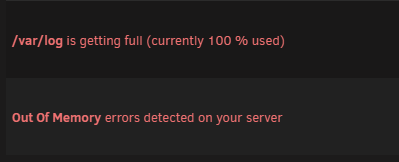
Yeah I rebooted both after the install of the swapfile plugin and after uninstall of it, so the warnings were new at each stage. Just run FCP again and got a new error: Fresh diags attached tower-diagnostics-20230704-1808.zip