




300x300.png.43914b1e92b593d44f130653fee4bfae.png)
Kudjo
Members
-
Joined
-
Last visited
Everything posted by Kudjo
-
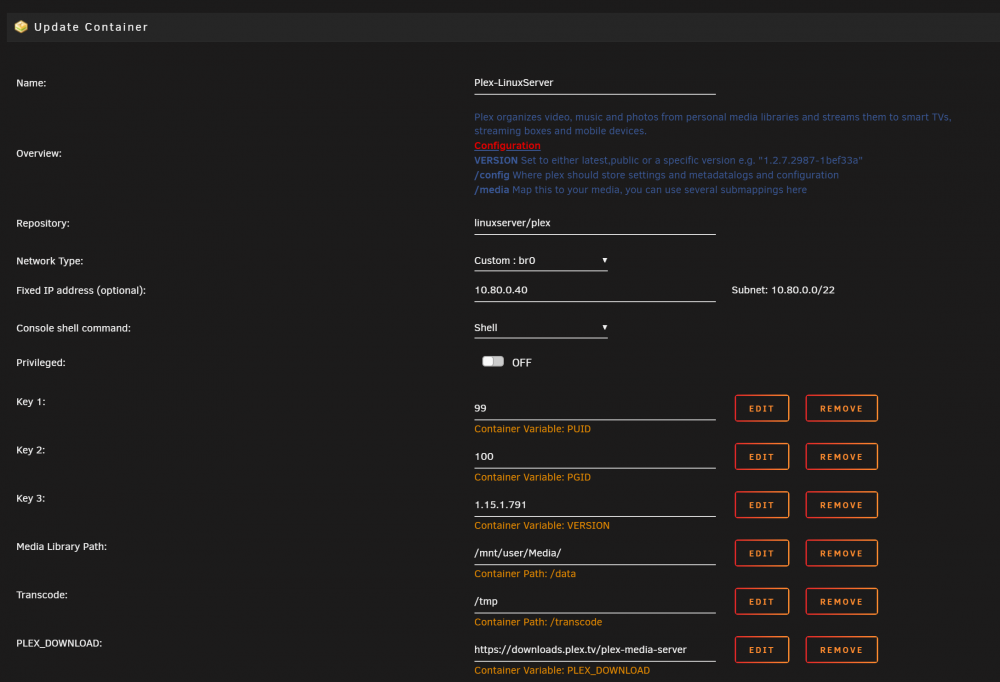
No change... I added the variable, as you suggested. But I must be missing something. No matter what I try, the "version" still reports as "latest" and the Plex container still says I'm running 1.15.2.793. Could someone please point out what I'm missing/doing wrong? I'd love to have this control again. Thanks.

-
I am having this EXACT same problem. Trying to rollback because I sometimes can't leave the Plex home screen. (I can still play everything if I click it directly and search still works, but plex will never leave the home screen). The TAG/Version method has worked before, but it won't roll back this time. I'm also running Unraid Version 6.6.7. The official Plex docker rolls back like normal using the same TAG method, so I wonder if there might be a hangup with this build in particular? Does anyone have any suggestions?
-
Good news: adding "append vfio_iommu_type1.allow_unsafe_interrupts=1 initrd=/bzroot" to the syslinux.cfg file worked for getting the VM to boot with the card! Another snag, though. I get the following message whenever I run the unbind/bind command: "-bash: echo: write error: No such device". The BIOS dump only produces a 126KB file, so I don't think it's happening properly. So, two questions: 1) remind me what we need the bios file for again if we can get the card to boot using the UnRaid GUI? (I'm sure we DO, I'm just unclear what the difference/advantage is between bios dumped and added to XML vs not) 2) Is there a way to verify the validity of my bios dump other than filesize? (And if filesize is the only way to check, how do I know I have the right filesize) Almost there! I'm so grateful for your great videos that help me get the most out of unraid. I feel I'm close, I just want to understand what's going on. (Teach me to "fish") Thank you, again!
-
I was hoping for some help. I have tried this with 5 video cards on two different systems (and three different versions of unraid) and have gotten the same result each time so it has to be something I'm missing. Whenever I go to start a VM with a GPU assigned as the passthrough, I am met with the following: Execution error internal error: process exited while connecting to monitor: 2017-02-24T16:31:08.340691Z qemu-system-x86_64: -device vfio-pci,host=02:00.0,id=hostdev0,bus=pci.0,addr=0x5: vfio: failed to set iommu for container: Operation not permitted 2017-02-24T16:31:08.340724Z qemu-system-x86_64: -device vfio-pci,host=02:00.0,id=hostdev0,bus=pci.0,addr=0x5: vfio: failed to setup container for group 11 2017-02-24T16:31:08.340729Z qemu-system-x86_64: -device vfio-pci,host=02:00.0,id=hostdev0,bus=pci.0,addr=0x5: vfio: failed to get group 11 2017-02-24T16:31:08.340744Z qemu-system-x86_64: -device vfio-pci,host=02:00.0,id=hostdev0,bus=pci.0,addr=0x5: Device initialization failed No amount of googling or searching on unraid forums has explained why this might be happening or how I might fix it. Any ideas? vt-x and vt-d enabled in BIOS, UNRAID 6.3.2, using OVMF and "i440fx-2.7", Windows 10 VM, currently trying to passthrough an Nvidia 1070 Founder's Edition and also have an EVGA GTX 1060 SC 3GB (and several other older cards, 550ti, 8600, etc.), GPU is all alone in IOMMU group 11, Enable PCIe ACS Override set to "No"
300x300.thumb.png.7b6b346bae303f8f1c2ceb74644ad2a9.png)

